

What is the campsite reservation form template?
Campsite bookings have more moving parts than a hotel room: the type of pitch, the length of the caravan or motorhome, electric hookup, how many cars, whether the dog is coming, and whether the group wants to be pitched next to friends. Taking all that over the phone or by email means a lot of back-and-forth before you can allocate a pitch.
This campsite reservation template collects it in three short pages. Campers choose what they're booking — tent, caravan, motorhome, campervan, cabin or glamping — and the follow-up adapts: tent size for tents, length for caravans and motorhomes. Pets, children and vehicles each reveal their own detail fields only when needed.
Campers agree to your site rules and cancellation policy before submitting, and each request is saved as a PDF in VergeHR Files so you can confirm the booking and allocate a pitch from one clear record.
- Best for
- Campsites, RV and caravan parks, holiday parks, glamping sites and campgrounds
- Filled in by
- Campers booking a stay
- Time to complete
- About 4 minutes
- Includes
- Pitch or unit type, unit length, hookups, party size, pets, vehicles, extras, site rules agreement
Who uses a campsite reservation form?
- A family campsite takes bookings from its website instead of by phone
- An RV park checks rig length before allocating a pitch
- A glamping site takes requests for yurts and cabins
- A campsite with dog-friendly pitches records pets in advance
- A lakeside campsite handles group bookings that want to camp together
- A small farm campsite collects vehicle registrations for its car park
Questions On This campsite reservation Form
25 questions over 3 pages · includes conditional questions, multiple pages, consent checkbox.
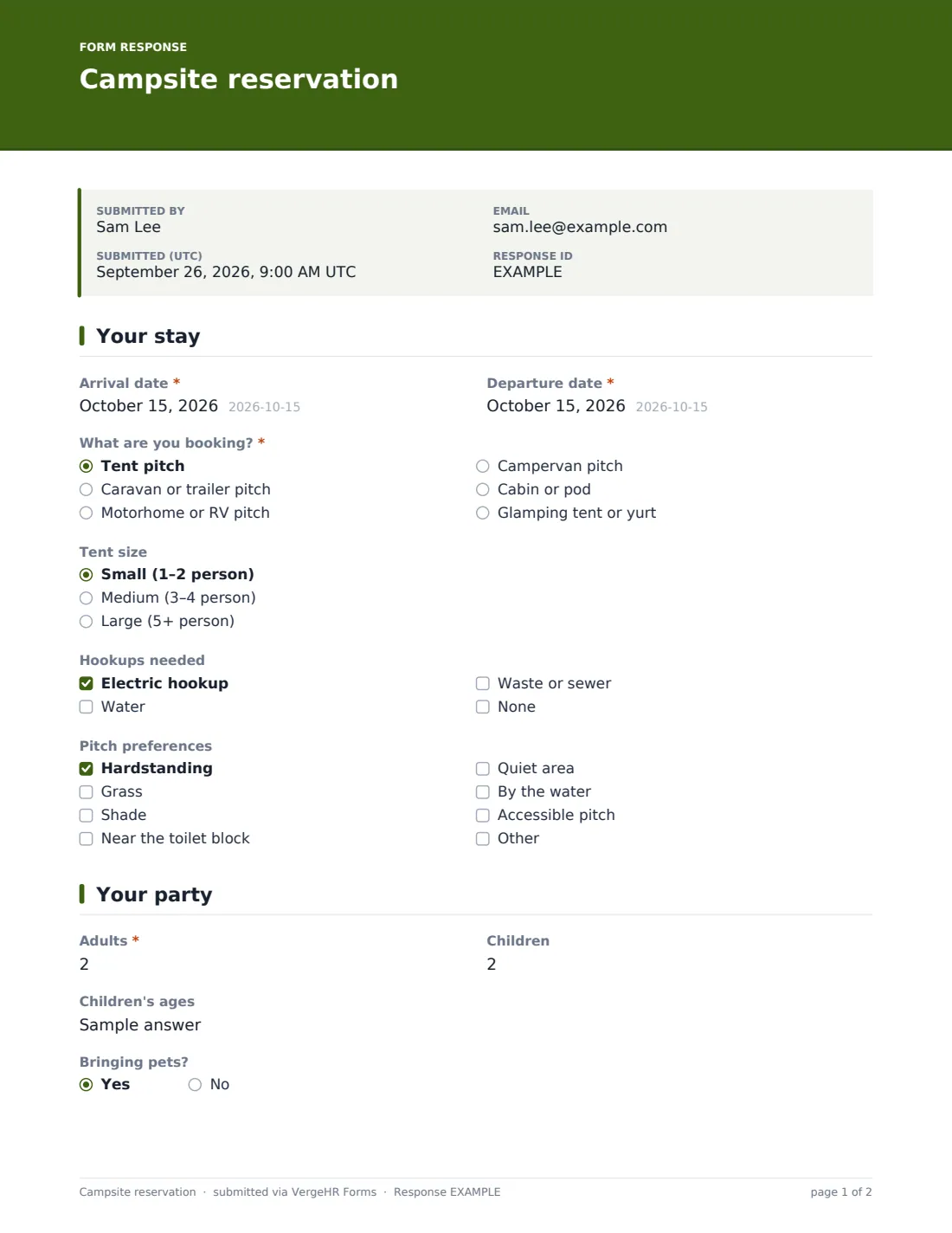
1 Your stay
- Arrival date*
- Departure date*
- What are you booking?* Tent pitch · Caravan or trailer pitch · Motorhome or RV pitch · Campervan pitch · Cabin or pod · Glamping tent or yurt
- Tent size asked only when it applies Small (1–2 person) · Medium (3–4 person) · Large (5+ person)
- Length of your motorhome or RV (m) asked only when it applies
- Length of caravan plus towing vehicle (m) asked only when it applies
- Hookups needed Electric hookup · Water · Waste or sewer · None
- Pitch preferences Hardstanding · Grass · Shade · Near the toilet block · Quiet area · By the water · Accessible pitch
2 Your party
- Adults*
- Children
- Children's ages asked only when it applies
- Bringing pets?
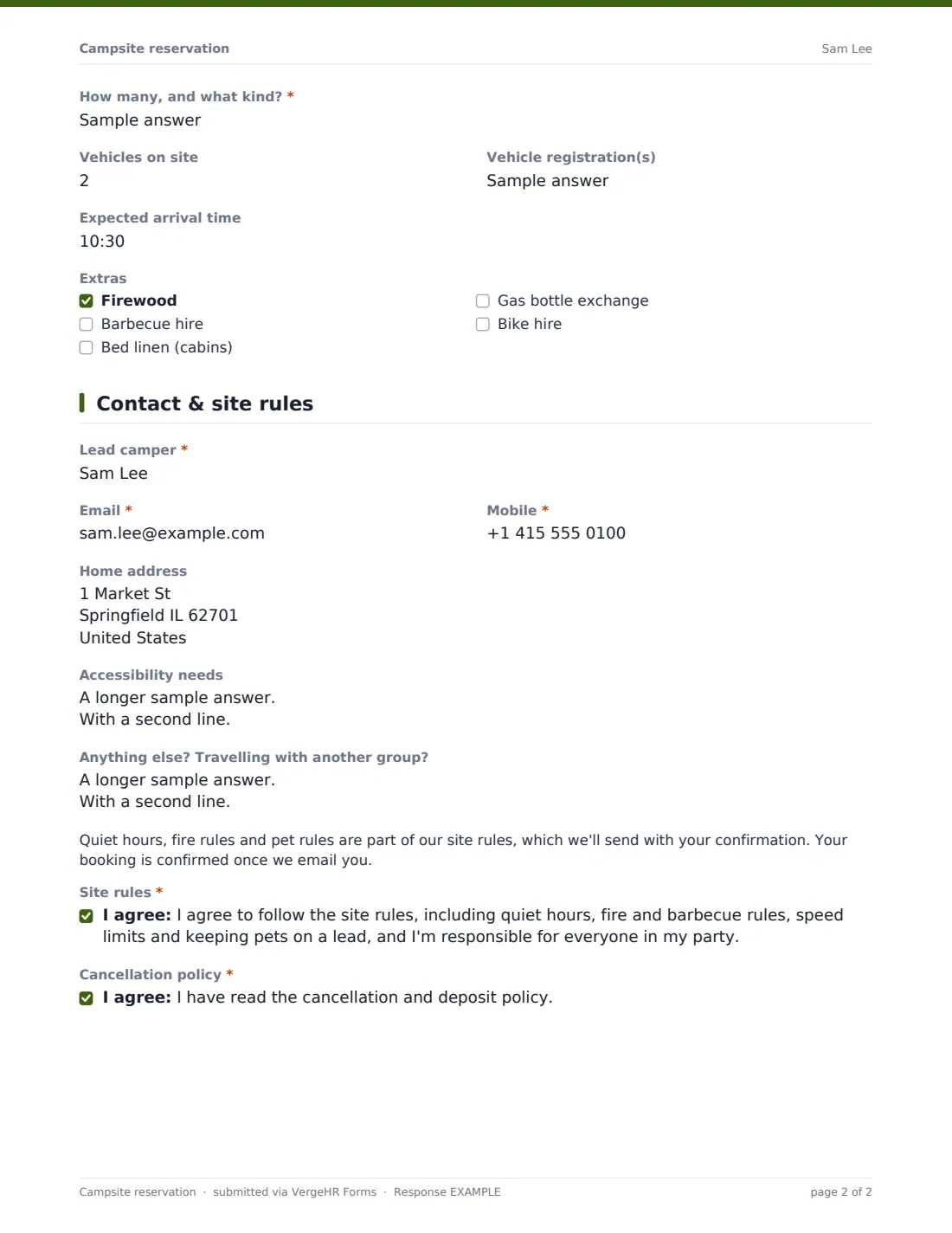
- How many, and what kind?* asked only when it applies
- Vehicles on site
- Vehicle registration(s) asked only when it applies
- Expected arrival time
- Extras Firewood · Barbecue hire · Bed linen (cabins) · Gas bottle exchange · Bike hire
3 Contact & site rules
- Lead camper*
- Email*
- Mobile*
- Home address
- Accessibility needs
- Anything else? Travelling with another group?
- Site rules*
- Cancellation policy*
The campsite reservation form, page by page
1 Your stay
Campers enter arrival and departure dates and choose what they're booking: a tent, caravan or trailer, motorhome or RV, or campervan pitch, a cabin or pod, or a glamping tent or yurt. Tent bookings ask for the tent size; caravans ask for the combined length of caravan and towing vehicle; motorhomes ask for the vehicle's length. Campers tick the hookups they need and pitch preferences such as hardstanding, shade, a quiet area, by the water or an accessible pitch.
2 Your party
The page records adults and children (with children's ages when children are coming), whether pets are coming and what kind, the number of vehicles and their registrations, the expected arrival time and extras such as firewood, barbecue hire, bed linen, gas bottle exchange or bike hire.
3 Contact & site rules
The lead camper gives their name, email, mobile and home address, any accessibility needs, and other requests — including whether they'd like to be pitched next to another group. A short note explains that the booking is confirmed only once you email. Campers agree to the site rules and confirm they've read the cancellation policy.
Make the Template Yours
- Replace the accommodation types with your own pitch and unit categories
- Change metres to feet in the length questions if your campers think in feet
- Edit the extras to match what you sell or hire
- Add a link to your full site rules in the paragraph on the last page
- Set a closing date for the season, or cap responses for a special event weekend
- Add a question about awning size if pitches are tight
Tips for a Better campsite reservation Form
- Put your quiet hours and fire rules in the confirmation email as well as the rules
- Check rig lengths before promising a pitch — it avoids problems on arrival
- Tell late arrivals how to find their pitch after reception closes
- Group requests from friends are easier to honour when they book close together
- Review pet numbers per pitch if you have limits
Every Response Becomes a PDF In Files
Each booking request is saved as a PDF in the Files folder you choose, the owner is emailed straight away, and the camper can receive a copy of their answers.
Use the Responses table to see requests by arrival date and export to CSV to plan pitch allocations for the week.
- Start from this template. It opens in the VergeHR Forms designer — change any question, add pages, set the rules for when questions appear.
- Share it. Turn on a public link, or send it to people by email, each with their own link. They don’t need a VergeHR login.
- Get the answers as PDFs. Each response is saved as a PDF in the Files folder you choose — and listed in a Responses table, with any uploaded files, that you can export to CSV.
Campsite reservation form: frequently asked questions
Is this campsite reservation template free?
Yes. It's included in the Forms app on every VergeHR account, including the free plan.
Does the form check availability?
No. It collects booking requests. You check availability and confirm the booking by email.
Can we take a deposit through the form?
No. The form doesn't take payments; send payment details with your confirmation.
Do campers need an account to book?
No. Anyone with the link can submit a request.
Can we use feet instead of metres?
Yes. Edit the labels and limits on the length questions.
Can we close bookings at the end of the season?
Yes. Set a closing date in the form's settings.
Does it work on phones?
Yes. The form adapts to phone screens, which is where most campers will book.