

What is the client project feedback form template?
Agencies and consultants often hear about problems only when a client quietly doesn't come back. An end-of-project review gives clients a simple way to say what went well and what didn't, and gives you a record you can learn from, quote from and follow up on.
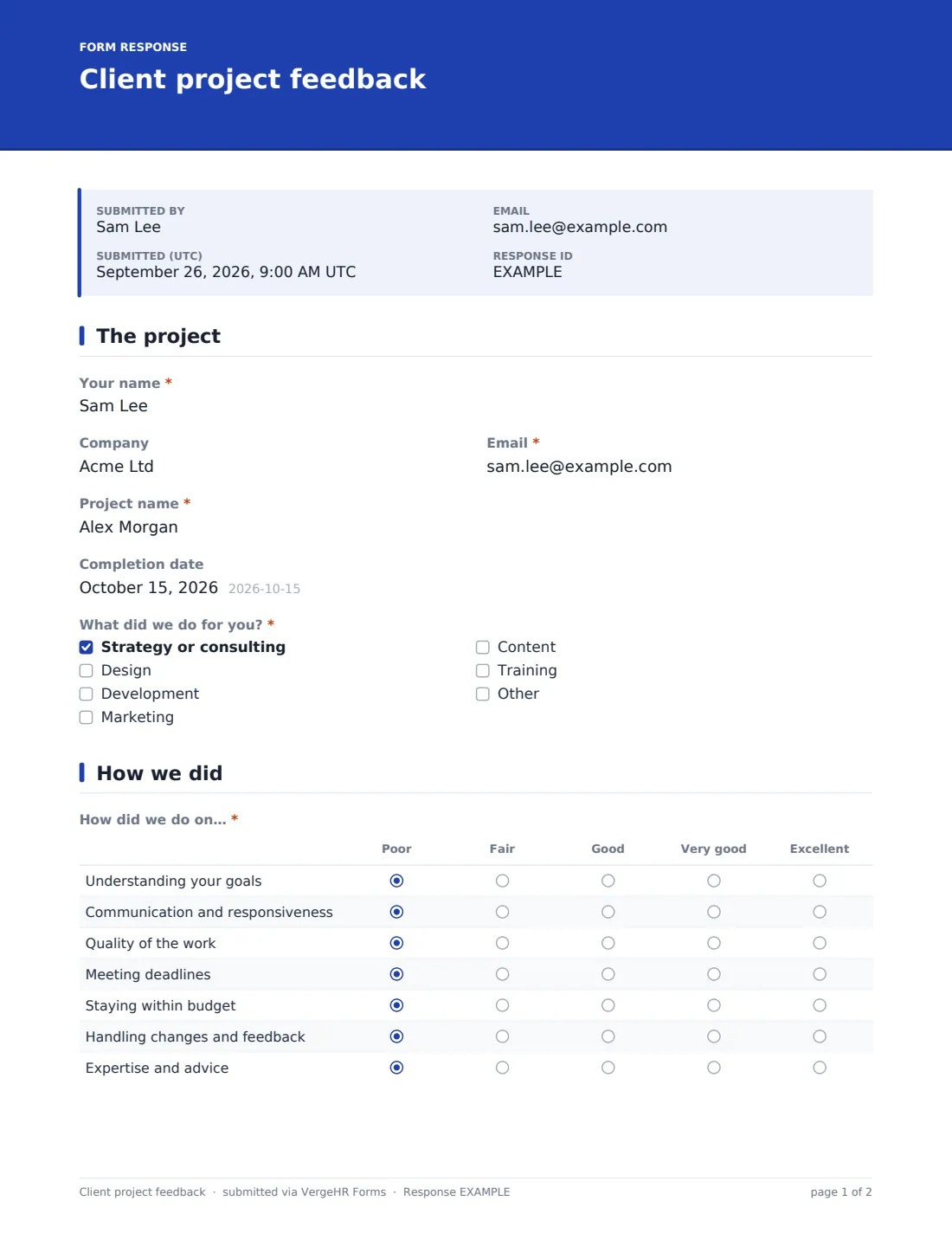
This template asks for the client's name, company and email, the project name, completion date and the services delivered. They rate you on understanding their goals, communication, quality, deadlines, budget, handling changes and expertise, say whether the project achieved what they set out to do, describe the difference it has made, compare the final cost with the estimate and note anything that frustrated them.
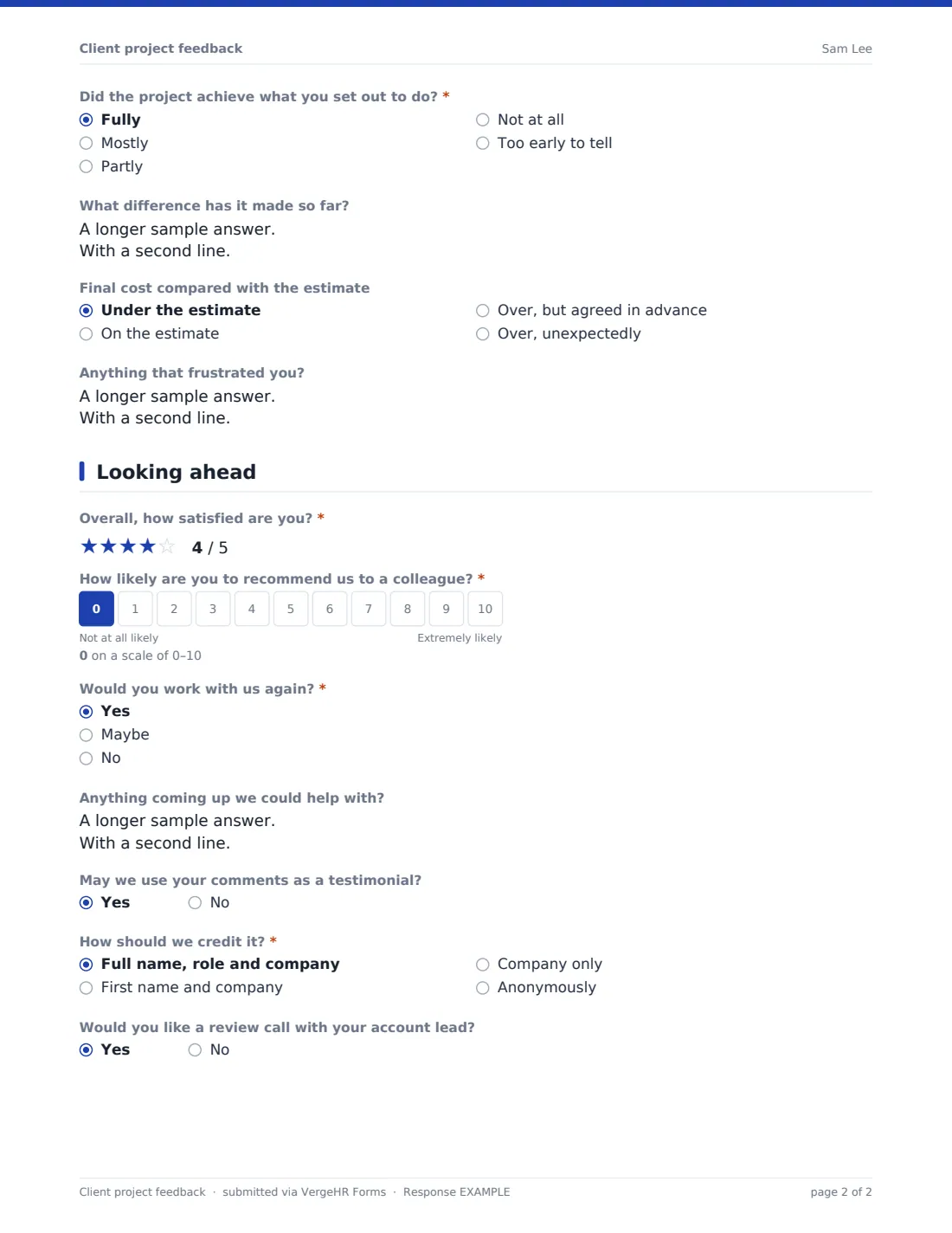
The last page asks for overall satisfaction, a recommend score, whether they'd work with you again, upcoming needs, permission to use their comments as a testimonial and whether they'd like a review call. Each response is saved as a PDF in VergeHR Files, next to the rest of the client's documents if you like.
- Best for
- Agencies, consultants, freelancers and professional services firms
- Filled in by
- Clients at the end of a project
- Time to complete
- About 3 minutes
- Includes
- Seven-part delivery grid, goals achieved, cost vs estimate, frustrations, recommend score, repeat intent and testimonial permission
Who uses a client project feedback form?
- A standard step in your project closing checklist
- Comparing delivery quality across account teams
- Finding upsell opportunities from upcoming needs
- Collecting testimonials with clear credit permission
- Spotting budget and scope problems early
- Quarterly reviews for long-running retainers
Questions On This client project feedback Form
18 questions over 3 pages · includes conditional questions, multiple pages, ratings.
1 The project
- Your name*
- Company
- Email*
- Project name*
- Completion date
- What did we do for you?* Strategy or consulting · Design · Development · Marketing · Content · Training
2 How we did
- How did we do on…* Poor · Fair · Good · Very good · Excellent
- Did the project achieve what you set out to do?* Fully · Mostly · Partly · Not at all · Too early to tell
- What difference has it made so far?
- Final cost compared with the estimate Under the estimate · On the estimate · Over, but agreed in advance · Over, unexpectedly
- Anything that frustrated you?
3 Looking ahead
- Overall, how satisfied are you?*
- How likely are you to recommend us to a colleague?*
- Would you work with us again?* Yes · Maybe · No
- Anything coming up we could help with?
- May we use your comments as a testimonial?
- How should we credit it?* asked only when it applies Full name, role and company · First name and company · Company only · Anonymously
- Would you like a review call with your account lead?
The client project feedback form, page by page
1 The project
'Your name', 'Email' and 'Project name' are required; company and completion date are optional. 'What did we do for you?' lists strategy or consulting, design, development, marketing, content and training, with room for another answer.
2 How we did
A Poor-to-Excellent grid covers understanding your goals, communication and responsiveness, quality of the work, meeting deadlines, staying within budget, handling changes and feedback, and expertise and advice. 'Did the project achieve what you set out to do?' runs from fully to not at all, with 'Too early to tell'. Open boxes ask 'What difference has it made so far?' and 'Anything that frustrated you?'. 'Final cost compared with the estimate' separates over-but-agreed from over-unexpectedly.
3 Looking ahead
A required five-star overall rating, a required 0–10 recommend score and 'Would you work with us again?'. 'Anything coming up we could help with?' is open. Saying yes to using comments as a testimonial asks how to credit it — full name, role and company; first name and company; company only; or anonymously. A final yes/no offers a review call with the account lead.
Make the Template Yours
- Edit the services list to what you sell
- Add a row to the grid for anything you promise, such as reporting or training handover
- Send it as a personal request from the Share tab so each client has their own link
- File responses to each client's folder, or link them to an entity in Settings
- Add the account lead to NotifyEmails
- Use your brand color and a personal cover note from the founder
Tips for a Better client project feedback Form
- Send it within a week of handover, before everyone moves on
- Reply personally to every response, especially lower scores
- Follow up 'unexpectedly over budget' answers with a conversation about scoping
- Pass upcoming needs to whoever handles new business the same day
- Use testimonials only with the credit the client chose
- Review all responses each quarter to find patterns across projects
Every Response Becomes a PDF In Files
Each response is saved as a PDF titled with the client's name in the Files folder you choose, and the client is emailed a copy of their answers.
Use the Responses tab to search by project or company, and export to CSV to track recommend scores and repeat-business intent across clients.
- Start from this template. It opens in the VergeHR Forms designer — change any question, add pages, set the rules for when questions appear.
- Share it. Turn on a public link, or send it to people by email, each with their own link. They don’t need a VergeHR login.
- Get the answers as PDFs. Each response is saved as a PDF in the Files folder you choose — and listed in a Responses table, with any uploaded files, that you can export to CSV.
Client project feedback form: frequently asked questions
Is this client project feedback template free?
Yes. It's a starter template in the VergeHR Forms app, which every account includes.
How is it different from the client testimonial template?
The testimonial template is focused on collecting a quote. This one is a full project review, with testimonial permission as one optional question.
Can I send it to several people at one client?
Yes. Send personal requests to each contact, or share one link with the client team.
Do clients need a VergeHR login?
No. They open the link or their emailed request.
Can I file responses with each client's other documents?
Yes. Choose a Files folder and, optionally, an entity in the form's Settings.
Is it anonymous?
No — it asks for name and email so you can follow up. You can make those optional if you prefer.