


What is the date & time poll form template?
Finding a date for a club meeting, a family get-together or a team offsite usually means a long chain of messages and someone keeping a tally in their head. A date poll does the tally for you: everyone sees the same options and ticks the ones that work.
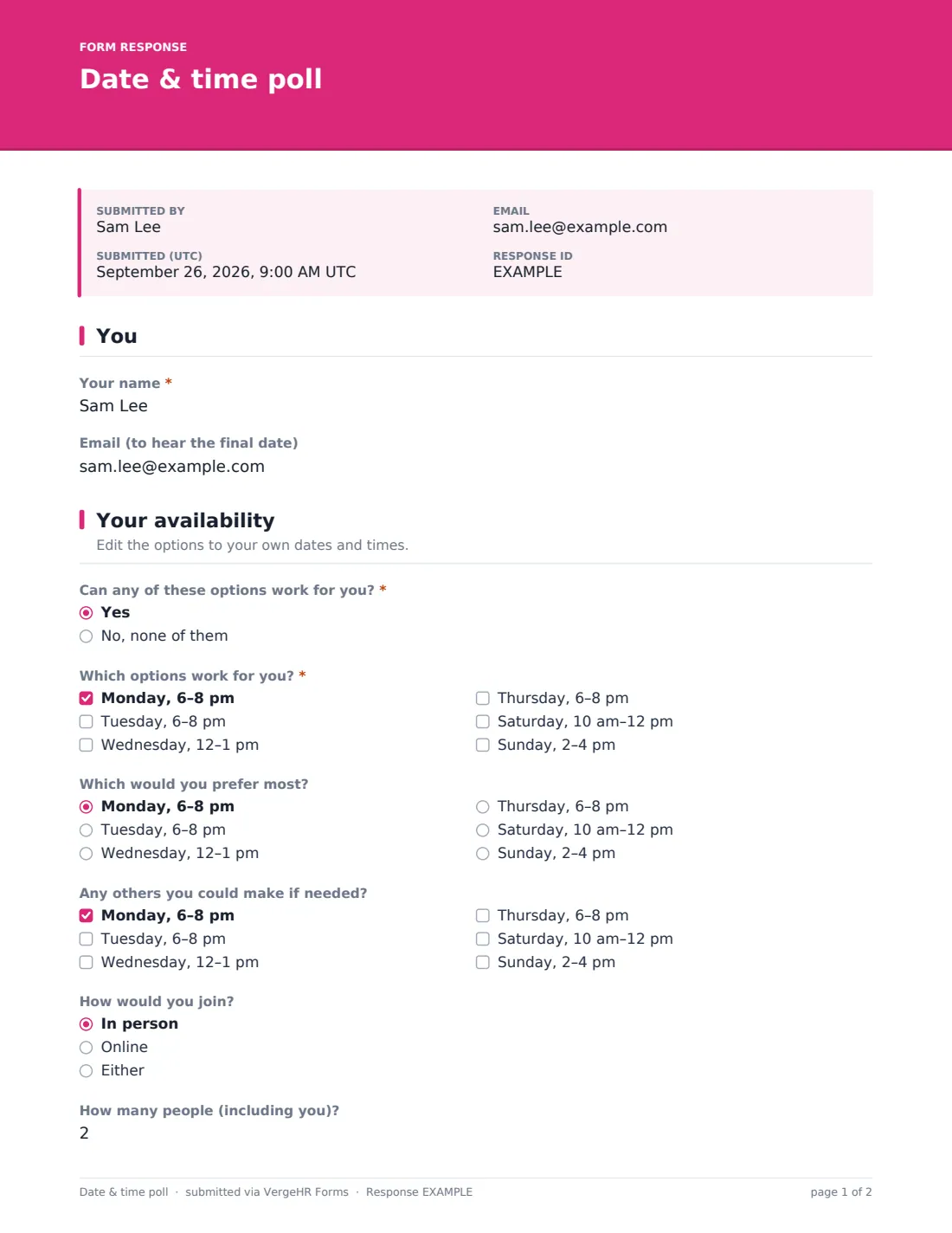
This template asks for a name and, optionally, an email to hear the final date. People first say whether any of the options could work. If they can, they tick every slot that suits, choose a favourite, and mark any others they could make if needed. If none work, they suggest another day and time instead.
Two last questions ask whether they'd join in person or online and how many people are coming with them. Each reply is saved as a PDF in VergeHR Files, and the Responses tab lets you export everything to count the votes.
- Best for
- Clubs, committees, families, teachers and teams arranging meetings or events
- Filled in by
- Everyone you want to invite
- Time to complete
- Under 1 minute
- Includes
- Six editable time slots, favourite and 'if needed' choices, alternative suggestions, attendance mode and headcount
Who uses a date & time poll form?
- Choosing a date for a committee or club meeting
- Scheduling a parents' evening or class event
- Arranging a family reunion or birthday dinner
- Booking a team offsite or training day
- Picking a time for a book club or study group
- Finding a slot for a volunteer briefing
Questions On This date & time poll Form
10 questions over 2 pages · includes conditional questions, multiple pages.
1 You
- Your name*
- Email (to hear the final date)
2 Your availability
- Can any of these options work for you?* Yes · No, none of them
- Which options work for you?* asked only when it applies Monday, 6–8 pm · Tuesday, 6–8 pm · Wednesday, 12–1 pm · Thursday, 6–8 pm · Saturday, 10 am–12 pm · Sunday, 2–4 pm
- Which would you prefer most? asked only when it applies Monday, 6–8 pm · Tuesday, 6–8 pm · Wednesday, 12–1 pm · Thursday, 6–8 pm · Saturday, 10 am–12 pm · Sunday, 2–4 pm
- Any others you could make if needed? asked only when it applies Monday, 6–8 pm · Tuesday, 6–8 pm · Wednesday, 12–1 pm · Thursday, 6–8 pm · Saturday, 10 am–12 pm · Sunday, 2–4 pm
- Suggest another day and time* asked only when it applies
- How would you join? In person · Online · Either
- How many people (including you)?
- Anything else?
The date & time poll form, page by page
1 You
'Your name' is required. 'Email (to hear the final date)' is optional — when given, the person also receives a copy of their reply.
2 Your availability
'Can any of these options work for you?' is required. Yes reveals 'Which options work for you?' (tick at least one) with six slots, from Monday 6–8 pm to Sunday 2–4 pm, then 'Which would you prefer most?' and 'Any others you could make if needed?'. No reveals a required 'Suggest another day and time' instead. Everyone can say how they'd join — in person, online or either — give 'How many people (including you)?', and add notes.
Make the Template Yours
- Replace the six example slots with your real dates and times — edit the favourite and 'if needed' lists to match
- Remove the 'how would you join' question for in-person-only events
- Drop the headcount question if it's one person per reply
- Set a close date so the poll stops on the day you'll decide
- Set identity collection to required in Settings if you'd rather ask for name and email before the questions
- Change the cover text to say what the date is for
Tips for a Better date & time poll Form
- Offer four to eight options; too few and nobody fits, too many and people don't read them
- Include at least one weekend and one evening for groups with day jobs
- Count 'if needed' slots as half a vote when it's close
- Announce the chosen date to everyone, including those who said none worked
- Give a deadline in the cover text so people answer promptly
- Use the alternative suggestions to plan a second round if no slot wins clearly
Every Response Becomes a PDF In Files
Each reply is saved as a PDF titled with the person's name in the Files folder you choose, and you can be emailed as replies arrive.
Export the Responses tab to CSV and count each slot in a spreadsheet to see which date works for most people, or scan the table for the favourite column.
- Start from this template. It opens in the VergeHR Forms designer — change any question, add pages, set the rules for when questions appear.
- Share it. Turn on a public link, or send it to people by email, each with their own link. They don’t need a VergeHR login.
- Get the answers as PDFs. Each response is saved as a PDF in the Files folder you choose — and listed in a Responses table, with any uploaded files, that you can export to CSV.
Date & time poll form: frequently asked questions
Is this date poll template free?
Yes. It's one of the starter templates in the Forms app, included with every VergeHR account.
Does it count the votes for me?
Not automatically. Every reply is listed in the Responses tab, and a CSV export makes counting each slot quick in any spreadsheet.
Can people change their answer?
Respondents can't edit a reply after submitting, but they can submit again — multiple replies are allowed by default. Use the most recent one.
Does it add the event to calendars?
No. Once you've chosen a date, send your own calendar invitation.
Do people need an account?
No. They open the link and tick the times that work.
Can I use real dates instead of weekdays?
Yes. Edit the option labels to any dates and times you like.