

What is the property viewing feedback form template?
Sellers and landlords always ask the same question after a viewing: what did they think? Phoning every viewer is slow and the answers are often polite rather than useful. A short feedback form, sent the same day, gets more honest answers and gives the agent something concrete to pass on.
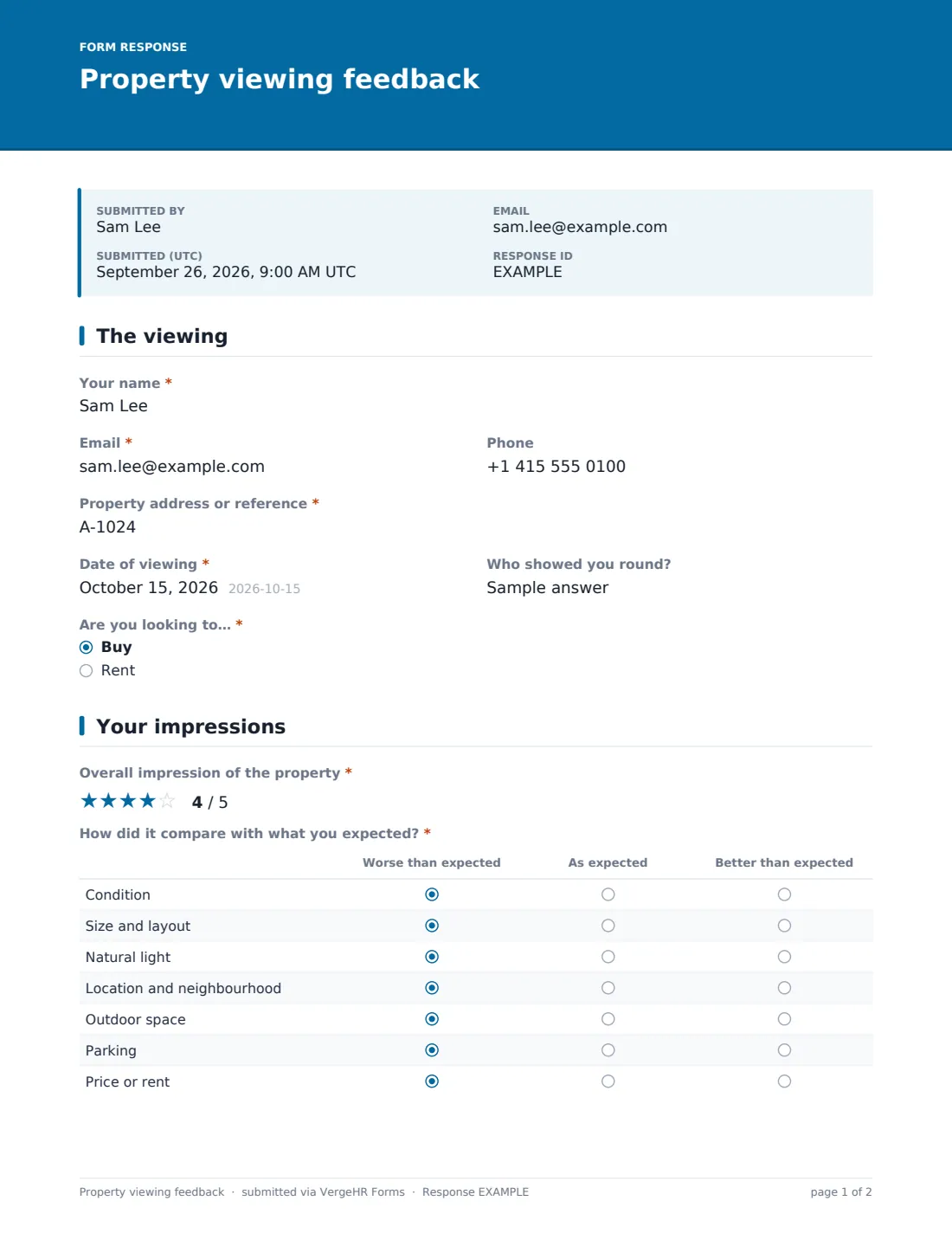
This template records who viewed, which property, when and who showed them round, and whether they're looking to buy or rent. Viewers rate their overall impression, compare the property with their expectations on condition, layout, light, location, outdoor space, parking and price, and say whether the listing matched reality.
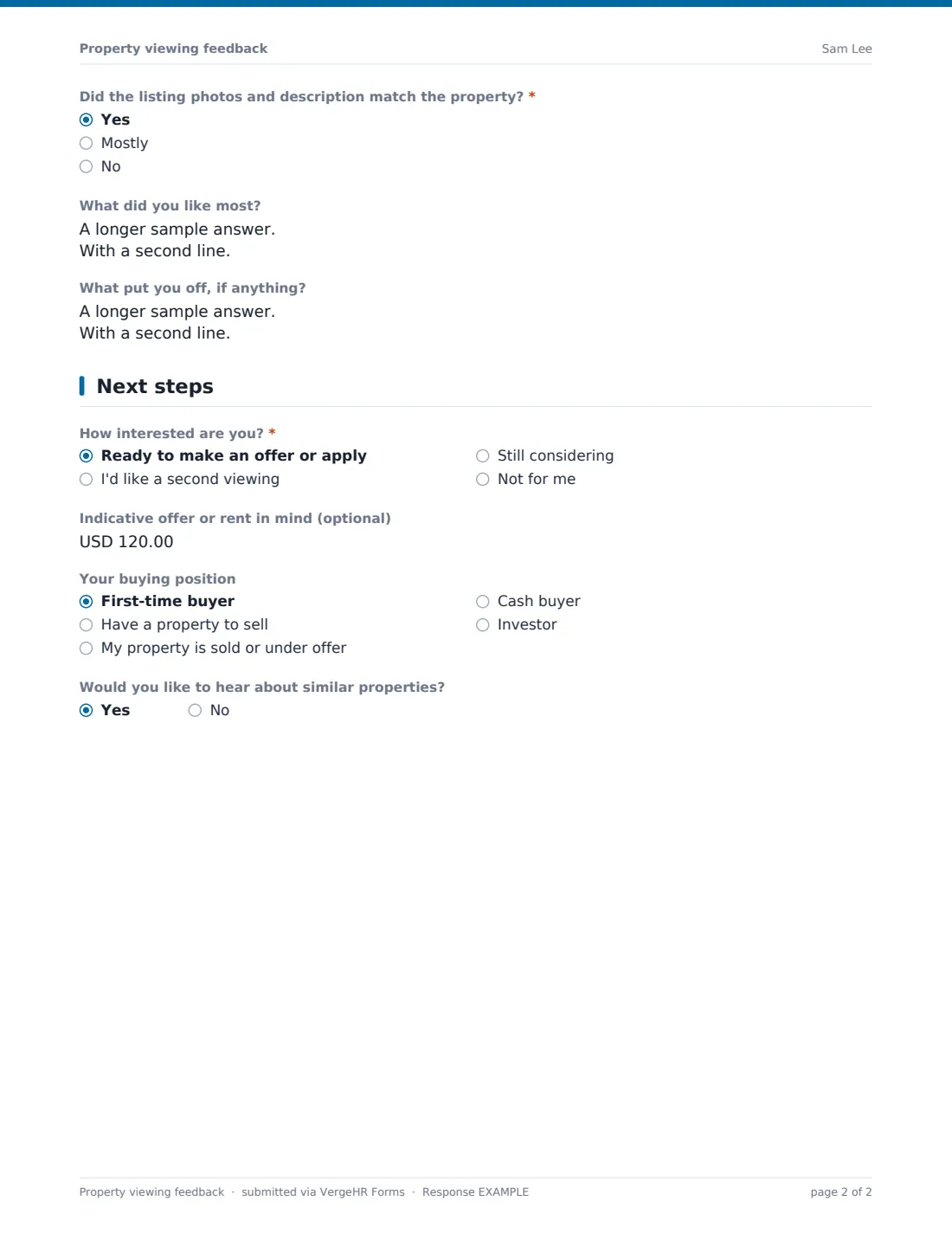
The last page sorts viewers by intent. Ready to offer, keen on a second viewing, still considering or not for me — each choice asks the right follow-up question. Every response is saved as a PDF in VergeHR Files, ready to share with the owner.
- Best for
- Estate agents, letting agents, private landlords and sellers
- Filled in by
- Buyers and prospective tenants after a viewing
- Time to complete
- About 2 minutes
- Includes
- Overall rating, expectations grid, listing accuracy, likes and dislikes, interest with follow-ups, buying position or move date
Who uses a property viewing feedback form?
- A link texted to viewers on the afternoon of the viewing
- Collecting feedback from everyone at an open house
- A weekly feedback summary for a seller or landlord
- Spotting a price or listing issue when several viewers say the same thing
- Finding second-viewing requests quickly
- Building a list of buyers for similar properties
Questions On This property viewing feedback Form
19 questions over 3 pages · includes conditional questions, multiple pages, ratings.
1 The viewing
- Your name*
- Email*
- Phone
- Property address or reference*
- Date of viewing*
- Who showed you round?
- Are you looking to…* Buy · Rent
2 Your impressions
- Overall impression of the property*
- How did it compare with what you expected?* Worse than expected · As expected · Better than expected
- Did the listing photos and description match the property?* Yes · Mostly · No
- What did you like most?
- What put you off, if anything?
3 Next steps
- How interested are you?* Ready to make an offer or apply · I'd like a second viewing · Still considering · Not for me
- Indicative offer or rent in mind (optional) asked only when it applies
- When could you come back?* asked only when it applies
- Why isn't it right for you?* asked only when it applies Price · Size · Location · Condition · Layout · I've found another property
- Your buying position asked only when it applies First-time buyer · Have a property to sell · My property is sold or under offer · Cash buyer · Investor
- When would you like to move in? asked only when it applies
- Would you like to hear about similar properties?
The property viewing feedback form, page by page
1 The viewing
Name, email, the property address or reference and the date of viewing are required; phone and 'Who showed you round?' are optional. 'Are you looking to…' — buy or rent — shapes the last page.
2 Your impressions
A five-star 'Overall impression of the property' comes first. A grid asks how the property compared with what they expected — worse, as expected or better — for condition, size and layout, natural light, location and neighbourhood, outdoor space, parking, and price or rent. 'Did the listing photos and description match the property?' is required. Two open boxes ask what they liked most and what put them off.
3 Next steps
'How interested are you?' is required. 'Ready to make an offer or apply' reveals an optional indicative figure, which the help text says is not binding. 'I'd like a second viewing' asks when they could come back. 'Not for me' asks why — price, size, location, condition, layout, found another property, or something else. Buyers can give their buying position, from first-time buyer to cash buyer or investor; renters can say when they'd like to move in. Everyone is asked whether they'd like to hear about similar properties.
Make the Template Yours
- Change the currency on the offer question to your own
- Swap the property box for a dropdown of your current listings
- Edit the expectations grid — add a garden, a view or energy efficiency if those sell
- Remove the buy or rent question if you only do one
- Include the property in the document title so PDFs file neatly per listing
- Route each listing's responses to its own folder in Files
Tips for a Better property viewing feedback Form
- Send the link within a few hours of the viewing
- Call anyone ready to offer straight away; the form is a prompt, not a replacement
- Share themes with the owner rather than individual comments word for word
- If several viewers say the listing didn't match, update the photos or description
- Follow up 'still considering' viewers after a few days
- Ask for consent before adding someone to a mailing list for similar properties
Every Response Becomes a PDF In Files
Each response is filed as a PDF titled with the viewer's name and date in the Files folder you chose, and the viewer is emailed a copy.
Search the Responses tab by property to see all feedback for one listing, and export to CSV for a seller or landlord report.
- Start from this template. It opens in the VergeHR Forms designer — change any question, add pages, set the rules for when questions appear.
- Share it. Turn on a public link, or send it to people by email, each with their own link. They don’t need a VergeHR login.
- Get the answers as PDFs. Each response is saved as a PDF in the Files folder you choose — and listed in a Responses table, with any uploaded files, that you can export to CSV.
Property viewing feedback form: frequently asked questions
Is this property viewing feedback form free?
Yes. It's one of the starter templates in VergeHR's Forms app, which comes with every account.
Is an indicative offer on this form binding?
No. The help text tells viewers it isn't binding; it only helps the agent prepare. Formal offers should go through your usual process.
Can I use one form for all my properties?
Yes. Viewers enter the address or reference, so one link can cover many listings. You can also make a copy per property.
Do viewers need an account?
No. They open the link you send and fill it in.
Can sellers see the responses?
You can share the PDFs or a CSV export with them. They don't get access to your VergeHR account.
Does it work for open houses?
Yes. Share one link or a QR code with everyone who attended.