

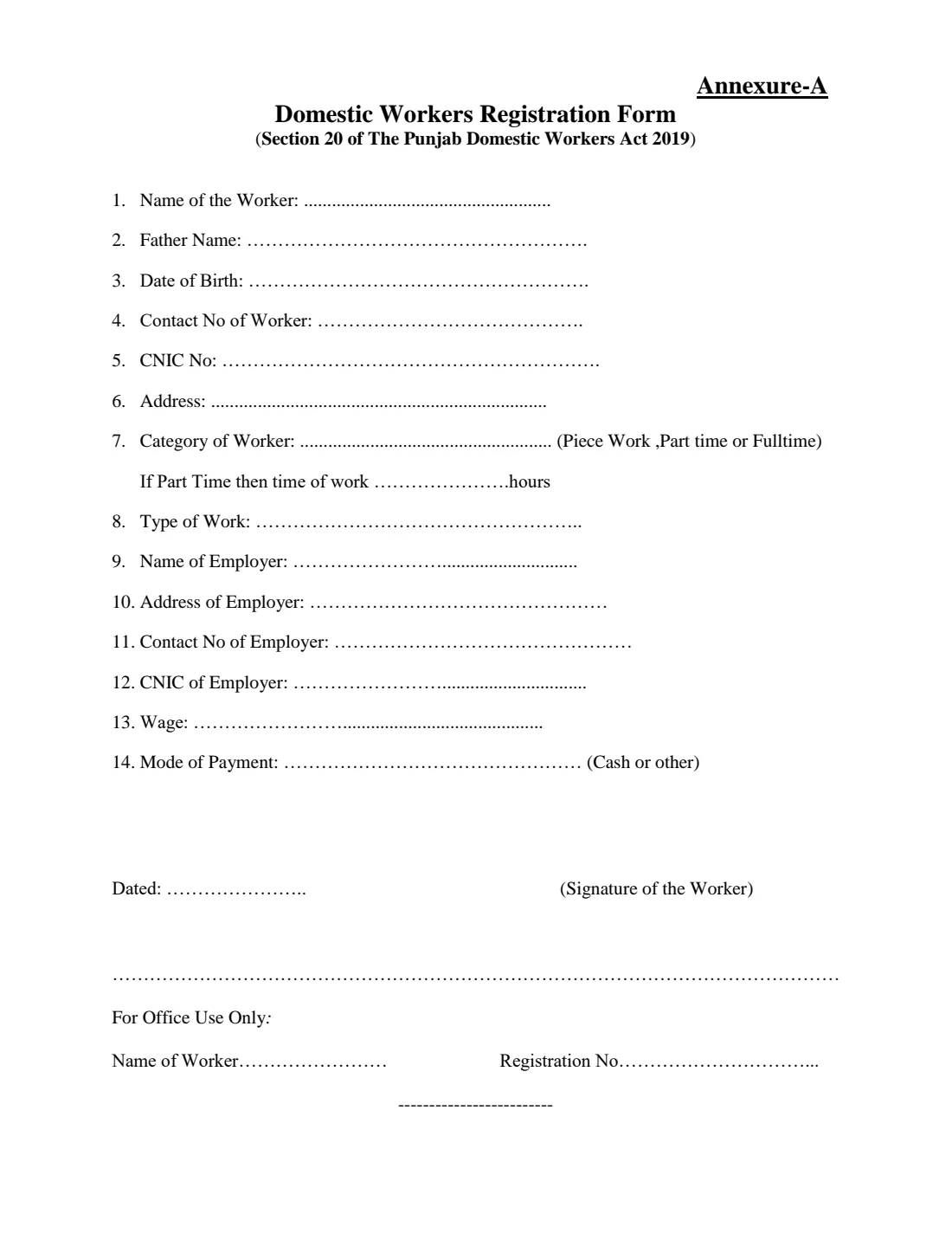

What is Domestic Worker Registration (Annexure-A)?
The Punjab Domestic Workers Act, 2019 gives people who work in households, such as cooks, cleaners, drivers, gardeners, guards, nannies and carers, the right to a written agreement, a minimum wage, limits on working hours, leave and social security cover. Section 20 provides for the registration of domestic workers, and Annexure-A is the registration form, published by the Punjab Employees Social Security Institution (PESSI) and the Labour & Human Resource Department.
The one-page form asks for the worker's name, father's name, date of birth, contact number, CNIC and address, the category of work (piece work, part time or full time, with hours for part-time work), the type of work, the employer's name, address, contact number and CNIC, the wage and the mode of payment.
VergeHR fills in what it knows from the employee's record, checks the CNIC format and prints the answers on PESSI's own PDF. The filled form is saved in VergeHR Files. The worker signs it by hand and it is handed to PESSI: VergeHR never submits anything. The employer registers on a separate form, Annexure-B.
- Who fills it
- The domestic worker, often with the employer's help
- Given to
- The Punjab Employees Social Security Institution (PESSI)
- Signatures
- Signed or thumb-printed by hand by the worker
- Legal basis
- Section 20 of the Punjab Domestic Workers Act, 2019
- Employer's form
- Annexure-B, Domestic Employer Registration Form
- Language
- English (an Urdu version is also published)
Who needs to fill out Domestic Worker Registration (Annexure-A)?
- A domestic worker employed by a household in Punjab: cook, cleaner, driver, gardener, guard, nanny, carer or similar.
- A household employer helping its domestic staff register.
- An HR team that manages household staff for a family or a company's residences.
When to Use Domestic Worker Registration (Annexure-A)
- When a domestic worker starts work in a household in Punjab.
- When a domestic worker already employed has not yet been registered.
What You Need Before You Start
- The worker's CNIC, date of birth, contact number and address.
- Whether the work is piece work, part time (and how many hours) or full time, and what the work is.
- The employer's name, address, contact number and CNIC.
- The wage and how it is paid.
What’s On Domestic Worker Registration (Annexure-A)
The 2026 edition has 2 pages. VergeHR asks for it in 5 parts:
- 1 to 6. The Domestic WorkerDomestic worker
- 7 and 8. The WorkDomestic worker
- 9 to 12. The EmployerDomestic worker
- 13 and 14. Wage and PaymentDomestic worker
- Date and SignatureDomestic worker
How to fill out Domestic Worker Registration (Annexure-A), step by step
1 Items 1 to 6: the worker
Name, father's name, date of birth, contact number, CNIC and address.
2 Items 7 and 8: the work
Piece work, part time or full time (with the hours for part-time work), and the type of work.
3 Items 9 to 12: the employer
The employer's name, address, contact number and CNIC.
4 Items 13 and 14: pay
The wage, printed as rupees per month, week, day or piece, and whether it is paid in cash or otherwise.
5 Date and signature
VergeHR prints the date. The worker signs or thumb-prints by hand. PESSI fills the office-use block.
Common Mistakes to Avoid
- A CNIC with a wrong digit: it is 13 digits, like 35202-1234567-1.
- A wage below the minimum wage the Punjab Government has notified.
- Forgetting the employer's own registration on Annexure-B.
- Registering a child: the Act does not allow a child under 15 to be employed as a domestic worker.
After You Fill It Out
Print the form and have the worker sign or thumb-print it.
Hand it to PESSI with copies of the worker's and the employer's CNICs, or follow PESSI's current instructions.
Keep a copy with the worker's employment records.
Fill Out Domestic Worker Registration (Annexure-A) Online with VergeHR
- Pick the employee. Choose an employee and VergeHR fills in their name, date of birth, email and other details it already knows.
- Answer plain-language questions. One part of the form at a time, with the official help text beside each question — 18 fields in all. Your answers save as you go.
- Check the live preview. Watch your answers land on the real Punjab Employees Social Security Institution (PESSI) and Labour & Human Resource Department, Government of the Punjab, under the Punjab Domestic Workers Act, 2019 form, and let VergeHR do any worksheet arithmetic.
- Generate the official PDF. VergeHR prints your answers into the agency’s own PDF and files it in that person’s folder in your vault.
VergeHR fills the form — it never files or submits anything for you. Deliver the finished form to whoever asked for it, the way the form’s instructions say.
Start Domestic Worker Registration (Annexure-A) Now — It’s FreeDomestic Worker Registration (Annexure-A): frequently asked questions
Who is a domestic worker under the Act?
Someone who does domestic work in or for a household under an employment relationship, for example cooking, cleaning, driving, gardening, guarding or looking after children, the elderly or the sick.
Can the worker register online?
PESSI also offers online and app-based registration. This form is the paper route.
Does VergeHR register the worker?
No. VergeHR fills the official PDF. The worker signs it and it is handed to PESSI.
Official Sources
- Blank form (PDF), published by Punjab Employees Social Security Institution (PESSI) and Labour & Human Resource Department, Government of the Punjab, under the Punjab Domestic Workers Act, 2019: https://pessi.punjab.gov.pk/system/files/Domestic%20worker%20Registration%20a.pdf
- Official instructions and guidance: https://pessi.punjab.gov.pk/forms_and_guidelines
- Edition shown on this page: Annexure-A (Section 20 of the Punjab Domestic Workers Act 2019), May 2019 (checked 2026-11-09).
VergeHR is not affiliated with or endorsed by Punjab Employees Social Security Institution (PESSI) and Labour & Human Resource Department, Government of the Punjab, under the Punjab Domestic Workers Act, 2019 or any government. This page explains the form in general terms and is not legal, tax or immigration advice. Always read the official instructions, and check that you are using the edition the recipient accepts. Page last reviewed 2026-11-09.