

What is First Accident Report (Form J-I)?
When an accident in a factory causes death or an injury that keeps a worker away from work, the Factories Act, 1934 requires the manager to notify the authorities. In Punjab the first notice is Form J-I under rules 82 and 83 of the Punjab Factories Rules, 1978, to be submitted within 24 hours of the accident. The Labour & Human Resource Department publishes it on its Downloads page.
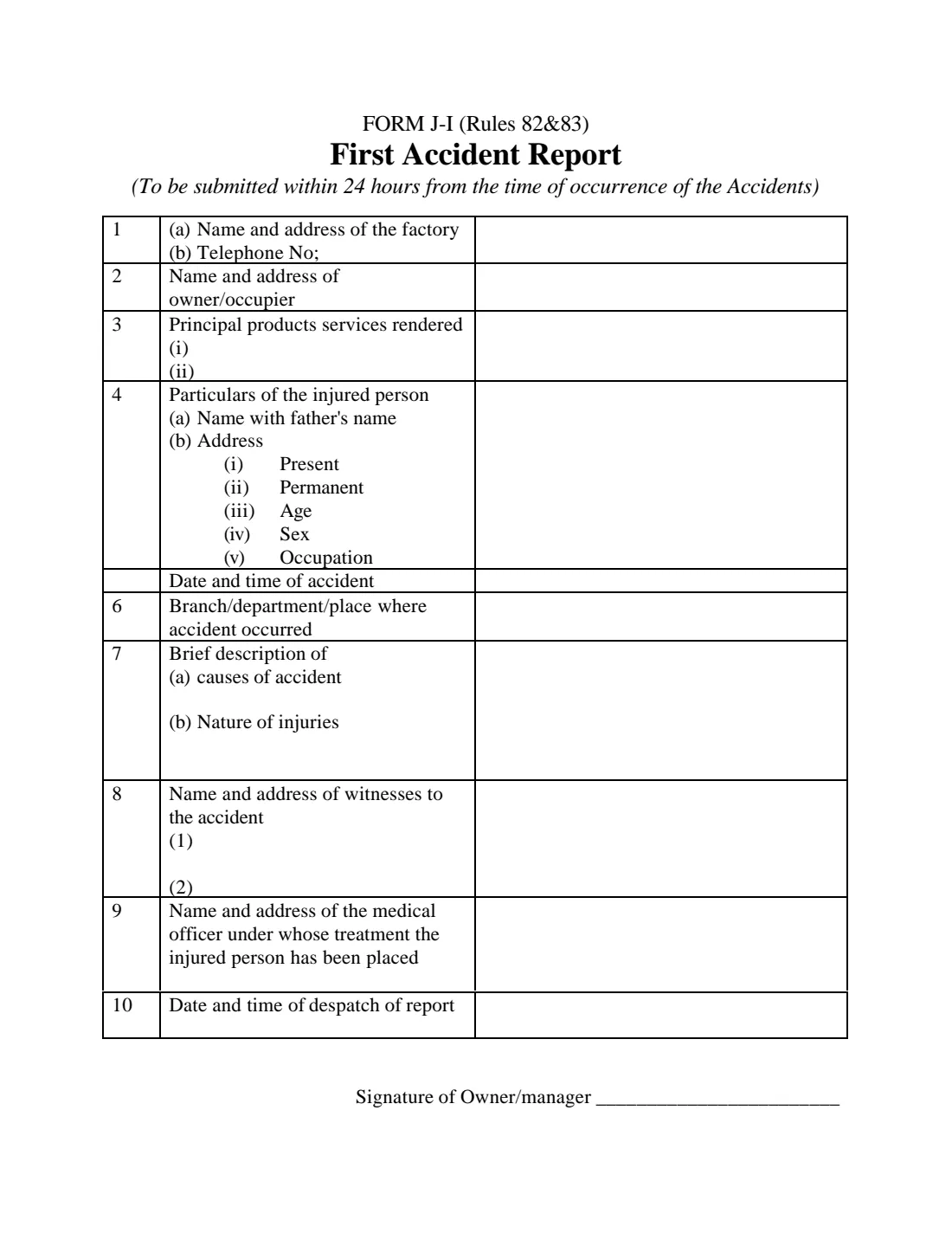
The one-page form asks for the factory and its owner or occupier, its principal products, the injured person's name with father's name, addresses, age, sex and occupation, the date and time of the accident, where it happened, its causes, the nature of the injuries, two witnesses and the medical officer treating the injured person, and when the report was despatched.
VergeHR fills in the injured employee's name, addresses and date of birth from their record, works out their age on the day of the accident, and prints the answers in the right-hand column of the Labour Department's own PDF. The filled report is saved in VergeHR Files. You print it, the owner or manager signs it, and you send it yourself: VergeHR never submits anything.
- Who fills it
- The factory's owner, occupier or manager
- Given to
- The Inspector of Factories (Labour & Human Resource Department, Punjab)
- When
- Within 24 hours of the accident
- Signatures
- Signed by hand by the owner or manager
- Legal basis
- Rules 82 and 83 of the Punjab Factories Rules, 1978, under the Factories Act, 1934
- Follow-up
- A final accident report on Form J-II, within 3 months
Who needs to fill out First Accident Report (Form J-I)?
- A factory in Punjab where a worker has been injured or killed in an accident.
- HR, safety and compliance officers who report workplace accidents for the factory.
When to Use First Accident Report (Form J-I)
- Straight after a reportable accident: the form is due within 24 hours.
- Check the Punjab Factories Rules or ask the Inspector which accidents must be reported, for example those causing death or keeping the worker away from work.
What You Need Before You Start
- The factory's name, address and telephone number, and the owner's or occupier's name and address.
- The injured person's name, father's name, present and permanent addresses, date of birth or age, sex and occupation.
- The date, time and place of the accident, what caused it and the injuries.
- The names and addresses of up to two witnesses and of the medical officer treating the injured person.
What’s On First Accident Report (Form J-I)
The 2026 edition has 1 page. VergeHR asks for it in 5 parts:
- 1 to 3. The FactoryEmployer
- 4. The Injured PersonEmployer
- 5 to 7. The AccidentEmployer
- 8 and 9. Witnesses and Medical OfficerEmployer
- 10. Despatch of the ReportEmployer
How to fill out First Accident Report (Form J-I), step by step
1 Items 1 to 3: the factory
Name and address of the factory and its telephone number, the owner or occupier, and up to two principal products or services.
2 Item 4: the injured person
Name with father's name (printed as S/O or D/O), present and permanent addresses, age, sex and occupation. VergeHR works out the age from the date of birth.
3 Items 5 to 7: the accident
When it happened, the branch, department or place, a brief description of its causes and the nature of the injuries.
4 Items 8 to 10: witnesses, doctor and despatch
Two witnesses, the medical officer treating the injured person, and the date and time you send the report.
Common Mistakes to Avoid
- Sending the report late: it is due within 24 hours of the accident.
- Describing the injuries vaguely. Name the body part and the kind of injury.
- Forgetting the final report on Form J-II, which follows within 3 months.
- Not telling the social security institution (PESSI) as well, when the worker is a secured person.
After You Fill It Out
Print the report. The owner or manager signs it.
Send it to the Inspector of Factories within 24 hours of the accident and keep a copy.
For a secured person, also report the employment injury to PESSI on its own form.
Send the final accident report on Form J-II within 3 months.
Fill Out First Accident Report (Form J-I) Online with VergeHR
- Pick the employee. Choose an employee and VergeHR fills in their name, date of birth, email and other details it already knows.
- Answer plain-language questions. One part of the form at a time, with the official help text beside each question — 28 fields in all. Your answers save as you go.
- Check the live preview. Watch your answers land on the real Labour & Human Resource Department, Government of the Punjab, under the Factories Act, 1934 and the Punjab Factories Rules, 1978 form, and let VergeHR do any worksheet arithmetic.
- Generate the official PDF. VergeHR prints your answers into the agency’s own PDF and files it in that person’s folder in your vault.
VergeHR fills the form — it never files or submits anything for you. Deliver the finished form to whoever asked for it, the way the form’s instructions say.
Start First Accident Report (Form J-I) Now — It’s FreeFirst Accident Report (Form J-I): frequently asked questions
Does this replace the PESSI injury report?
No. Form J-I goes to the Inspector of Factories. An employment injury of a worker registered with PESSI is reported to PESSI separately.
Can I fill it for an employee whose date of birth I don't have?
Yes. Leave the date of birth blank and enter the age yourself.
Does VergeHR send the report?
No. VergeHR fills the official PDF. You print it, sign it and send it yourself.
Official Sources
- Blank form (PDF), published by Labour & Human Resource Department, Government of the Punjab, under the Factories Act, 1934 and the Punjab Factories Rules, 1978: https://labour.punjab.gov.pk/system/files/Form6.PDF
- Official instructions and guidance: https://labour.punjab.gov.pk/downloads
- Edition shown on this page: Form J-I (Rules 82 & 83); no revision date printed (checked 2026-11-09).
VergeHR is not affiliated with or endorsed by Labour & Human Resource Department, Government of the Punjab, under the Factories Act, 1934 and the Punjab Factories Rules, 1978 or any government. This page explains the form in general terms and is not legal, tax or immigration advice. Always read the official instructions, and check that you are using the edition the recipient accepts. Page last reviewed 2026-11-09.