

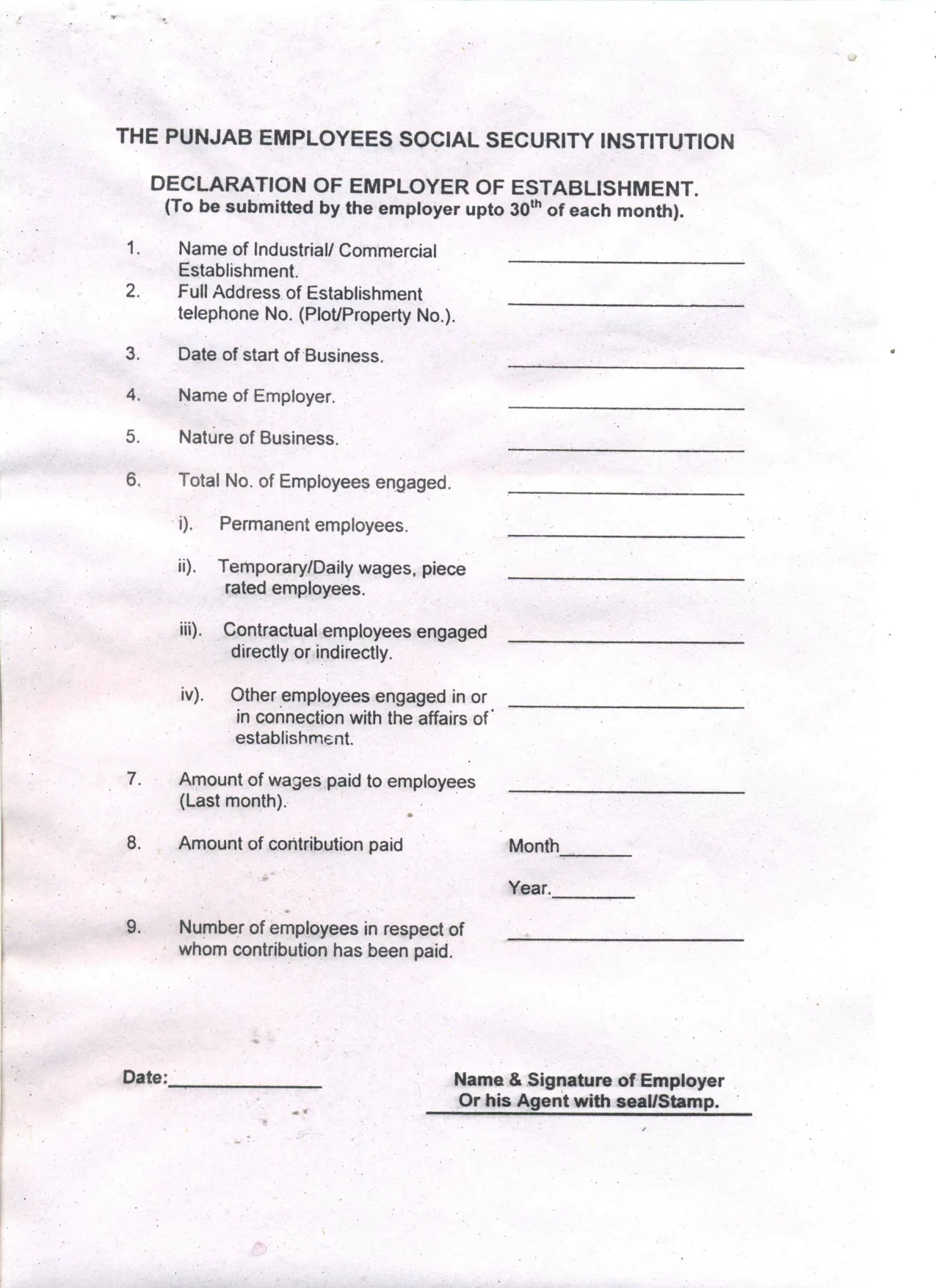
What is PESSI Monthly Employer Declaration?
Employers of industrial and commercial establishments in Punjab pay a social security contribution for their secured employees to the Punjab Employees Social Security Institution (PESSI), under the Punjab Employees' Social Security Ordinance, 1965. PESSI's Declaration of Employer of Establishment is the one-page statement that goes with it, to be submitted by the employer by the 30th of each month.
It asks for the establishment's name, address and telephone number, the date business started, the name of the employer and the nature of the business, the employees engaged (permanent; temporary, daily-wage or piece-rated; contractual, engaged directly or indirectly; and others), last month's wages, the contribution paid with its month and year, and the number of employees it was paid for.
VergeHR adds up the employees for you, formats the rupee amounts and prints everything on PESSI's own form. The filled declaration is saved in VergeHR Files. You print it, sign it, add the seal or stamp and hand it to PESSI: VergeHR never submits anything.
- Who fills it
- An employer registered with PESSI, or their agent
- Given to
- The Punjab Employees Social Security Institution (PESSI) directorate for the area
- When
- By the 30th of each month
- Signatures
- Signed by hand by the employer or agent, with the seal or stamp
- Legal basis
- Punjab Employees' Social Security Ordinance, 1965
- Length
- 1 page, 9 items
Who needs to fill out PESSI Monthly Employer Declaration?
- An industrial or commercial establishment in Punjab registered with PESSI.
- Payroll and HR teams that pay the monthly social security contribution.
When to Use PESSI Monthly Employer Declaration
- Every month, by the 30th, with the contribution for the month.
- When PESSI asks for a declaration for a month that was missed.
What You Need Before You Start
- The establishment's name, address, telephone number and the date it started business.
- The number of employees by type: permanent; temporary, daily-wage or piece-rated; contractual; and others.
- Last month's total wages.
- The contribution paid, the month and year it is for, and how many employees it covers.
What’s On PESSI Monthly Employer Declaration
The 2026 edition has 1 page. VergeHR asks for it in 4 parts:
- 1 to 5. The EstablishmentEmployer
- 6. Employees EngagedEmployer
- 7 to 9. Wages and ContributionEmployer
- Date and SignatureEmployer
How to fill out PESSI Monthly Employer Declaration, step by step
1 Items 1 to 5: the establishment
Name, address and telephone, date of start of business, name of the employer and nature of the business.
2 Item 6: employees engaged
Permanent, temporary or daily-wage or piece-rated, contractual, and other employees. VergeHR prints the total.
3 Items 7 to 9: wages and contribution
Last month's wages, the contribution paid with its month and year, and the number of employees it was paid for.
4 Date and signature
VergeHR prints the date and the signer's name. The employer or agent signs and stamps the form by hand.
Common Mistakes to Avoid
- Leaving out contractual or daily-wage workers from item 6.
- A number in item 9 larger than the total in item 6.
- Submitting after the 30th of the month.
- Forgetting the seal or stamp.
After You Fill It Out
Print the declaration, sign it and add the seal or stamp.
Hand it to PESSI with, or after, the month's contribution payment, and keep a copy with the payment receipt.
Fill Out PESSI Monthly Employer Declaration Online with VergeHR
- Pick the employee. Choose an employee and VergeHR fills in their name, date of birth, email and other details it already knows.
- Answer plain-language questions. One part of the form at a time, with the official help text beside each question — 21 fields in all. Your answers save as you go.
- Check the live preview. Watch your answers land on the real Punjab Employees Social Security Institution (PESSI), under the Punjab Employees' Social Security Ordinance, 1965 form, and let VergeHR do any worksheet arithmetic.
- Generate the official PDF. VergeHR prints your answers into the agency’s own PDF and files it in that person’s folder in your vault.
VergeHR fills the form — it never files or submits anything for you. Deliver the finished form to whoever asked for it, the way the form’s instructions say.
Start PESSI Monthly Employer Declaration Now — It’s FreePESSI Monthly Employer Declaration: frequently asked questions
Which employees count as secured persons?
PESSI covers employees of covered establishments earning up to the wage ceiling the Punjab Government notifies. Check PESSI's current rules for the ceiling and the contribution rate.
Can I pay PESSI online?
PESSI offers online services. This declaration is its paper form.
Does VergeHR file the declaration?
No. VergeHR fills the official PDF. You sign, stamp and hand it to PESSI yourself.
Official Sources
- Blank form (PDF), published by Punjab Employees Social Security Institution (PESSI), under the Punjab Employees' Social Security Ordinance, 1965: https://pessi.punjab.gov.pk/system/files/declaration%20of%20employor%20of%20establishment.pdf
- Official instructions and guidance: https://pessi.punjab.gov.pk/forms_and_guidelines
- Edition shown on this page: No form number or revision date printed (scanned form, June 2011) (checked 2026-11-09).
VergeHR is not affiliated with or endorsed by Punjab Employees Social Security Institution (PESSI), under the Punjab Employees' Social Security Ordinance, 1965 or any government. This page explains the form in general terms and is not legal, tax or immigration advice. Always read the official instructions, and check that you are using the edition the recipient accepts. Page last reviewed 2026-11-09.