

What is Form 2553?
Form 2553 is how a small business corporation elects to be treated as an S corporation under section 1362 of the Internal Revenue Code. An S corporation generally doesn't pay federal income tax itself: its income, deductions and credits pass through to its shareholders. An LLC or other entity that is eligible to elect to be treated as a corporation can use the same form, without first filing Form 8832.
The election is accepted only if the corporation meets every test under "Who May Elect" in the instructions (for example, no more than 100 shareholders, only allowable shareholders such as individuals, certain trusts and estates, no nonresident alien shareholders, and only one class of stock), every shareholder signs the consent statement, and an officer signs page 1. Timing matters. The instructions say to file no more than 2 months and 15 days after the beginning of the tax year the election is to take effect, or at any time during the year before. The form also covers late elections filed under Rev. Proc. 2013-30.
VergeHR walks the officer and the shareholders through each part, fits the late-election explanation onto the form's nine lines, and prints everything into the IRS's own PDF. Each shareholder can sign column K, and the officer page 1, with VergeHR's eSignature or by hand. You then fax or mail it to the IRS.
- Who files
- A domestic corporation, or an LLC or other entity eligible to elect to be treated as a corporation
- Deadline
- No more than 2 months and 15 days after the start of the tax year the election takes effect, or any time in the year before
- How to file
- By fax or mail to the IRS in Kansas City, MO or Ogden, UT, depending on the principal business location. It can't be filed online.
- Signatures
- An officer on page 1, and every shareholder who must consent in column K
- IRS response
- Generally within 60 days, according to the instructions
- Edition
- Rev. December 2017 (instructions Rev. December 2020)
Who needs to fill out Form 2553?
- New corporations that want S corporation tax treatment from their first tax year.
- Existing C corporations that want to become S corporations from their next tax year.
- LLCs and other eligible entities that want to be taxed as an S corporation. Filing Form 2553 also covers the election to be treated as a corporation.
- Corporations that missed the deadline and are asking for late-election relief under Rev. Proc. 2013-30.
- Shareholders, who each sign the consent statement. A trust's income beneficiary can also make a QSST election in Part III.
When to Use Form 2553
- Within 2 months and 15 days after the start of the tax year you want S status to begin. For a calendar-year corporation that already exists, that means by March 15, and a new corporation counts from the day its first tax year begins.
- Any time during the tax year before the year the election should take effect.
- Late, with an explanation of reasonable cause, generally within 3 years and 75 days of the intended effective date under Rev. Proc. 2013-30.
- With Part II, when the corporation wants a fiscal year or a 52-53-week year instead of the calendar year.
What You Need Before You Start
- The corporation's exact legal name, address and EIN, as on the IRS letter that assigned the EIN or as later updated.
- The date and state of incorporation (or formation, for an LLC).
- The date the election should take effect, and the tax year the corporation will use.
- For each shareholder who must consent: name, address, number of shares or ownership percentage, date(s) acquired, SSN or EIN, and the shareholder's tax year end.
- The name, title and phone number of an officer or legal representative the IRS can call.
- For a late election: an explanation of the reasonable cause and of the steps taken once the mistake was found.
What’s On Form 2553
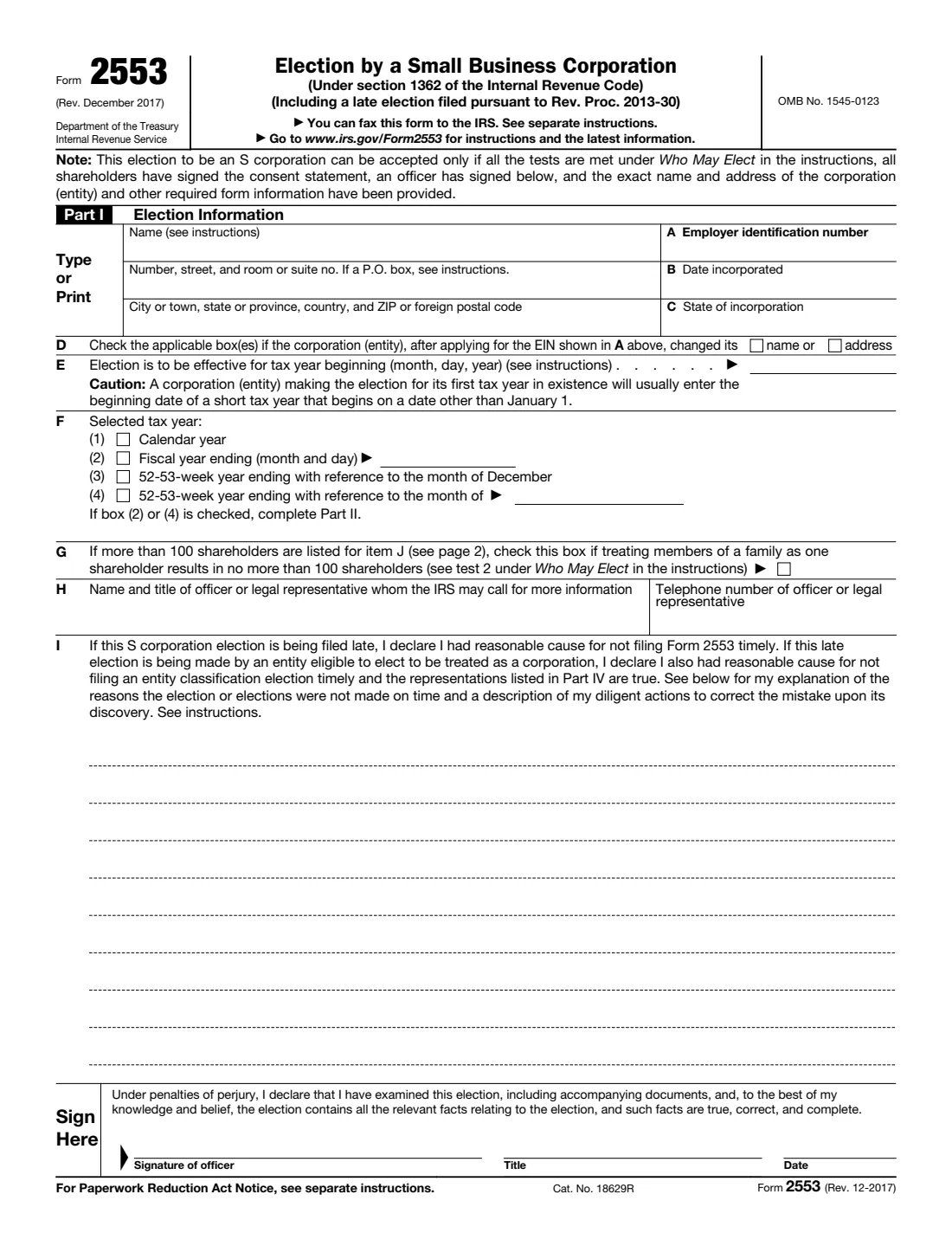
The 2017 edition has 4 pages. VergeHR asks for it in 13 parts, and it is signed by Officer of the corporation and Shareholder 1 and Shareholder 2 and Shareholder 3 and Shareholder 4 and Shareholder 5 and Shareholder 6 and Shareholder 7 and Qsst income beneficiary:
- Part I: The corporation (entity)Officer of the corporation
- Part I, items E–H: The electionOfficer of the corporation
- Part I, item I: Late election reliefOfficer of the corporation
- Signature of officerOfficer of the corporation
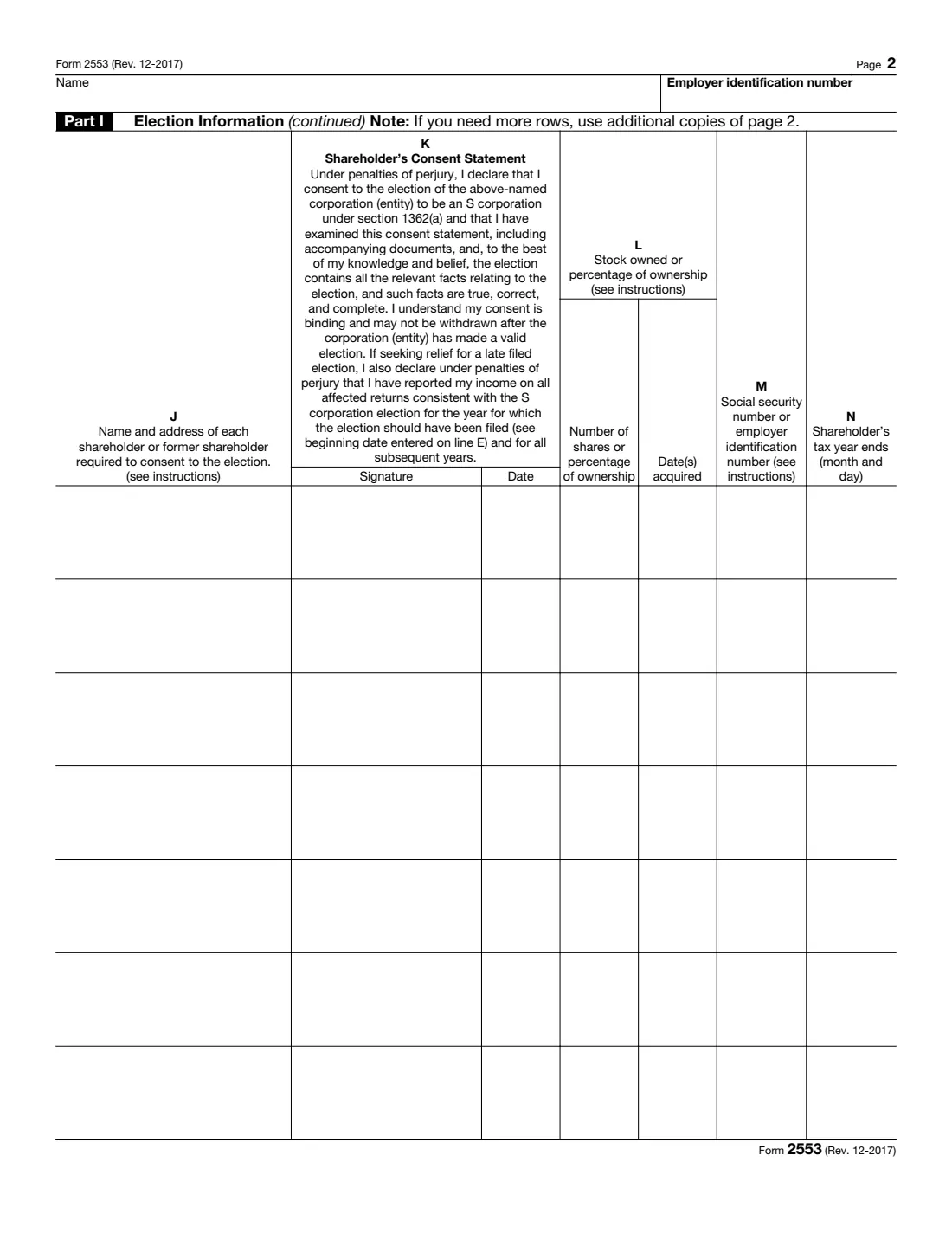
- Shareholder 1 (columns J–N)Shareholder 1
- Shareholder 2 (columns J–N)Shareholder 2
- Shareholder 3 (columns J–N)Shareholder 3
- Shareholder 4 (columns J–N)Shareholder 4
- Shareholder 5 (columns J–N)Shareholder 5
- Shareholder 6 (columns J–N)Shareholder 6
- Shareholder 7 (columns J–N)Shareholder 7
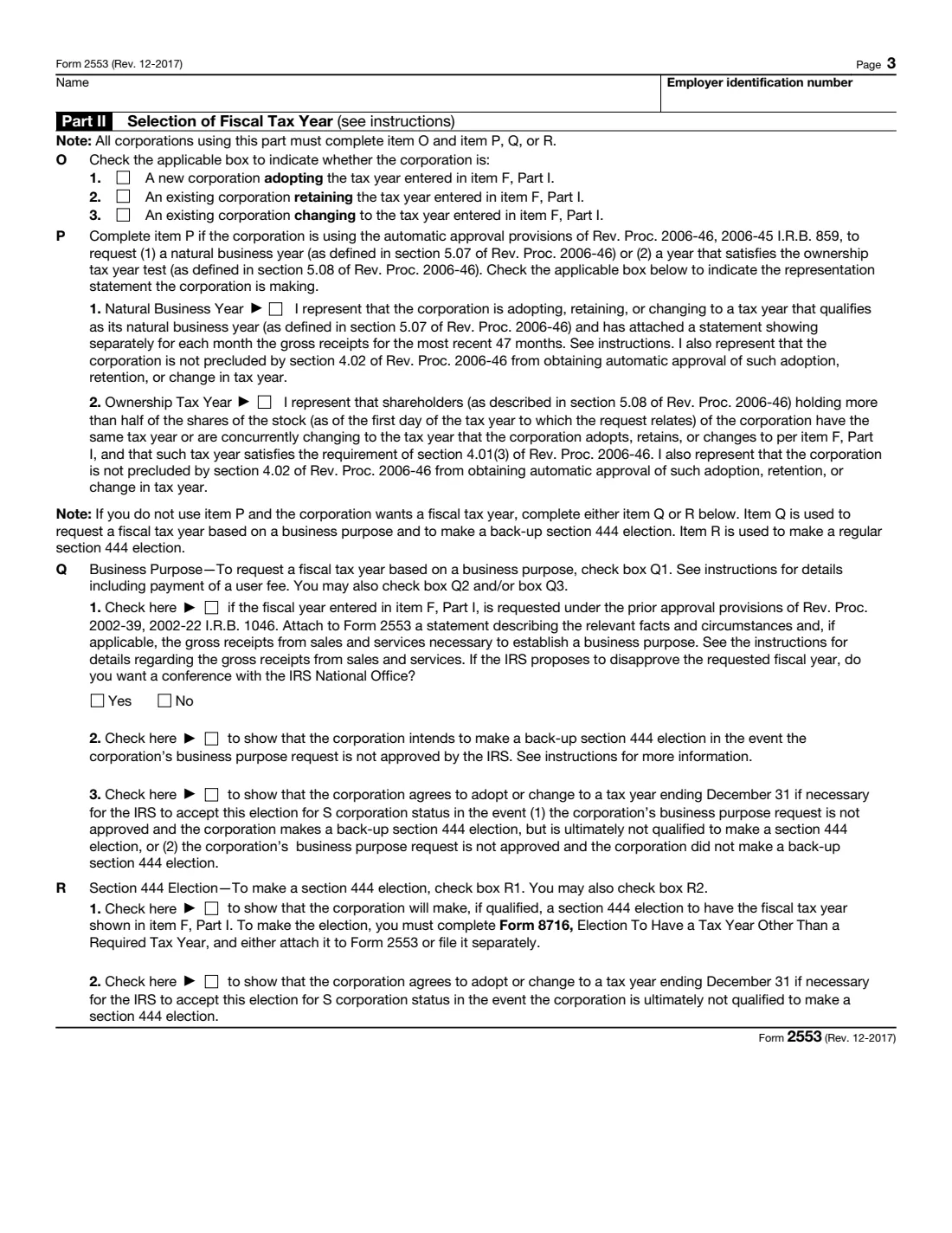
- Part II: Selection of fiscal tax yearOfficer of the corporation
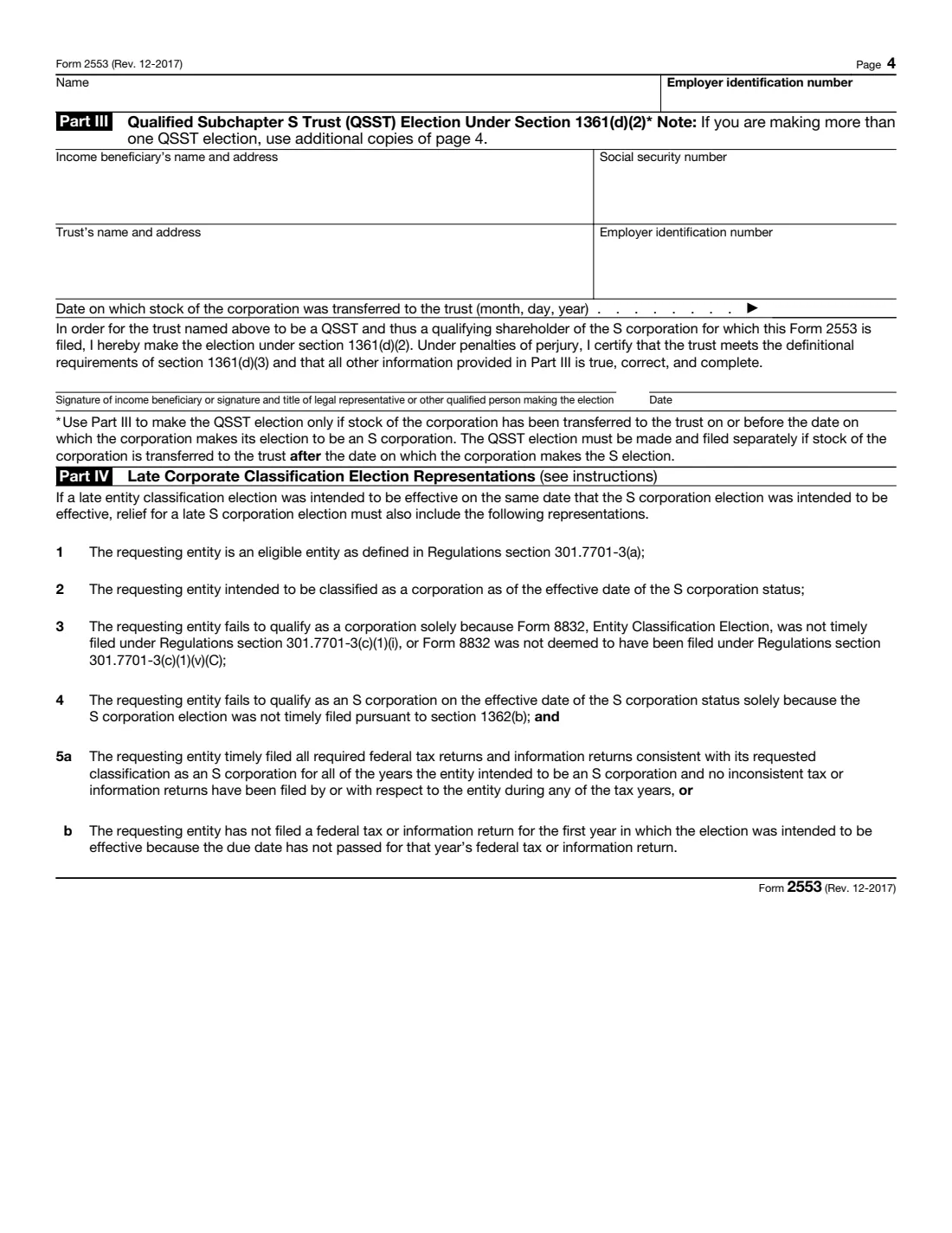
- Part III: Qualified Subchapter S Trust (QSST) electionQsst income beneficiary
How to fill out Form 2553, step by step
1 Part I, name, address and items A–D
Enter the corporation's name and address exactly as the IRS has them, its EIN (item A), the date incorporated (B) and state of incorporation (C). Tick item D if the name or address has changed since the EIN was assigned.
2 Item E: Effective date
Enter the first day of the tax year the election should apply to. A new corporation making the election for its first year usually enters the start of a short first tax year, which is often not January 1.
3 Item F: Tax year
Choose a calendar year, a fiscal year, or a 52-53-week year. Anything other than a calendar year or a 52-53-week year tied to December also needs Part II on page 3.
4 Items G and H
Item G only matters when more than 100 shareholders are listed and counting family members as one shareholder brings the number to 100 or fewer. Item H is the officer or legal representative the IRS may call, with their phone number.
5 Item I: Late election
If the election is late, explain why it wasn't filed on time and what was done to correct the mistake. The instructions also ask for "FILED PURSUANT TO REV. PROC. 2013-30" in the top margin of page 1.
6 Page 2: Shareholders' consent (columns J–N)
List each shareholder who must consent, with their address, shares or ownership percentage, dates acquired, SSN or EIN, and tax year end. Each one signs and dates column K. The consent is binding and can't be withdrawn once the election is valid. If you need more rows, use additional copies of page 2.
7 Page 3: Part II, fiscal tax year
Complete item O (adopting, retaining or changing a tax year) and one of P (automatic approval for a natural business year or ownership tax year), Q (a business purpose request, which carries an IRS user fee) or R (a section 444 election, with Form 8716).
8 Page 4: Parts III and IV
Part III is the QSST election, made by a trust's income beneficiary when stock was transferred to the trust on or before the date of the S election. Part IV lists the representations an entity makes when it also needs relief for a late entity classification election. There is nothing to fill in there, but they must be true.
9 Officer's signature
An officer signs and dates page 1 and gives their title.
Common Mistakes to Avoid
- Missing a shareholder's consent. Everyone who was a shareholder when the election is made, and anyone who held stock earlier in the tax year before the election, must consent.
- Using a name or address that doesn't match IRS records for the EIN.
- Filing too late without asking for late-election relief. The election then generally takes effect only the following tax year.
- Choosing a fiscal year without completing Part II.
- Sending a photocopy by mail. The instructions ask for the original, or a fax, in which case you keep the original.
- Filing Form 1120-S for a year before the election takes effect.
After You Fill It Out
Once the officer and every shareholder have signed, fax or mail the form to the IRS center for the state where the corporation's principal business, office or agency is located. The December 2020 instructions list Kansas City, MO 64999 (fax 855-887-7734) and Ogden, UT 84201 (fax 855-214-7520), and say the filing information is subject to change, so check IRS.gov first. If you fax it, keep the original with the corporation's permanent records.
The IRS should generally tell you within 60 days whether the election is accepted, or about 90 days longer if box Q1 is checked. If you hear nothing within 2 months (5 months with Q1), the instructions say to call 1-800-829-4933. Keep proof of filing, such as a certified mail receipt or a fax confirmation, with the copy VergeHR saves in Files.
Once the election takes effect, the corporation files Form 1120-S each year. Keep filing Form 1120 or its other return until then.
Fill Out Form 2553 Online with VergeHR
- Pick the employee. Choose an employee and VergeHR fills in their name, date of birth, email and other details it already knows.
- Answer plain-language questions. One part of the form at a time, with the official help text beside each question — 103 fields in all. Your answers save as you go.
- Check the live preview. Watch your answers land on the real Internal Revenue Service (IRS) form, and let VergeHR do any worksheet arithmetic.
- Generate the official PDF. VergeHR prints your answers into the agency’s own PDF and files it with that employee’s documents. Sign it, or send it for e-signature.
VergeHR fills the form — it never files or submits anything for you. Deliver the finished form to whoever asked for it, the way the form’s instructions say.
Start Form 2553 Now — It’s FreeForm 2553: frequently asked questions
Can I file Form 2553 online?
No. Form 2553 is filed by fax or mail. VergeHR fills the official PDF and collects the signatures. You then send it to the IRS.
Can an LLC file Form 2553?
Yes. An LLC that is eligible to elect to be treated as a corporation can file Form 2553 to be taxed as an S corporation. It doesn't need to file Form 8832 as well.
What is the deadline for Form 2553?
No more than 2 months and 15 days after the beginning of the tax year the election is to take effect, or at any time during the preceding tax year. For an existing calendar-year corporation, that is March 15.
What if I missed the deadline?
You may still get relief under Rev. Proc. 2013-30 if there was reasonable cause and you act diligently. Relief is generally available within 3 years and 75 days of the intended effective date. Explain the cause on line I, and write "FILED PURSUANT TO REV. PROC. 2013-30" at the top of the form.
Who has to sign Form 2553?
An officer of the corporation signs page 1. Every shareholder who must consent signs and dates column K on page 2. That includes both spouses when stock is community property or held jointly.
How long does IRS approval take?
The instructions say you should generally hear within 60 days, or about 90 days longer if you request a fiscal year based on business purpose (box Q1).
Is the December 2017 revision still current?
Yes. The IRS still publishes Rev. December 2017 as the current Form 2553, with instructions revised December 2020.
Official Sources
- Blank form (PDF), published by Internal Revenue Service (IRS): https://www.irs.gov/pub/irs-pdf/f2553.pdf
- Official instructions and guidance: https://www.irs.gov/forms-pubs/about-form-2553
- Edition shown on this page: Rev. December 2017 (checked 2026-09-28).
VergeHR is not affiliated with or endorsed by Internal Revenue Service (IRS) or any government. This page explains the form in general terms and is not legal, tax or immigration advice. Always read the official instructions, and check that you are using the edition the recipient accepts. Page last reviewed 2026-09-28.