

What is Form DS-10?
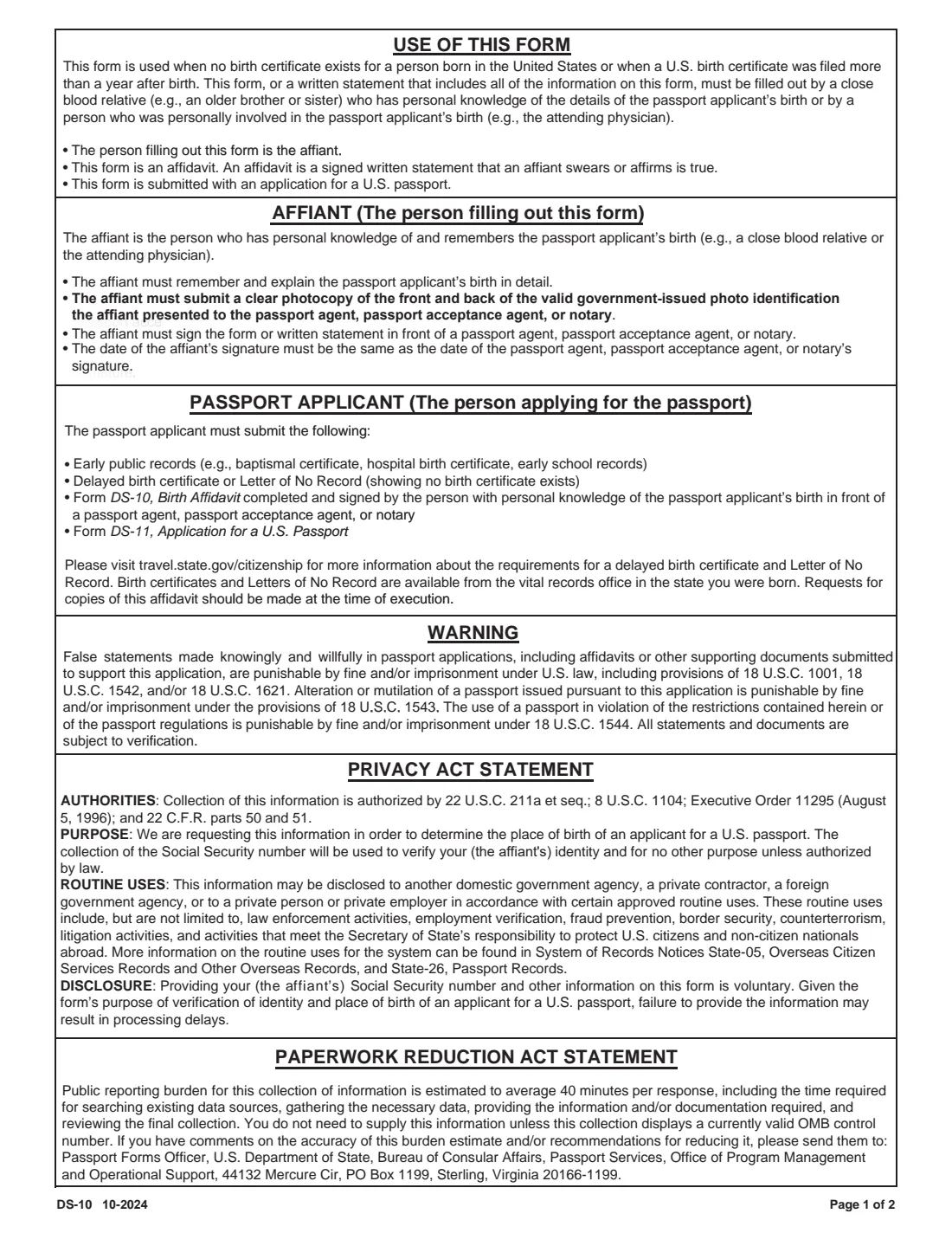
Form DS-10, the Birth Affidavit, is used when no birth certificate exists for a person born in the United States, or when their U.S. birth certificate was filed more than a year after the birth. It is filled out by the affiant: a close blood relative, such as an older brother or sister, who has personal knowledge of the passport applicant's birth, or a person who was personally involved in the birth, such as the attending physician.
The affidavit is not an application on its own. It is submitted with the applicant's Form DS-11, Application for a U.S. Passport, together with early public records (such as a baptismal certificate, hospital birth certificate or early school records) and a delayed birth certificate or a Letter of No Record. The affiant signs it in front of a passport agent, passport acceptance agent or notary, and the date of the affiant's signature must match the official's.
VergeHR walks the affiant through every item and prints the answers onto the State Department's own DS-10 PDF, including names with accents and letters such as ł or ș, and a long item 7 statement wrapped neatly inside its box. It pre-fills the applicant's name and date of birth from the employee records in Files, checks things like the affiant being older than the applicant, and saves the finished PDF to the person's folder in Files. VergeHR never files anything: the affiant prints the form and signs it in front of the official.
- Who fills it
- The affiant: a close blood relative (for example an older sibling) or someone personally involved in the birth, such as the attending physician.
- Supports
- A Form DS-11 passport application for someone born in the U.S. without a timely birth certificate.
- Signed
- In ink, in front of a passport agent, passport acceptance agent or notary, on the same date as the official signs.
- ID needed
- The affiant's valid government-issued photo ID, plus a clear photocopy of its front and back.
- Edition
- DS-10 10-2024 (OMB 1405-0132, expires 10-31-2027)
Who needs to fill out Form DS-10?
- Passport applicants born in the United States for whom no birth certificate exists.
- Applicants whose U.S. birth certificate was filed more than one year after they were born (a delayed birth certificate).
- Older brothers and sisters, parents or other close blood relatives who remember the applicant's birth and are asked to swear to it.
- Physicians, midwives or others who were personally involved in the birth.
- Families helping an older relative, often born at home, get a first U.S. passport.
When to Use Form DS-10
- When preparing a first passport application on Form DS-11 and the applicant has no birth certificate, or only one filed more than a year after birth.
- Alongside a Letter of No Record or a delayed birth certificate from the vital records office of the state of birth.
- Complete the details before the appointment, but sign only in front of the passport agent, acceptance agent or notary.
- The form says requests for copies of the affidavit should be made at the time it is signed, so ask then if you want one.
What You Need Before You Start
- The applicant's full name, date of birth, place of birth (city and state) and current home address.
- How many years you have known the applicant and how you know them (for example older sibling, parent or physician).
- A detailed account of the birth: the date, time and location, who was present, how you know about it, the names of the applicant's birth parents and your relationship to the applicant and/or the parents.
- Your own printed name, date of birth and address; your Social Security number is voluntary.
- Your valid government-issued photo ID (driver's license, passport, military ID or other) and a clear photocopy of its front and back.
- For the applicant: Form DS-11, early public records, and a delayed birth certificate or Letter of No Record.
What’s On Form DS-10
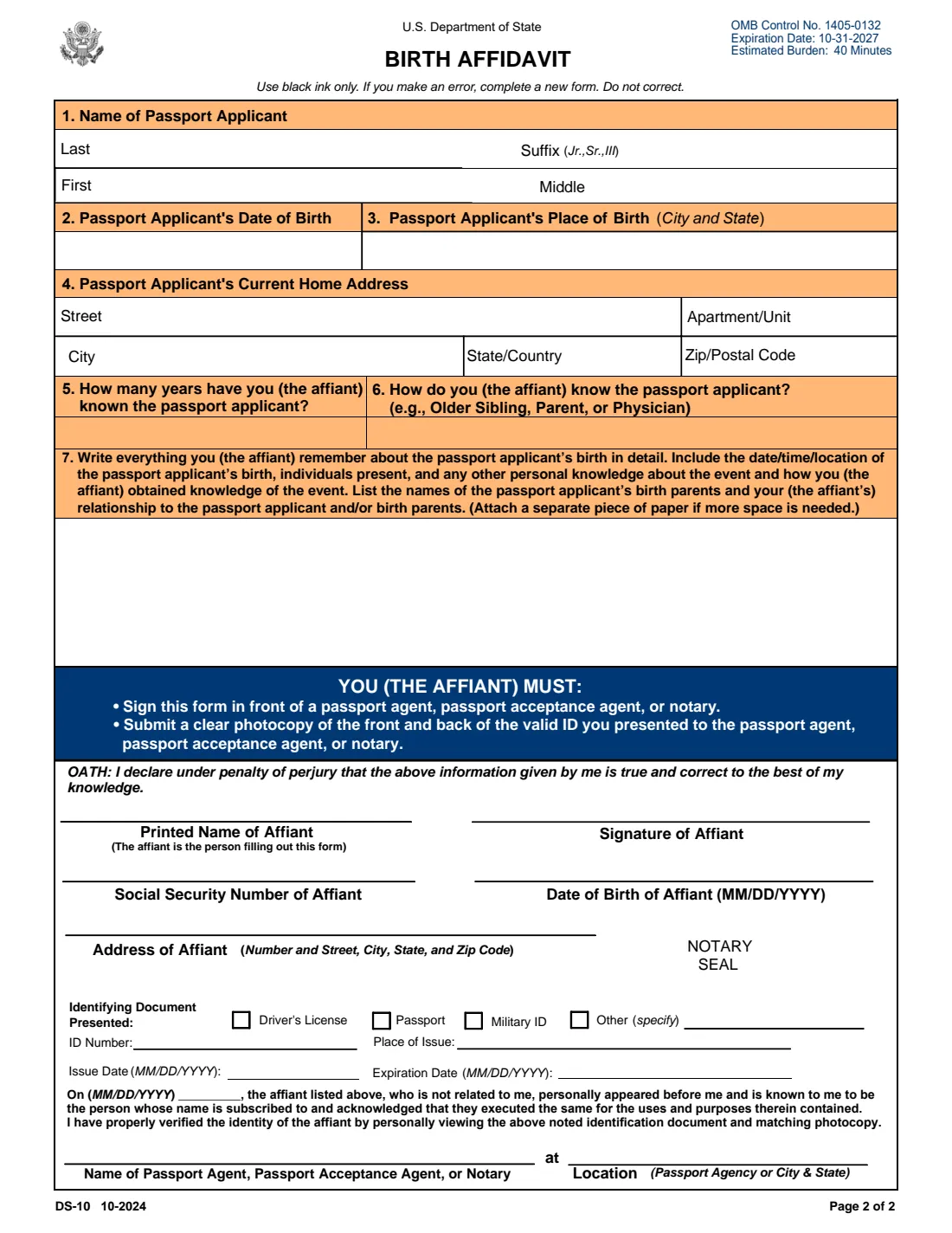
The 2024 edition has 2 pages. VergeHR asks for it in 4 parts:
- Items 1-4: The passport applicantAffiant
- Items 5-7: How you know about the birthAffiant
- About you (the affiant)Affiant
- Your photo ID (optional)Affiant
How to fill out Form DS-10, step by step
1 Items 1-4: The passport applicant
Enter the applicant's last, first and middle name and any suffix, their date of birth, place of birth (city and state) and current home address. These must match the DS-11 the affidavit supports. VergeHR pre-fills the name and date of birth from the person's record in Files.
2 Items 5-6: How you know the applicant
Say how many years you have known the applicant and how you know them, for example older sibling, parent or physician. The form is meant for someone with personal knowledge of the birth, so VergeHR checks you are older than the applicant.
3 Item 7: Everything you remember about the birth
Write in detail: the date, time and location of the birth, the people present, any other personal knowledge about the event and how you obtained it, the names of the birth parents and your relationship to the applicant and/or the parents. The box holds about seven lines. If you need more, the form says to attach a separate piece of paper.
4 Oath and your details
Under the oath you give your printed name, Social Security number (voluntary), date of birth and address. Leave the signature line empty: you sign in front of the passport agent, passport acceptance agent or notary.
5 Identifying document and the official's section
The 'Identifying Document Presented' lines record the ID you show: driver's license, passport, military ID or other, with its number, place of issue, issue date and expiration date. You can fill these in or leave them to the official. The date, the official's name and location, and the notary seal are completed by the official.
Common Mistakes to Avoid
- Signing the affidavit before the appointment. It must be signed in front of a passport agent, acceptance agent or notary, dated the same day.
- Correcting the printed form by hand. The form says to use black ink only and, if you make an error, to complete a new form.
- Giving a vague statement. The affiant must remember and explain the birth in detail, including date, time, place and who was present.
- Forgetting the photocopy of the front and back of the ID the affiant presented.
- Asking someone who can't have personal knowledge of the birth, such as a younger sibling.
- Sending the affidavit on its own. It supports a DS-11 together with early public records and a delayed birth certificate or Letter of No Record.
After You Fill It Out
Print page 2 (page 1 holds the instructions and Privacy Act statement), take it with your photo ID and its photocopy to a passport agent, passport acceptance agent or notary, and sign in front of them. They complete the official section on the same date.
The signed affidavit goes with the applicant's Form DS-11, early public records and delayed birth certificate or Letter of No Record. Birth certificates and Letters of No Record come from the vital records office in the state where the applicant was born.
VergeHR keeps the completed affidavit in the applicant's folder in Files. When the passport arrives, add it to Files so VergeHR can remind you before it expires.
Fill Out Form DS-10 Online with VergeHR
- Pick the employee. Choose an employee and VergeHR fills in their name, date of birth, email and other details it already knows.
- Answer plain-language questions. One part of the form at a time, with the official help text beside each question — 27 fields in all. Your answers save as you go.
- Check the live preview. Watch your answers land on the real U.S. Department of State form, and let VergeHR do any worksheet arithmetic.
- Generate the official PDF. VergeHR prints your answers into the agency’s own PDF and files it in that person’s folder in your vault.
VergeHR fills the form — it never files or submits anything for you. Deliver the finished form to whoever asked for it, the way the form’s instructions say.
Start Form DS-10 Now — It’s FreeForm DS-10: frequently asked questions
Can I fill out the DS-10 online?
Yes. VergeHR guides you through each item and fills your answers into the official DS-10 PDF. You still print it and sign it in front of a passport agent, passport acceptance agent or notary.
Who can sign a birth affidavit for a passport?
A close blood relative who has personal knowledge of the applicant's birth, such as an older brother or sister, or someone who was personally involved in the birth, such as the attending physician. The affiant must remember and explain the birth in detail.
Does the DS-10 need to be notarized?
It must be signed in front of a passport agent, passport acceptance agent or notary, and the date of your signature must be the same as theirs. The official confirms your identity from your photo ID.
Is the DS-10 enough to get a passport without a birth certificate?
No. The form lists what the applicant submits: Form DS-11, early public records (such as a baptismal certificate, hospital birth certificate or early school records), a delayed birth certificate or Letter of No Record, and this affidavit.
What if my statement doesn't fit in item 7?
The form says to attach a separate piece of paper if more space is needed. VergeHR tells you when your text is longer than the box so you can shorten it and continue on an attached page.
Do I have to give my Social Security number?
No. The form says providing it is voluntary, but leaving it out may delay processing. It is used to verify your identity.
Can I get a copy of the affidavit later?
The form says requests for copies should be made at the time the affidavit is signed.
Official Sources
- Blank form (PDF), published by U.S. Department of State: https://eforms.state.gov/Forms/ds10.pdf
- Official instructions and guidance: https://eforms.state.gov/Forms/ds10.pdf
- Edition shown on this page: DS-10 10-2024 (OMB 1405-0132, expires 10-31-2027) (checked 2026-09-28).
VergeHR is not affiliated with or endorsed by U.S. Department of State or any government. This page explains the form in general terms and is not legal, tax or immigration advice. Always read the official instructions, and check that you are using the edition the recipient accepts. Page last reviewed 2026-09-28.