

What is Form L-4?
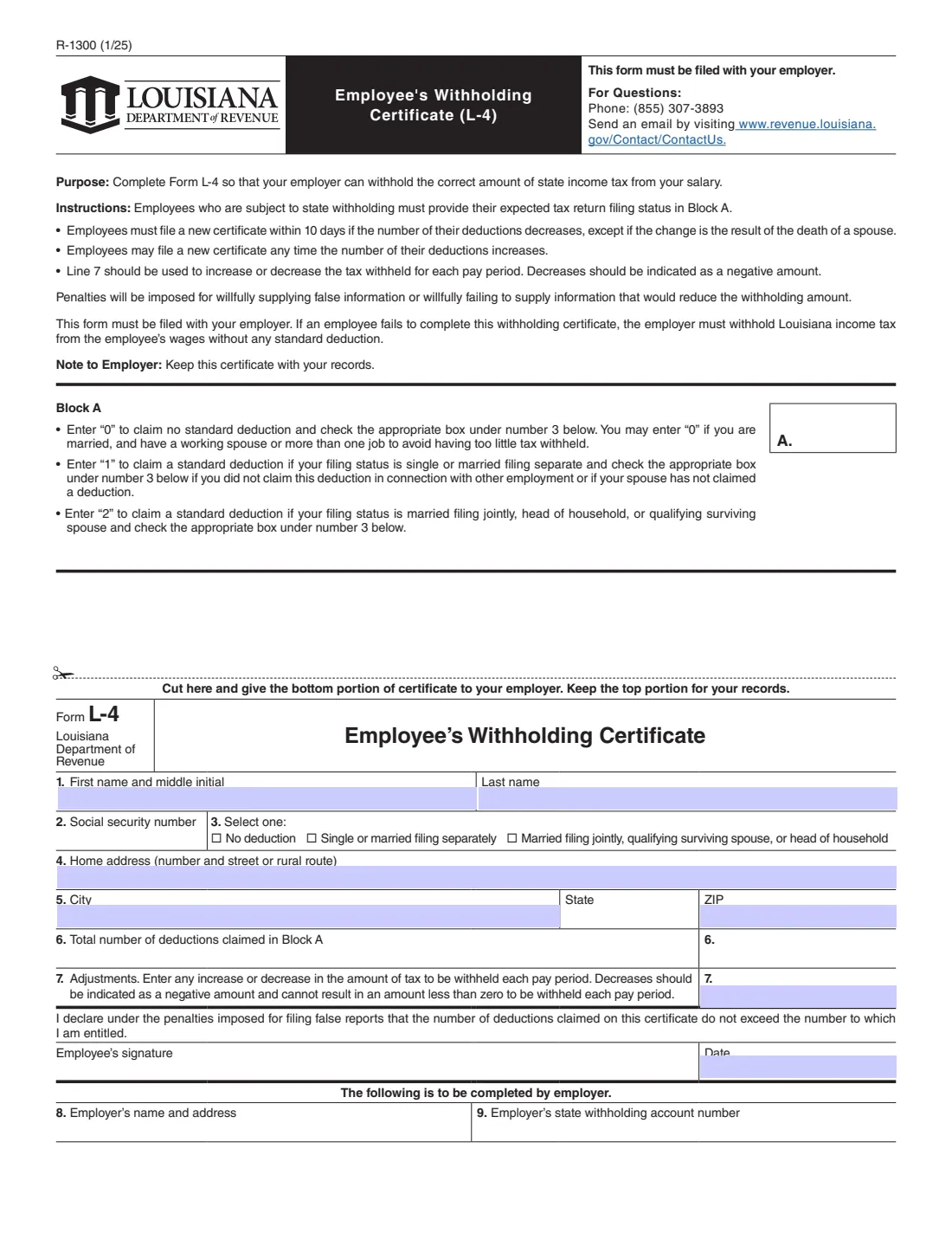
Form L-4 (R-1300) is the Louisiana Employee's Withholding Certificate. You give it to your employer so they can withhold the right amount of Louisiana income tax from your pay. The federal Form W-4 doesn't set Louisiana withholding, so Louisiana employees complete an L-4 as well.
The Louisiana Department of Revenue redesigned the L-4 for 2025, when Louisiana moved to a flat income tax. The old personal exemptions and dependent counts are gone. The current form asks one main question in Block A: do you claim no standard deduction (0), one standard deduction (single or married filing separately), or two (married filing jointly, qualifying surviving spouse or head of household)? Line 7 lets you increase or decrease the tax withheld each pay period.
With VergeHR you fill out the L-4 online in a guided form. VergeHR pre-fills your name from the employee records in Files, carries your Block A choice to the line 3 box and line 6, prints a decrease on line 7 as a negative amount as the form asks, and fills the Department's own PDF. The finished form is saved in Files and can be sent for e-signature. VergeHR never submits it anywhere — you give it to your employer yourself.
- Who fills it
- The employee. The employer completes lines 8 and 9.
- Given to
- Your employer — the bottom part of the page. Keep the top part for your records.
- When
- When you start a job, and within 10 days if your number of deductions goes down.
- Signatures
- The employee signs and dates it.
- Edition
- R-1300 (1/25), in use from January 1, 2025.
- Cost
- Free to fill out on any VergeHR account.
Who needs to fill out Form L-4?
- New employees subject to Louisiana income tax withholding.
- Current employees who haven't given their employer the redesigned 2025 L-4 and want their withholding to reflect their filing status.
- Married employees with a working spouse, or anyone with more than one job, who may choose 0 to avoid having too little tax withheld.
- Anyone who wants to increase or decrease the Louisiana tax taken from each paycheck.
When to Use Form L-4
- On your first days with a new employer, together with the federal Form W-4 and Form I-9.
- Within 10 days if the number of your deductions decreases — unless the change is because your spouse died.
- Any time the number of your deductions increases, for example when you marry or become head of household.
- When you want to change the extra or reduced amount withheld each pay period on line 7.
What You Need Before You Start
- Your first name, middle initial and last name.
- Your Social Security number.
- Your home address, city, state and ZIP code.
- The filing status you expect to use on your Louisiana return, which decides whether you claim 0, 1 or 2.
- Whether you have another job, or whether your spouse works or has claimed a deduction.
- Any amount you want to add to, or take off, the tax withheld each pay period.
What’s On Form L-4
The 2025 edition has 1 page. VergeHR asks for it in 3 parts, and it is signed by Employee:
- Lines 1–5: About youEmployee
- Block A and lines 3, 6 and 7: Your withholdingEmployee
- Lines 8–9: To be completed by employerEmployer
How to fill out Form L-4, step by step
1 Block A — Your standard deduction
Enter 0 to claim no standard deduction. The form says you may choose 0 if you are married and have a working spouse, or have more than one job, to avoid having too little tax withheld. Enter 1 if your filing status is single or married filing separately and you haven't claimed this deduction at another job (or your spouse hasn't claimed one). Enter 2 if you file married filing jointly, as a qualifying surviving spouse, or as head of household.
VergeHR asks this once and prints it in Block A, ticks the matching box on line 3, and repeats it on line 6.
2 Lines 1–5 — Name, SSN and address
Enter your first name and middle initial, last name, Social Security number, home address (number and street or rural route), city, state and ZIP.
3 Line 6 — Total number of deductions
Line 6 is the number you entered in Block A: 0, 1 or 2.
4 Line 7 — Adjustments
Enter any increase or decrease in the tax to be withheld each pay period. A decrease is written as a negative amount, and it can't bring the amount withheld for a pay period below zero. In VergeHR you choose Increase or Decrease and enter the amount; VergeHR adds the minus sign for a decrease.
5 Signature and employer lines
You declare under the penalties for filing false reports that the deductions you claim don't exceed what you are entitled to, then sign and date. Your employer completes line 8 (employer's name and address) and line 9 (employer's state withholding account number) and keeps the certificate with its records.
Common Mistakes to Avoid
- Claiming 1 when you have already claimed the deduction at another job, or your spouse has claimed one.
- Claiming 2 on both spouses' certificates when both work, which can leave too little tax withheld.
- Writing a decrease on line 7 as a positive number — decreases must be negative.
- Leaving line 3 unchecked or not matching Block A.
- Not filing a new L-4 within 10 days when your deductions decrease.
- Using an old L-4 with personal exemptions and dependents — those lines no longer exist on the 2025 form.
After You Fill It Out
Sign and date the certificate, cut along the line and give the bottom part to your employer; keep the top part for your records. VergeHR saves the whole page in the person's folder in Files, and you can send the PDF for e-signature if your employer accepts that.
Your employer keeps the certificate with its records. If you don't complete one, the form says your employer must withhold Louisiana income tax from your wages without any standard deduction.
Questions go to the Louisiana Department of Revenue at (855) 307-3893, the number printed on the form.
Fill Out Form L-4 Online with VergeHR
- Pick the employee. Choose an employee and VergeHR fills in their name, date of birth, email and other details it already knows.
- Answer plain-language questions. One part of the form at a time, with the official help text beside each question — 17 fields in all. Your answers save as you go.
- Check the live preview. Watch your answers land on the real Louisiana Department of Revenue form, and let VergeHR do any worksheet arithmetic.
- Generate the official PDF. VergeHR prints your answers into the agency’s own PDF and files it with that employee’s documents. Sign it, or send it for e-signature.
VergeHR fills the form — it never files or submits anything for you. Deliver the finished form to whoever asked for it, the way the form’s instructions say.
Start Form L-4 Now — It’s FreeForm L-4: frequently asked questions
Why did the Louisiana L-4 change in 2025?
Louisiana moved to a flat income tax for 2025, and the Department of Revenue redesigned the L-4 (R-1300, 1/25). It now asks for 0, 1 or 2 standard deductions based on filing status instead of personal exemptions and dependents.
Should I enter 0, 1 or 2 on the L-4?
0 claims no standard deduction; 1 is for single or married filing separately; 2 is for married filing jointly, qualifying surviving spouse or head of household. Married people with a working spouse, or people with more than one job, may choose 0 to avoid having too little withheld.
How do I reduce Louisiana withholding on the L-4?
Enter a negative amount on line 7. It can't bring the tax withheld for a pay period below zero.
Do I need a new L-4 if I already gave my employer one?
You must file a new one within 10 days if your number of deductions decreases, except when the change is because your spouse died. You may file a new one any time it increases.
What happens if I don't give my employer an L-4?
The form says the employer must withhold Louisiana income tax from your wages without any standard deduction.
Can I fill out the L-4 online?
Yes. VergeHR walks you through the certificate and prints your answers into the Department of Revenue's fillable PDF, ready to sign and give to your employer.
Official Sources
- Blank form (PDF), published by Louisiana Department of Revenue: https://dam.ldr.la.gov/taxforms/1300(1_25)F.pdf
- Official instructions and guidance: https://revenue.louisiana.gov/tax-forms/businesses/r-1300-tf-01-02-2025/
- Edition shown on this page: R-1300 (1/25) (checked 2026-09-28).
VergeHR is not affiliated with or endorsed by Louisiana Department of Revenue or any government. This page explains the form in general terms and is not legal, tax or immigration advice. Always read the official instructions, and check that you are using the edition the recipient accepts. Page last reviewed 2026-09-28.