

What is the team retrospective form template?
Retrospectives work best when everyone contributes, but the loudest voices often fill the board and quieter people say nothing. Asking the team to answer a few questions beforehand, anonymously, gets a fuller picture and frees the meeting for discussion and decisions.
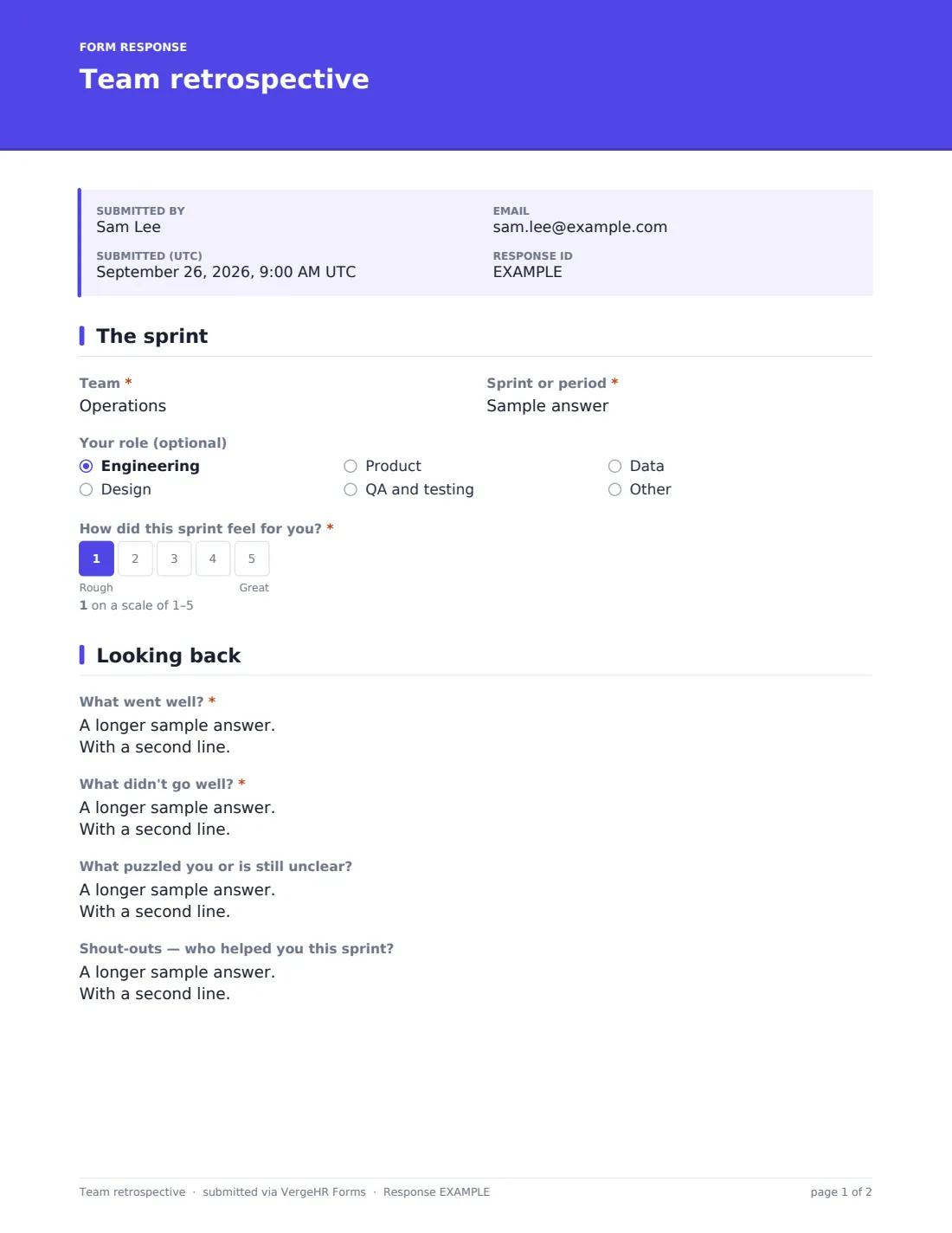
This template covers the classic retro prompts — what went well, what didn't, what puzzled you, and shout-outs for colleagues who helped. It adds a short team health check on delivery, pace, clarity, tools, asking for help and releases, and asks whether anyone is blocked right now.
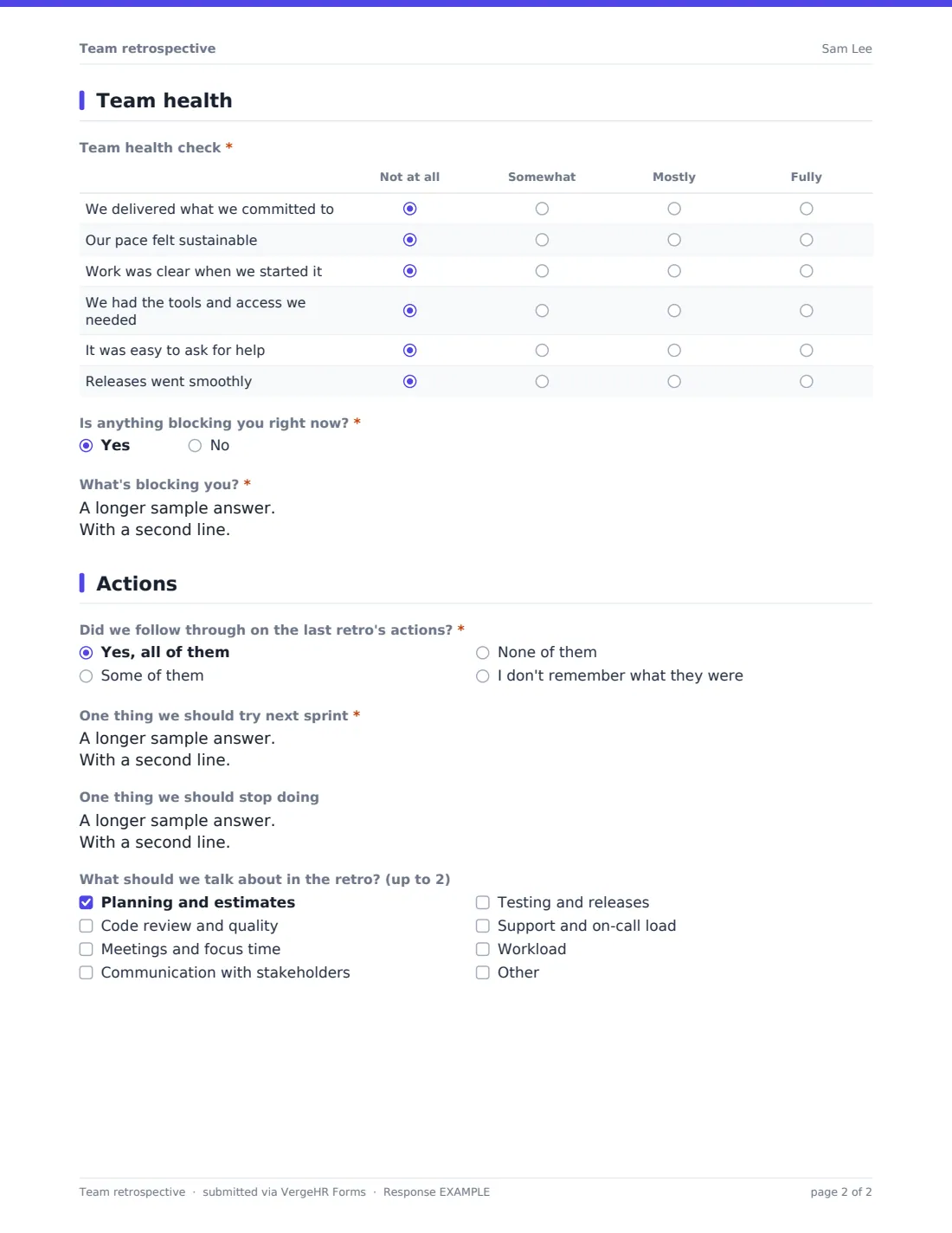
The final page closes the loop: did the team follow through on the last retro's actions, what should it try and stop, and which topics deserve time in the meeting. Each response is saved as a PDF in VergeHR Files, so you have a record of every sprint.
- Best for
- Scrum masters, engineering managers, project leads and agile coaches
- Filled in by
- Team members, anonymously, before the retro
- Time to complete
- About 4 minutes
- Includes
- Sprint mood scale, went well / didn't / puzzles / shout-outs, health check grid, blockers, follow-through and topic votes
Who uses a team retrospective form?
- Gathering input before a fortnightly sprint retro
- Running a retro asynchronously for a distributed team
- End-of-project lessons learned
- Tracking team health from sprint to sprint
- Giving a new team a safe way to raise problems
- Preparing for a quarterly team offsite
Questions On This team retrospective Form
15 questions over 4 pages · includes conditional questions, multiple pages, ratings.
1 The sprint
- Team*
- Sprint or period*
- Your role (optional) Engineering · Design · Product · QA and testing · Data · Other
- How did this sprint feel for you?*
2 Looking back
- What went well?*
- What didn't go well?*
- What puzzled you or is still unclear?
- Shout-outs — who helped you this sprint?
3 Team health
- Team health check* Not at all · Somewhat · Mostly · Fully
- Is anything blocking you right now?*
- What's blocking you?* asked only when it applies
4 Actions
- Did we follow through on the last retro's actions?* Yes, all of them · Some of them · None of them · I don't remember what they were
- One thing we should try next sprint*
- One thing we should stop doing
- What should we talk about in the retro? (up to 2) Planning and estimates · Code review and quality · Meetings and focus time · Communication with stakeholders · Testing and releases · Support and on-call load · Workload
The team retrospective form, page by page
1 The sprint
'Team' and 'Sprint or period' are required, with 'e.g. Sprint 42 or March' as a prompt. 'Your role' is optional — engineering, design, product, QA and testing, data or other — so small teams can leave it out to stay anonymous. 'How did this sprint feel for you?' is a 1–5 scale from Rough to Great.
2 Looking back
'What went well?' and 'What didn't go well?' are required. 'What puzzled you or is still unclear?' and 'Shout-outs — who helped you this sprint?' are optional.
3 Team health
A grid asks, from Not at all to Fully, whether the team delivered what it committed to, the pace felt sustainable, work was clear when it started, the team had the tools and access it needed, it was easy to ask for help, and releases went smoothly. 'Is anything blocking you right now?' is required; yes opens a box to describe the blocker.
4 Actions
'Did we follow through on the last retro's actions?' — all, some, none, or 'I don't remember what they were'. 'One thing we should try next sprint' is required and 'One thing we should stop doing' optional. People can vote for up to two topics to discuss, from planning and estimates and code review to meetings, stakeholders, releases, support load and workload, or add their own.
Make the Template Yours
- Rename 'sprint' to 'cycle', 'iteration' or 'month' to fit how you work
- Edit the health check statements to the habits your team is working on
- Change the topic list each quarter as priorities shift
- Remove the role question for very small teams
- Duplicate the form per team so responses stay separate
- Set a close date for the morning of the retro
Tips for a Better team retrospective Form
- Send the link two days before the retro and close it the morning of
- Read the 'I don't remember' answers as a sign actions need an owner and a due date
- Group the 'try' suggestions before the meeting and vote on one or two
- Share the shout-outs at the start of the retro — it sets a good tone
- Deal with blockers straight away rather than waiting for the meeting
- Watch the health grid over several sprints rather than reacting to one
Every Response Becomes a PDF In Files
Each response is saved as a PDF titled with the date in the Files folder you choose. Respondents aren't emailed a copy because the form is anonymous.
Before the meeting, open the Responses tab to read every answer together, or export to CSV and paste the went-well and didn't-go-well answers onto your retro board.
- Start from this template. It opens in the VergeHR Forms designer — change any question, add pages, set the rules for when questions appear.
- Share it. Turn on a public link, or send it to people by email, each with their own link. They don’t need a VergeHR login.
- Get the answers as PDFs. Each response is saved as a PDF in the Files folder you choose — and listed in a Responses table, with any uploaded files, that you can export to CSV.
Team retrospective form: frequently asked questions
Is this team retrospective template free?
Yes. It comes with the VergeHR Forms app on every account, and you can edit every question.
Is it really anonymous?
The form asks for no names or emails and identity collection is off. In very small teams, the optional role question could identify someone, so consider removing it.
Does it replace the retro meeting?
It's designed to feed it. The answers give the meeting a head start; decisions are still best made together.
Can I run fully async retros with it?
Yes. Share the answers afterwards and agree actions in a thread or a short call.
Does it integrate with Jira or other tools?
No. Export responses to CSV if you want to bring them into another tool.
Do team members need VergeHR accounts?
No. Anyone with the link can answer.