

What is Form W-3?
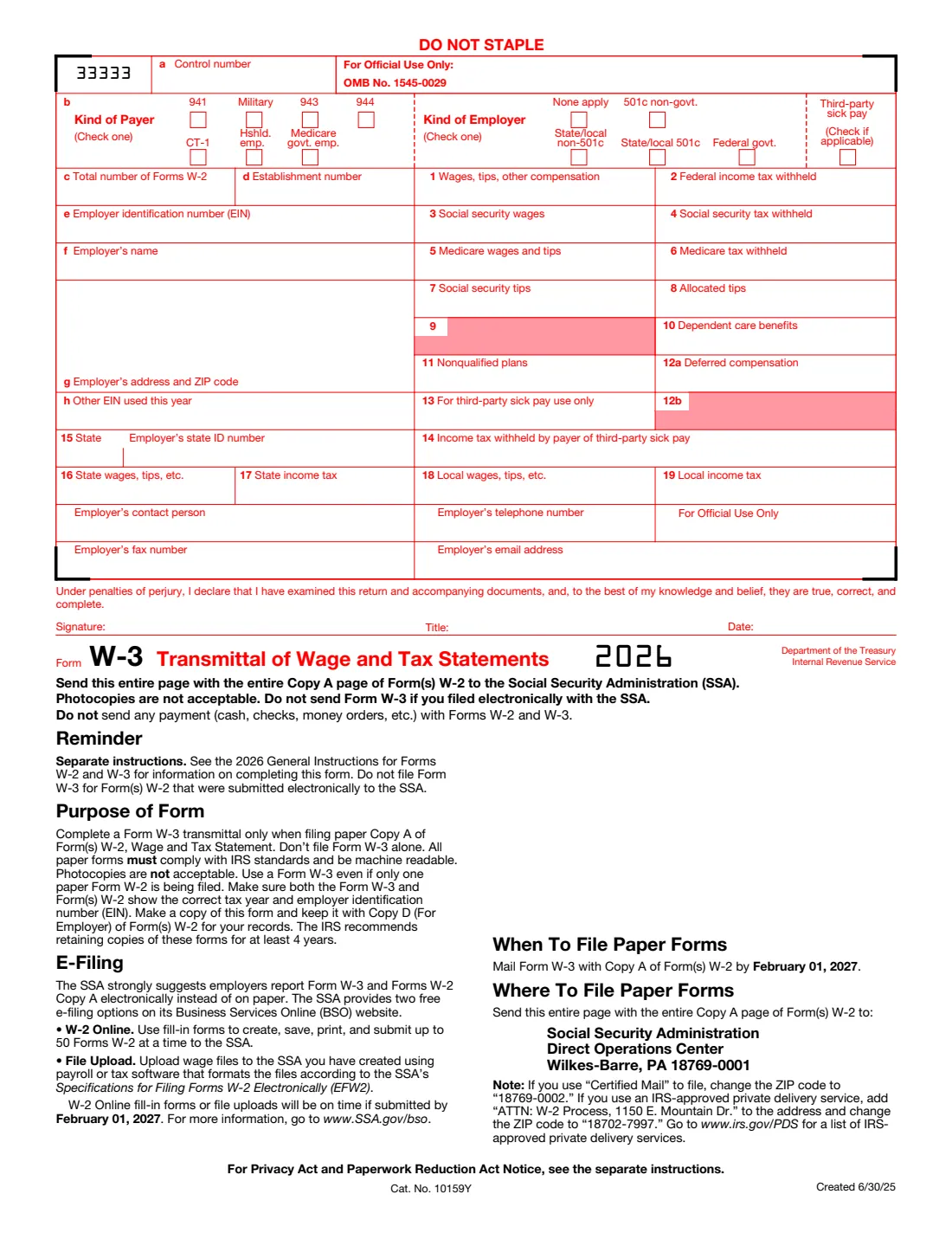
Form W-3 totals every box of the Forms W-2 an employer sends the Social Security Administration on paper: wages, federal income tax withheld, social security and Medicare wages and tax, deferred compensation and state and local amounts. It also says what kind of payer and employer you are and gives the SSA a contact person. Employers who file Forms W-2 electronically don't file a separate Form W-3.
Note on filing: Form W-3 has only one copy, the red Copy A for the Social Security Administration. The IRS says Copy A printed from IRS.gov is for informational purposes only: it can't be scanned, so don't print it and file it with the SSA, or you may be charged a penalty. File electronically through SSA Business Services Online, which creates the Form W-3 for you, or use the official red-ink Form W-3 ordered from the IRS. The copy VergeHR fills is your worksheet for the totals and your record to keep with Copy D of the Forms W-2.
VergeHR walks you through the boxes, checks the totals against the 2026 limits (the $184,500 social security wage base for each Form W-2, 6.2% social security tax, Medicare tax at most 2.35% of Medicare wages) and the SSA's reconciliation rules, and prints them on the 2026 Form W-3 so you can check and keep them.
- Who Completes It
- Employers filing paper Copy A of Forms W-2 with the SSA.
- Due Date
- With Copy A of the Forms W-2 by February 1, 2027.
- Filing
- Only on the official red-ink form or electronically (BSO creates it); not from a downloaded PDF.
- Signatures
- The employer or an authorized person, under penalties of perjury, with title and date.
- Edition
- 2026 (created 6/30/25)
- Agency
- Internal Revenue Service (IRS) and Social Security Administration (SSA)
Who needs to fill out Form W-3?
- Employers mailing paper Forms W-2 to the SSA, even for a single Form W-2.
- Employers who file electronically use it as a worksheet: the SSA's W-2 Online service creates the Form W-3 itself.
- One Form W-3 for each kind of Form W-2 (for example 941 and 943 employees go on separate Forms W-3).
When to Use Form W-3
- Once a year, with the Forms W-2 for 2026.
- Make sure the Form W-3 shows the same tax year and EIN as the Forms W-2 it transmits.
- To correct a Form W-3 already filed, use Form W-3c with the Forms W-2c.
What You Need Before You Start
- Your EIN, name, address and any other EIN used on your 2026 Forms 941, 943, 944 or CT-1.
- The number of Forms W-2 you're sending, not counting VOID ones.
- The totals of boxes 1 to 11, the box 12 deferred compensation codes (D to H, S, Y, AA, BB and EE) and the state and local boxes.
- A contact person, phone, fax and email for the SSA.
What’s On Form W-3
The 2026 edition has 2 pages. VergeHR asks for it in 4 parts, and it is signed by Employer:
- Employer: Boxes a to hEmployer
- Boxes 1 to 14: Totals of Your Forms W-2Employer
- Boxes 15 to 19: State and LocalEmployer
- Contact and SignatureEmployer
How to fill out Form W-3, step by step
1 Box b: Kind of Payer and Kind of Employer
Check one kind of payer (941, Military, 943, 944, CT-1, Household Employer or Medicare Government Employer) and one kind of employer. Tick Third-Party Sick Pay as well if it applies.
2 Boxes c to h: Your Details
The number of Forms W-2, an optional establishment number, your EIN, name and address, and any other EIN used this year.
3 Boxes 1 to 14: Totals
The totals of the same boxes on your Forms W-2, with cents. Leave box 9 and box 13 blank. Box 12a totals only the deferred compensation codes; box 14 is income tax withheld by a third-party sick pay payer, which is also in box 2.
4 Boxes 15 to 19: State and Local
The state code (or X for more than one state, with no ID number) and the state and local totals, as one sum.
5 Contact and Signature
The SSA's contact person, then the signature, title and date.
Common Mistakes to Avoid
- Printing the Form W-3 from IRS.gov and mailing it to the SSA. Only the official red-ink form or an electronic filing is accepted.
- Totals that don't match the Forms W-2, or your Forms 941 or 944 for the year (boxes 2, 3, 5 and 7).
- Counting VOID Forms W-2 in box c.
- Sending a Form W-3 when you filed the Forms W-2 electronically.
- Including a payment. Never send money with Forms W-2 and W-3.
After You Fill It Out
Compare the totals with your Forms W-2 and your 2026 Forms 941 or 944. VergeHR keeps the filled PDF in Files.
File electronically through SSA Business Services Online, or copy the figures onto the official red-ink Form W-3 and mail it with Copy A of the Forms W-2, flat and unstapled, to the SSA in Wilkes-Barre, PA by February 1, 2027.
Keep this copy with Copy D of your Forms W-2 for at least 4 years.
Fill Out Form W-3 Online with VergeHR
- Pick the employee. Choose an employee and VergeHR fills in their name, date of birth, email and other details it already knows.
- Answer plain-language questions. One part of the form at a time, with the official help text beside each question — 36 fields in all. Your answers save as you go.
- Check the live preview. Watch your answers land on the real Internal Revenue Service (IRS) form, and let VergeHR do any worksheet arithmetic.
- Generate the official PDF. VergeHR prints your answers into the agency’s own PDF and files it with that employee’s documents. Sign it, or send it for e-signature.
VergeHR fills the form — it never files or submits anything for you. Deliver the finished form to whoever asked for it, the way the form’s instructions say.
Start Form W-3 Now — It’s FreeForm W-3: frequently asked questions
Can I mail the Form W-3 that VergeHR fills?
No. Form W-3 is printed only as a red Copy A, and the IRS says Copy A downloaded from IRS.gov is for informational purposes only and can't be scanned. File electronically through SSA Business Services Online, or use the official red-ink form ordered from the IRS. Use VergeHR's copy to check your totals and keep for your records.
Do I need Form W-3 if I e-file my Forms W-2?
No. When you file Forms W-2 electronically with the SSA, no separate Form W-3 is filed: W-2 Online creates one for you.
When is Form W-3 due for 2026?
With Copy A of the Forms W-2 by February 1, 2027.
Why is this the 2026 edition when IRS.gov shows a 2027 Form W-3?
A Form W-3 must show the same tax year as the Forms W-2 it transmits. The IRS has already posted the 2027 Form W-3 for 2027 wages, so for 2026 Forms W-2 VergeHR uses the 2026 Form W-3.
Official Sources
- Blank form (PDF), published by Internal Revenue Service (IRS): https://www.irs.gov/pub/irs-prior/fw3--2026.pdf
- Official instructions and guidance: https://www.irs.gov/forms-pubs/about-form-w-3
- Edition shown on this page: 2026 (created 6/30/25) (checked 2026-11-09).
VergeHR is not affiliated with or endorsed by Internal Revenue Service (IRS) or any government. This page explains the form in general terms and is not legal, tax or immigration advice. Always read the official instructions, and check that you are using the edition the recipient accepts. Page last reviewed 2026-11-09.