

What is a donor recognition consent?
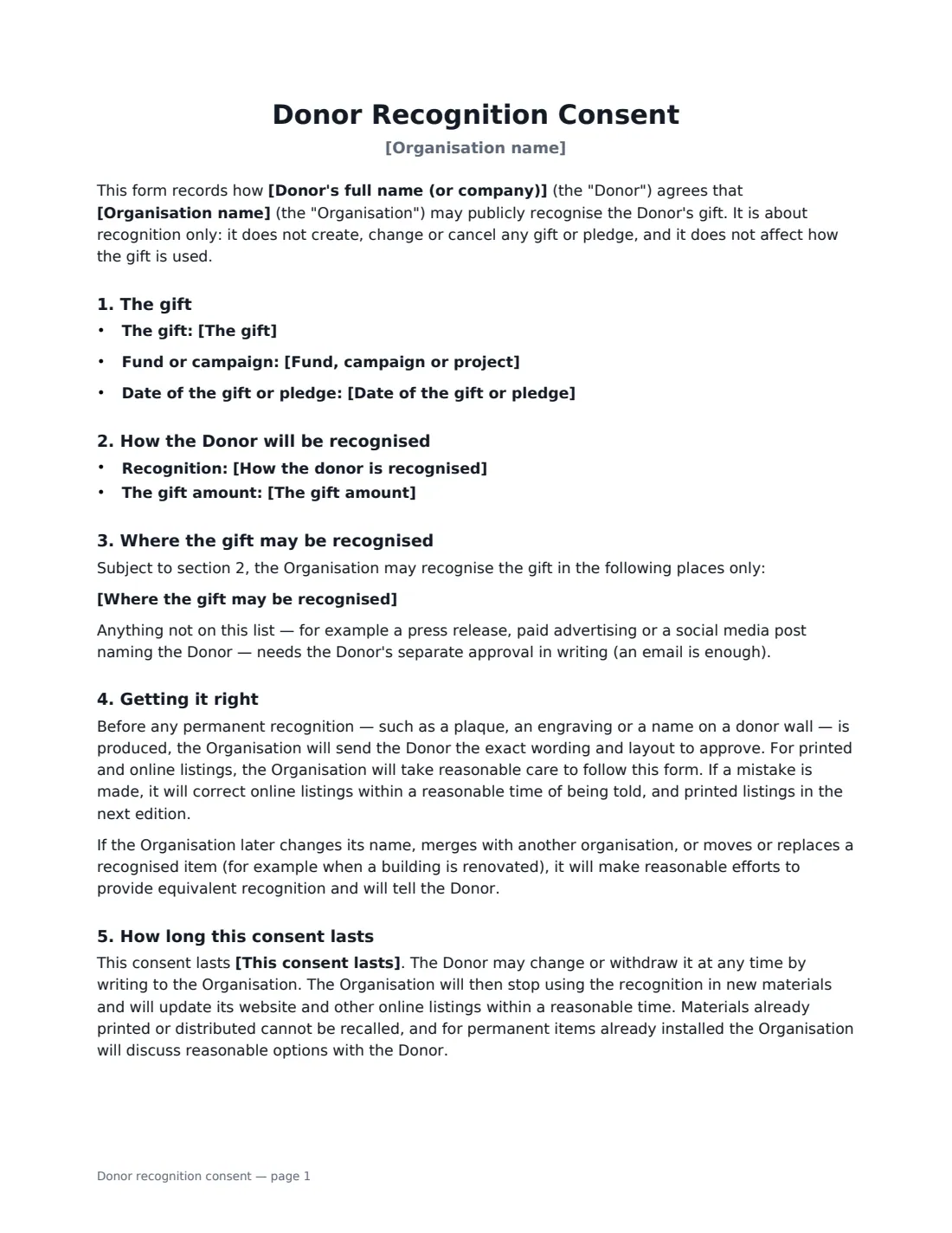
Most donors are happy to be thanked, but not all in the same way. Some want their family name on the donor wall, some want to appear as "Anonymous", some want no public mention at all, and many are uncomfortable with the exact amount of their gift being printed in the annual report. A donor recognition consent form asks the donor to make those choices in writing before anything is published, so the development team is never guessing — and never has to reprint a plaque.
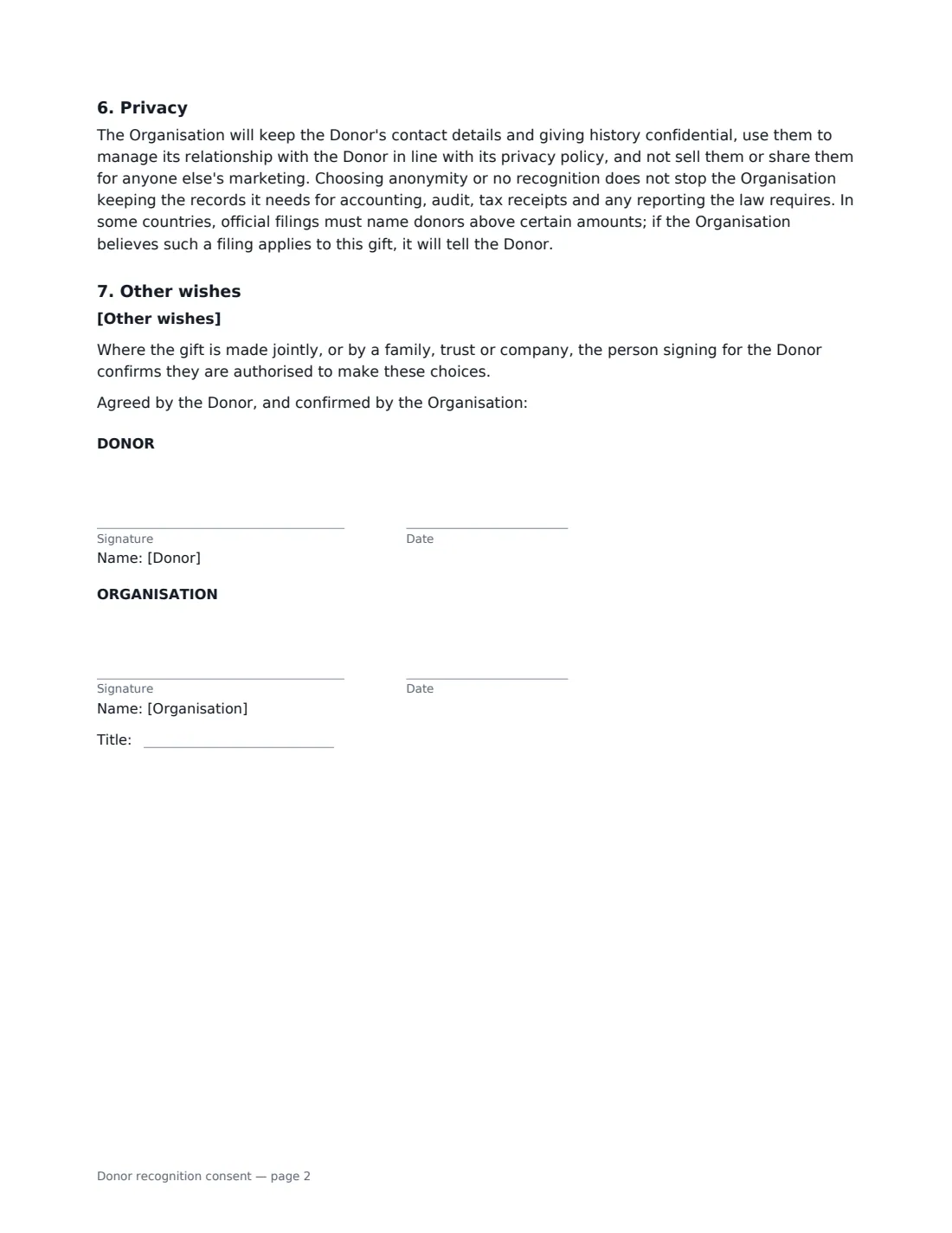
This template records the gift and the campaign it supports, then the donor's choices: recognition by name (with the exact wording to use, such as "The Okafor Family, in memory of Grace Okafor"), as "Anonymous", or not at all; whether the amount is hidden, shown as a giving level or range, or shown exactly; the specific places recognition may appear; and whether photos, quotes and stories may be used with the donor's approval. It commits the organisation to sending permanent wording for approval, correcting mistakes, and keeping donor details confidential, and it lets the donor change or withdraw consent at any time. It is about recognition only — it does not create or change a pledge.
- Best for
- Charities, nonprofits, schools, museums, hospitals and faith communities
- Signed by
- The donor and a fundraising or development lead at the organisation
- Recognition options
- By name, as "Anonymous", or no public recognition
- Length
- 2 pages
When to Use a donor recognition consent
- Confirming the wording for a donor wall, plaque, bench or named room before it is made
- Collecting listing preferences for an annual report or printed donor honour roll
- A major donor who wants to give anonymously and needs that promise in writing
- A family gift made in memory of someone, where the dedication wording matters
- Capital campaigns where gifts are listed by giving level on the website and in programmes
What You Fill In
13 blanks, then the name and email of each person who signs: donor, organisation.
1 The organisation
- Organisation name*
- Fund, campaign or project
2 The donor and the gift
- Donor's full name (or company)*
- The gift*
- Date of the gift or pledge
3 Recognition choices
- How the donor is recognised* By name · As "Anonymous" · No public recognition at all
- Name exactly as it should appear
- The gift amount* Not shown · Shown as a giving level or range · Shown as the exact amount
- Giving level or range
- Where the gift may be recognised*
- Photos, quotes and stories* Name listing only · May be used, with the donor's approval of each one
- This consent lasts* until the Donor withdraws it · for one year · for three years · for five years · for the life of the named space, plaque or item
- Other wishes
4 Who signs
- Donor signature and date · The person making the gift, or someone authorised to sign for a family, trust or company donor.
- Organisation signature and date, job title · A fundraising or development lead who can confirm how the gift will be recognised.
What the donor recognition consent Covers
- The gift
- How the Donor will be recognised
- Where the gift may be recognised
- Getting it right
- How long this consent lasts
- Privacy
- Other wishes
Using the donor recognition consent, step by step
1 Describe the gift
Enter the donor's name and describe the gift the way you want it recorded — for example "a pledge of $25,000 over three years" — plus the fund or campaign and the date. The form makes clear it does not create or change the pledge itself; use a donation pledge agreement for that.
2 Record the donor's recognition choice
Choose by name, as "Anonymous", or no public recognition. For recognition by name, type the name exactly as it should appear; the organisation promises not to change the wording or spelling without approval. The anonymous option also rules out photos, dedications or descriptions that would identify the donor.
3 Decide how the amount appears
Hide the amount entirely, show a giving level or range (enter your level name, such as "Benefactor ($10,000–$24,999)"), or show the exact figure. Then edit the list of places recognition may appear — anything not on the list, such as a press release or a social media post, needs separate approval.
4 Send it to the donor
Add the donor's name and email and send. Choose in-order signing if you want the donor to sign first from any device before you countersign. The signed form is filed in Files, so anyone preparing the annual report or a plaque can check it.
Tips Before You Send It
- Send the form before the gift is announced — it is much easier than correcting a published list.
- For joint gifts, agree the exact order and form of the names; the person signing confirms they can decide for everyone.
- Record "in memory of" or "in honour of" wording in the display name field so it is approved with the rest.
- Choosing anonymity does not stop you keeping the records you need for receipts, audits and any official reporting — the form says so, which avoids awkward conversations later.
Sign It Online In Minutes
- Fill in the blanks. Names, dates and amounts go straight into the agreement — the preview shows exactly where.
- Name who signs. Tick “This is me” for your own part. VergeHR builds the PDF with every signature, date box on the right line, and you can check or move anything before sending.
- Send it. Each signer gets a secure link and signs from any device — no account needed. The signed PDF, with an audit trail and a Certificate of Completion, is filed in Files and emailed to everyone.
Donor recognition consent: frequently asked questions
Does this form commit the donor to giving?
No. It only covers how an existing or promised gift is recognised. The gift itself is covered by your pledge agreement, gift agreement or receipt.
Can a donor change their mind later?
Yes. The donor can change or withdraw consent at any time in writing. The organisation stops using the recognition in new materials and updates online listings within a reasonable time; materials already printed cannot be recalled, and for permanent items the parties discuss reasonable options.
If a donor is anonymous, can we still name them in our records?
Yes. Anonymity applies to public recognition. You can keep the records you need for accounting, audit, tax receipts and legal reporting. Some countries require certain filings to name donors above set amounts — the form commits you to telling the donor if you believe that applies.
Is an electronic signature valid for this form?
Electronic signatures are generally valid for ordinary agreements and consents like this in the US (ESIGN Act and UETA), the UK, the EU (eIDAS) and Canada. VergeHR keeps an audit trail and a Certificate of Completion with the signed PDF.