

What is a employment verification letter?
Landlords, mortgage lenders, banks, car finance companies and immigration officials often ask for proof that someone is employed. An employment verification letter (sometimes called a proof of employment or employment confirmation letter) is the employer's signed statement of the facts: who the person is, their job title, how long they have worked there and, where the employee wants it included, what they are paid.
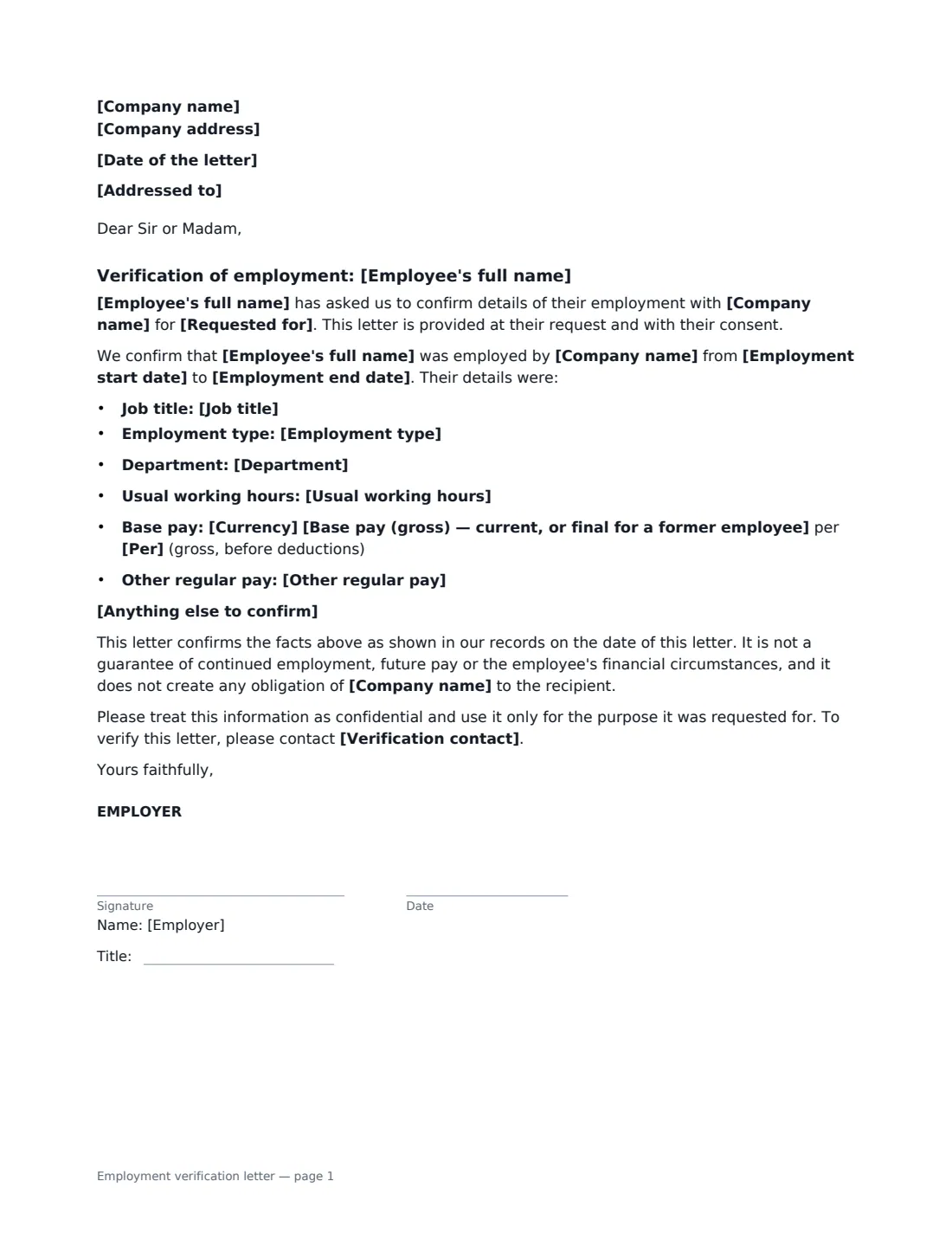
This template produces a one-page letter from the employer. It confirms either current employment since a start date, or past employment between two dates for a former employee, and lists the job title, employment type and, if you fill them in, department, usual hours, base pay and other regular pay such as bonus or commission. It says the letter is provided at the employee's request and with their consent, limits what it promises (it confirms records on the date of the letter, not future employment or pay), asks the recipient to keep it confidential, and gives a contact who can verify it. Only the employer signs.
- Best for
- Rental applications, mortgages and loans, bank accounts, visa and immigration applications
- Signed by
- The employer — an HR person or manager, with their job title
- Pay details
- Optional — include only with the employee's permission
- Length
- 1 page
When to Use a employment verification letter
- A tenant's prospective landlord or letting agent asks for proof of employment and income
- A mortgage lender or bank needs confirmation of job and salary
- An employee applying for a visa, residence permit or visa extension
- A former employee needs confirmation of the dates they worked for you
- A childcare, school or benefits application asks for an employer's letter
What You Fill In
18 blanks, then the name and email of each person who signs: employer.
1 The employer
- Date of the letter*
- Company name*
- Company address
- Addressed to
2 The employee
- Employee's full name*
- Job title*
- Department
- Employment type* full-time, permanent · part-time, permanent · full-time, fixed-term · part-time, fixed-term · casual or on-call · seasonal
- Employment start date*
- Employment end date
- Usual working hours
3 Pay (only with the employee's permission)
- Currency*
- Base pay (gross) — current, or final for a former employee
- Per* year · month · week · hour
- Other regular pay
4 Purpose and contact
- Requested for
- Anything else to confirm
- Verification contact*
5 Who signs
- Employer signature and date, job title · An HR person or manager authorised to confirm employment details.
Using the employment verification letter, step by step
1 Get the employee's request
Only prepare the letter when the employee asks for it, and ask what they want included — especially whether to show their pay. The letter states it is provided at their request and with their consent.
2 Address it
Enter the recipient's name and address if you have them, such as the leasing office or the bank; the letter then opens "Dear Sir or Madam". Leave it empty for a "To whom it may concern" letter the employee can hand to anyone.
3 Confirm the employment details
Enter the job title, employment type and start date. Add an end date only for someone who has left — the wording switches from "is currently employed" to "was employed from … to …". Department and usual hours are optional.
4 Add pay only if authorised
Enter base pay and the pay period, and any other regular pay, only when the employee has agreed. Leave pay empty to keep it out of the letter entirely. Add a verification contact, then sign it yourself — no one else needs to sign.
Tips Before You Send It
- Check every detail against your payroll and HR records before you sign. Only confirm facts, not predictions about future employment or pay.
- If the employee is on notice, probation or a fixed-term contract, don't imply otherwise — some recipients ask directly.
- Use a verification contact that goes to HR or payroll, so the recipient can check the letter is genuine.
- Send the signed PDF to the employee to pass on, or forward it to the recipient yourself if the employee asked you to.
Sign It Online In Minutes
- Fill in the blanks. Names, dates and amounts go straight into the agreement — the preview shows exactly where.
- Name who signs. Tick “This is me” for your own part. VergeHR builds the PDF with every signature, date box on the right line, and you can check or move anything before sending.
- Send it. Each signer gets a secure link and signs from any device — no account needed. The signed PDF, with an audit trail and a Certificate of Completion, is filed in Files and emailed to everyone.
Employment verification letter: frequently asked questions
Do I need the employee's permission to share their salary?
It is good practice, and in many places data protection or privacy law requires a lawful reason to share personal information. The template leaves pay out unless you enter it, and the Help text reminds you to include it only with the employee's permission.
Can I use this for a former employee?
Yes. Enter their end date and the letter confirms they were employed from the start date to the end date, instead of saying they are currently employed.
Does the employee sign the letter?
No. It is the employer's statement, so only the employer signs. The employee receives the signed PDF to pass on.
Will a landlord or bank accept an electronically signed letter?
Most do. Electronic signatures are generally valid in the US (ESIGN Act and UETA), the UK, the EU (eIDAS) and Canada, and the letter includes a contact for verification. Some visa or immigration processes have their own document rules, so check what the recipient asks for.