

What is a reference check authorization?
Before making a final hiring decision, most employers talk to a candidate's references: former managers, colleagues or clients who can speak to their work. A reference check authorization is the candidate's written permission to do that. It protects the candidate by limiting who you contact and what you do with the information, and it helps you because some former employers will only share details once they see signed consent.
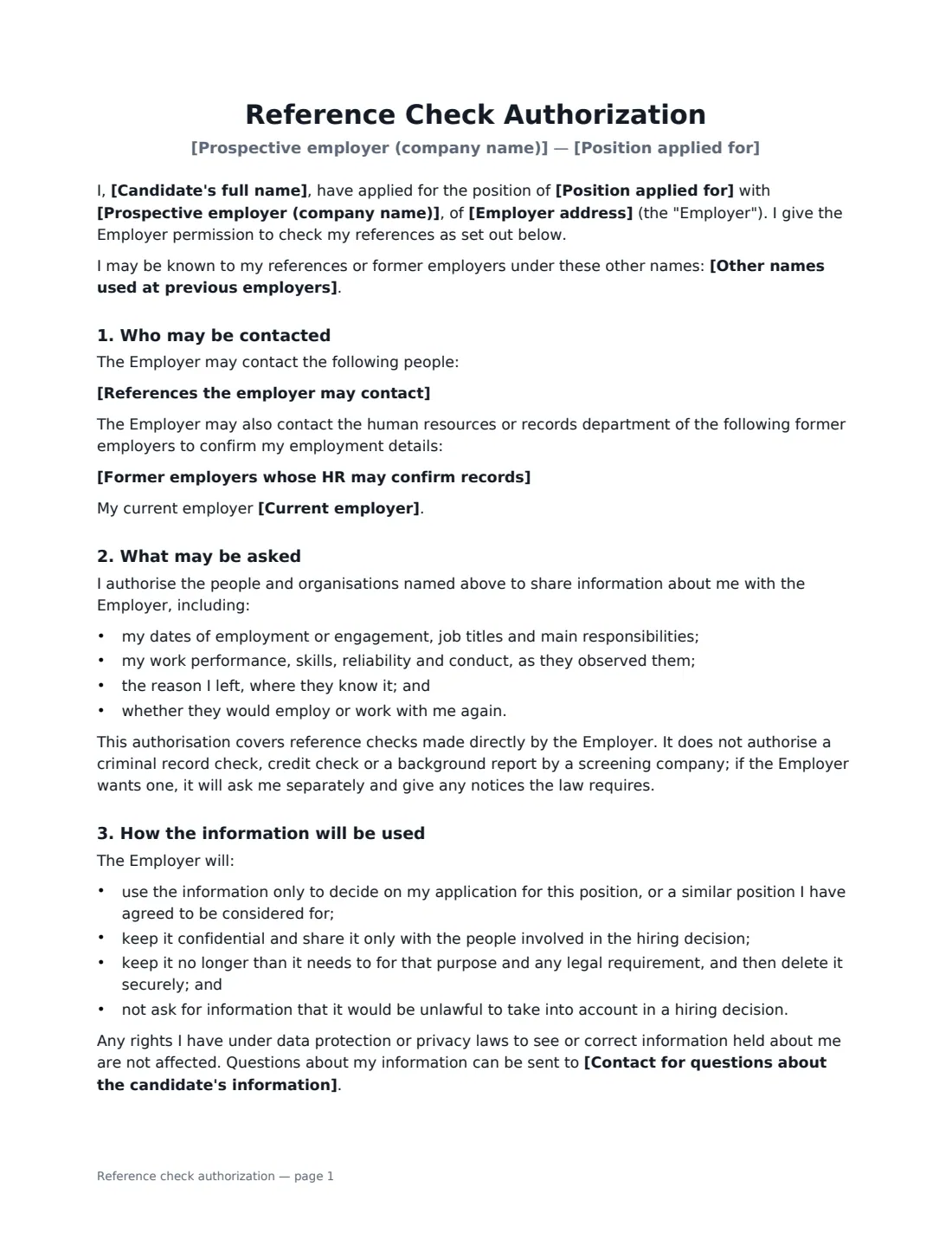
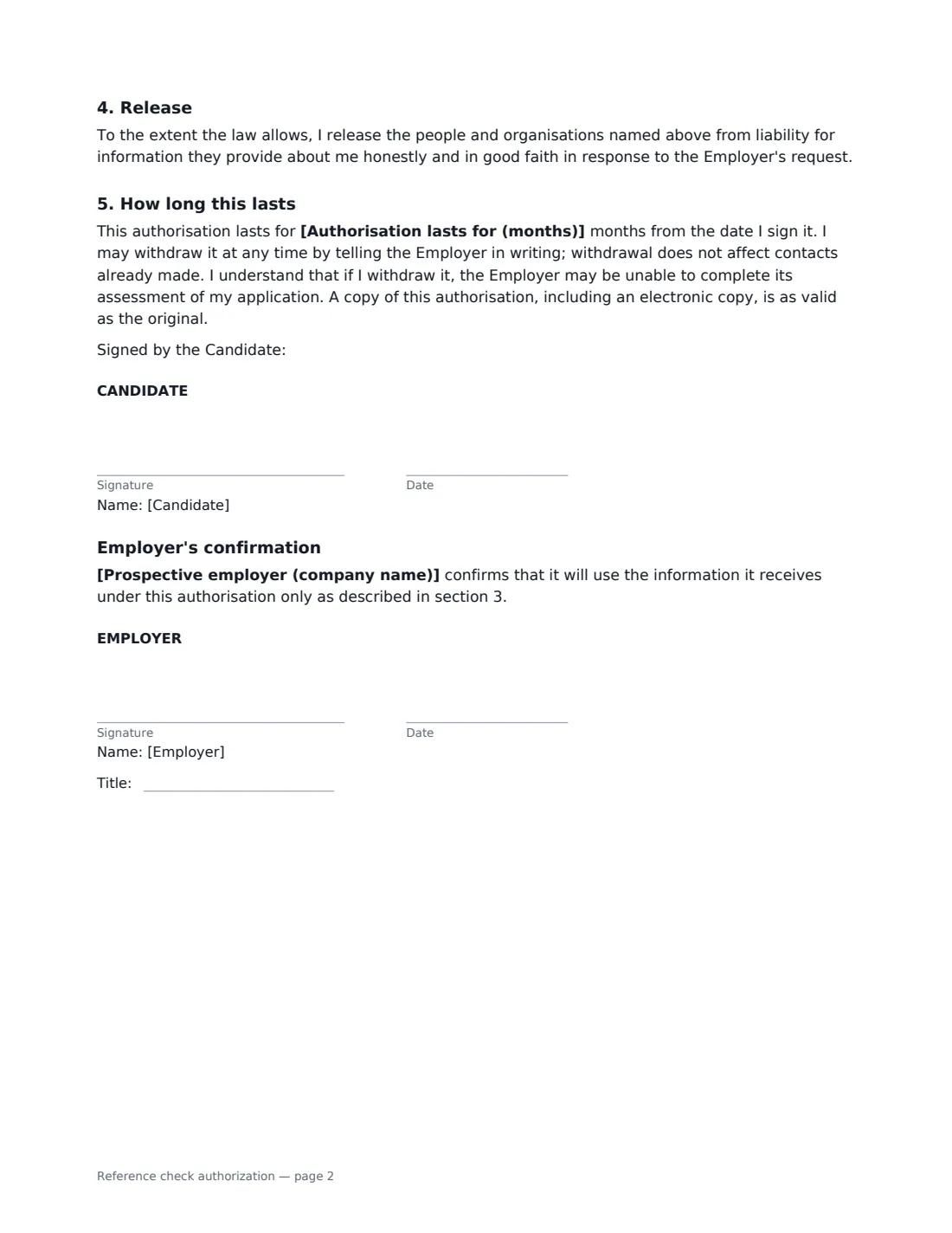
In this template you list the references the candidate has given you and, optionally, former employers whose HR team can confirm dates and job titles, and record the candidate's choice on whether their current employer may be contacted at any time, only after a conditional offer, or not at all. The form lists what may be asked (dates, role, performance and conduct, reason for leaving, whether they would rehire), makes clear it does not cover criminal record, credit or screening-company background checks, and commits the employer to using the information only for the hiring decision, keeping it confidential and deleting it when no longer needed. It includes a release for references who answer honestly and in good faith, an expiry in months, and the candidate's right to withdraw consent. The employer countersigns to confirm how it will use the information.
- Best for
- Final-stage candidates before a job offer or before an offer becomes unconditional
- Signed by
- The candidate, then the prospective employer
- Current employer
- Candidate chooses: any time, only after a conditional offer, not at all, or not applicable
- Length
- About 2 pages
When to Use a reference check authorization
- Checking references for a shortlisted candidate before an offer
- Confirming a new hire's references after a conditional offer
- A former employer's HR team asks for signed consent before confirming dates and titles
- Recruiters collecting consent on behalf of a hiring client
- Roles where references are required by your own policy, such as positions of trust
What You Fill In
11 blanks, then the name and email of each person who signs: candidate, employer.
1 The role
- Prospective employer (company name)*
- Employer address
- Position applied for*
2 The candidate
- Candidate's full name*
- Other names used at previous employers
- Candidate email or phone
3 Who may be contacted
- References the employer may contact*
- Former employers whose HR may confirm records
- Current employer* may be contacted at any time · may be contacted only after I have received a conditional job offer · may not be contacted · does not apply, as I am not currently employed
4 How the information is used
- Authorisation lasts for (months)*
- Contact for questions about the candidate's information*
5 Who signs
- Candidate signature and date · The job applicant giving permission.
- Employer signature and date, job title · The prospective employer, usually the hiring manager or recruiter.
What the reference check authorization Covers
- Who may be contacted
- What may be asked
- How the information will be used
- Release
- How long this lasts
- Employer's confirmation
Using the reference check authorization, step by step
1 Describe the role
Enter your company name and address and the position the candidate applied for. These appear in the heading and the opening paragraph.
2 List the references
Add each reference on its own line: name, relationship, organisation and contact details. You can fill these in from the candidate's application, or ask the candidate for them first. Former employers' HR departments are optional.
3 Set the limits
Choose when the current employer may be contacted — agree this with the candidate first, since the form is written in their words. The default is only after a conditional offer, which protects candidates who haven't told their employer they are looking. Set how many months the authorisation lasts and a contact for questions about the candidate's information.
4 Send to the candidate
The candidate signs first, then you countersign the employer's confirmation. Keep the signed PDF with the application, and share a copy with a reference who asks to see consent.
Tips Before You Send It
- Ask every reference the same core questions so candidates are compared fairly, and write down the answers.
- Don't ask references about health, family plans, religion or any other characteristic you can't lawfully take into account.
- If you also want a criminal record, credit or background check, use the separate disclosure and consent that your local law requires — this form deliberately doesn't cover them.
- Delete reference notes for unsuccessful candidates in line with your retention policy.
Sign It Online In Minutes
- Fill in the blanks. Names, dates and amounts go straight into the agreement — the preview shows exactly where.
- Name who signs. Tick “This is me” for your own part. VergeHR builds the PDF with every signature, date box on the right line, and you can check or move anything before sending.
- Send it. Each signer gets a secure link and signs from any device — no account needed. The signed PDF, with an audit trail and a Certificate of Completion, is filed in Files and emailed to everyone.
Reference check authorization: frequently asked questions
Do I need written consent to check references?
Not everywhere, but it is good practice and some former employers ask for it before sharing anything. Where data protection or privacy laws apply, a signed authorisation also helps show the candidate knew what you would do with their information.
Does this cover a background check?
No. It covers references contacted directly by the employer. Criminal record checks, credit checks and reports from screening companies often need a separate disclosure and consent under local law.
Can the candidate withdraw consent?
Yes. The form lets them withdraw in writing at any time, without affecting contacts already made. The employer may then be unable to finish assessing the application.
Is an electronic signature enough for this consent?
Generally, yes. Electronic signatures are valid for ordinary documents like this in the US (ESIGN Act and UETA), the UK, the EU (eIDAS) and Canada, and VergeHR's audit trail records when and how the candidate signed.