

What is a leave of absence request?
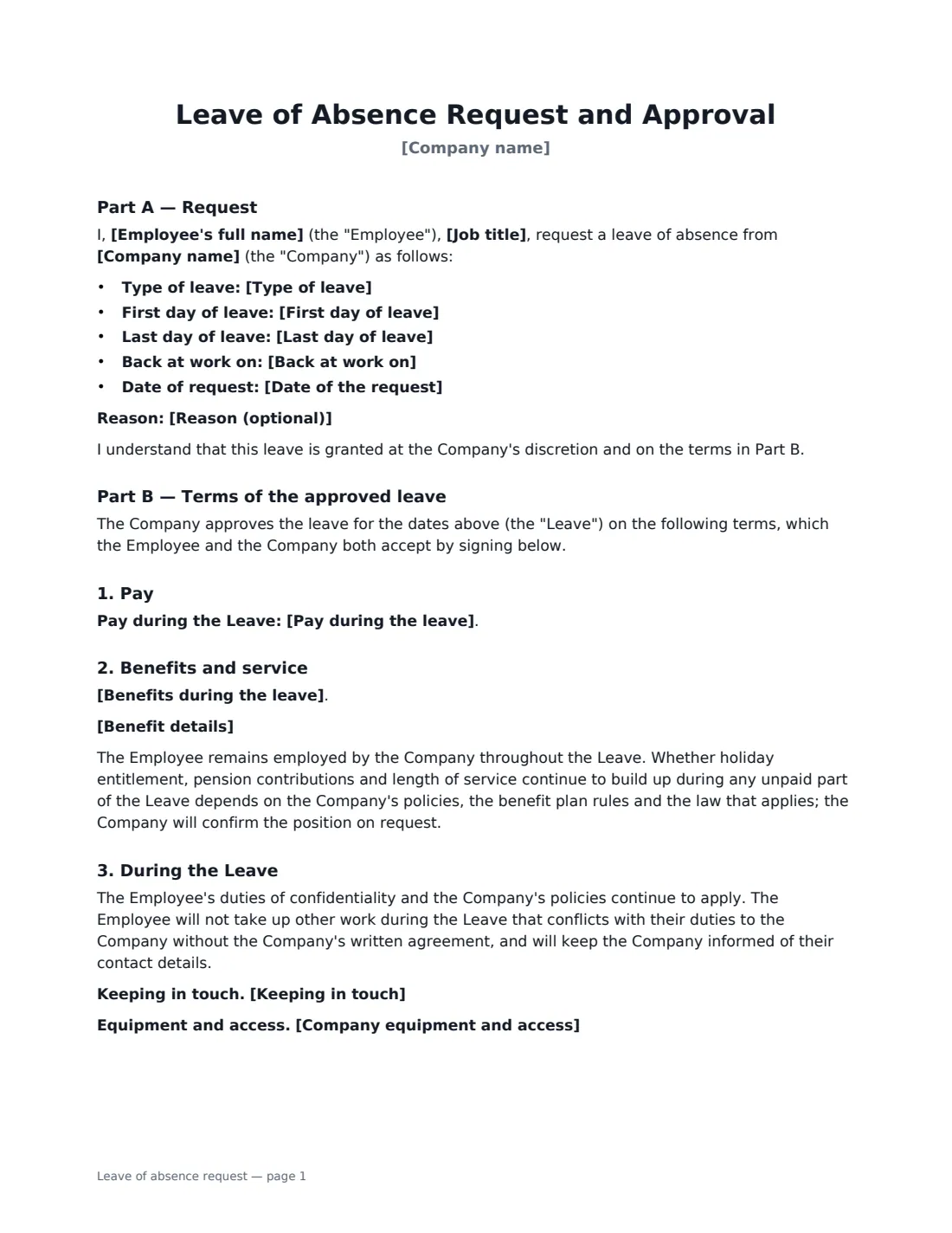
When an employee needs extended time off beyond their normal holiday — to care for a family member, study, travel or recover — both sides need the same answers in writing: exactly when the leave starts and ends, whether it's paid, what happens to benefits, how to stay in touch and what job the employee comes back to. A leave of absence form captures all of that before anyone leaves.
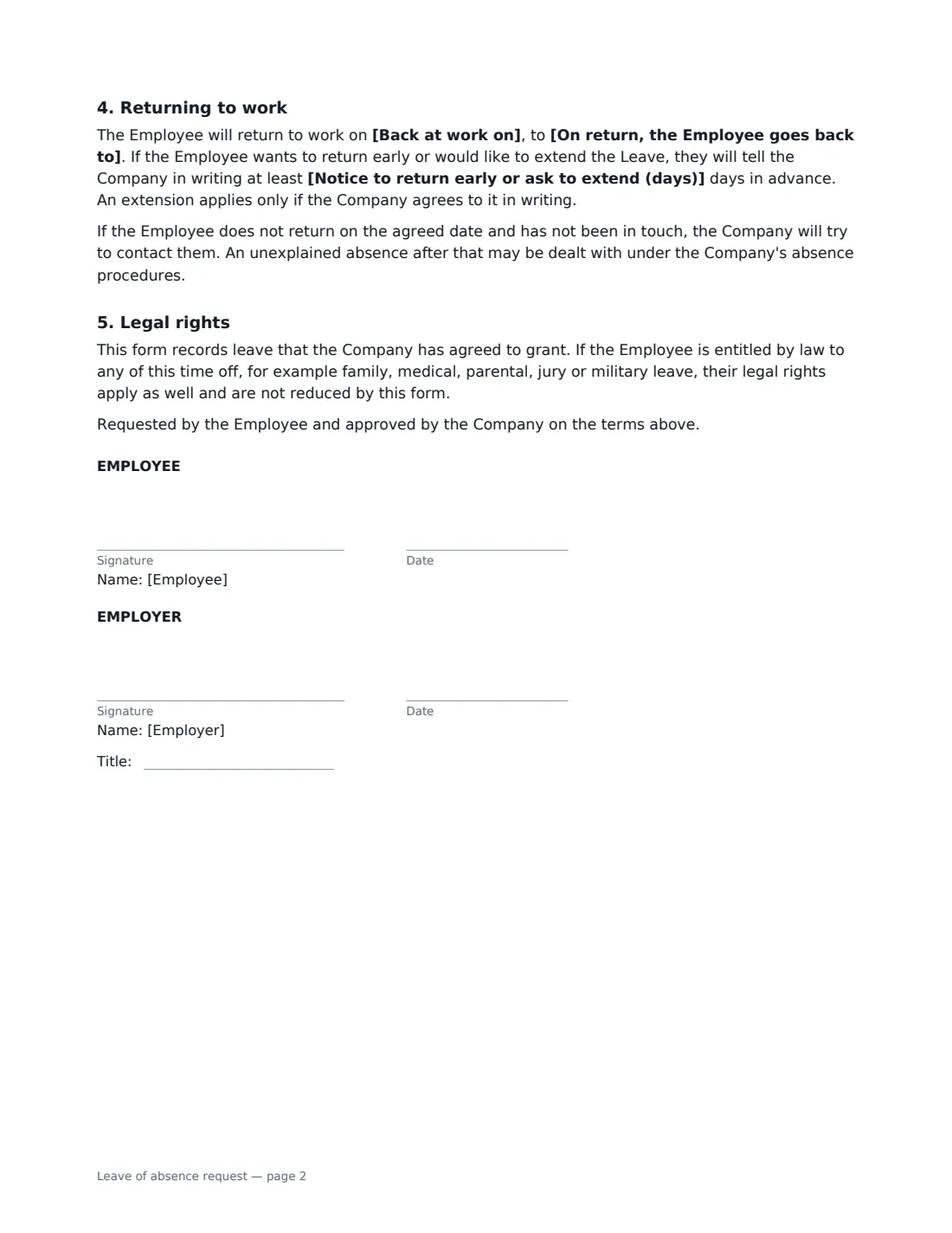
Part A is the employee's request: type of leave, first and last day, return date and an optional reason (with no need to share medical details). Part B sets the approved terms: pay (unpaid, partly paid or paid), benefits (continue, paused, or continued with the employee paying their share), a plain statement that whether holiday and service keep building up depends on policy and local law, conduct during the leave, keeping in touch, equipment and access, and the return — to the same job or a comparable one, with notice to return early or ask for an extension. It also says any legal leave rights apply on top.
- Best for
- Unpaid or extended leave that the employer agrees to grant
- Signed by
- The employee (request) and the employer (approval)
- Pay options
- Unpaid, partly paid or paid
- Length
- About 2 pages
When to Use a leave of absence request
- Several weeks of unpaid leave to care for a relative
- Extended travel or a career break that is shorter than a sabbatical
- Time off to study for an exam or complete a course
- Extra leave for health reasons after paid sick leave runs out
- Leave that combines some paid holiday with an unpaid period
What You Fill In
17 blanks, then the name and email of each person who signs: employee, employer.
1 The request
- Company name*
- Date of the request*
- Employee's full name*
- Job title
- Type of leave* Personal leave · Family or caring leave · Leave for study or training · Extended travel · Leave for health reasons · Other leave
- Reason (optional)
2 Dates
- First day of leave*
- Last day of leave*
- Back at work on*
3 Pay and benefits
- Pay during the leave* Unpaid · Partly paid · Paid
- How partly paid leave is paid
- Benefits during the leave* Benefits continue as normal during the Leave · Benefits are paused during the Leave and restart when the Employee returns · Benefits continue during the Leave, and the Employee pays their own share of the cost
- Benefit details
4 Returning
- On return, the Employee goes back to* the same job · the same job or, if that is not reasonably possible, a similar job on terms no less favourable
- Notice to return early or ask to extend (days)*
- Keeping in touch
- Company equipment and access
5 Who signs
- Employee signature and date · The person asking for leave
- Employer signature and date, job title · The manager or HR person approving it
What the leave of absence request Covers
- Part A — Request
- Part B — Terms of the approved leave
- Pay
- Benefits and service
- During the Leave
- Returning to work
- Legal rights
Using the leave of absence request, step by step
1 Fill in the request
Add the employee, the type of leave and the dates — first day, last day and the day they're back. A reason is optional; keep it to what's needed to consider the request.
2 Decide pay and benefits
Choose unpaid, partly paid or paid. For partly paid, describe how (for example, the first 10 days as paid holiday). Then pick what happens to benefits, and add details such as how the employee pays their share of insurance.
3 Plan the return
Choose whether the employee returns to the same job or, if that's not reasonably possible, a similar one. Set the notice needed to return early or ask to extend, and note how you'll keep in touch and what happens to their laptop and system access.
4 Send for both signatures
Agree the terms with the employee first, then fill in the form and send it. The employee signs the request and you sign the approval as the employer; the signed copy is filed in Files.
Tips Before You Send It
- Check whether the leave is a legal entitlement — family, medical, parental, jury or military leave often is. The form says legal rights apply as well, but your obligations may be more specific.
- Check each benefit plan's rules before promising cover during unpaid leave; some insurers limit it.
- Agree how you'll keep in touch before the leave starts — and how often. Too much contact can feel like work.
- Set a date to confirm the return plan a few weeks before the employee comes back.
Sign It Online In Minutes
- Fill in the blanks. Names, dates and amounts go straight into the agreement — the preview shows exactly where.
- Name who signs. Tick “This is me” for your own part. VergeHR builds the PDF with every signature, date box on the right line, and you can check or move anything before sending.
- Send it. Each signer gets a secure link and signs from any device — no account needed. The signed PDF, with an audit trail and a Certificate of Completion, is filed in Files and emailed to everyone.
Leave of absence request: frequently asked questions
Is unpaid leave a right?
Some kinds of leave are legal rights in many places — for example family, medical or parental leave — and others are at the employer's discretion. This form records leave the employer agrees to grant, and states that any legal rights apply as well and are not reduced.
Do holiday and service keep building up during unpaid leave?
It depends on your policies, the benefit plan rules and local law. The form says so and commits the company to confirm the position on request, rather than making a promise that may not be right where you are.
What if the employee doesn't come back on time?
The form says the company will try to contact them first, and an unexplained absence after that may be dealt with under the company's absence procedures. It doesn't treat a late return as an automatic resignation.
Can this form be signed electronically?
Generally, yes. Electronic signatures are widely accepted for workplace documents like this in the US (ESIGN Act and UETA), the UK, the EU (eIDAS) and Canada.