

What is a workplace accommodation plan?
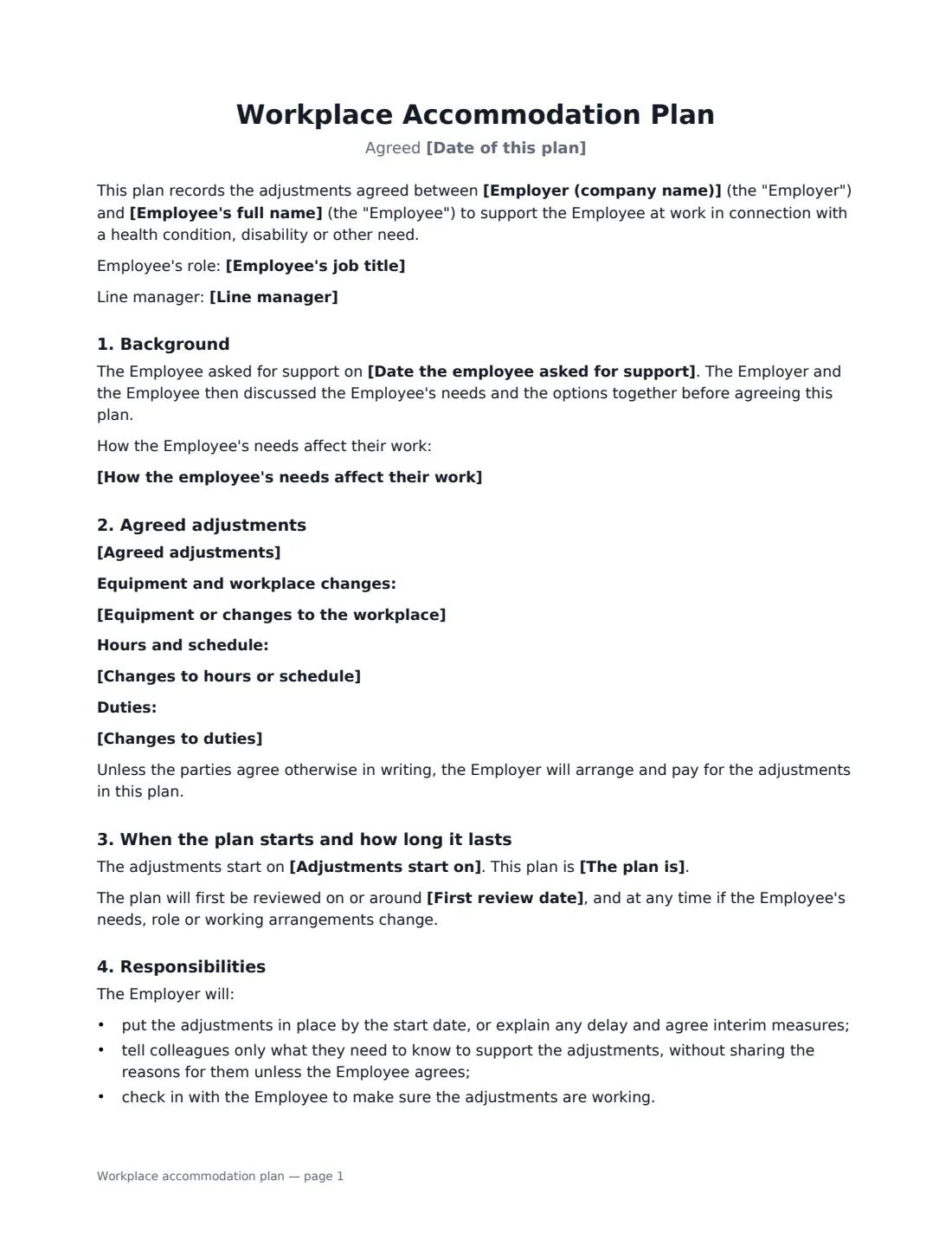
A workplace accommodation plan (also called a reasonable adjustments agreement or passport) records the changes an employer and employee have agreed to support the employee at work because of a health condition, disability, pregnancy or other need. Writing it down means everyone knows what was agreed, a new manager can pick it up without the employee having to explain everything again, and there is a clear date to check it is still working.
This template records the background and, if the employee wants, how their needs affect their work — without requiring a diagnosis. It lists the agreed adjustments, with optional sections for equipment and workplace changes, hours and schedule, and duties. It says when the adjustments start, whether the plan is ongoing or temporary (for a short-term need such as recovery from an injury), and when it will be reviewed. It sets out responsibilities on both sides, keeps medical information confidential, explains how to raise concerns, and makes clear that the plan does not limit the employee's legal rights.
- Best for
- Disability or health-related adjustments, temporary adjustments during recovery or treatment, pregnancy-related changes
- Signed by
- The employer (manager or HR) and the employee
- Duration
- Ongoing with reviews, or temporary until an end date
- Length
- 2 pages
When to Use a workplace accommodation plan
- An employee with a back condition needs a sit-stand desk and regular breaks
- Temporary adjustments while an employee recovers from surgery or goes through treatment
- Changing start times or working-from-home days to fit around treatment
- Adjusting lifting or driving duties while a worker recovers from an injury
- Recording adjustments so they follow an employee to a new manager or team
What You Fill In
16 blanks, then the name and email of each person who signs: employer, employee.
1 The people
- Employer (company name)*
- Employee's full name*
- Employee's job title
- Line manager
- Date of this plan*
2 Background
- Date the employee asked for support
- How the employee's needs affect their work
3 Agreed adjustments
- Agreed adjustments*
- Equipment or changes to the workplace
- Changes to hours or schedule
- Changes to duties
4 Timing and review
- Adjustments start on*
- The plan is* ongoing · temporary
- Temporary adjustments end on
- First review date
- Who to contact about the plan
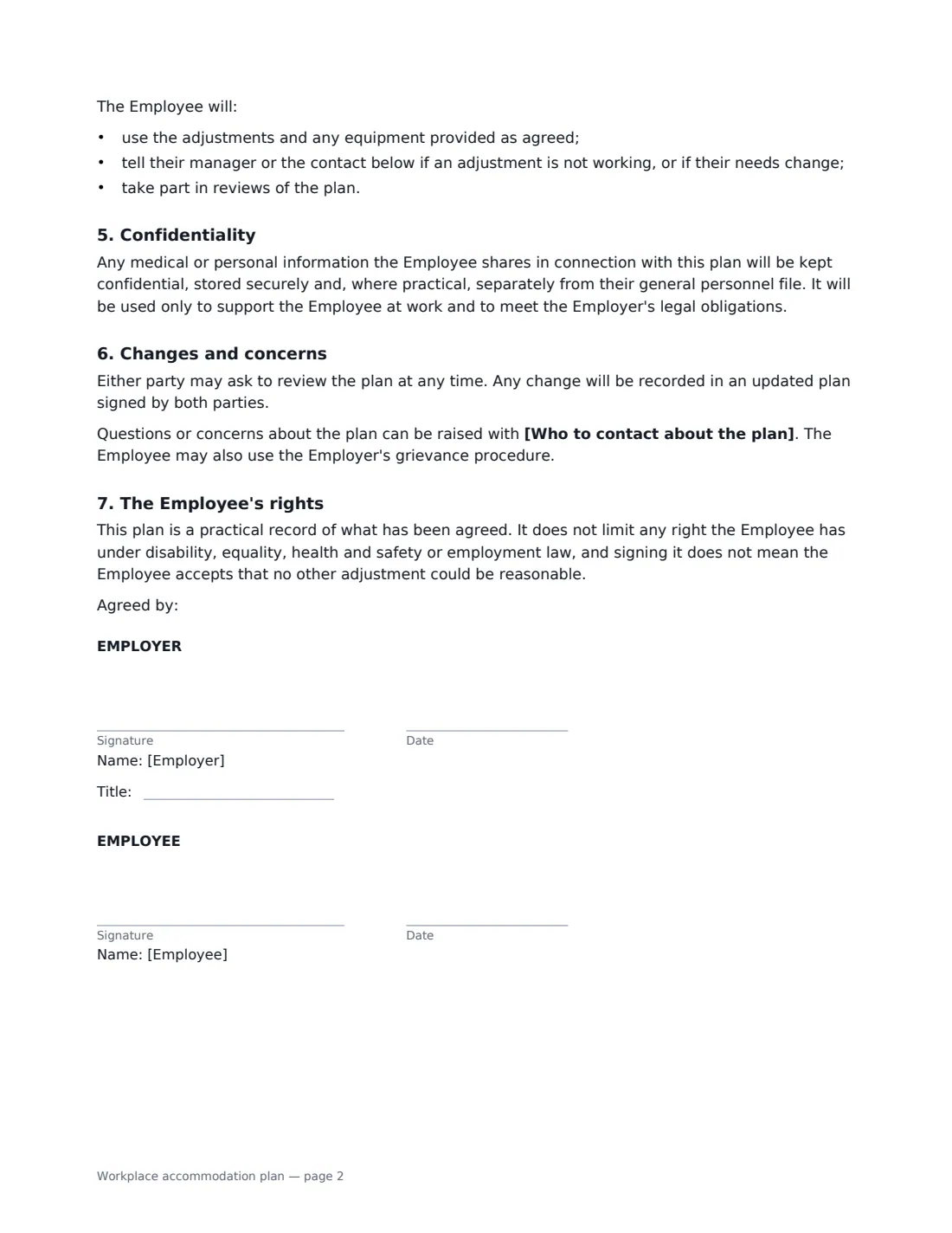
5 Who signs
- Employer signature and date, job title · The manager or HR contact responsible for putting the plan in place.
- Employee signature and date
What the workplace accommodation plan Covers
- Background
- Agreed adjustments
- When the plan starts and how long it lasts
- Responsibilities
- Confidentiality
- Changes and concerns
- The Employee's rights
Using the workplace accommodation plan, step by step
1 Talk first, then write it down
The plan records the outcome of a conversation, so meet with the employee first and agree what will help. The form notes the date they asked for support and that the options were discussed together.
2 Describe needs, not diagnoses
The "how needs affect work" box is optional. Describe the effect on work — "sitting for long periods causes pain" — and only include medical details if the employee wants them in the plan.
3 List the adjustments
Put each agreed adjustment on its own line, then use the optional boxes for equipment, hours and schedule, and duties. Empty boxes are left out of the document.
4 Set the timing and review
Choose ongoing or temporary (with an end date), add the start date and a first review date, and name who the employee should contact. Both of you sign; the plan is filed in Files so it is easy to find at review time.
Tips Before You Send It
- Review the plan when the employee's needs, role, manager or workplace change — not only on the review date.
- Share only the adjustments with colleagues who need to know, not the reasons for them.
- If you can't agree to a particular request, record what you did agree and keep talking; the plan says it doesn't mean no other adjustment could be reasonable.
- Occupational health or a doctor's advice can help decide what will work, but the plan belongs to the employer and employee.
Sign It Online In Minutes
- Fill in the blanks. Names, dates and amounts go straight into the agreement — the preview shows exactly where.
- Name who signs. Tick “This is me” for your own part. VergeHR builds the PDF with every signature, date box on the right line, and you can check or move anything before sending.
- Send it. Each signer gets a secure link and signs from any device — no account needed. The signed PDF, with an audit trail and a Certificate of Completion, is filed in Files and emailed to everyone.
Workplace accommodation plan: frequently asked questions
Is an employer legally required to make accommodations?
In many countries, including the US, the UK, EU member states and Canada, disability and equality laws require employers to make reasonable accommodations or adjustments for disabled workers, and some also cover pregnancy or religion. What is "reasonable" depends on the circumstances and the law where you are. This plan records what you agreed; it does not decide what the law requires.
Does the employee have to disclose their diagnosis?
The template doesn't ask for one. It records how the employee's needs affect their work and the adjustments agreed. Any medical information the employee chooses to share is kept confidential and stored securely.
Can the plan be temporary?
Yes. Choose "temporary" and add an end date — useful for a short-term need such as recovery from an injury. For a structured phased return after a long absence, the return-to-work agreement is a closer fit. Before the end date, you meet to decide whether any adjustments should continue, change or become permanent.
Is an electronically signed accommodation plan valid?
Electronic signatures are generally valid for ordinary employment documents in the US (ESIGN Act and UETA), the UK, the EU (eIDAS) and Canada. VergeHR keeps an audit trail and a Certificate of Completion with the signed PDF.
Is this template free?
Yes. It is free to use with the eSignature app in VergeHR, and the employee doesn't need a VergeHR login to sign.