

What is a workplace incident report?
An incident report is the first written record of something that went wrong at work: a slip, a cut, a back strain, a forklift near miss, damaged equipment. Filling it in promptly, while memories are fresh, matters — it is the basis for fixing the cause, and it may be needed for an insurance or workers' compensation claim or a report to a health and safety regulator.
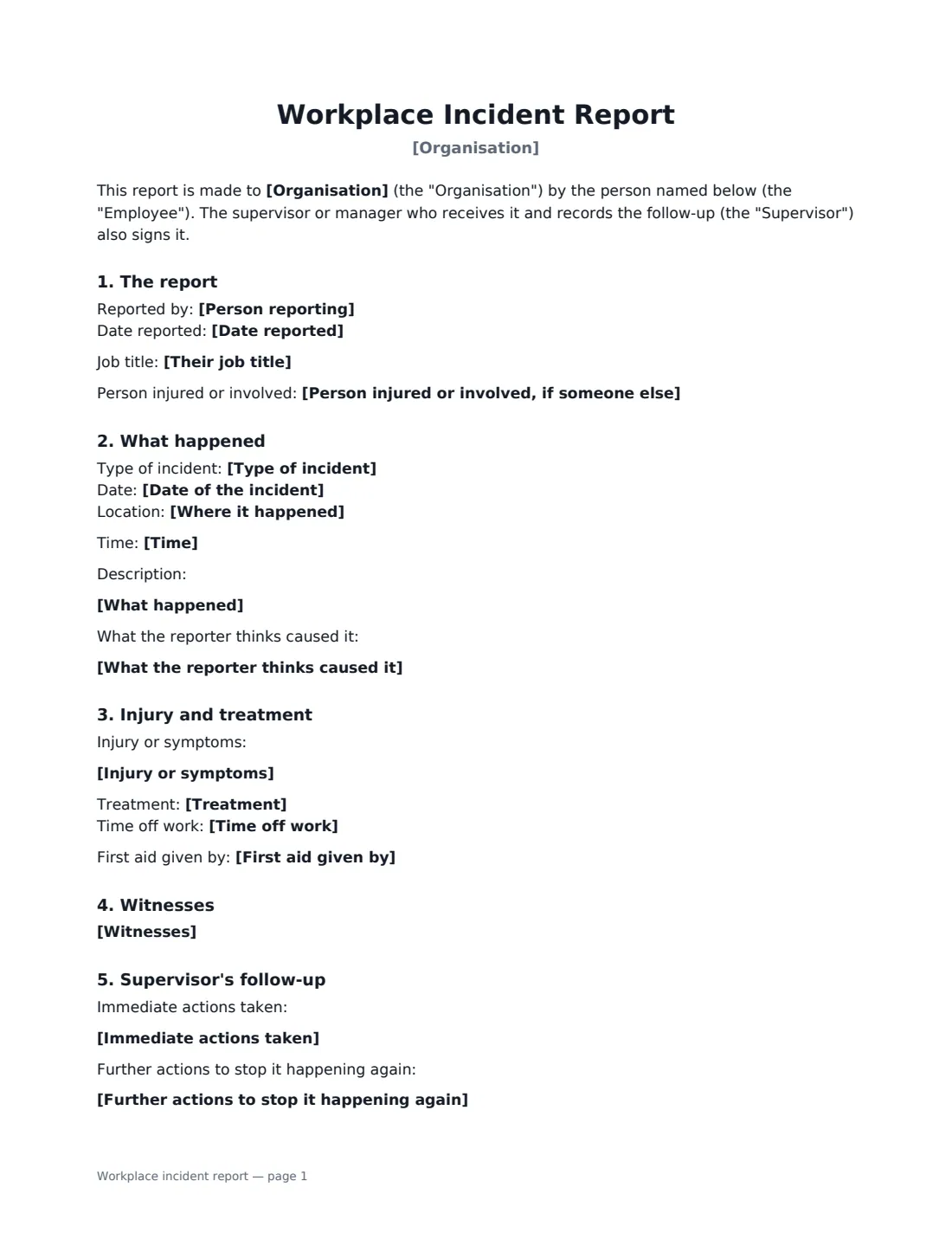
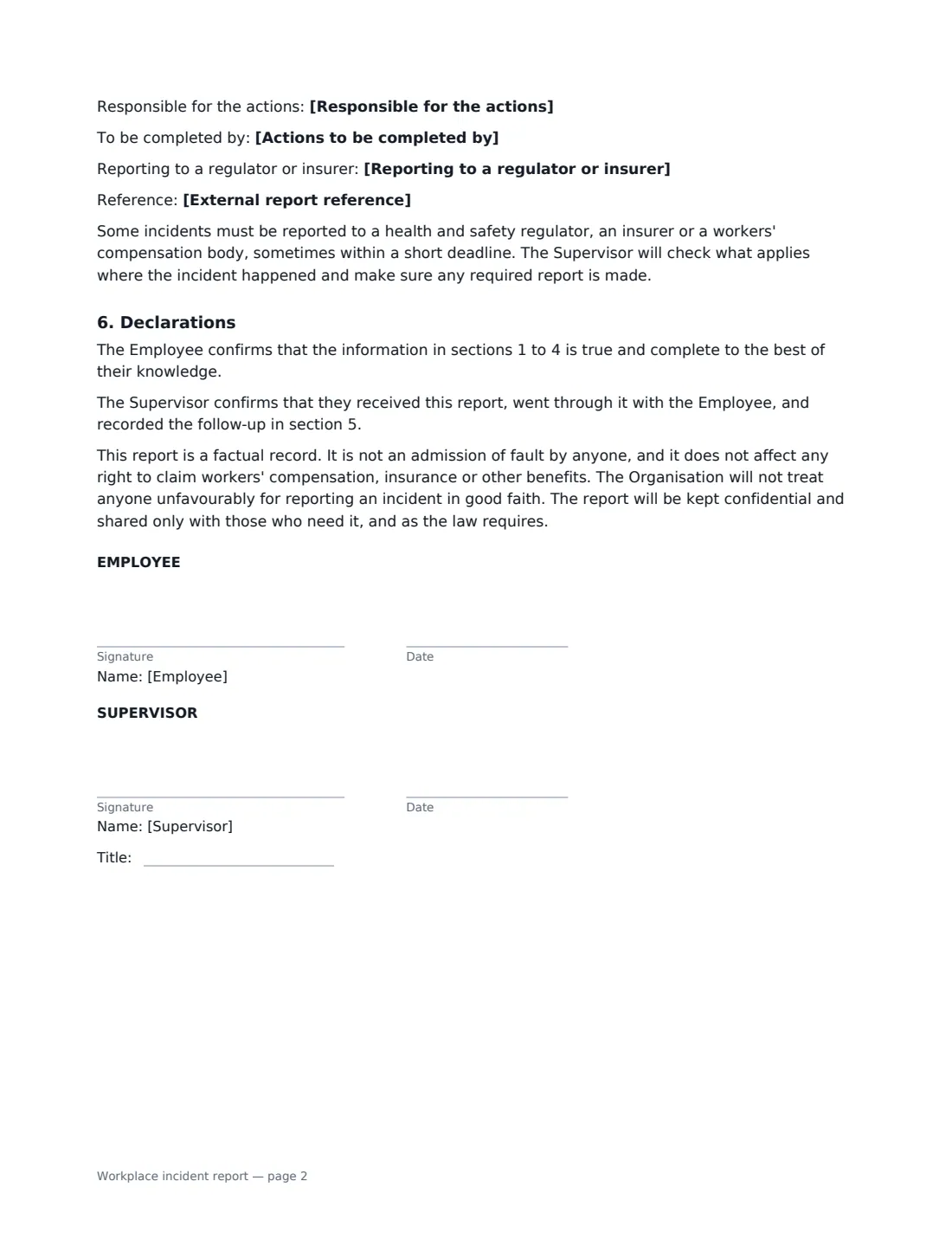
This form records who is reporting and who was involved, the type of incident, date, time and location, a factual description and what the reporter thinks caused it. It records any injury or symptoms, the treatment given and by whom, and time off work, followed by the names of witnesses. The supervisor's section records immediate actions, further actions to stop it happening again, who owns them and by when, and whether the incident has to be reported to a regulator or insurer. Both sign: the employee to confirm the facts, the supervisor to confirm the report and the follow-up.
- Best for
- Accidents, injuries, work-related illness, near misses and property damage
- Signed by
- The employee reporting and their supervisor or manager
- Includes
- What happened, treatment, witnesses, corrective actions, external reporting
- Length
- 2 pages
When to Use a workplace incident report
- An employee slips on a wet floor and needs first aid
- A near miss between a forklift and a pedestrian in the warehouse
- A worker develops symptoms they believe are caused by their work
- A visitor or contractor is hurt on your premises
- Company equipment or a vehicle is damaged
What You Fill In
22 blanks, then the name and email of each person who signs: employee, supervisor.
1 The report
- Organisation*
- Date reported*
- Person reporting*
- Their job title
- Person injured or involved, if someone else
2 What happened
- Type of incident* Injury · Work-related illness · Near miss — nobody was hurt · Damage to property or equipment · Dangerous occurrence · Other
- Date of the incident*
- Time
- Where it happened*
- What happened*
- What the reporter thinks caused it
3 Injury and treatment
- Injury or symptoms
- Treatment* None needed · First aid on site · Seen by a doctor or clinic · Taken to hospital · Not yet known
- First aid given by
- Time off work* None — returned to work · Stopped work for the rest of the day · Expected to be off work · Not yet known
4 Witnesses
- Witnesses
5 Supervisor's follow-up
- Immediate actions taken
- Further actions to stop it happening again
- Responsible for the actions
- Actions to be completed by
- Reporting to a regulator or insurer* Not required · Being checked · Required — to be made · Made
- External report reference
6 Who signs
- Employee signature and date · The person reporting the incident — usually the person involved or a witness.
- Supervisor signature and date, job title · The supervisor or manager who receives the report and records the follow-up.
What the workplace incident report Covers
- The report
- What happened
- Injury and treatment
- Witnesses
- Supervisor's follow-up
- Declarations
Using the workplace incident report, step by step
1 Record the facts
Enter the type of incident, when and where it happened, and a description in order: what was being done, what went wrong, what happened next. Stick to facts, and let the employee check the wording before they sign.
2 Add injury, treatment and witnesses
Describe any injury or symptoms, choose the treatment and time off work, and name whoever gave first aid. List witnesses with contact details so they can be asked for their own account.
3 Record the follow-up
As supervisor, note what was done straight away and what will be done to stop it happening again, who is responsible and by when.
4 Check external reporting and sign
Record whether the incident has to be reported to a regulator or insurer. Then send it to the employee to sign. The signed report is filed in Files with a full audit trail.
Tips Before You Send It
- Complete the report as soon as possible after the incident, while details are fresh.
- Record near misses too — they are the cheapest warning you'll get.
- Check promptly whether the incident must be reported to a regulator, insurer or workers' compensation body; some deadlines are short and depend on where you are.
- Focus on causes and fixes, not blame — the form says it isn't an admission of fault.
Sign It Online In Minutes
- Fill in the blanks. Names, dates and amounts go straight into the agreement — the preview shows exactly where.
- Name who signs. Tick “This is me” for your own part. VergeHR builds the PDF with every signature, date box on the right line, and you can check or move anything before sending.
- Send it. Each signer gets a secure link and signs from any device — no account needed. The signed PDF, with an audit trail and a Certificate of Completion, is filed in Files and emailed to everyone.
Workplace incident report: frequently asked questions
Do workplace incidents have to be reported to a regulator?
Some do. Many countries require employers to record certain work-related injuries and illnesses and to report serious ones to a health and safety authority, often within a short time. What counts and the deadlines depend on where the incident happened, so the form records whether a report is needed and the supervisor checks.
Does filling in this form affect a workers' compensation claim?
The form states that it doesn't affect any right to claim workers' compensation, insurance or other benefits, and it isn't an admission of fault. Claims usually follow their own process.
Who should fill in the report?
Usually the supervisor fills it in with the employee who was involved or saw what happened, then both sign. If someone else was injured — a visitor or a colleague — record their name in the "person injured or involved" box.
Is an electronically signed incident report valid?
Electronic signatures are generally valid for ordinary workplace records in the US (ESIGN Act and UETA), the UK, the EU (eIDAS) and Canada. VergeHR keeps an audit trail and a Certificate of Completion with the signed PDF.
Is this template free?
Yes. It is free to use with the eSignature app in VergeHR, and the employee doesn't need a VergeHR login to sign.