

What is a training completion acknowledgement?
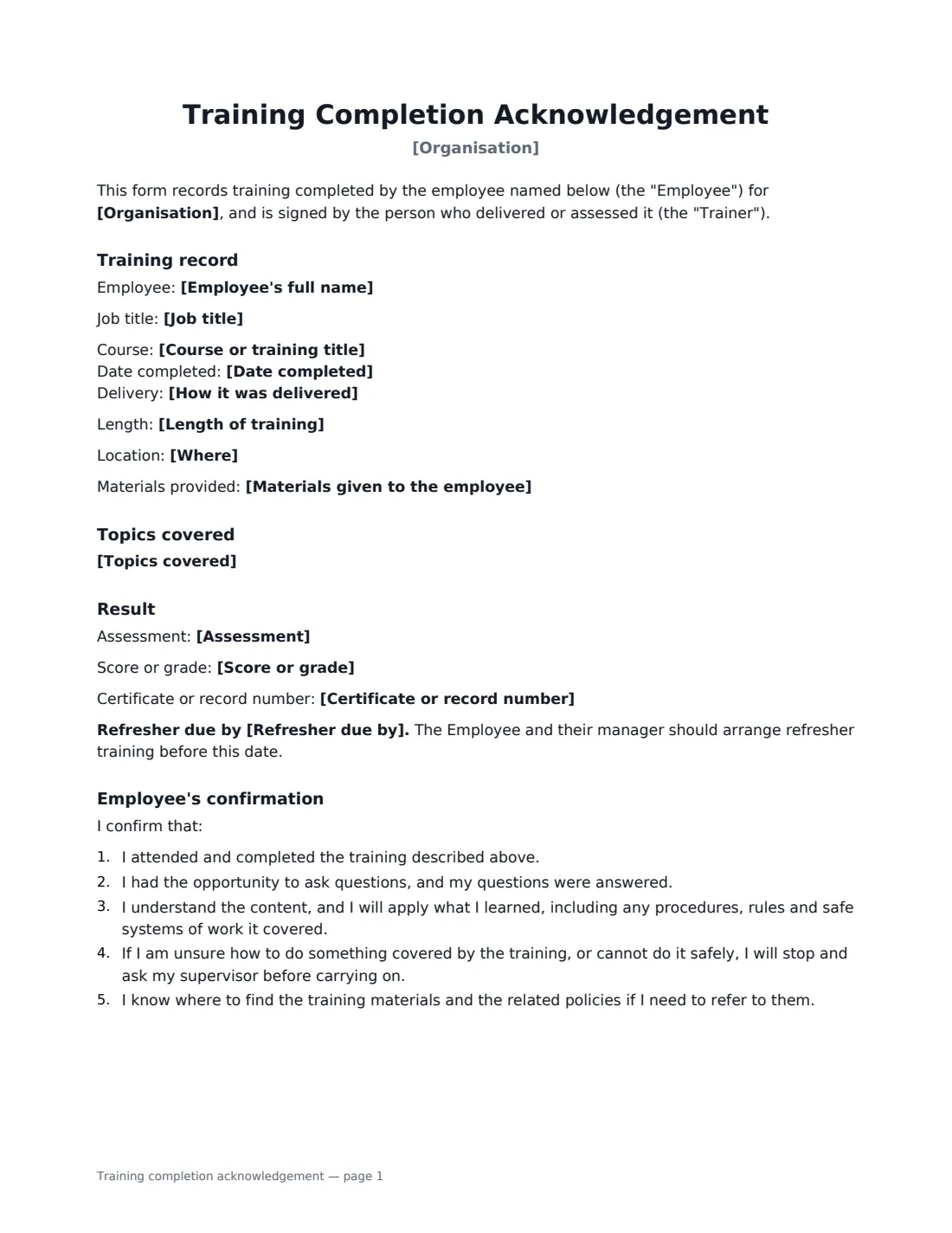
A training completion acknowledgement is the record an employer keeps to show that an employee was trained: what the course covered, when and how it was delivered, whether they were assessed, and that the employee confirms they understood it. It matters most for safety-critical and compliance training — forklift operation, working at height, food hygiene, anti-harassment, data protection — where you may need to show an inspector, an insurer or a court that training really happened.
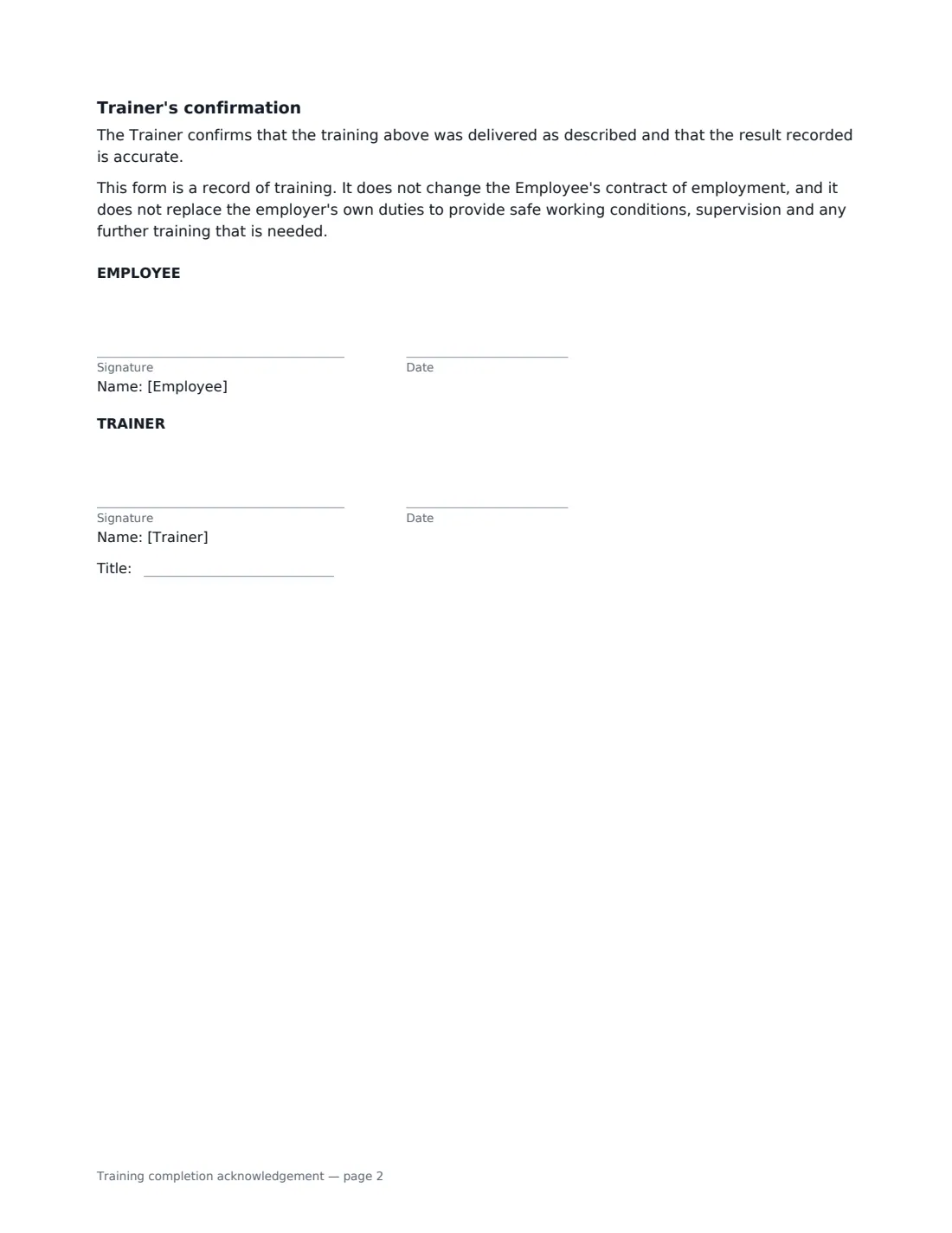
This form records the course title, date, length, delivery method, location, topics covered and materials given. It records the assessment — none, a written or online test, a practical assessment or both — with an optional score, certificate number and refresher date. The employee confirms they attended, had their questions answered, understand the material and will stop and ask if unsure; the trainer confirms the training was delivered and the result is accurate.
- Best for
- Health and safety, equipment, compliance and induction training
- Signed by
- The employee and the trainer or assessor
- Records
- Topics, delivery, assessment result, certificate number, refresher date
- Length
- 1–2 pages
When to Use a training completion acknowledgement
- Signing off forklift, machinery or vehicle training after a practical assessment
- Recording annual anti-harassment, data protection or security awareness training
- Health and safety training for new starters, alongside a site safety induction
- Food hygiene, first aid or manual handling courses with refresher dates
- On-the-job training for a new process or piece of equipment
What You Fill In
14 blanks, then the name and email of each person who signs: employee, trainer.
1 The training
- Organisation*
- Course or training title*
- Date completed*
- Length of training
- How it was delivered* In person, led by the Trainer · Live online, led by the Trainer · Self-paced online course, reviewed by the Trainer · On the job, by demonstration and supervised practice
- Where
- Topics covered*
- Materials given to the employee
2 The employee
- Employee's full name*
- Job title
3 Result
- Assessment* No formal assessment · Passed a written or online test · Passed a practical assessment · Passed a written test and a practical assessment
- Score or grade
- Certificate or record number
- Refresher due by
4 Who signs
- Employee signature and date · The person who completed the training.
- Trainer signature and date, job title · The person who delivered or assessed the training.
What the training completion acknowledgement Covers
- Training record
- Topics covered
- Result
- Employee's confirmation
- Trainer's confirmation
Using the training completion acknowledgement, step by step
1 Describe the training
Enter the course title, date, how it was delivered and, optionally, how long it took, where, and what materials the employee received. List the topics one per line — this is what shows what the employee was actually taught.
2 Record the result
Choose the assessment type. For a practical assessment the form adds that it was observed by the trainer and the employee showed they can do the tasks safely. Add a score or certificate number if there is one.
3 Add the refresher date
If the training or certificate needs renewing, enter the date. The form flags it in bold — and once the signed copy is in VergeHR Files, you can set that date as the document's expiry so you are reminded before it lapses.
4 Send it to the employee
Sign as the trainer and add the employee. One signed record per employee keeps your training file clean and easy to search.
Tips Before You Send It
- Be specific in the topics list — "pre-use safety checks, safe stacking, pedestrian awareness" is evidence; "forklift training" isn't.
- Have the trainer who delivered or assessed the training sign, not someone who wasn't there.
- Some roles need a formal licence or certificate from an accredited provider; this form records the training but doesn't replace that.
- Keep the course materials or slides alongside the signed record.
Sign It Online In Minutes
- Fill in the blanks. Names, dates and amounts go straight into the agreement — the preview shows exactly where.
- Name who signs. Tick “This is me” for your own part. VergeHR builds the PDF with every signature, date box on the right line, and you can check or move anything before sending.
- Send it. Each signer gets a secure link and signs from any device — no account needed. The signed PDF, with an audit trail and a Certificate of Completion, is filed in Files and emailed to everyone.
Training completion acknowledgement: frequently asked questions
Why get employees to sign for training?
A signed record is good evidence that the training took place and that the employee confirmed they understood it. Health and safety rules in many places expect employers to provide adequate training and to be able to show it.
Does a signed form mean the employer has done everything it needs to?
No. The form says it doesn't replace the employer's own duties to provide safe working conditions, supervision and any further training that is needed.
Can I use it for online courses?
Yes. Choose "self-paced online course, reviewed by the trainer" or "live online" as the delivery method, and record any test score.
Is an electronically signed training record valid?
Electronic signatures are generally valid for ordinary employment records in the US (ESIGN Act and UETA), the UK, the EU (eIDAS) and Canada. VergeHR keeps an audit trail and a Certificate of Completion with the signed PDF.
Is this template free?
Yes. It is free to use with the eSignature app in VergeHR, and the employee doesn't need a VergeHR login to sign.