

What is a gPS tracking consent?
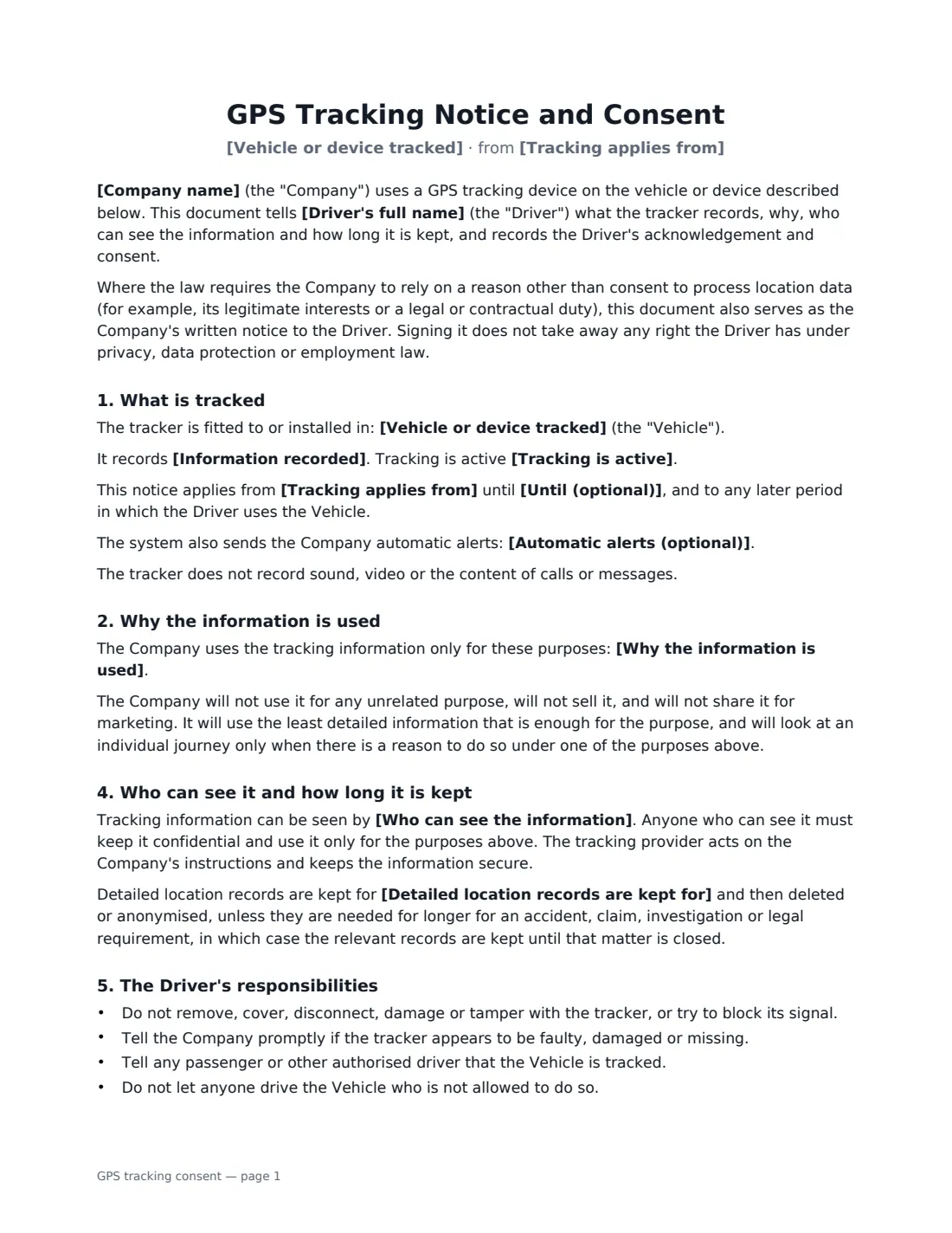
A GPS tracking consent form is a written notice that a vehicle or device is fitted with a tracker, signed by the person who drives or uses it. Fleet operators, trades businesses, delivery firms and car, van and equipment rental companies use one so there is no surprise later: the driver knows their location is recorded, understands what it is used for, and has confirmed it in writing before the keys change hands.
This template is written as a notice with an acknowledgement at the end. You describe the vehicle, the information recorded (location, speed, ignition, mileage and so on), when tracking is active, your purposes, who can see the data and how long detailed records are kept. Choose whether the driver is an employee or contractor, or a renter — the wording about private use, working hours and looking at journeys during a rental changes to match. Optional clauses cover automatic alerts, such as leaving an agreed area, and a remote immobiliser, which the document limits to stolen, overdue or unlawfully used vehicles and never a moving one.
- Best for
- Company vans and cars, pool vehicles, plant and equipment, car and van rentals
- Signed by
- The driver or renter, and someone authorised at the company
- You set
- What is recorded, when tracking is on, purposes, who has access, how long records are kept
- Length
- About 2 pages
When to Use a gPS tracking consent
- Handing an employee the keys to a company van or car fitted with telematics
- Contractors or delivery drivers using a tracked vehicle you own
- Car, van or motorhome rentals where the vehicle has a GPS tracker
- Equipment hire where machinery or devices carry a location tracker
- Refreshing notices when you install trackers across an existing fleet
What You Fill In
15 blanks, then the name and email of each person who signs: driver, company.
1 The parties
- Company name*
- Driver's full name*
- The driver is* An employee or contractor · A renter or hirer
- Tracking applies from*
- Until (optional)
2 What is tracked
- Vehicle or device tracked*
- Information recorded*
- Tracking is active* only while the ignition is on or the device is in use · at all times, including when the vehicle is parked · only during working hours or the rental period
3 Why and who
- Why the information is used*
- Private use of the vehicle* is not allowed · is allowed, and tracking continues during it · is allowed, and the Driver can switch the tracker to private mode
- Who can see the information*
- Detailed location records are kept for*
- Automatic alerts (optional)
- Remote immobiliser* No · Yes
- Questions and requests go to*
4 Who signs
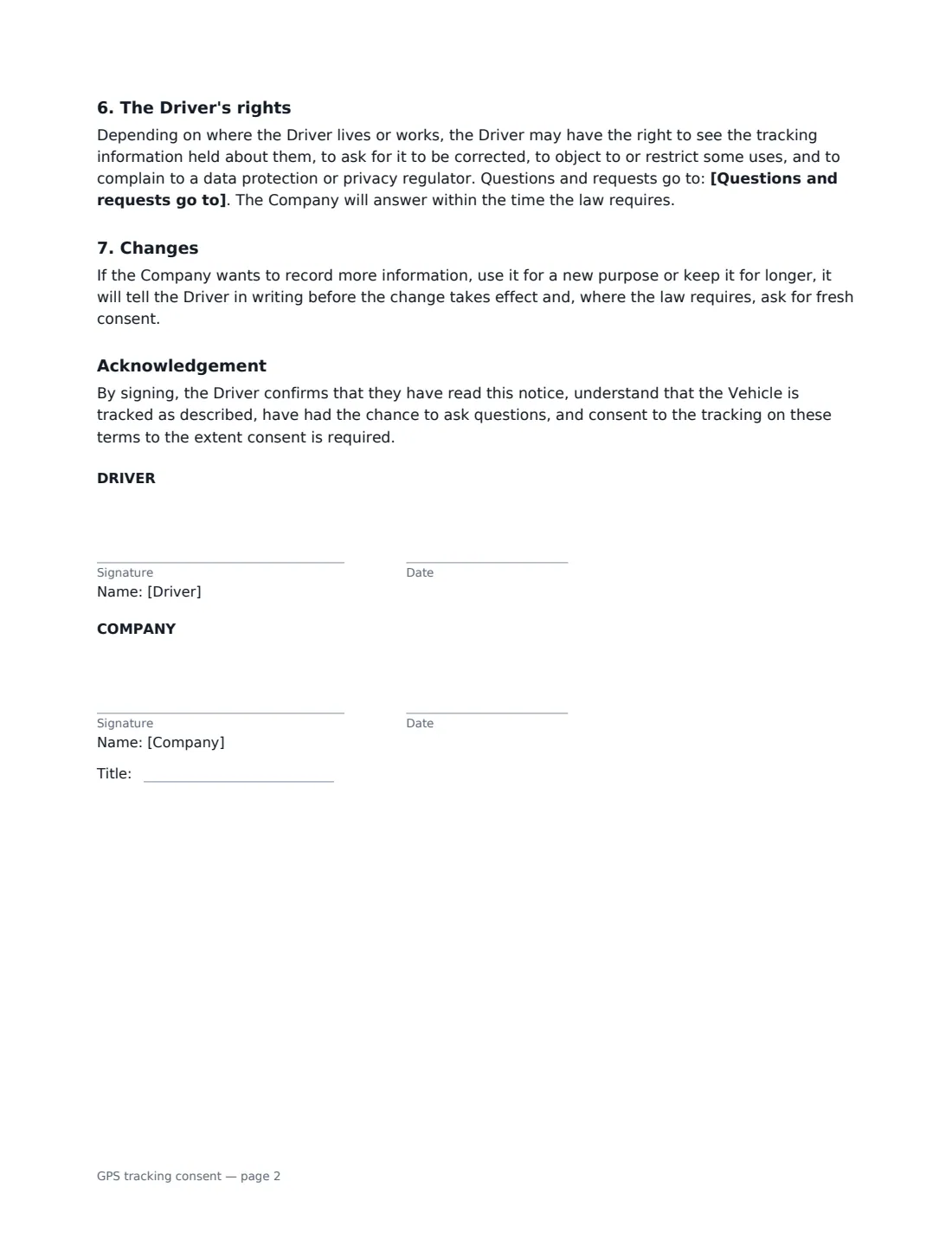
- Driver signature and date · The employee, contractor or renter who will use the tracked vehicle or device.
- Company signature and date, job title · Someone authorised to sign for the business that owns or controls the tracker.
What the gPS tracking consent Covers
- What is tracked
- Why the information is used
- Working time and private use
- During the rental
- Who can see it and how long it is kept
- The Driver's responsibilities
- The Driver's rights
- Changes
- Acknowledgement
Using the gPS tracking consent, step by step
1 Describe the vehicle and the tracker
Enter the vehicle or device with a registration or serial number so there is no doubt which one is covered. Edit the list of information recorded so it matches what your tracker actually collects, and choose whether tracking runs only with the ignition on, at all times, or only in working hours or the rental period.
2 Be specific about purposes
The notice promises that the data is used only for the purposes you list and never sold or used for marketing. Keep the list honest — security and recovery, dispatch, mileage records, maintenance and accident investigation are the usual ones.
3 Choose employee or renter wording
For employees and contractors, choose whether private use is allowed and whether the driver can switch to private mode. For renters, the document explains that journeys are not followed routinely and are looked at only if the vehicle is overdue, stolen, damaged or taken outside the permitted area.
4 Set access, retention and a contact
Say who can see the data, how long detailed location records are kept (90 days is pre-filled — use your own policy), and who drivers can contact with questions or requests. Then add the driver as a signer and send.
Tips Before You Send It
- Give the notice before the driver first uses the vehicle — not after a dispute arises.
- Rules on tracking differ by place. Some US states have laws on placing tracking devices on vehicles, and data protection laws in places such as the UK, the EU and Canada generally expect tracking to be necessary, proportionate and explained to the people tracked. Check the rules where your drivers work.
- Tracking employees outside working hours is especially sensitive. If private use is allowed, a private-mode switch or a clear policy on when journeys are looked at helps.
- Keep retention short and delete records on schedule — old location history is a privacy risk, not an asset.
- Pair it with your company vehicle use agreement or rental agreement; this form covers only the tracking.
Sign It Online In Minutes
- Fill in the blanks. Names, dates and amounts go straight into the agreement — the preview shows exactly where.
- Name who signs. Tick “This is me” for your own part. VergeHR builds the PDF with every signature, date box on the right line, and you can check or move anything before sending.
- Send it. Each signer gets a secure link and signs from any device — no account needed. The signed PDF, with an audit trail and a Certificate of Completion, is filed in Files and emailed to everyone.
GPS tracking consent: frequently asked questions
Do I need consent to put a GPS tracker on a company vehicle?
It depends on where you operate. Some places require notice or consent before tracking a vehicle someone else drives, and data protection laws generally require you to tell drivers what you collect and why. This form records both the notice and the driver's consent, and says that where the law relies on another legal basis, it still serves as written notice.
Can a rental company track the car I rent?
Many rental companies fit trackers for security and recovery. This template tells the renter the vehicle is tracked and limits when the company looks at location information — for example when the vehicle is overdue, stolen or involved in an accident. Check the consumer and privacy rules that apply where you rent vehicles.
Does signing mean the driver gives up their privacy rights?
No. The document says that signing does not take away any right the driver has under privacy, data protection or employment law, and explains how to ask to see or correct the data.
Is an electronically signed tracking consent valid?
Electronic signatures are generally valid for ordinary documents like this in the US (ESIGN Act and UETA), the UK, the EU (eIDAS) and Canada. VergeHR keeps an audit trail and a Certificate of Completion with the signed PDF as evidence of who signed and when.
Is this template free?
Yes. It is free to use with the eSignature app in VergeHR, and drivers don't need a VergeHR login to sign.