

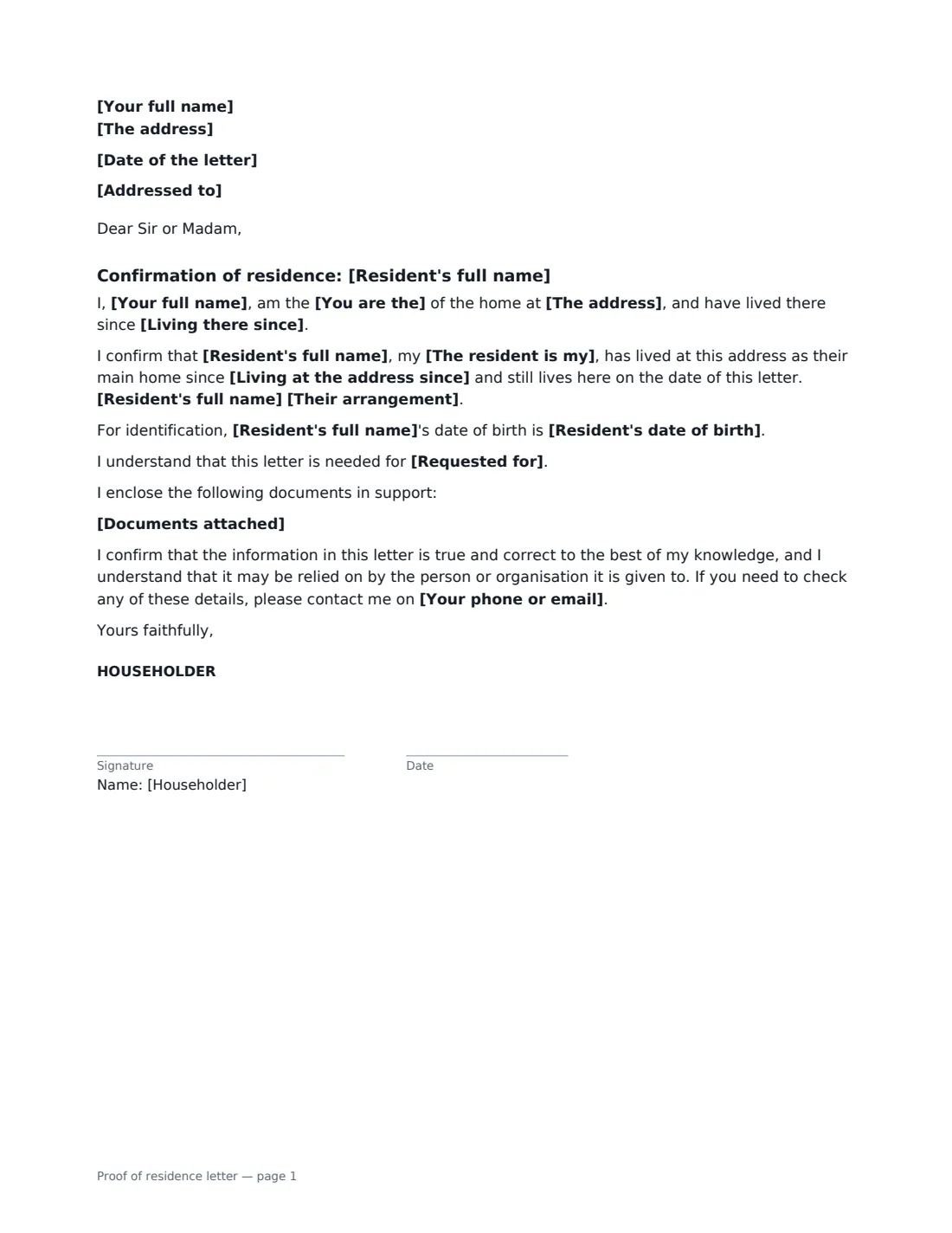
What is a proof of residence letter?
Banks, schools, doctors, employers and government offices often ask for proof of address. That's easy with a utility bill in your own name — but a young adult living at home, a partner who has just moved in, an elderly parent or a lodger often has nothing addressed to them. A proof of residence letter (sometimes called a letter of residency or householder letter) is the homeowner's or tenant's signed confirmation that the person lives there.
This template produces a one-page letter from you as the householder. It gives your name and the address, says whether you own or rent it (alone or jointly) and optionally since when, and confirms that the resident — named, with their relationship to you — has lived there as their main home since a given date and still does. It says whether they live as part of the household without rent, contribute to household costs, or rent a room from you. You can add their date of birth, what the letter is for, and a list of documents you enclose, such as your ID and a recent bill. It closes by confirming the information is true and giving your contact details for checks.
- Best for
- Bank accounts, school enrolment, doctor and council registration, ID applications
- Signed by
- The householder (owner or tenant)
- Confirms
- Who lives there, since when, and on what basis
- Length
- 1 page
When to Use a proof of residence letter
- An adult child living at home opening a first bank account
- Enrolling a child at a school that needs proof you live in its area
- A partner or parent who has moved in registering with a doctor or for voting
- A lodger or room renter who needs proof of address for a job or licence
- A relative staying long term who needs to update their ID or driving licence
What You Fill In
14 blanks, then the name and email of each person who signs: householder.
1 The letter
- Date of the letter*
- Addressed to
- Requested for
2 You (the householder)
- Your full name*
- The address*
- You are the* owner · joint owner · tenant · joint tenant
- Living there since
- Your phone or email*
3 The resident
- Resident's full name*
- Resident's date of birth
- The resident is my*
- Living at the address since*
- Their arrangement* lives here as a member of my household and does not pay rent · lives here as a member of my household and contributes to household costs · rents a room from me
4 Supporting documents
- Documents attached
5 Who signs
- Householder signature and date · The owner or tenant of the home, confirming that the resident lives there. Usually the person whose name is on the utility bills, lease or deed.
Using the proof of residence letter, step by step
1 Check what the recipient accepts
Ask whether a householder letter is enough, and what supporting documents they want — often your photo ID and a recent bill or bank statement in your name at the address. Enter the recipient, or leave it for "To whom it may concern".
2 Your details
Enter your name and the address, whether you are the owner, joint owner, tenant or joint tenant, and optionally how long you have lived there.
3 The resident's details
Enter the resident's full name, how they are related to you, the date they moved in and their arrangement — part of the household without rent, contributing to costs, or renting a room. Add their date of birth if it helps identify them.
4 Enclose, sign and send
List any documents you are attaching, sign the letter and send the signed PDF to the resident or the recipient.
Tips Before You Send It
- Only confirm what is true. The letter says the recipient may rely on it.
- Use the resident's full legal name, exactly as on their ID.
- If you rent your home, check your tenancy allows the resident to live there before describing them as renting a room.
- Some schools and government offices only accept particular documents, or ask for a signed statement in front of a witness or notary. Check before you rely on a letter.
Sign It Online In Minutes
- Fill in the blanks. Names, dates and amounts go straight into the agreement — the preview shows exactly where.
- Name who signs. Tick “This is me” for your own part. VergeHR builds the PDF with every signature, date box on the right line, and you can check or move anything before sending.
- Send it. Each signer gets a secure link and signs from any device — no account needed. The signed PDF, with an audit trail and a Certificate of Completion, is filed in Files and emailed to everyone.
Proof of residence letter: frequently asked questions
Who should sign a proof of residence letter?
The homeowner or the tenant named on the lease — usually the person whose name appears on the bills. The resident doesn't sign.
Will a bank or school accept it?
Many do, especially with a copy of your ID and a bill in your name, but each organisation sets its own rules. Some need official documents only, or a notarised statement. Ask first.
Can a landlord use this for a lodger?
Yes. Choose "rents a room from me" as the arrangement. It confirms residence only; the terms of the let belong in a room rental agreement.
Is an electronically signed letter valid?
Electronic signatures are generally valid in the US (ESIGN Act and UETA), the UK, the EU (eIDAS) and Canada, and VergeHR includes a Certificate of Completion showing who signed and when. A recipient can still ask for a wet-ink or notarised version.
Is this template free?
Yes. The template is free to use with the eSignature app in VergeHR.