

What is a sign-on bonus agreement?
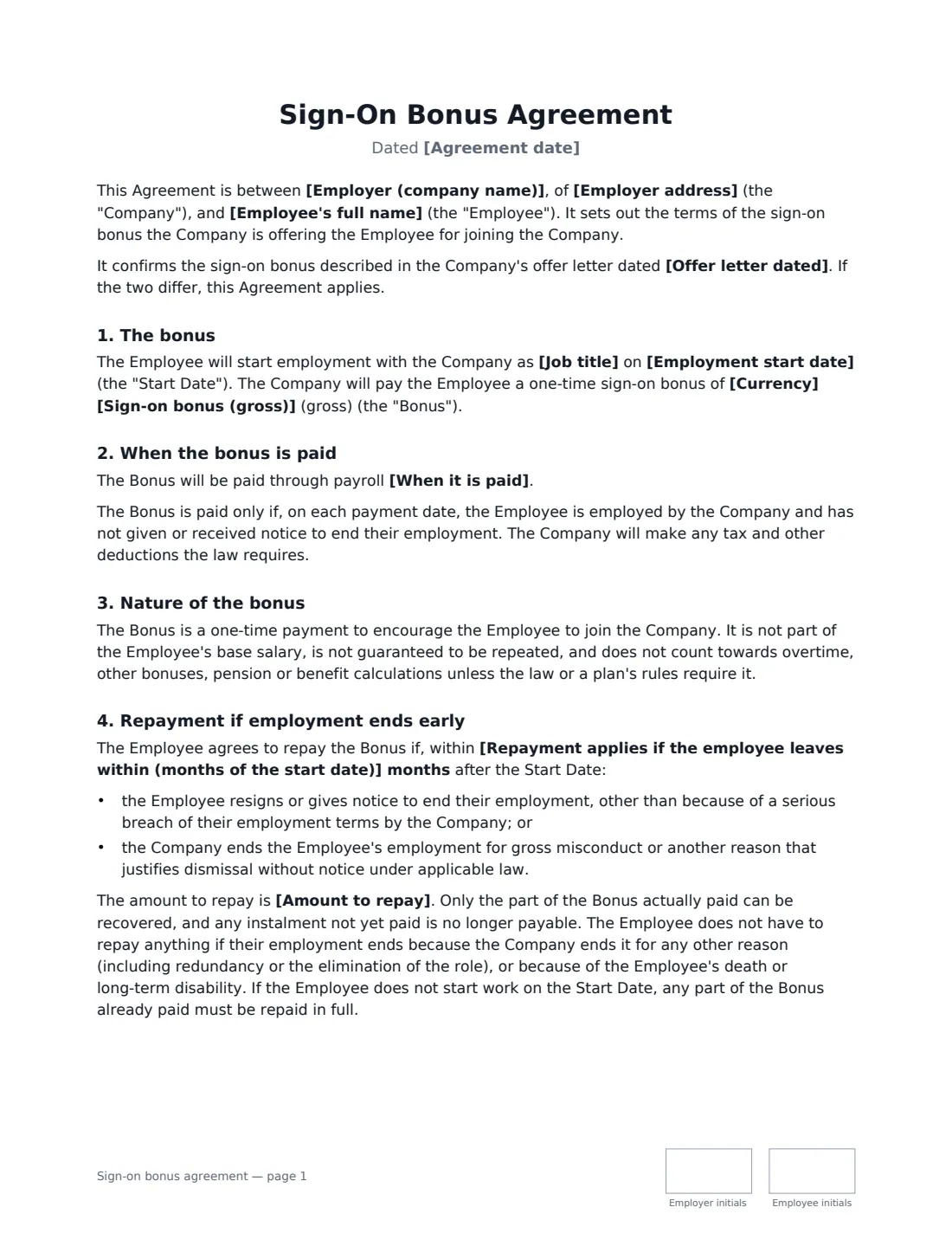
A sign-on bonus agreement records a one-time payment an employer makes to attract a new hire — to compensate for a bonus they are leaving behind, to win a candidate in a tight market, or simply to close an offer. The offer letter usually mentions the bonus; this agreement sets out exactly how it works.
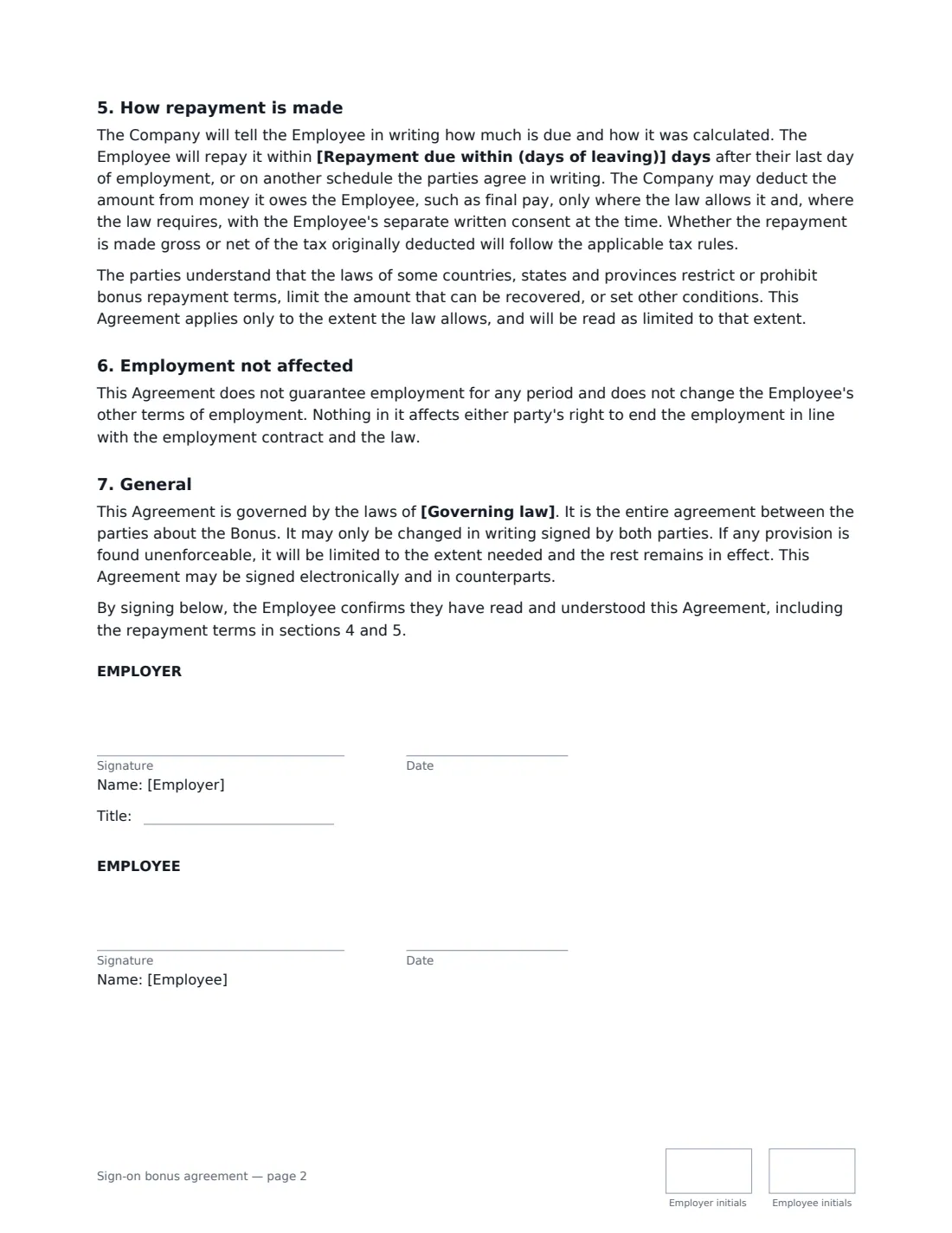
The template states the gross amount and whether it is paid with the first salary payment, on a set date or in instalments, and makes payment conditional on the employee still being employed and not under notice. It confirms the bonus is not part of base salary. If the employee resigns or is dismissed for gross misconduct within the number of months you choose, they repay the bonus — in full or pro rata, as you decide — with no repayment for redundancy, other dismissals, death or disability. Deductions from final pay are made only where the law allows, and the agreement notes that some places restrict bonus repayment terms.
- Best for
- New hires offered a joining, signing or hiring bonus
- Signed by
- The employer (with job title) and the new employee
- Payment timing
- First salary payment, a set date, or instalments
- Repayment
- You set the period and choose full or pro-rata repayment
- Length
- About 2 pages, initialled on every page
When to Use a sign-on bonus agreement
- Closing an offer with a candidate who has competing offers
- Compensating a new hire for an annual bonus they give up by leaving their current job
- Paying a hiring bonus in two instalments to encourage the employee to stay
- Confirming the bonus promised in an offer letter, with clear repayment terms
- Hiring for hard-to-fill roles such as nurses, engineers or skilled trades
What You Fill In
15 blanks, then the name and email of each person who signs: employer, employee.
1 The parties
- Agreement date*
- Employer (company name)*
- Employer address
- Employee's full name*
- Job title
- Employment start date*
2 The bonus
- Currency*
- Sign-on bonus (gross)*
- When it is paid* with the Employee's first regular salary payment after the Start Date · on the date set out below · in instalments, as set out below
- Payment date or instalment schedule
- Offer letter dated
3 Repayment
- Repayment applies if the employee leaves within (months of the start date)*
- Amount to repay* the Bonus paid, reduced by an equal amount for each full month of employment completed after the Start Date, so that nothing is repayable once the repayment period has ended · the full amount of the Bonus paid
- Repayment due within (days of leaving)*
4 The parties
- Governing law*
5 Who signs
- Employer signature and date, job title, initials on every page · Someone authorised to approve the bonus, such as HR or the hiring manager.
- Employee signature and date, initials on every page · The new hire receiving the bonus.
What the sign-on bonus agreement Covers
- The bonus
- When the bonus is paid
- Nature of the bonus
- Repayment if employment ends early
- How repayment is made
- Employment not affected
- General
Using the sign-on bonus agreement, step by step
1 Enter the bonus
Add the employee's name, job title, start date, currency and the gross bonus. If the bonus was promised in an offer letter, add the letter's date so the two documents are linked.
2 Choose when it is paid
Pick the first regular salary payment, a set date, or instalments. For a set date or instalments, describe the schedule — for example, half on the first payday and half after 90 days.
3 Set the repayment terms
Choose how many months after the start date repayment applies, whether the employee repays the full bonus or a pro-rata share, and how many days they have to repay after leaving.
4 Send it before the start date
Add the new hire's name and email and send. Both sides initial each page and sign. The signed agreement is filed in Files with the offer letter.
Tips Before You Send It
- Get the agreement signed before the employee starts — and ideally before they resign from their current job — so the repayment terms are clearly agreed in advance.
- Paying in instalments can do the job of a repayment clause without asking anyone to hand money back.
- Pro-rata repayment is easier to justify than full repayment late in the period.
- Tell the employee the bonus is usually taxed like salary, so the amount they receive will be less than the gross figure.
- Keep the repayment period short and proportionate to the bonus.
Sign It Online In Minutes
- Fill in the blanks. Names, dates and amounts go straight into the agreement — the preview shows exactly where.
- Name who signs. Tick “This is me” for your own part. VergeHR builds the PDF with every signature, date and initials box on the right line, and you can check or move anything before sending.
- Send it. Each signer gets a secure link and signs from any device — no account needed. The signed PDF, with an audit trail and a Certificate of Completion, is filed in Files and emailed to everyone.
Sign-on bonus agreement: frequently asked questions
Does a sign-on bonus have to be repaid if I leave?
Only if you agreed to repay it. Under this template, repayment applies if the employee resigns or is dismissed for gross misconduct within the period set in the agreement. It does not apply if the employer lets the employee go for other reasons, or on death or long-term disability. Local law may limit repayment further.
Is the repayment the gross or the net amount?
The agreement says only the part actually paid can be recovered, and that whether repayment is gross or net of the tax originally deducted follows the applicable tax rules. Payroll can confirm how that works where the employee is taxed.
Can the employer take the repayment from my final paycheck?
The template allows a deduction only where the law allows it and, where the law requires, with the employee's separate written consent at the time. Many places restrict deductions from final pay.
Is an e-signed bonus agreement legally valid?
Electronic signatures are generally valid for ordinary employment agreements like this in the US (ESIGN Act and UETA), the UK, the EU (eIDAS) and Canada. VergeHR adds an audit trail and a Certificate of Completion to the signed PDF.
Is the template free?
Yes. It is free with the eSignature app in VergeHR, and the employee signs without creating an account.