

What is a car detailing agreement?
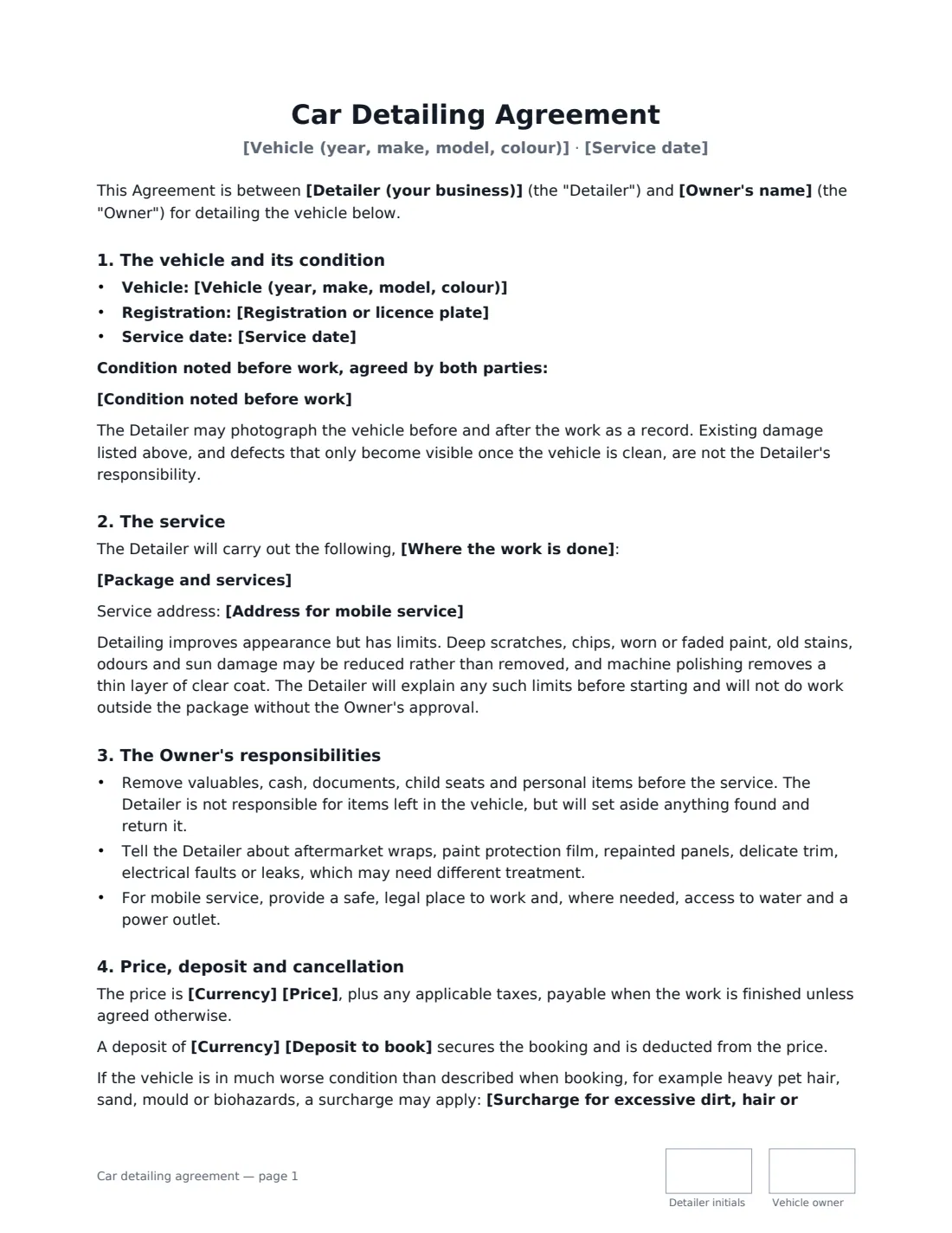
A car detailing agreement is the paperwork between a detailer and a vehicle owner for a full detail, paint correction, ceramic coating or interior deep clean. The most valuable part is the condition report: once a car is clean, scratches, chips and torn seats become obvious, and without a written record made before the work it's the detailer's word against the customer's.
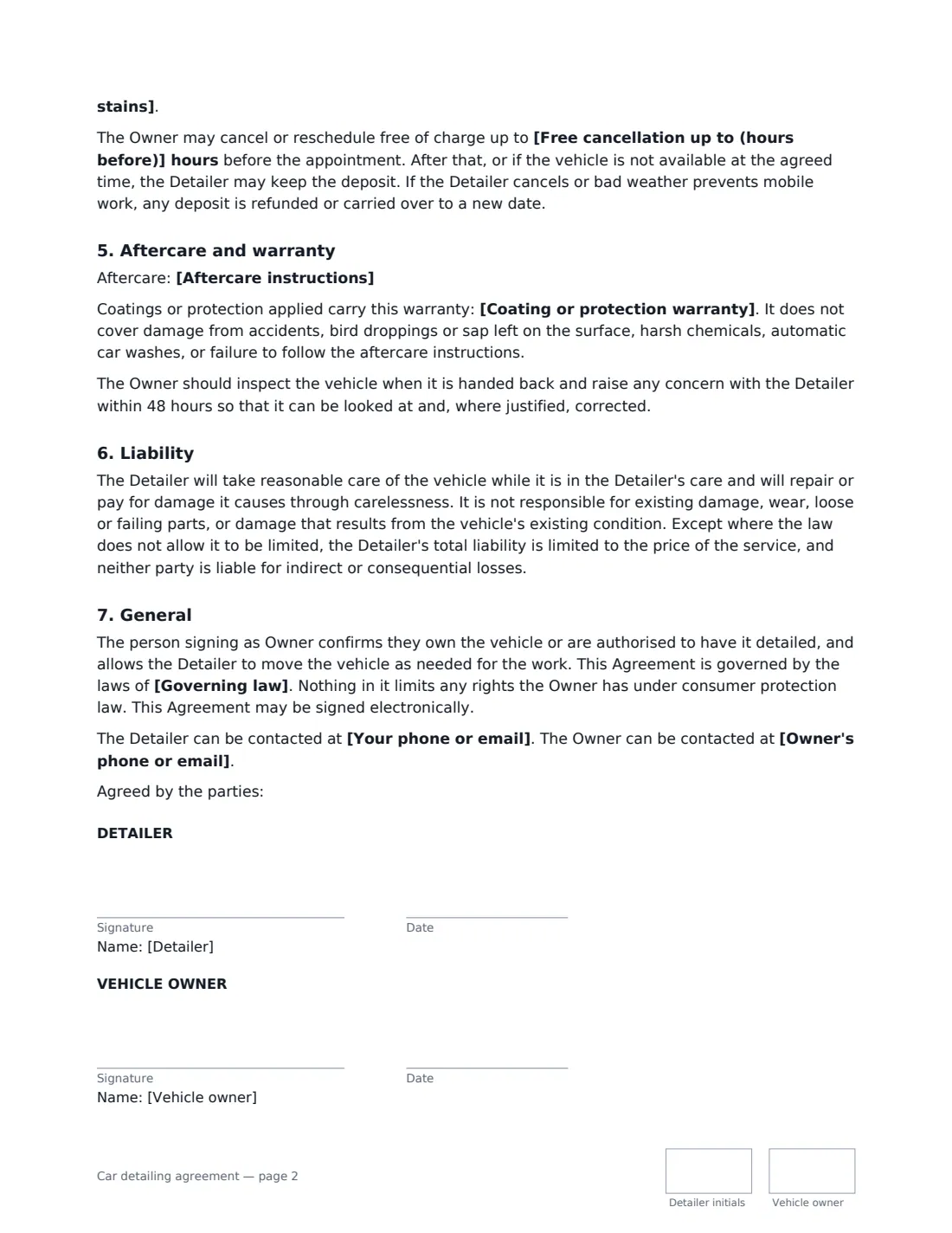
This template records the vehicle and its existing damage, the package and add-ons, and whether the work happens at your premises or as a mobile service. It sets honest expectations about what detailing can't fix, asks the owner to remove valuables and mention wraps, film or repainted panels, and covers the deposit, late cancellation, surcharges for extreme mess, aftercare instructions, an optional coating warranty with its exclusions, a 48-hour window to raise concerns, and a liability limit.
- Best for
- Mobile and shop-based detailers, ceramic coating and paint correction specialists
- Signed by
- The detailer and the vehicle owner (or a fleet manager)
- Key record
- Vehicle condition noted and agreed before work starts
- Length
- About 2 pages, initialled on every page
When to Use a car detailing agreement
- A full interior and exterior detail booked online
- Paint correction followed by a multi-year ceramic coating
- Mobile detailing at a customer's home or office car park
- Pre-sale detailing for a used car dealer or private seller
- Regular detailing for a small business fleet
What You Fill In
19 blanks, then the name and email of each person who signs: detailer, vehicle owner.
1 The parties
- Detailer (your business)*
- Your phone or email*
- Owner's name*
- Owner's phone or email*
2 The vehicle
- Vehicle (year, make, model, colour)*
- Registration or licence plate
- Condition noted before work*
3 The service
- Service date*
- Where the work is done* at the Detailer's premises · at the Owner's address (mobile service) · at another agreed location (mobile service)
- Address for mobile service
- Package and services*
4 Price and payment
- Currency*
- Price*
- Deposit to book
- Free cancellation up to (hours before)*
- Surcharge for excessive dirt, hair or stains
5 Aftercare
- Coating or protection warranty
- Aftercare instructions
- Governing law*
6 Who signs
- Detailer signature and date, initials on every page · The detailing business or detailer.
- Vehicle owner signature and date, initials on every page · The owner, or someone authorised by the owner, such as a fleet manager.
What the car detailing agreement Covers
- The vehicle and its condition
- The service
- The Owner's responsibilities
- Price, deposit and cancellation
- Aftercare and warranty
- Liability
- General
Using the car detailing agreement, step by step
1 Walk round the car
Enter the vehicle details, then note existing damage with the owner — scratches, chips, stains, tears, heavy pet hair. Take photos as well; the agreement says you may.
2 Describe the package
List the services and add-ons, pick where the work happens and, for mobile jobs, the address. The template already explains what detailing can reduce but not remove.
3 Set price and cancellation
Enter the price, an optional deposit, the free cancellation window in hours and any surcharge for extreme mess.
4 Add aftercare and send
Add aftercare instructions and, for coatings, the warranty and its maintenance conditions. Send it to the owner to sign before you start.
Tips Before You Send It
- Fill in the condition section with the owner present, ideally while you photograph the car — it's the clause that prevents most disputes.
- If you machine polish, tell customers it removes a thin layer of clear coat; the template mentions it, but a quick word helps too.
- Coating warranties usually depend on maintenance washes — put that condition in the warranty field so it prints in the contract.
- For mobile jobs, confirm water and power access in advance or bring your own.
Sign It Online In Minutes
- Fill in the blanks. Names, dates and amounts go straight into the agreement — the preview shows exactly where.
- Name who signs. Tick “This is me” for your own part. VergeHR builds the PDF with every signature, date and initials box on the right line, and you can check or move anything before sending.
- Send it. Each signer gets a secure link and signs from any device — no account needed. The signed PDF, with an audit trail and a Certificate of Completion, is filed in Files and emailed to everyone.
Car detailing agreement: frequently asked questions
Why include a condition report in a detailing contract?
Because cleaning reveals damage that was hidden under dirt. Recording it before work starts, agreed by both of you, means you aren't blamed for scratches, chips or tears that were already there.
What does the ceramic coating warranty cover?
Whatever you write in the warranty field, for example two years subject to regular maintenance washes. The template excludes accidents, bird droppings or sap left on the paint, harsh chemicals, automatic car washes and not following the aftercare.
Can I keep the deposit if the customer cancels late?
The agreement lets you keep the deposit when the owner cancels inside the free cancellation window or the car isn't available at the appointment. If you cancel or weather stops a mobile job, the deposit is refunded or moved to a new date.
Do customers need an account to sign?
No. They get a link by email, sign on their phone or computer, and VergeHR sends everyone the completed PDF with its audit trail.