

What is a conflict of interest disclosure?
A conflict of interest disclosure form is how an organisation finds out about the situations that could sway someone's judgement: shares in a supplier, a second role with a competitor, a relative who works for a customer, or generous hospitality from a bidder. Having a conflict is not wrongdoing; hiding it is. Companies use the form when people join and every year, and nonprofit boards often need one from every director or trustee.
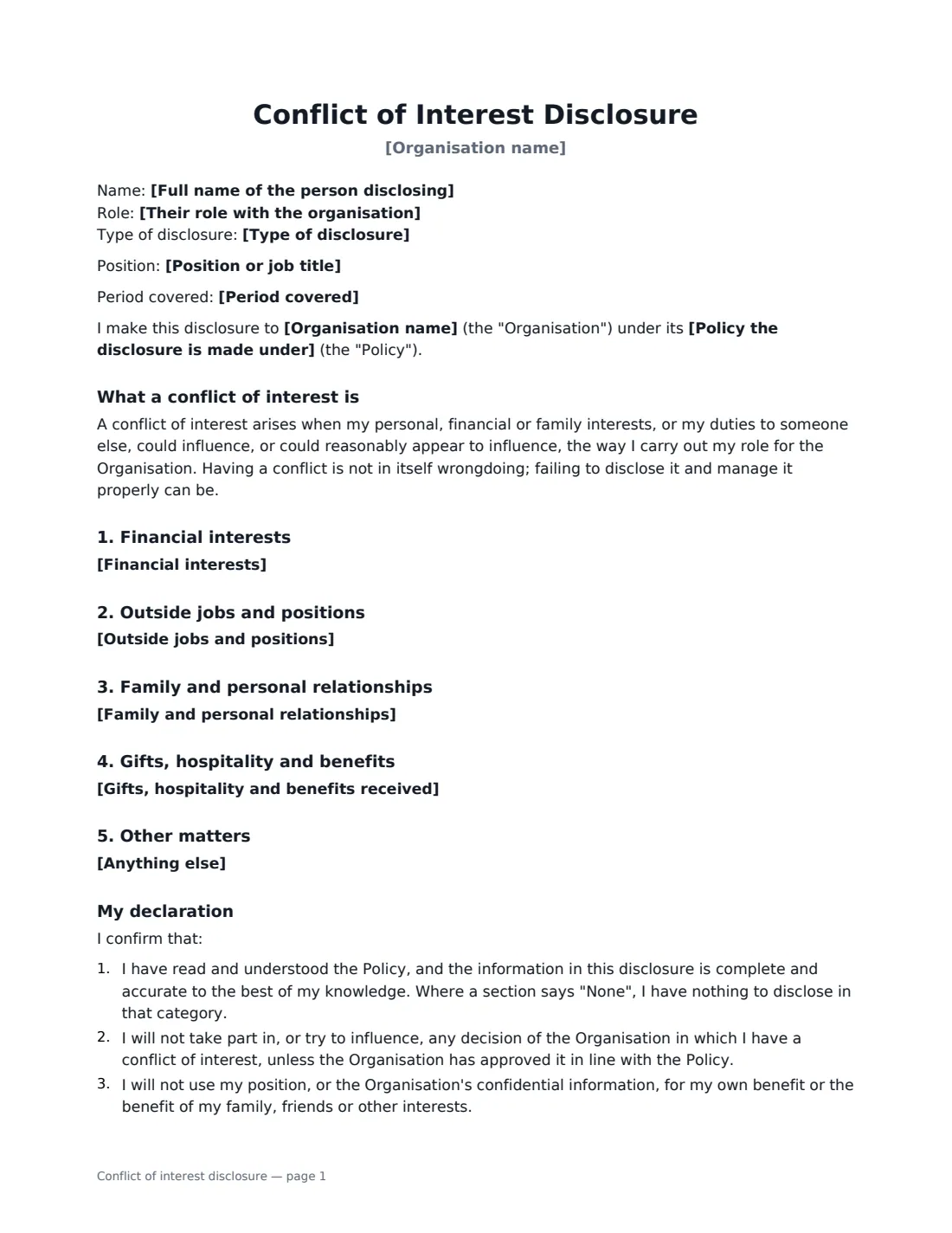
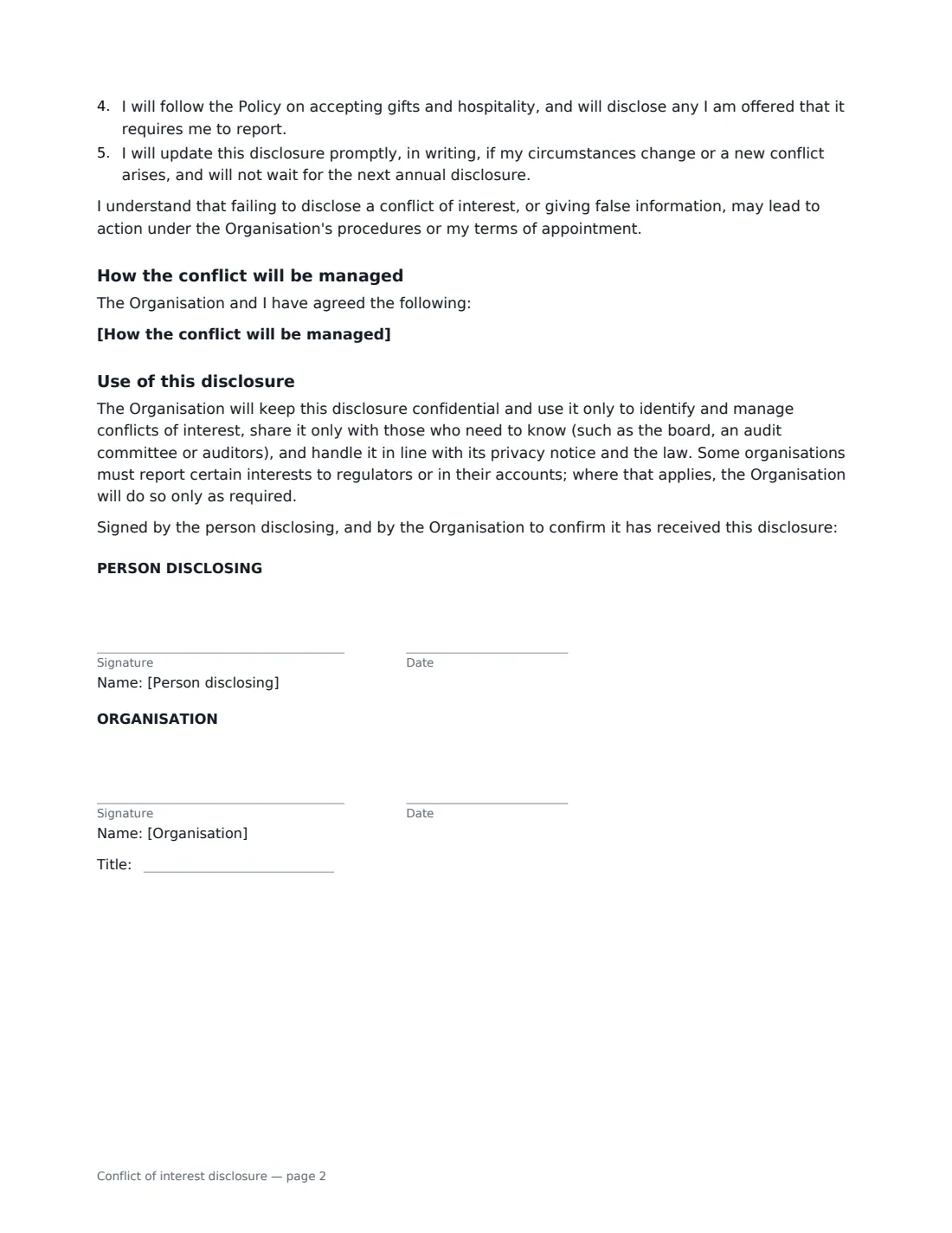
This form records the person's name, role (employee, director, trustee, officer, committee member, volunteer, contractor or adviser) and the type of disclosure: annual, on joining, or a new or changed interest. It then has five sections — financial interests, outside jobs and positions, family and personal relationships, gifts and hospitality, and anything else. A section left empty prints "None.", so the signed form is a clear nil return. The person declares that the disclosure is complete, that they will step back from decisions where they are conflicted, not use their position for personal benefit, follow the gifts rules and update the disclosure when things change. You can record how a conflict will be managed, and the organisation countersigns to confirm receipt.
- Best for
- Annual disclosures, new starters and board members, new or changed interests
- Signed by
- The person disclosing, then the organisation (with job title)
- Categories
- Financial interests, outside roles, relationships, gifts, other
- Nil return
- An empty section prints "None."
- Length
- About 2 pages
When to Use a conflict of interest disclosure
- Annual conflict of interest declarations for a nonprofit or company board
- New employees in purchasing, finance or other sensitive roles
- An employee whose partner starts working for a supplier or competitor
- Volunteers and committee members of a club, school or charity
- Recording the steps agreed to manage a known conflict, such as stepping back from a decision
What You Fill In
13 blanks, then the name and email of each person who signs: person disclosing, organisation.
1 The disclosure
- Organisation name*
- Full name of the person disclosing*
- Their role with the organisation* Employee · Director or board member · Trustee · Officer · Committee member · Volunteer · Contractor or adviser
- Position or job title
- Type of disclosure* Annual disclosure · Disclosure on joining · New or changed interest
- Period covered
- Policy the disclosure is made under
2 What is disclosed
- Financial interests
- Outside jobs and positions
- Family and personal relationships
- Gifts, hospitality and benefits received
- Anything else
3 The organisation's response
- How the conflict will be managed
4 Who signs
- Person disclosing signature and date · The employee, director, trustee or volunteer making the disclosure.
- Organisation signature and date, job title · The person who receives disclosures, such as the compliance officer, company secretary or board chair.
What the conflict of interest disclosure Covers
- What a conflict of interest is
- Financial interests
- Outside jobs and positions
- Family and personal relationships
- Gifts, hospitality and benefits
- Other matters
- My declaration
- How the conflict will be managed
- Use of this disclosure
Using the conflict of interest disclosure, step by step
1 Enter the details
Add the organisation, the person's name, their role and position, the type of disclosure and, for annual returns, the period covered. Name the policy the disclosure is made under.
2 Fill in what is disclosed
Fill in each category from what the person has told you — they check it before they sign. Leave a category empty and it prints "None.", which the person confirms in the declaration.
3 Record how conflicts are managed
If there is a conflict, describe what has been agreed — for example, that the person will not take part in decisions about a particular supplier and who will make them instead.
4 Send for signature
The person disclosing signs first; the compliance officer, company secretary or board chair countersigns. Each signed disclosure is filed in Files, making the annual round easy to track.
Tips Before You Send It
- Send the form to everyone in the group at the same time each year, and keep a list of who has signed.
- Ask people to include interests of close family members, not only their own.
- Give an example of the level of gift or hospitality your policy expects people to report.
- Do not treat a disclosed conflict as a problem — thank people for disclosing and agree practical steps.
- Ask for an updated form straight away when someone's circumstances change, not just at the next annual round.
Sign It Online In Minutes
- Fill in the blanks. Names, dates and amounts go straight into the agreement — the preview shows exactly where.
- Name who signs. Tick “This is me” for your own part. VergeHR builds the PDF with every signature, date box on the right line, and you can check or move anything before sending.
- Send it. Each signer gets a secure link and signs from any device — no account needed. The signed PDF, with an audit trail and a Certificate of Completion, is filed in Files and emailed to everyone.
Conflict of interest disclosure: frequently asked questions
Who should complete a conflict of interest disclosure?
Usually directors, trustees and officers, and employees in roles where outside interests could influence decisions, such as purchasing, finance, hiring and sales. Many organisations ask every employee or volunteer.
What if I have nothing to disclose?
Leave every category empty. Each prints "None.", and the declaration confirms that where a section says "None" the person has nothing to disclose in that category.
Who sees the disclosure?
The form says the organisation keeps it confidential, uses it only to identify and manage conflicts, shares it only with those who need to know (such as the board, an audit committee or auditors) and handles it in line with its privacy notice and the law.
Is an electronically signed disclosure valid?
Electronic signatures are generally valid for ordinary documents like this in the US (ESIGN Act and UETA), the UK, the EU (eIDAS) and Canada. VergeHR keeps an audit trail and a Certificate of Completion showing who signed and when.
Is this form free?
Yes. It is free with the eSignature app in VergeHR, and the person disclosing signs without an account.