

What is a outside employment approval?
Many employees have a second job, freelance clients, a small business or a board seat. Most employers are happy with that as long as it does not eat into working time, compete with the business or put confidential information at risk. An outside employment approval form records what the employee is doing and the conditions on which it is approved, so neither side is surprised later.
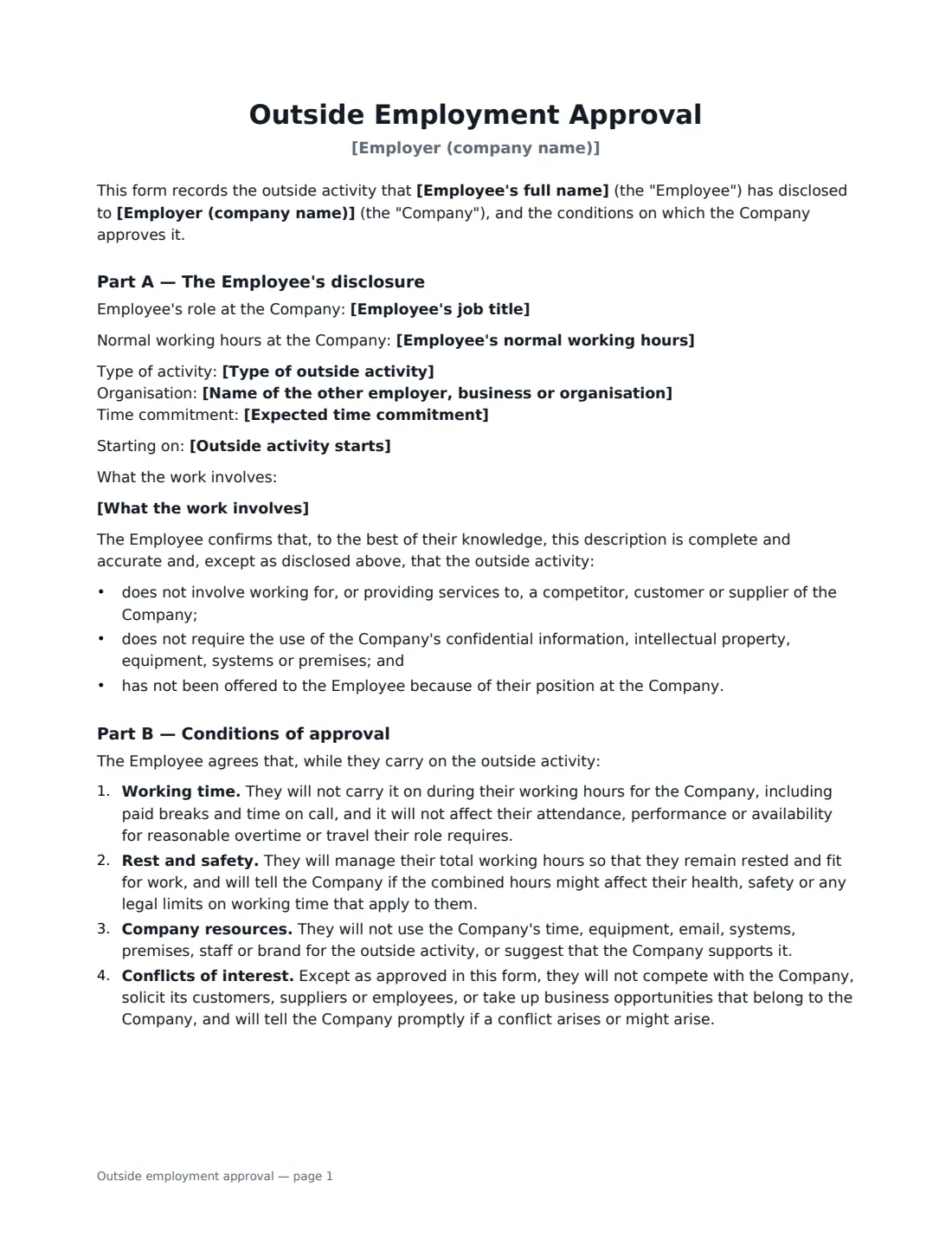
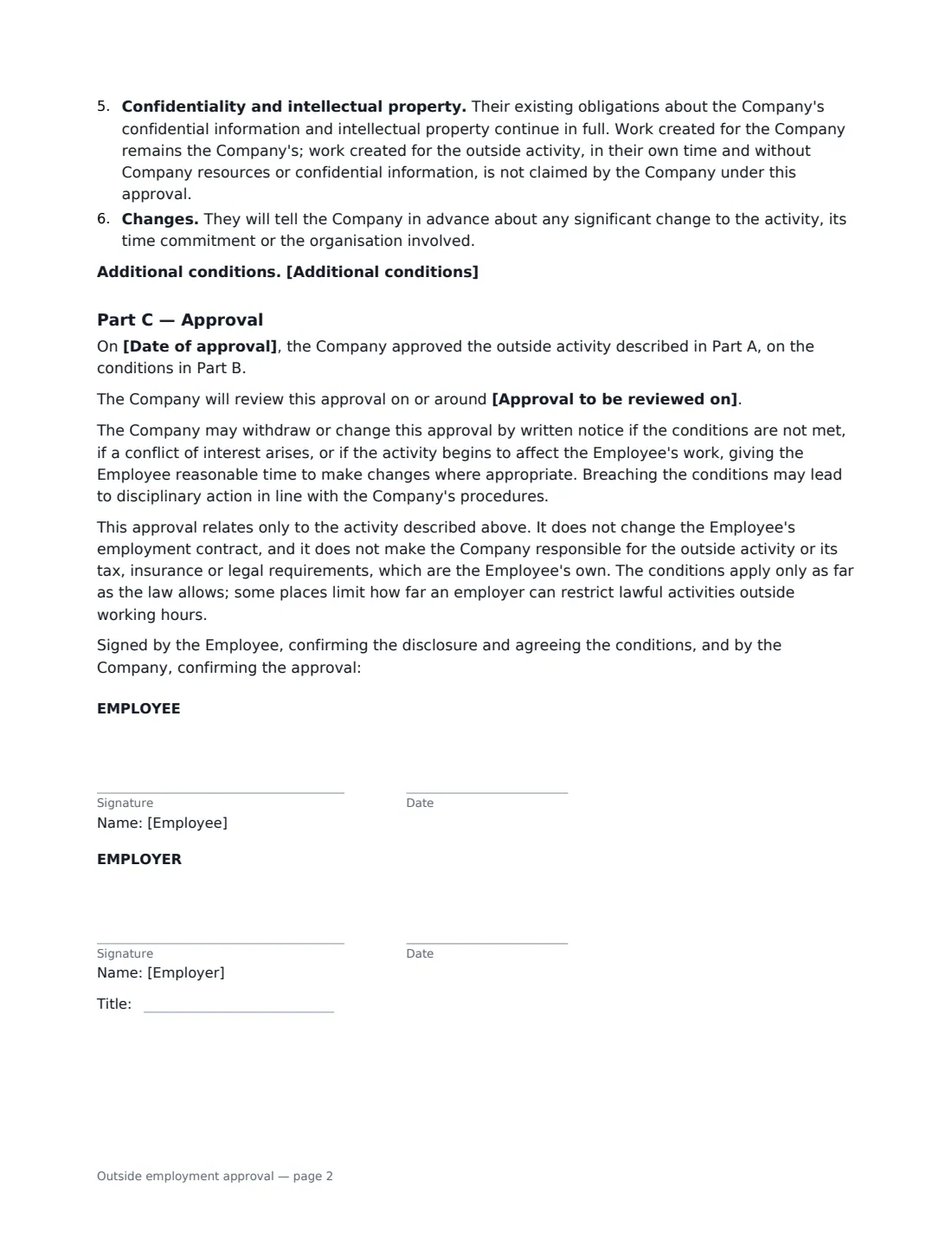
Part A is the employee's disclosure: the type of activity, the organisation, what the work involves, the expected time commitment and start date, plus confirmations that it does not involve a competitor, customer or supplier or use company resources. Part B sets the standard conditions — no outside work in company time, managing total hours so the employee stays rested and fit for work, no use of company equipment or brand, no competing or soliciting, confidentiality and intellectual property, and telling the company about changes — and you can add your own. Part C records the approval, an optional review date, and how the approval can be withdrawn. The form notes that some places limit how far an employer can restrict lawful activities outside working hours.
- Best for
- Second jobs, side businesses, freelance work, board and advisory roles
- Signed by
- The employee, then the employer (with job title)
- Structure
- Part A disclosure, Part B conditions, Part C approval
- Length
- About 2 pages
When to Use a outside employment approval
- An employee wants to take a weekend job with another employer
- A designer or developer starts freelancing for their own clients
- An employee launches a small online business or shop
- A manager is invited to join a charity board or a start-up's advisory board
- Your handbook or contract requires approval before taking on other work
What You Fill In
12 blanks, then the name and email of each person who signs: employee, employer.
1 The parties
- Employer (company name)*
- Employee's full name*
- Employee's job title
- Employee's normal working hours
2 The outside activity
- Type of outside activity* a second job with another employer · self-employment or a side business · freelance or consulting work · a board, trustee or advisory role · another outside activity
- Name of the other employer, business or organisation*
- What the work involves*
- Expected time commitment*
- Outside activity starts
3 The decision
- Additional conditions
- Approval to be reviewed on
- Date of approval*
4 Who signs
- Employee signature and date · The employee asking to take on the outside work.
- Employer signature and date, job title · The manager or HR person approving it.
What the outside employment approval Covers
- Part A — The Employee's disclosure
- Part B — Conditions of approval
- Part C — Approval
Using the outside employment approval, step by step
1 Record the disclosure
Enter the employee's name, role and normal hours, then the type of activity, the organisation, what the work involves and the expected time commitment. Fill this in from what the employee told you — they confirm it is accurate when they sign.
2 Add any extra conditions
The standard conditions cover working time, rest, company resources, conflicts, confidentiality and changes. Add anything specific, such as not working for current clients or not using the company's name in marketing.
3 Record the approval
Enter the approval date and, if you want to check in, a review date.
4 Send it to the employee
The employee signs first, confirming the disclosure and conditions, and you countersign to confirm the approval. The signed form is filed in Files with their HR records.
Tips Before You Send It
- Ask about the time commitment in hours per week — "evenings" can mean two hours or twenty.
- Watch for combined working hours in safety-critical roles such as driving, healthcare or machinery operation.
- Set a review date for new or growing businesses, when the time commitment may change.
- If the outside activity involves a customer, supplier or competitor, use the conflict of interest disclosure as well.
- Keep conditions tied to real business interests; blanket bans on lawful outside work may not be enforceable.
Sign It Online In Minutes
- Fill in the blanks. Names, dates and amounts go straight into the agreement — the preview shows exactly where.
- Name who signs. Tick “This is me” for your own part. VergeHR builds the PDF with every signature, date box on the right line, and you can check or move anything before sending.
- Send it. Each signer gets a secure link and signs from any device — no account needed. The signed PDF, with an audit trail and a Certificate of Completion, is filed in Files and emailed to everyone.
Outside employment approval: frequently asked questions
Can an employer stop an employee from having a second job?
It depends on the employment contract and local law. Employers can usually protect legitimate interests such as working time, confidentiality and avoiding competition, but some places limit restrictions on lawful activities outside working hours. This form approves an activity on conditions rather than banning it.
Who owns work the employee creates for their side business?
Under the form, work created for the company remains the company's. Work created for the outside activity, in the employee's own time and without company resources or confidential information, is not claimed by the company under the approval. The employee's existing confidentiality and IP obligations still apply.
Can the approval be withdrawn?
Yes. The company can withdraw or change it by written notice if the conditions are not met, a conflict arises or the activity starts affecting the employee's work, giving reasonable time to make changes where appropriate.
Is an e-signed approval form valid?
Electronic signatures are generally valid for ordinary workplace documents like this in the US (ESIGN Act and UETA), the UK, the EU (eIDAS) and Canada. VergeHR keeps an audit trail and a Certificate of Completion with the signed PDF.
Is this form free?
Yes. It is free with the eSignature app in VergeHR, and the employee signs without an account.