

What is a exit interview form?
An exit interview form records the feedback a departing employee gives about their job, their manager, pay, workload and culture, and their real reasons for leaving. Collected consistently, those answers show patterns — a team with high turnover, a pay band that's fallen behind, a manager who needs support — that you rarely hear while people are still employed.
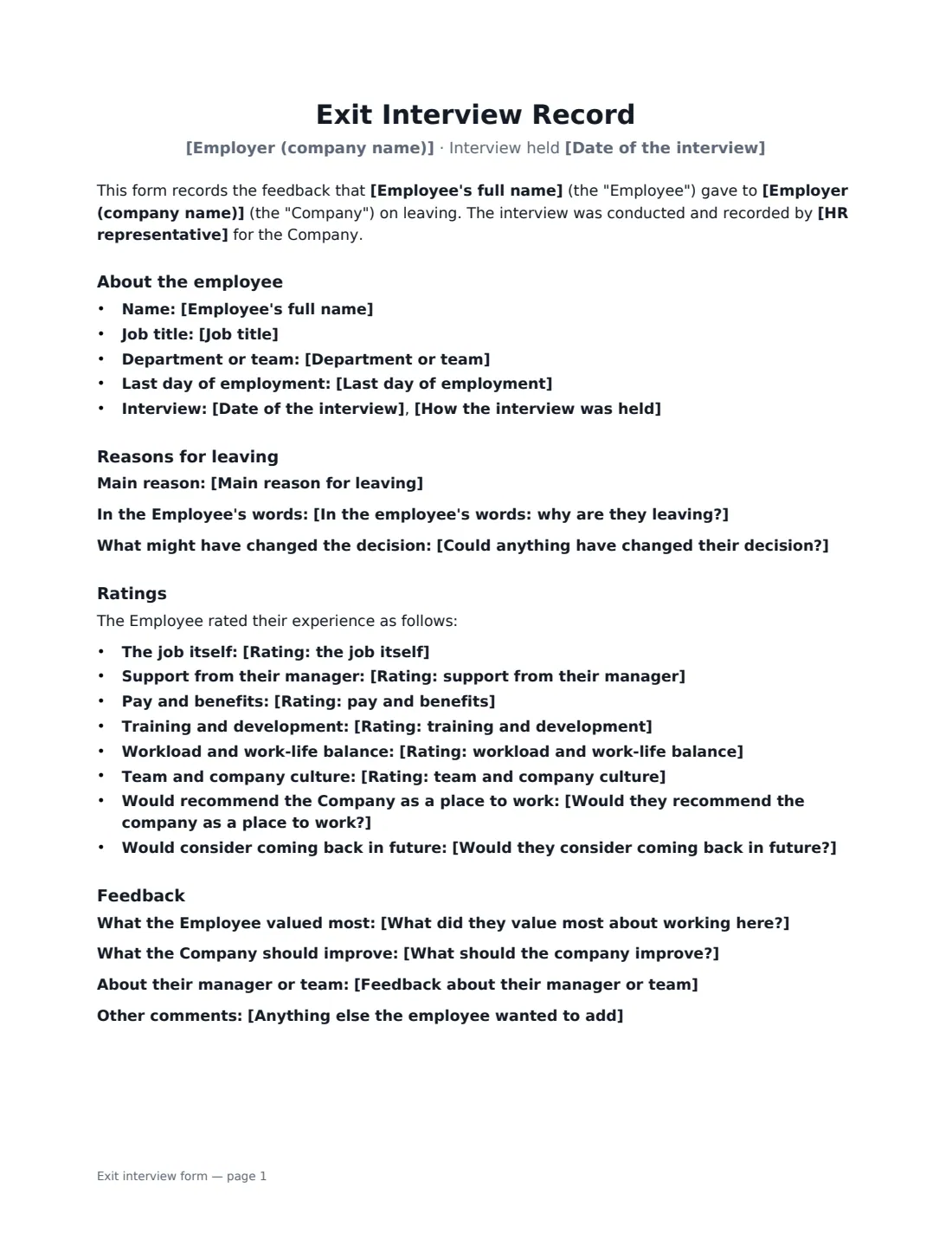
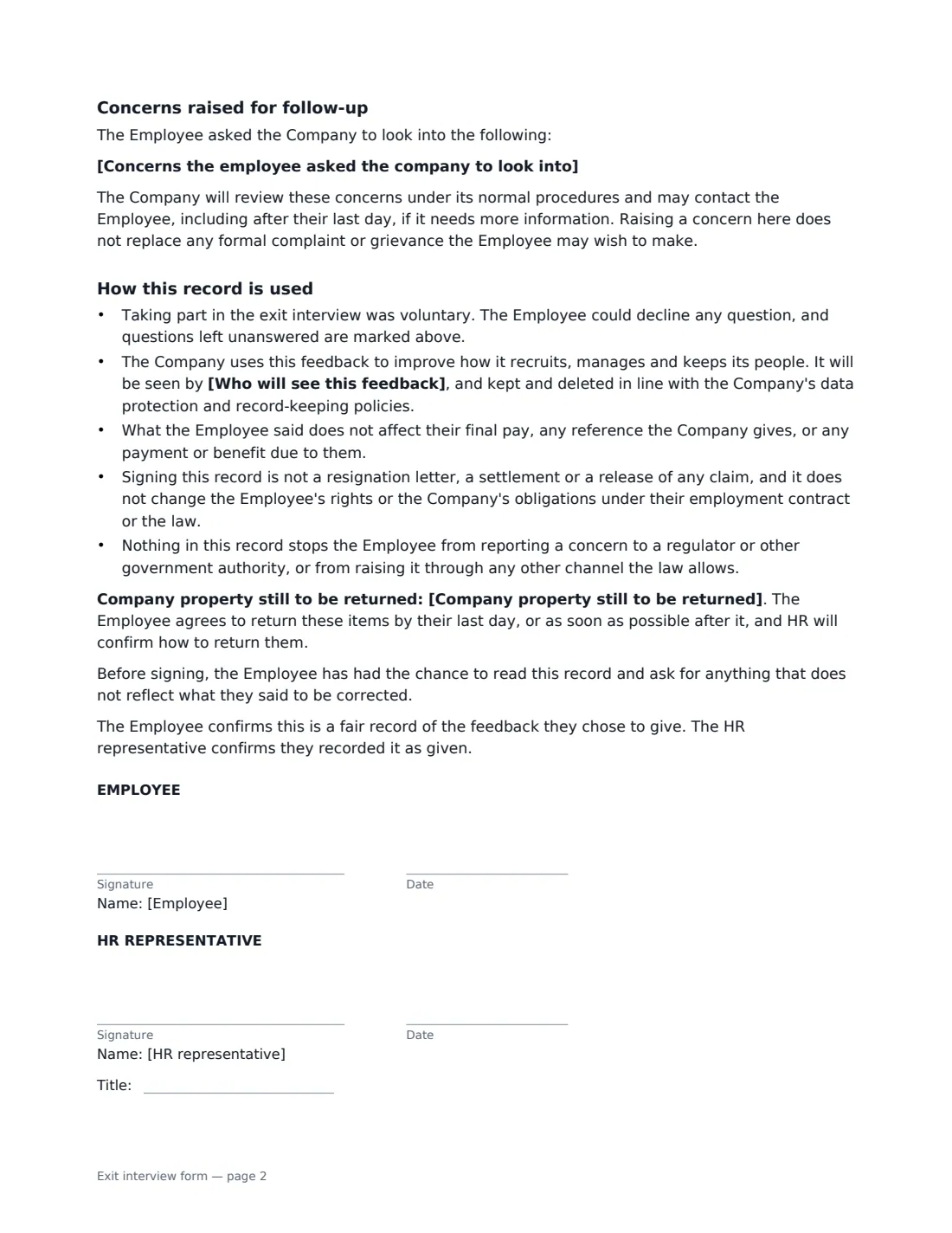
This form is filled in by HR from the interview (or from a written questionnaire) and then signed by the employee, confirming it fairly records what they chose to say. It covers the main reason for leaving and their own explanation, eight quick ratings, open feedback, any concerns they asked you to look into, and who will see the feedback. It also states plainly that taking part was voluntary, that answers do not affect final pay or references, and that signing is not a release of any claim.
- Best for
- Resignations, retirements and the end of fixed-term contracts
- Signed by
- The departing employee and the HR representative who held the interview
- Ratings
- Six areas from Very good to Very poor, plus would-recommend and would-return
- Length
- About 2 pages
When to Use a exit interview form
- An employee has resigned and you hold an exit interview in their last week
- You send a written exit questionnaire and want the answers signed off
- A long-serving employee is retiring and you want to capture what worked
- A fixed-term or seasonal contract is ending and you want feedback before people go
- A departing employee raises a concern you need to record and follow up
What You Fill In
25 blanks, then the name and email of each person who signs: employee, hr representative.
1 The interview
- Employer (company name)*
- Employee's full name*
- Job title*
- Department or team
- Last day of employment*
- Date of the interview*
- How the interview was held* in person · by video call · by phone · in writing (questionnaire)
2 Reasons for leaving
- Main reason for leaving* A new job elsewhere · Career change · Pay or benefits · Relationship with manager or team · Workload or working hours · Lack of progression or development · Relocation · Personal or family reasons
- In the employee's words: why are they leaving?
- Could anything have changed their decision?
3 Ratings
- Rating: the job itself* Very good · Good · Fair · Poor · Very poor · Not discussed
- Rating: support from their manager* Very good · Good · Fair · Poor · Very poor · Not discussed
- Rating: pay and benefits* Very good · Good · Fair · Poor · Very poor · Not discussed
- Rating: training and development* Very good · Good · Fair · Poor · Very poor · Not discussed
- Rating: workload and work-life balance* Very good · Good · Fair · Poor · Very poor · Not discussed
- Rating: team and company culture* Very good · Good · Fair · Poor · Very poor · Not discussed
- Would they recommend the company as a place to work?* Yes · Maybe · No · Prefer not to say
- Would they consider coming back in future?* Yes · Maybe · No · Prefer not to say
4 Feedback
- What did they value most about working here?
- What should the company improve?
- Feedback about their manager or team
- Anything else the employee wanted to add
- Concerns the employee asked the company to look into
5 Handling the record
- Who will see this feedback* HR, with themes shared with management without the employee's name · HR and the employee's manager · HR only
- Company property still to be returned
6 Who signs
- Employee signature and date · The person who is leaving — they confirm the record reflects what they said.
- HR representative signature and date, job title · Whoever held the interview and recorded the answers.
What the exit interview form Covers
- About the employee
- Reasons for leaving
- Ratings
- Feedback
- Concerns raised for follow-up
- How this record is used
Using the exit interview form, step by step
1 Hold the interview first
Meet the employee in person, by video or by phone, or send them the questions in writing. Tell them before you start that it is voluntary and who will read their feedback — the form's "Who will see this feedback" choice prints in the record.
2 Record their answers
Choose the main reason for leaving and type their explanation in their own words. Set each rating, and fill in the open questions. Leave a question empty if they chose not to answer: the form prints "not answered" rather than an awkward blank.
3 Note any concerns
If the employee raised something that needs follow-up — conduct, safety, pay — put it in the concerns box. A separate section then appears, saying you will review it under your normal procedures.
4 Send it for signature
Add the employee's name and email and your own as HR representative. The employee reads the record and signs to confirm it is fair; if something is wrong, they can ask you to correct it before signing. The signed copy is filed in Files.
Tips Before You Send It
- Hold the interview with someone other than the employee's direct manager — people are more candid.
- Send the form within a day or two of the interview, while it is fresh for both of you.
- Don't pressure anyone to sign. The form is useful even if some questions are left unanswered.
- Treat a serious concern raised in an exit interview like any other complaint: investigate it, don't just file it.
- Look at the ratings across all leavers every quarter — single interviews are anecdotes, trends are evidence.
Sign It Online In Minutes
- Fill in the blanks. Names, dates and amounts go straight into the agreement — the preview shows exactly where.
- Name who signs. Tick “This is me” for your own part. VergeHR builds the PDF with every signature, date box on the right line, and you can check or move anything before sending.
- Send it. Each signer gets a secure link and signs from any device — no account needed. The signed PDF, with an audit trail and a Certificate of Completion, is filed in Files and emailed to everyone.
Exit interview form: frequently asked questions
Does the employee have to take part in an exit interview?
Usually not, and this form says taking part was voluntary and that any question could be declined. Unanswered questions are marked as such in the record.
Does signing the form waive the employee's rights?
No. The form states that signing it is not a resignation letter, a settlement or a release of any claim, and that nothing in it stops the employee from reporting a concern to a regulator or government authority. If you are agreeing severance in exchange for a release, use a separation agreement instead.
Who should see exit interview feedback?
You choose: HR only, HR and the employee's manager, or HR with themes shared with management without the employee's name. The choice is printed in the record so the employee knows before signing.
Can an employee sign this electronically?
Yes. In most countries, including the US (ESIGN Act and UETA), the UK, the EU (eIDAS) and Canada, an electronic signature is generally valid for an ordinary employment document like this. VergeHR keeps an audit trail and a Certificate of Completion with the signed PDF as evidence of who signed and when.
Is this template free?
Yes. The template is free to use with the eSignature app in VergeHR. Signers don't need a VergeHR login.