

What is a liability waiver?
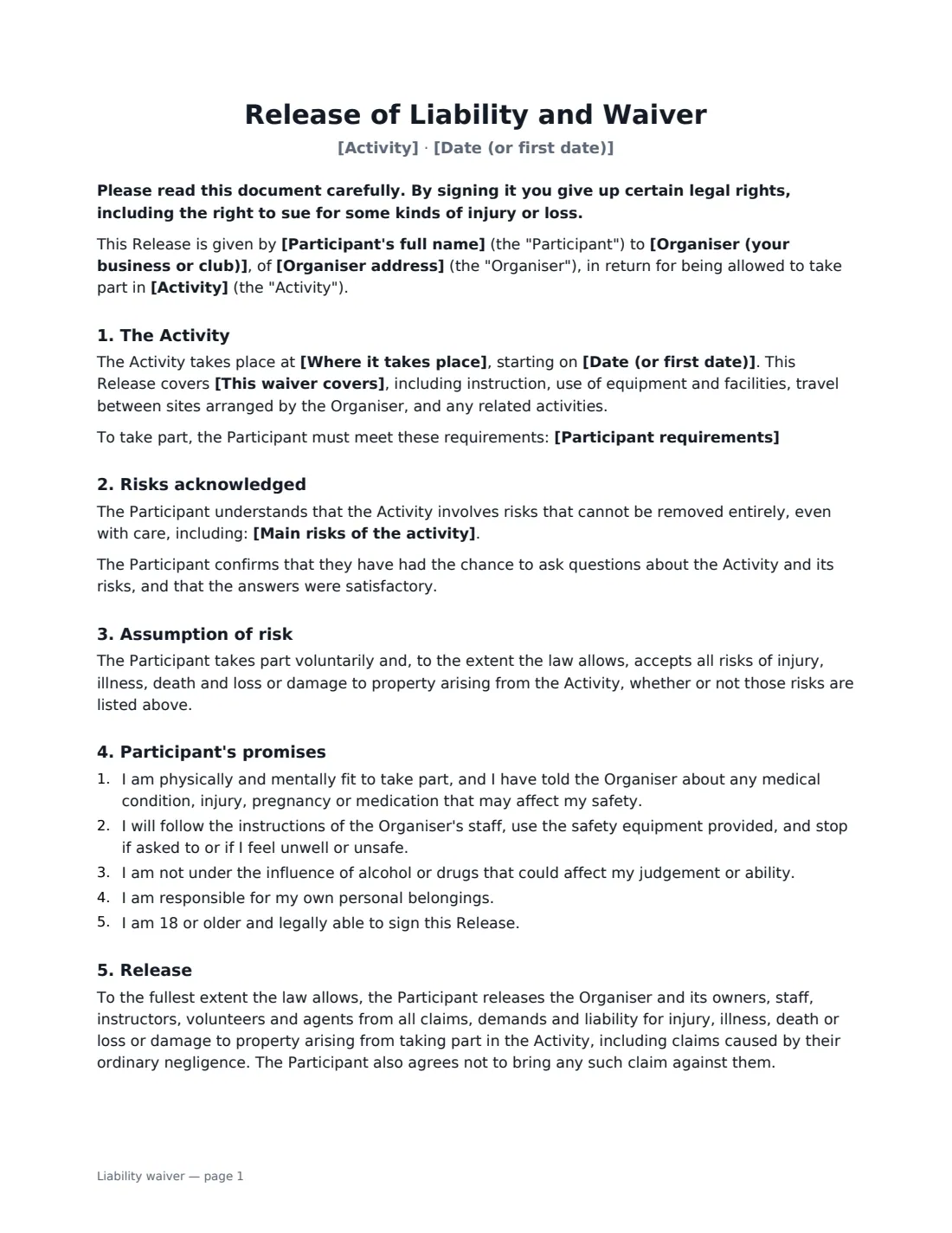
A liability waiver (also called a release of liability) is the form an adult signs before taking part in an activity that carries some risk: a kayaking tour, a climbing session, a fitness class, a trail run, a paintball game or a community sports day. The participant confirms they were told about the risks, accepts them, promises to follow instructions, and agrees not to bring certain claims against the organiser if something goes wrong.
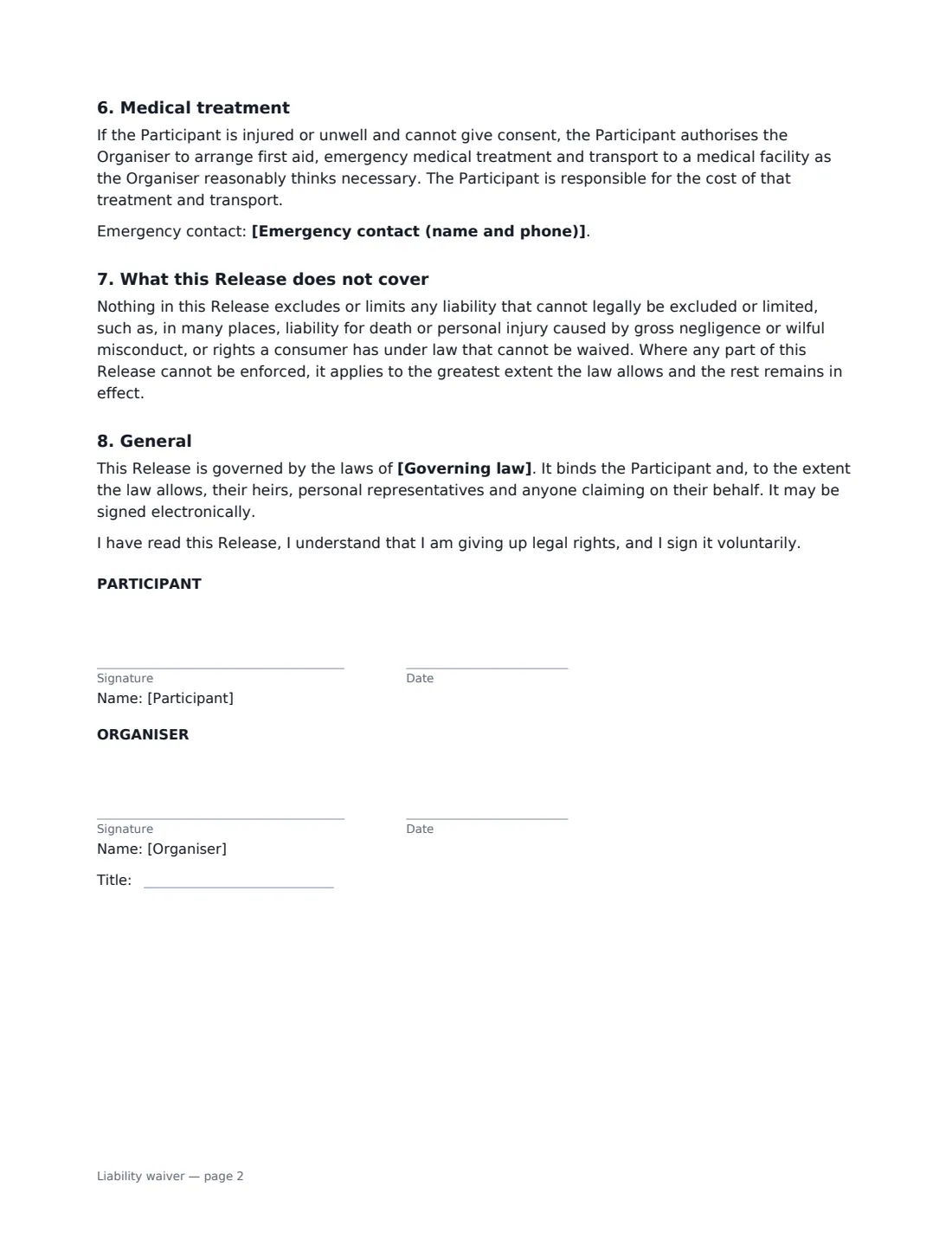
This template sets out the activity, where and when it happens and how long the waiver covers (one date, 12 months of sessions, or until withdrawn in writing). It lists the specific risks you describe, any requirements such as being able to swim, the participant's promises about fitness and conduct, the release itself, permission to arrange emergency medical treatment (at the participant's cost), an optional emergency contact, and a clear statement of what the release cannot cover. The participant and the organiser both sign — the organiser with a job title — and the signed copy is filed in Files.
- Best for
- Gyms, studios, tour operators, sports clubs, adventure activities, events
- Signed by
- The adult participant and the organiser
- Covers
- One date, 12 months of sessions, or all sessions until withdrawn — you choose
- Participants under 18
- Use the parental consent template instead
- Length
- 2 pages
When to Use a liability waiver
- A tour operator running guided kayaking, hiking or cycling trips
- A gym, climbing wall or martial arts studio signing up new members
- A yoga, dance or fitness instructor running classes or retreats
- A sports club or league registering adult players for the season
- An event organiser hosting an obstacle race, fun run or team-building day
- A business renting out equipment such as bikes, paddleboards or skis with instruction
What You Fill In
11 blanks, then the name and email of each person who signs: participant, organiser.
1 The organiser
- Organiser (your business or club)*
- Organiser address
2 The participant
- Participant's full name*
- Emergency contact (name and phone)
3 The activity
- Activity*
- Where it takes place
- Date (or first date)*
- This waiver covers* this activity on the date above · all sessions of this activity for 12 months · all sessions of this activity until withdrawn in writing
4 Risks
- Main risks of the activity*
- Participant requirements
5 Other terms
- Governing law*
6 Who signs
- Participant signature and date · The adult taking part. For someone under 18, use the parental consent template instead.
- Organiser signature and date, job title
What the liability waiver Covers
- The Activity
- Risks acknowledged
- Assumption of risk
- Participant's promises
- Release
- Medical treatment
- What this Release does not cover
- General
Using the liability waiver, step by step
1 Describe the activity
Name the activity the way a participant would recognise it — "guided sea kayaking tour" rather than "water sports" — and add the location and the date. Then choose what the waiver covers: just this date, every session for 12 months, or every session until the participant withdraws in writing, which suits memberships and regular classes.
2 List the real risks
The template starts you with common risks such as falls, collisions, strains, weather and equipment failure. Edit them to match your activity. A participant can only accept a risk they were told about, so specific beats generic: "capsizing and cold-water immersion" says far more than "water hazards".
3 Add requirements and the governing law
If taking part needs a minimum ability or kit — swimming 50 metres, closed-toe shoes, wearing the helmet provided — add it as a requirement. Enter the country, state or province whose law applies, normally where the activity takes place.
4 Send it before the activity
Enter the participant's name and, if you have it, their emergency contact — leave it empty and the form prints a blank line instead. Add their email and send. They can sign on their phone at booking or on arrival, and both of you get the signed PDF. Your copy is filed in VergeHR Files, so you can find it again if a question comes up later.
Tips Before You Send It
- Get the waiver signed before the participant starts, not afterwards — ideally when they book, so they have time to read it.
- Keep your safety briefing consistent with the risks listed in the waiver. The waiver works best alongside good safety practice, not instead of it.
- A waiver does not replace insurance. Check that your liability insurance covers the activity and ask your insurer whether they expect particular wording.
- Whether a waiver can release claims for negligence differs a lot between countries and states, and some places limit waivers for consumers. Have a local lawyer check the wording before you rely on it.
- For anyone under 18, use the parental consent template, signed by a parent or legal guardian.
Sign It Online In Minutes
- Fill in the blanks. Names, dates and amounts go straight into the agreement — the preview shows exactly where.
- Name who signs. Tick “This is me” for your own part. VergeHR builds the PDF with every signature, date box on the right line, and you can check or move anything before sending.
- Send it. Each signer gets a secure link and signs from any device — no account needed. The signed PDF, with an audit trail and a Certificate of Completion, is filed in Files and emailed to everyone.
Liability waiver: frequently asked questions
Is a liability waiver enforceable?
It depends on where you are and what happened. Many places allow an adult to accept the risks of an activity and release claims for ordinary negligence, but almost none allow a release for gross negligence or wilful misconduct, and some restrict waivers in consumer contracts. The template says the release applies only to the extent the law allows and that the rest stays in effect if one part cannot be enforced, and it expressly does not try to exclude liability the law does not allow to be excluded. It is not a guarantee of protection — take local legal advice.
Can a parent sign this waiver for a child?
This template is for adult participants — they confirm they are 18 or older. For a child, use the parental consent template, which a parent or legal guardian signs and which also records medical and dietary needs, an emergency contact, consent to emergency treatment and a photo choice. Note that it is a permission form, not a release of liability.
Do I need a new waiver every time someone comes back?
Not necessarily. Choose "all sessions of this activity for 12 months" or "until withdrawn in writing" and one signed waiver covers repeat visits. If the activity or its risks change significantly, ask participants to sign an updated waiver.
Is a waiver signed electronically valid?
In the US (ESIGN Act and UETA), the UK, the EU (eIDAS) and Canada, electronic signatures are generally valid for ordinary agreements like a waiver. VergeHR keeps an audit trail and a Certificate of Completion with the signed PDF showing who signed and when.
Can I change the wording?
You fill in the activity, risks, requirements, coverage and governing law. If you need different clauses, draft your own waiver and upload it to VergeHR eSignature; you can still place the signature boxes in the editor.
Is this template free?
Yes. The template is free to use with the eSignature app in VergeHR. Participants don't need a VergeHR login to sign.