

What is a parental consent for a minor?
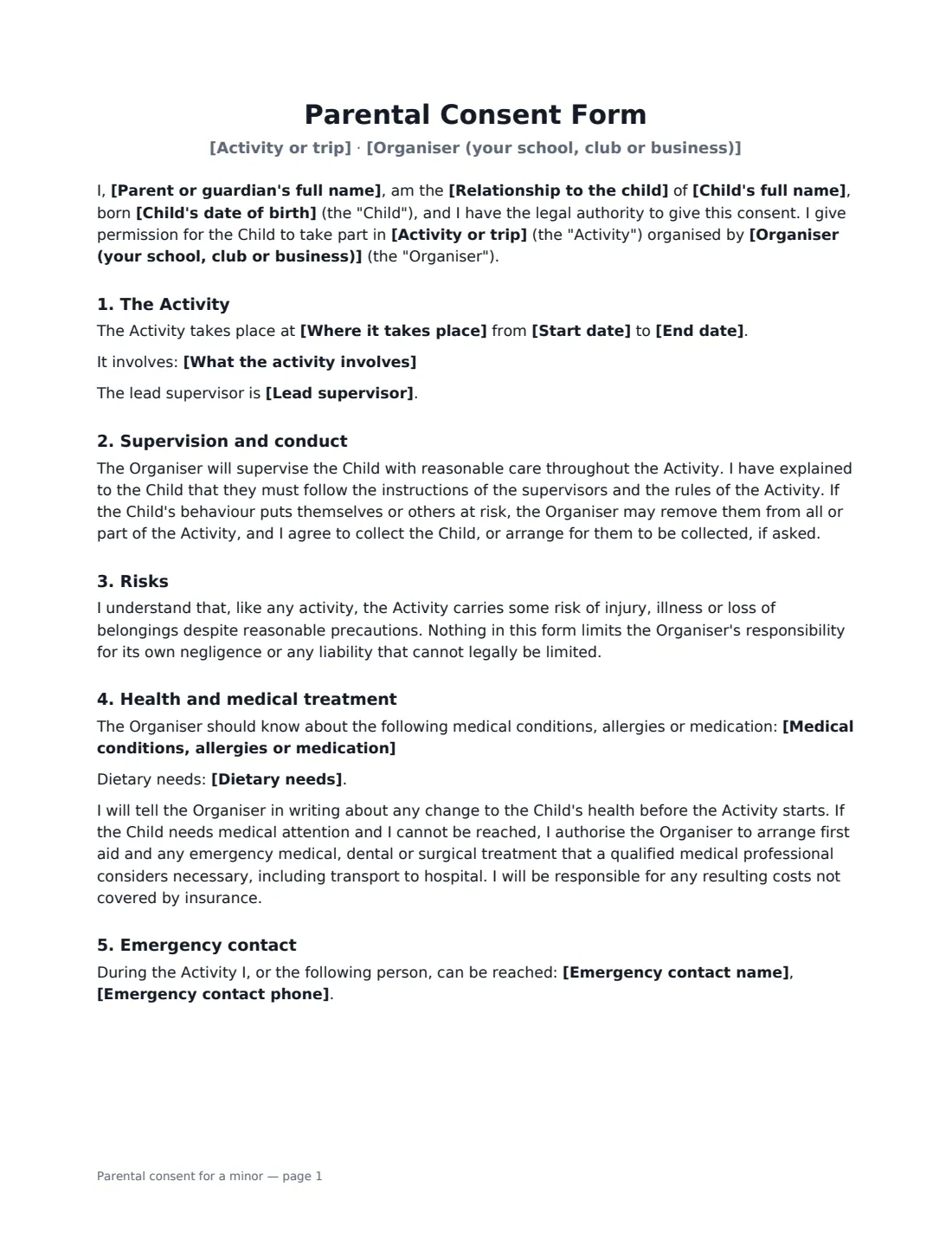
Schools, clubs, camps and youth organisers need a parent's or guardian's written permission before a child joins a trip or activity. A good consent form does more than say yes: it tells you about allergies and medication, gives you someone to call during the activity, authorises emergency treatment if the parent can't be reached, and records whether you may take and use photos.
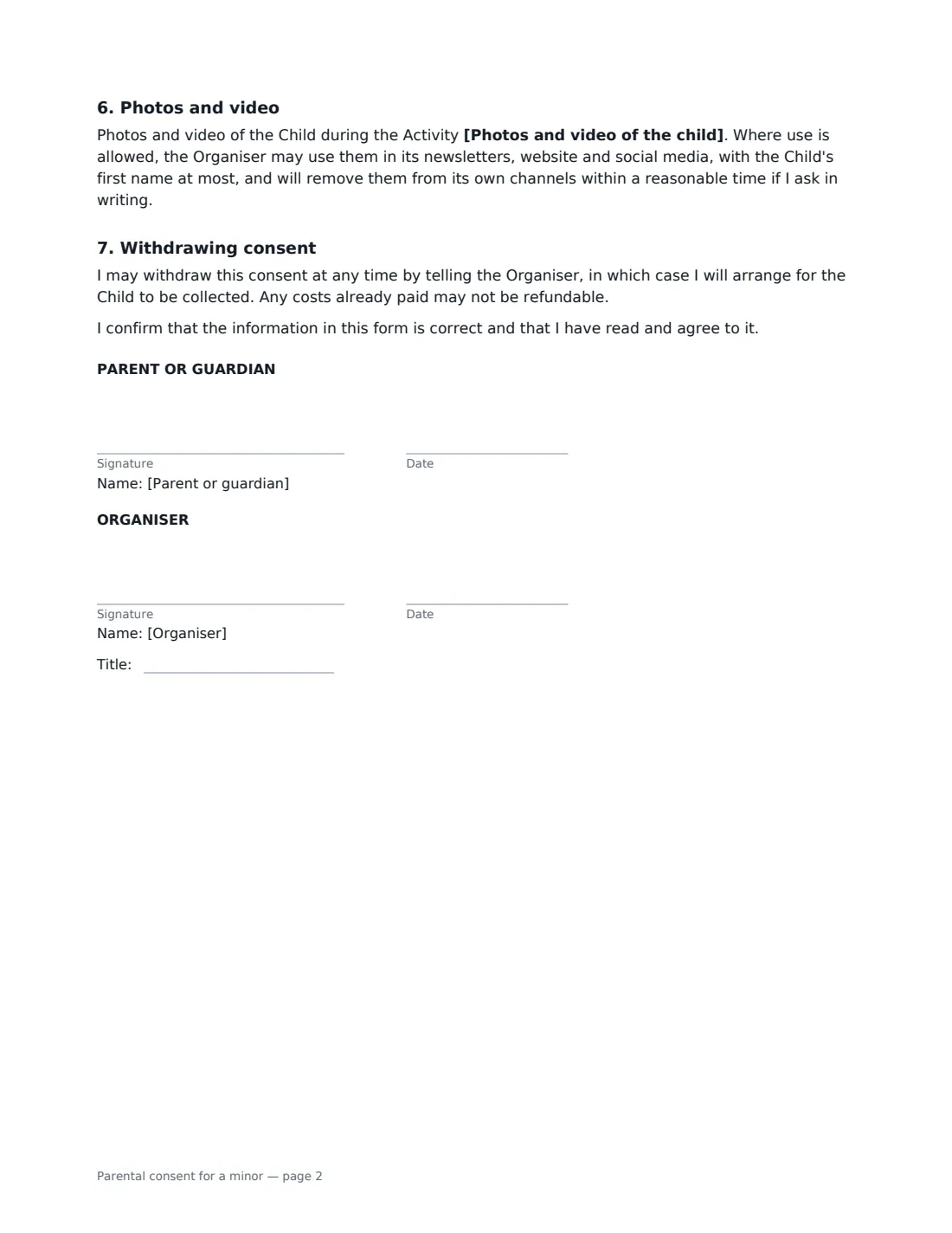
This form has the parent confirm their relationship to the child and their authority to consent, then covers the activity (dates, location, what it involves and the lead supervisor), supervision and behaviour, a fair statement of risk that does not limit your responsibility for your own negligence, medical conditions and dietary needs, emergency treatment, the emergency contact, a three-way photo choice, and how consent can be withdrawn. You fill in the details before sending, the parent or guardian checks them and signs — on their phone if they like — and you countersign as the organiser.
- Best for
- School trips, camps, clubs, sports teams, youth events
- Signed by
- A parent or legal guardian, and the organiser
- Records
- Medical and dietary needs, emergency contact, emergency-treatment consent, photo choice
- Photo choices
- May be used, internal use only, or must not be taken
- Length
- 2 pages
When to Use a parental consent for a minor
- A school day trip or overnight residential visit
- A summer camp, holiday club or scout outing
- A youth sports team travelling to a tournament
- A dance, drama or music group performing away from home
- A church or community youth group activity
- A one-off workshop or event for under-18s run by a business
What You Fill In
16 blanks, then the name and email of each person who signs: parent or guardian, organiser.
1 The activity
- Organiser (your school, club or business)*
- Activity or trip*
- Where it takes place*
- Start date*
- End date
- What the activity involves
- Lead supervisor
2 The child
- Child's full name*
- Child's date of birth*
3 Parent or guardian
- Parent or guardian's full name*
- Relationship to the child* Parent · Legal guardian
4 Emergency contact
- Emergency contact name*
- Emergency contact phone*
5 Health
- Medical conditions, allergies or medication
- Dietary needs
6 Photos
- Photos and video of the child* may be taken and used by the Organiser · may be taken for internal use only, not published · must not be taken
7 Who signs
- Parent or guardian signature and date · A parent or legal guardian with authority to consent for the child.
- Organiser signature and date, job title
What the parental consent for a minor Covers
- The Activity
- Supervision and conduct
- Risks
- Health and medical treatment
- Emergency contact
- Photos and video
- Withdrawing consent
Using the parental consent for a minor, step by step
1 Describe the activity
Enter the activity or trip, where it takes place and the start date. Add an end date for anything longer than one day. Use "what the activity involves" to flag travel, overnight stays and higher-risk parts such as swimming — parents are consenting to what you describe.
2 Add the child and parent
Enter the child's full name and date of birth, and the parent or legal guardian who will sign. Choose whether they are a parent or legal guardian.
3 Collect health and emergency details
Ask the parent for these first — for example from your booking form — then enter any medical conditions, allergies, medication and dietary needs. If you leave medical empty, the form has the parent confirm there are none to their knowledge, so only do that when they have told you so. The emergency contact name and phone are required and can be the parent's own.
4 Choose the photo option and send
Pick whether photos may be used, may be taken for internal use only, or must not be taken. Send the form to the parent; you countersign as organiser and the signed copy is filed in Files, ready to take on the trip.
Tips Before You Send It
- Send one form per child, and send it early enough to chase anyone who hasn't signed.
- Share the medical and dietary details with the supervisors who need them, and keep the signed forms with you during the activity.
- Check who has authority to consent where parents are separated or a court order is in place — the form asks the signer to confirm their authority.
- Respect the photo choice for each child when taking and posting pictures.
- For an adult participant, use the liability waiver template instead.
Sign It Online In Minutes
- Fill in the blanks. Names, dates and amounts go straight into the agreement — the preview shows exactly where.
- Name who signs. Tick “This is me” for your own part. VergeHR builds the PDF with every signature, date box on the right line, and you can check or move anything before sending.
- Send it. Each signer gets a secure link and signs from any device — no account needed. The signed PDF, with an audit trail and a Certificate of Completion, is filed in Files and emailed to everyone.
Parental consent for a minor: frequently asked questions
Does this form release the organiser from liability?
No. It records permission, health information and emergency arrangements. It says that the activity carries some risk but expressly does not limit the organiser's responsibility for its own negligence or any liability that cannot legally be limited.
Who can sign a parental consent form?
A parent or legal guardian with authority to make decisions for the child. The signer confirms their relationship to the child and that they have authority to give consent.
What if the child needs medical treatment and the parent can't be reached?
The parent authorises the organiser to arrange first aid and any emergency medical, dental or surgical treatment a qualified medical professional considers necessary, including transport to hospital. The parent is responsible for costs not covered by insurance.
Can parents sign a consent form electronically?
In the US (ESIGN Act and UETA), the UK, the EU (eIDAS) and Canada, electronic signatures are generally valid for everyday consents and agreements like this one. VergeHR keeps an audit trail and a Certificate of Completion with the signed PDF. Check whether your school district or governing body has its own form requirements.
Can I change the wording?
You fill in the activity, child, parent, health, emergency and photo details. If you need different clauses, draft your own form and upload it to VergeHR eSignature; you can still place the signature boxes in the editor.
Is this template free?
Yes. The template is free to use with the eSignature app in VergeHR. Parents don't need a VergeHR login to sign.