

What is a mediation agreement?
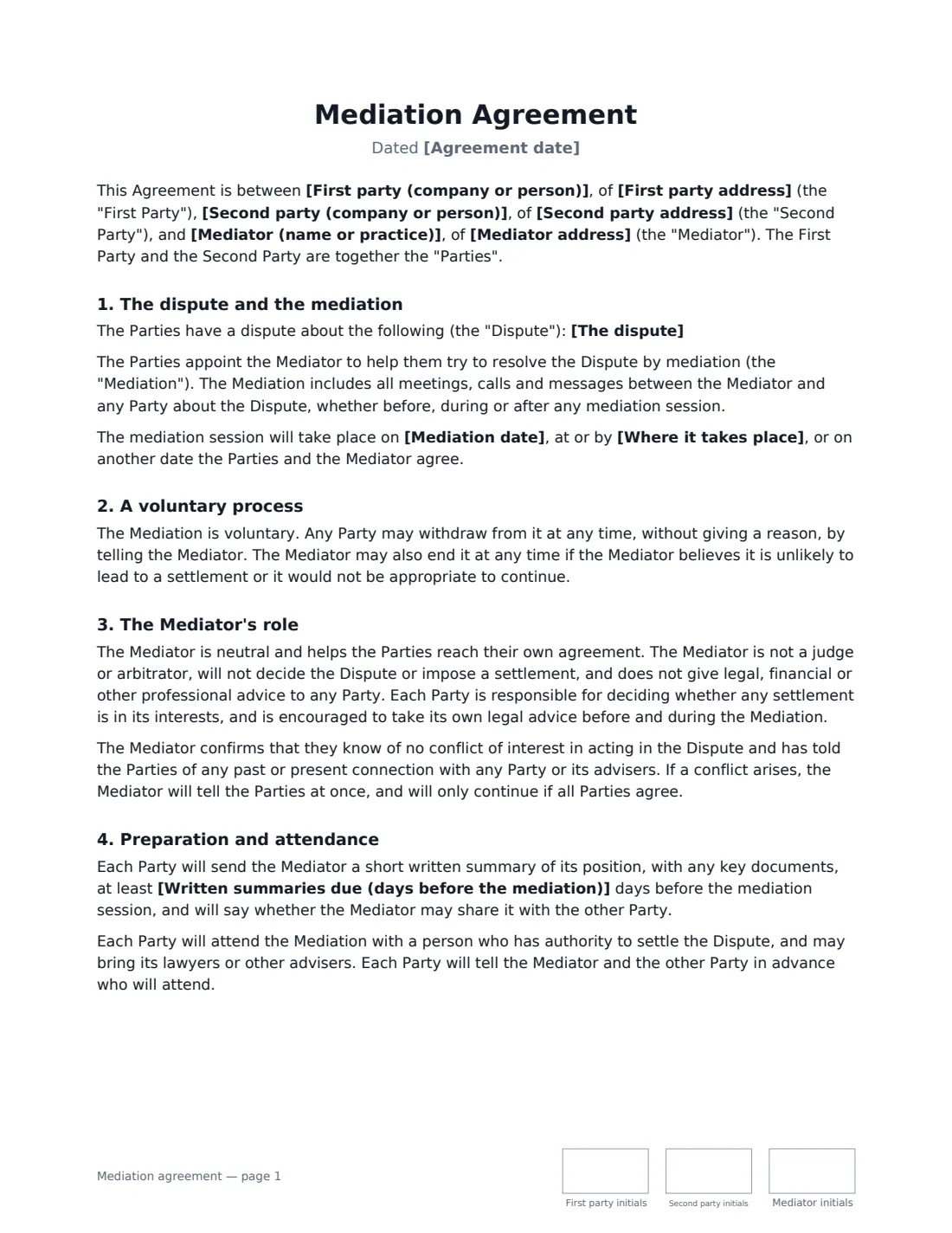
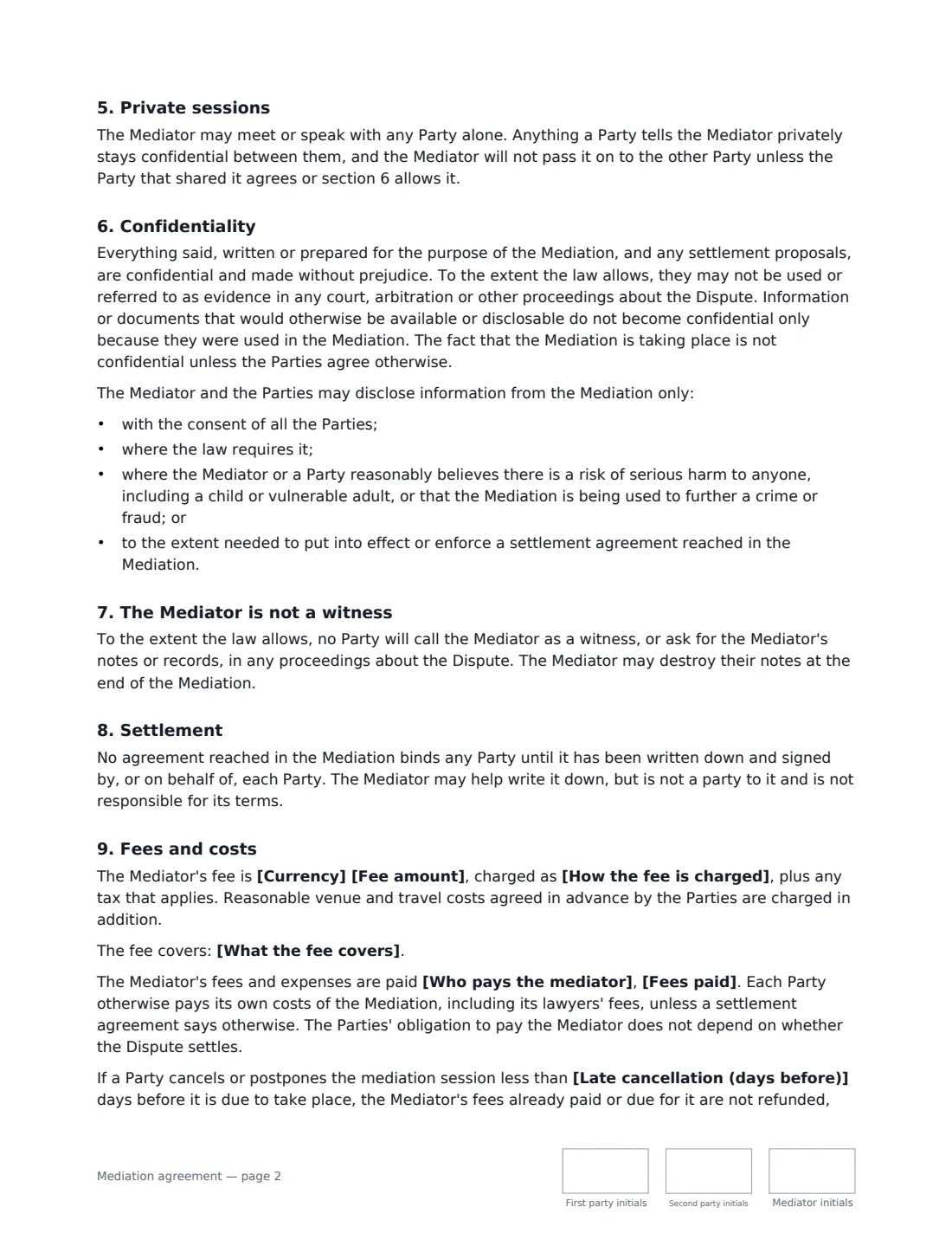
A mediation agreement (sometimes called an agreement to mediate) is signed by both sides of a dispute and the mediator before mediation starts. It sets the ground rules: the process is voluntary, what is said stays confidential and, to the extent the law allows, can't be used later in court, the mediator is neutral and won't decide anything, and nothing is binding until a settlement is written down and signed.
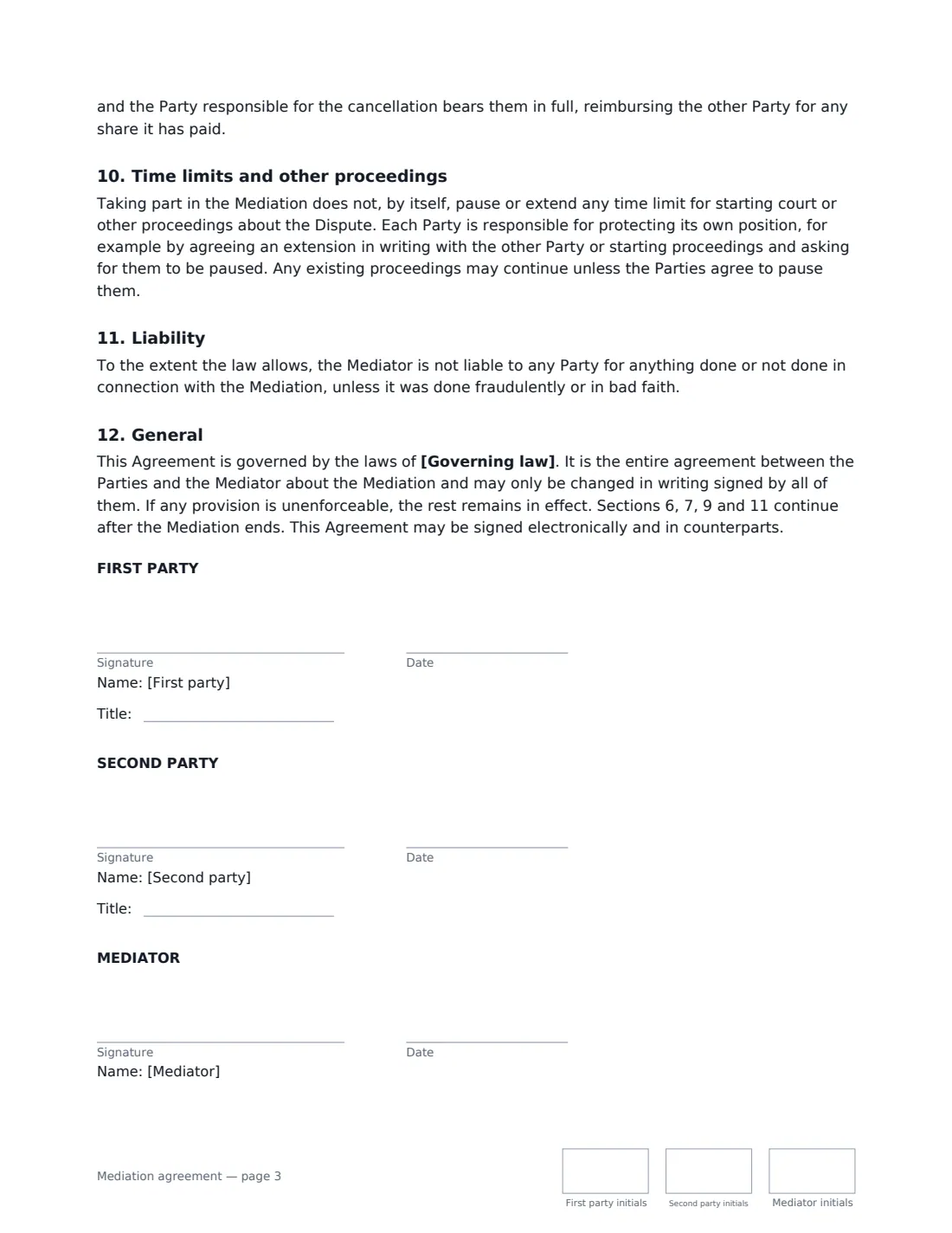
This template covers the dispute, the session date and place, the voluntary process, the mediator's role and independence, written summaries and attending with authority to settle, private sessions, confidentiality and its limits, the mediator not being called as a witness, how a settlement becomes binding, the mediator's fee and who pays it, late cancellation, time limits for court claims, and the mediator's liability. The mediator usually sends it; all three sign.
- Best for
- Commercial, contract, partnership, property and neighbour disputes
- Signed by
- Both parties and the mediator
- Fees
- Fixed, hourly or daily — split equally or paid by one side
- Length
- 3 pages, initialled by all three on every page
When to Use a mediation agreement
- A mediator engaged by two companies to resolve a disputed final account
- Business partners trying to agree the terms of a split before going to court
- A landlord and tenant mediating a dispute over repairs or a deposit
- A homeowner and contractor mediating a building-work dispute
- Mediation suggested by a court, where the mediator needs a signed agreement before the session
What You Fill In
19 blanks, then the name and email of each person who signs: first party, second party, mediator.
1 The parties and mediator
- Agreement date*
- First party (company or person)*
- First party address
- Second party (company or person)*
- Second party address
- Mediator (name or practice)*
- Mediator address
2 The mediation
- The dispute*
- Mediation date
- Where it takes place
- Written summaries due (days before the mediation)
3 Fees
- How the fee is charged* a fixed fee for the mediation · an hourly rate, including preparation time · a daily rate for each day or part day of mediation
- Currency*
- Fee amount*
- What the fee covers
- Who pays the mediator* equally by the First Party and the Second Party · entirely by the First Party · entirely by the Second Party
- Fees paid* in advance, before the mediation starts · within 14 days of the mediator's invoice
- Late cancellation (days before)
4 Other terms
- Governing law*
5 Who signs
- First party signature and date, job title, initials on every page · One side of the dispute.
- Second party signature and date, job title, initials on every page · The other side of the dispute.
- Mediator signature and date, initials on every page · The neutral person who runs the mediation.
What the mediation agreement Covers
- The dispute and the mediation
- A voluntary process
- The Mediator's role
- Preparation and attendance
- Private sessions
- Confidentiality
- The Mediator is not a witness
- Settlement
- Fees and costs
- Time limits and other proceedings
- Liability
- General
Using the mediation agreement, step by step
1 Name the parties and the mediator
Enter both parties and the mediator's name or practice. The mediator's name is pre-filled from your account, since the mediator usually sends it.
2 Describe the dispute and the session
Give a short, neutral description of the dispute, the date and place (or "online by video call") if fixed, and how many days before the session written summaries are due. Leave the summaries field empty if you don't need them.
3 Set the fee
Enter the fee and choose whether it's a fixed fee, an hourly rate or a daily rate, what it covers, who pays (equally, or one side), when it's paid, and the late-cancellation window.
4 Send to both parties
Tick "This is me" as the mediator and add each party's signer. VergeHR places three signature blocks and three sets of initials on every page.
Tips Before You Send It
- Ask each party to confirm who will attend and that they have authority to settle — the template requires it.
- Mediation doesn't pause court time limits by itself. A party close to a deadline should agree an extension in writing or protect its claim.
- Confidentiality has limits — risk of serious harm, crime or fraud, and legal requirements. Explain them at the start of the session.
- Have a simple settlement agreement ready: nothing agreed in mediation binds anyone until it is written down and signed.
- Check any rules that apply to mediators where you practise, such as accreditation or a professional code.
Sign It Online In Minutes
- Fill in the blanks. Names, dates and amounts go straight into the agreement — the preview shows exactly where.
- Name who signs. Tick “This is me” for your own part. VergeHR builds the PDF with every signature, date and initials box on the right line, and you can check or move anything before sending.
- Send it. Each signer gets a secure link and signs from any device — no account needed. The signed PDF, with an audit trail and a Certificate of Completion, is filed in Files and emailed to everyone.
Mediation agreement: frequently asked questions
Is mediation binding?
The process isn't — any party can walk away at any time, and the mediator doesn't decide anything. A settlement reached in mediation binds the parties once it is written down and signed by them, as this agreement states.
Can what is said in mediation be used in court?
The agreement makes mediation communications confidential and without prejudice, and says they may not be used as evidence to the extent the law allows. How much protection that gives depends on local law, and documents that would be disclosable anyway don't become protected just because they were used in mediation.
Who pays the mediator?
You choose: split equally, or paid entirely by one party. Each party pays its own lawyers. The fee is payable whether or not the dispute settles.
Can a mediation agreement be signed electronically?
In most countries, including the US (ESIGN Act and UETA), the UK, the EU (eIDAS) and Canada, an electronic signature is generally valid for an ordinary commercial contract like this one. VergeHR keeps an audit trail and a Certificate of Completion with the signed PDF as evidence of who signed and when.
Is this template free?
Yes. The template is free to use with the eSignature app in VergeHR, and the people you send it to don't need a VergeHR login to sign.