

What is a sale of goods agreement?
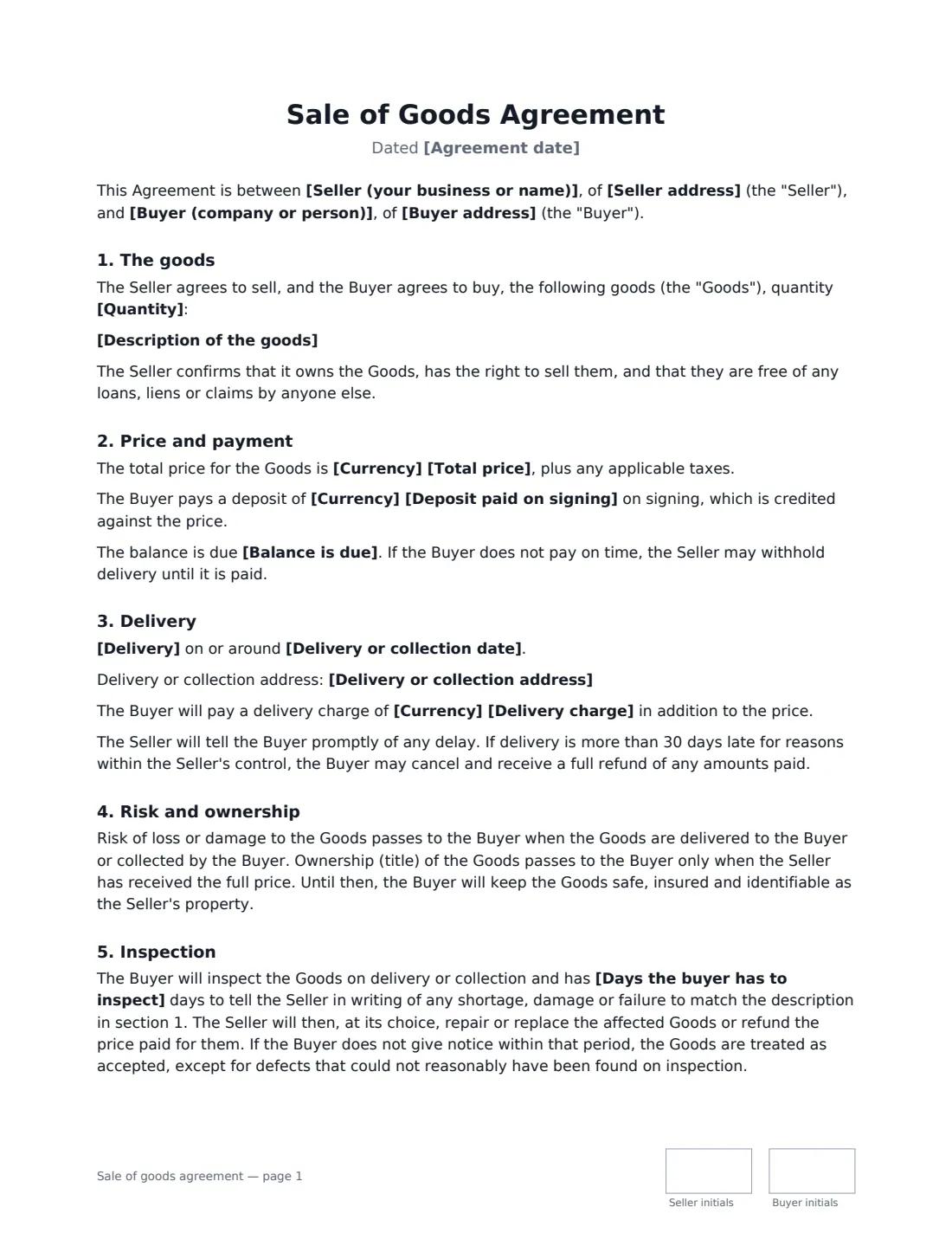
A sale of goods agreement records a one-off sale of physical goods: a used espresso machine to a café, a batch of stock to a retailer, office furniture to a new tenant, a piece of machinery to another business. Writing it down settles the questions that cause trouble after the goods change hands — was it paid in full, who carries the risk if it's damaged in transit, how long does the buyer have to complain, and is there a warranty at all.
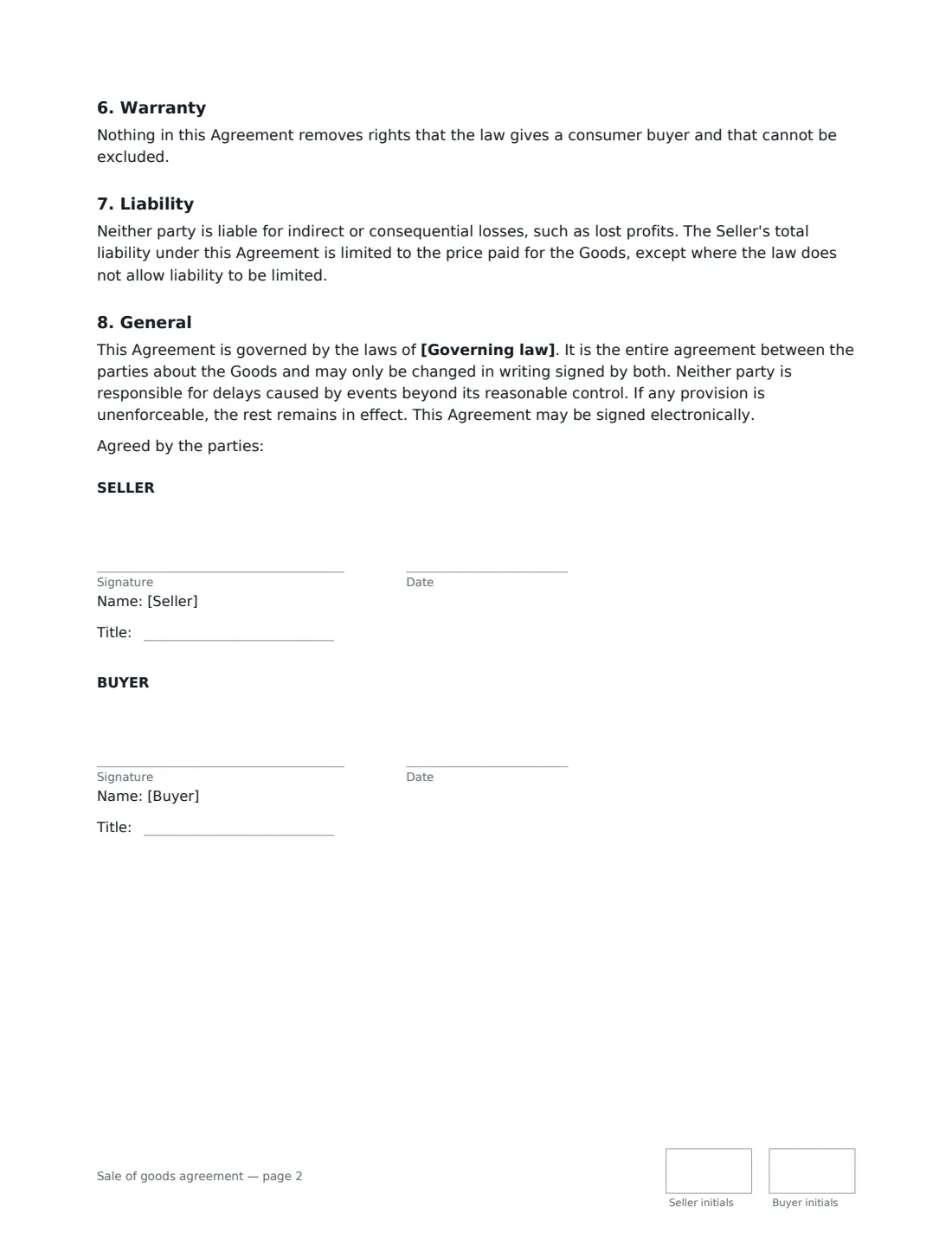
This template covers the goods and quantity, the price, an optional deposit and when the balance is due, delivery or collection, when risk and ownership pass, an inspection period, a choice between selling as is or with a limited warranty, a liability cap and the governing law. Ownership passes only once the seller has been paid in full, and the agreement keeps any consumer rights the law says cannot be excluded.
- Best for
- One-off sales of equipment, machinery, stock, furniture or other goods
- Signed by
- Seller and buyer — a person or an authorised signer for each business
- Warranty
- You choose: sold as is, or a limited warranty for a period you set
- Length
- About 2 pages, initialled on every page
When to Use a sale of goods agreement
- A business selling used equipment or machinery to another business
- A maker or wholesaler selling a batch of goods to a retailer
- Selling office furniture, fittings or stock when closing or moving premises
- A private seller selling a high-value item that needs clear delivery and payment terms
- Any sale where the goods are delivered or paid for after the agreement is signed
What You Fill In
19 blanks, then the name and email of each person who signs: seller, buyer.
1 The parties
- Seller (your business or name)*
- Seller address
- Buyer (company or person)*
- Buyer address
2 The goods
- Agreement date*
- Description of the goods*
- Quantity*
3 Price and payment
- Currency*
- Total price*
- Deposit paid on signing
- Balance is due* before delivery · on delivery · within 14 days of delivery · within 30 days of delivery
4 Delivery
- Delivery* The Seller delivers the goods to the Buyer's address · The Buyer collects the goods from the Seller
- Delivery or collection address
- Delivery or collection date*
- Delivery charge
5 Condition and warranty
- Days the buyer has to inspect*
- Warranty* Sold as is · Limited warranty
- Limited warranty period
6 Other terms
- Governing law*
7 Who signs
- Seller signature and date, job title, initials on every page
- Buyer signature and date, job title, initials on every page
What the sale of goods agreement Covers
- The goods
- Price and payment
- Delivery
- Risk and ownership
- Inspection
- Warranty
- Liability
- General
Using the sale of goods agreement, step by step
1 Describe the goods
Be specific: make, model, serial numbers, specification and condition, plus the quantity. The buyer can report goods that don't match this description during the inspection period, and the seller then repairs, replaces or refunds them — so it pays to get it right.
2 Set the price and payment
Enter the total price before taxes, any deposit paid on signing, and when the balance is due — before delivery, on delivery, or within 14 or 30 days after. If the buyer pays late, the seller may hold back delivery.
3 Agree delivery and inspection
Choose whether you deliver or the buyer collects, the date, a different address if needed, and any delivery charge. Set how many days the buyer has to report shortages or damage; after that the goods are treated as accepted, except for hidden defects.
4 Pick the warranty and send
Choose "Sold as is" or a limited warranty and its period, add the governing law, and enter the buyer's details. VergeHR places both signature blocks and the initials boxes; the signed copy is filed in Files and emailed to both of you.
Tips Before You Send It
- Selling to consumers? Many places give consumers rights about quality and description that a contract cannot remove, so "as is" may not cover everything. The agreement keeps those rights in place.
- If the buyer takes the goods before paying in full, remember they still belong to you until you are paid — the buyer must keep them safe, insured and identifiable.
- Agree who insures the goods in transit. Risk passes to the buyer only on delivery or collection, so loss or damage before then is at the seller's risk.
- For a regular, repeating supply relationship rather than a one-off sale, a supply agreement is a better fit.
Sign It Online In Minutes
- Fill in the blanks. Names, dates and amounts go straight into the agreement — the preview shows exactly where.
- Name who signs. Tick “This is me” for your own part. VergeHR builds the PDF with every signature, date and initials box on the right line, and you can check or move anything before sending.
- Send it. Each signer gets a secure link and signs from any device — no account needed. The signed PDF, with an audit trail and a Certificate of Completion, is filed in Files and emailed to everyone.
Sale of goods agreement: frequently asked questions
What is the difference between a sale of goods agreement and a bill of sale?
A bill of sale mainly records that a sale has happened and ownership has changed hands. A sale of goods agreement sets out the terms of the deal, often before delivery and payment are complete — delivery, inspection, warranty, and when risk and ownership pass. For a private used-car sale, a vehicle bill of sale is usually simpler.
When does the buyer become the owner?
Under this template, risk passes to the buyer on delivery or collection, but ownership passes only when the seller has received the full price. Until then, a buyer who already has the goods must keep them safe, insured and identifiable as the seller's property.
Is a sale of goods agreement signed electronically valid?
In the US (ESIGN Act and UETA), the UK, the EU (eIDAS) and Canada, electronic signatures are generally valid for ordinary commercial contracts like this one. VergeHR keeps an audit trail and a Certificate of Completion with the signed PDF as evidence of who signed and when.
Is this template free?
Yes. The template is free to use with the eSignature app in VergeHR, and the buyer doesn't need a VergeHR login to sign.