


What is a secondment agreement?
A secondment is a temporary move: an employee goes to work for another organisation — a client, a partner, a sister company, a charity or a public body — for a few weeks, months or a year, and then comes back. They stay employed and paid by their own employer throughout, while the host organisation directs their day-to-day work. Because three parties are involved, it helps to write down who is responsible for what before the first day.
This template is signed by the employer, the host and the employee. It sets the start and planned end dates, the role and duties at the host, the place of work and hours, and names a day-to-day supervisor at the host and a contact at the employer. It confirms that the employee's employment, pay and benefits continue with the employer, sets out any fee the host pays for the secondment, and covers leave and absence, discipline (which stays with the employer), health and safety, confidentiality and data sharing, who owns the work created, early termination on notice, the employee's return to their usual role, and an optional no-hire promise from the host.
- Best for
- Placing staff with a client, partner, group company, charity or public body for a fixed period
- Signed by
- Three parties — the employer, the host organisation and the employee
- Costs
- Optional fee from the host — monthly, per working day or one fixed fee — or no charge
- Length
- 3 to 4 pages, initialled by all three parties on every page
When to Use a secondment agreement
- A consultancy placing an analyst on site with a client for six months
- A group company moving an employee to a sister business to cover a vacancy or project
- A company lending a manager to a charity or community project
- An employee seconded to a government department, regulator or university
- Covering a host's maternity or parental leave gap with an experienced employee from a partner
What You Fill In
22 blanks, then the name and email of each person who signs: employer, host organisation, employee.
1 The parties
- Date of the agreement*
- Employer (company name)*
- Employer address
- Host organisation (name)*
- Host organisation address
- Employee's full name*
- Employee's usual job title*
2 The secondment
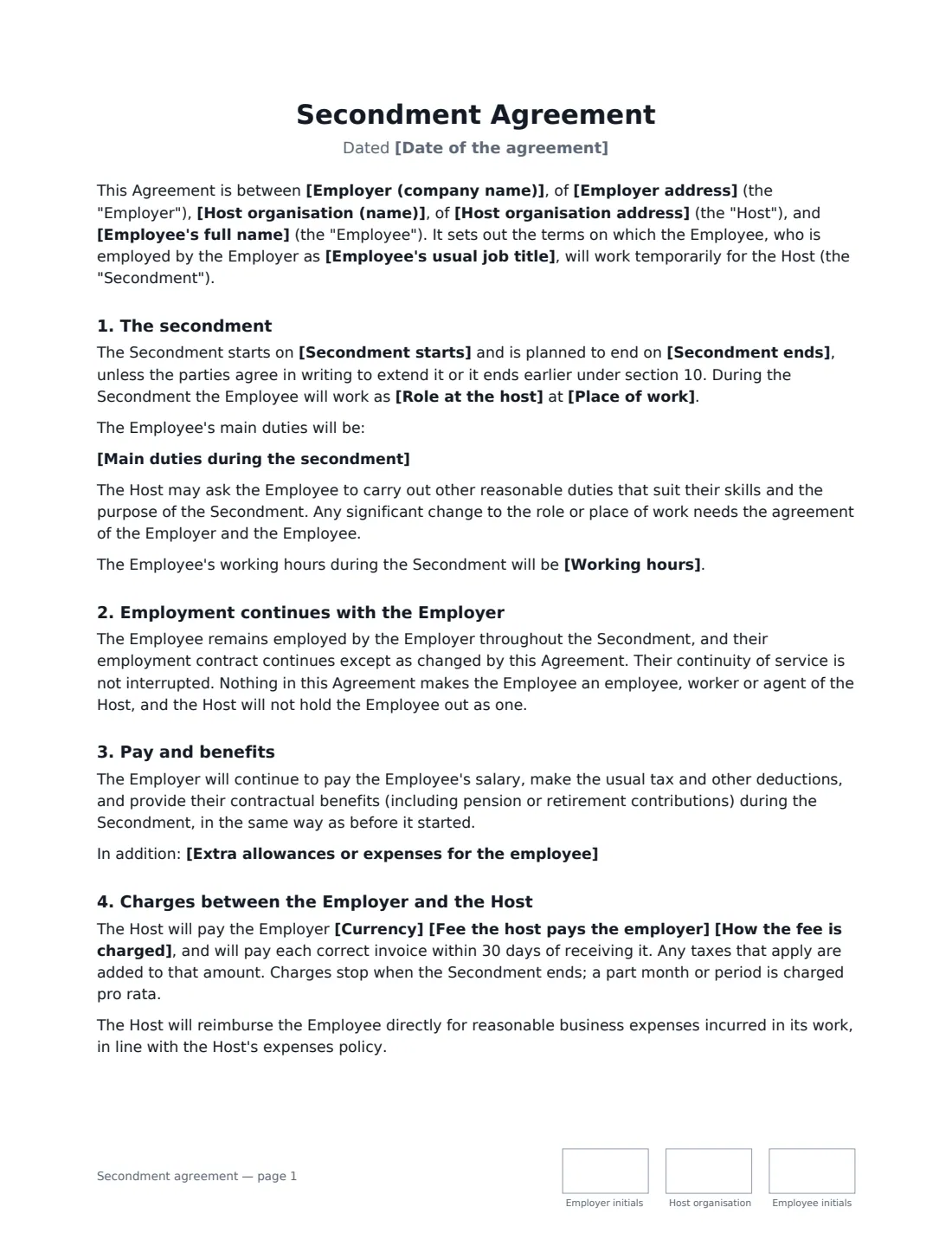
- Secondment starts*
- Secondment ends*
- Role at the host*
- Main duties during the secondment*
- Place of work*
- Working hours
3 Supervision
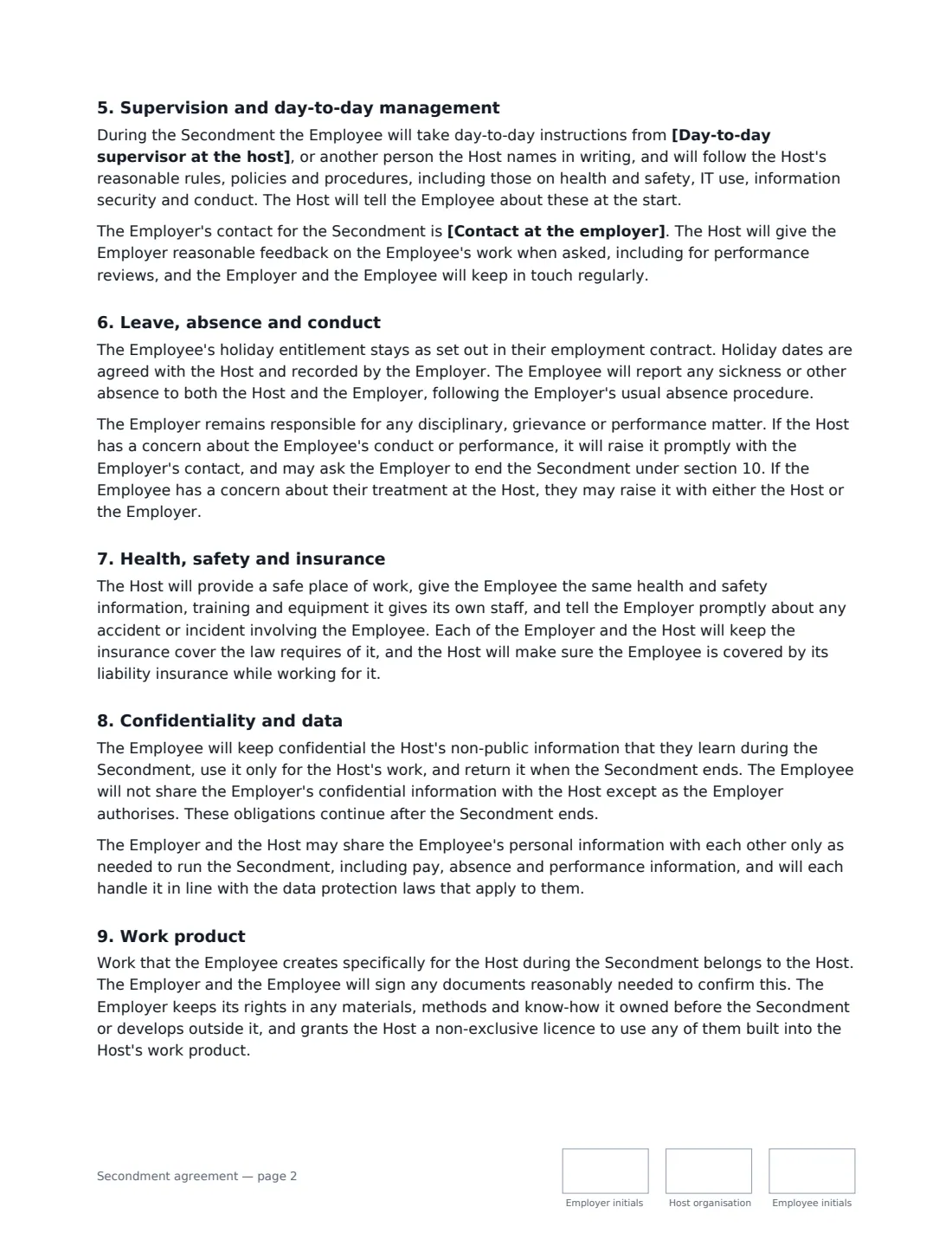
- Day-to-day supervisor at the host*
- Contact at the employer*
4 Pay and costs
- Currency*
- Fee the host pays the employer
- How the fee is charged* per month, invoiced monthly in arrears · per working day, invoiced monthly in arrears · as a single fee for the whole secondment
- Extra allowances or expenses for the employee
5 Ending and return
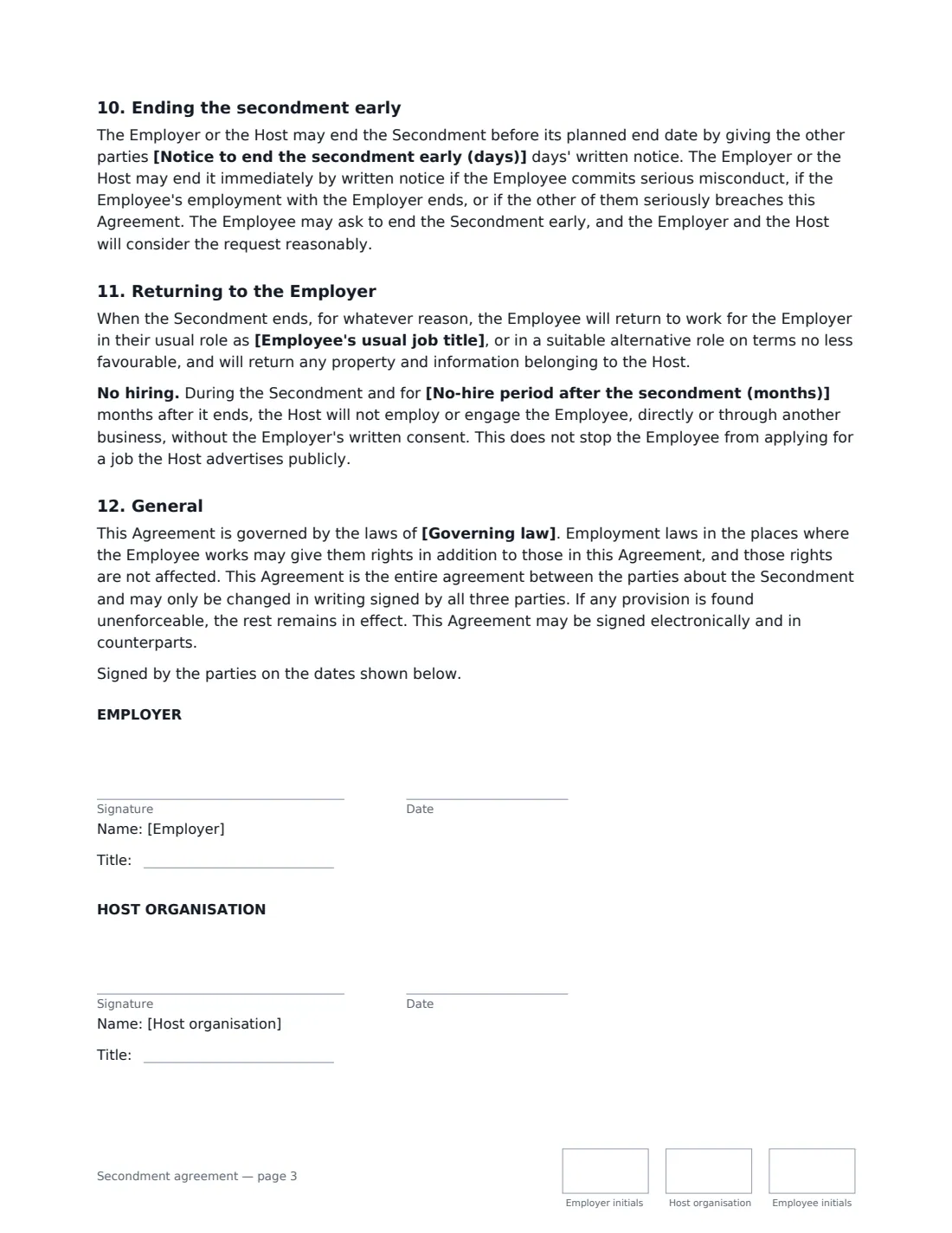
- Notice to end the secondment early (days)*
- No-hire period after the secondment (months)
- Governing law*
6 Who signs
- Employer signature and date, job title, initials on every page · The organisation that employs the employee and keeps employing them during the secondment.
- Host organisation signature and date, job title, initials on every page · The organisation the employee is seconded to.
- Employee signature and date, initials on every page · The person being seconded.
What the secondment agreement Covers
- The secondment
- Employment continues with the Employer
- Pay and benefits
- Charges between the Employer and the Host
- Supervision and day-to-day management
- Leave, absence and conduct
- Health, safety and insurance
- Confidentiality and data
- Work product
- Ending the secondment early
- Returning to the Employer
- General
Using the secondment agreement, step by step
1 Name the three parties
Enter the employer's and host's legal names and addresses, the employee's full name and their usual job title. The usual title matters: section 11 promises the employee returns to that role, or a suitable alternative on terms no less favourable.
2 Describe the secondment
Set the start date and planned end date, the role at the host, the main duties and where the employee will work. Leave working hours empty to keep the employee's usual hours, or describe the host's pattern if it is different.
3 Agree supervision and costs
Name the host's day-to-day supervisor and the employer's contact. If the host is paying for the secondment, enter the fee and choose whether it is charged monthly, per working day or as one fee; leave it empty if there is no charge. Add any extra allowances, such as travel or accommodation, and who pays them.
4 Set the ending terms and send
Choose the notice either organisation must give to end the secondment early, the no-hire period (or leave it empty to drop that clause) and the governing law. Add the host's signer and the employee, and send — each of the three signs and initials every page.
Tips Before You Send It
- Agree the fee and invoicing with the host before you send — including whether it covers the full employment cost or only salary.
- If the employee will work in another country, get advice on immigration, tax and social security first; a secondment agreement does not deal with those.
- Tell the host which of your own policies still apply to the employee, such as your disciplinary and grievance procedures.
- Diary a mid-point check-in between the employer's contact, the host supervisor and the employee.
- If the secondment is extended, record the new end date in writing signed by all three parties, as section 12 requires.
Sign It Online In Minutes
- Fill in the blanks. Names, dates and amounts go straight into the agreement — the preview shows exactly where.
- Name who signs. Tick “This is me” for your own part. VergeHR builds the PDF with every signature, date and initials box on the right line, and you can check or move anything before sending.
- Send it. Each signer gets a secure link and signs from any device — no account needed. The signed PDF, with an audit trail and a Certificate of Completion, is filed in Files and emailed to everyone.
Secondment agreement: frequently asked questions
Who employs the employee during a secondment?
Under this agreement the employee stays employed by their original employer, which keeps paying their salary and benefits. The host directs their day-to-day work but does not become their employer. Local employment law can still give the employee rights against either organisation, which the agreement does not take away.
Can the secondment end early?
Yes. Either the employer or the host can end it on the notice you choose, or immediately for serious misconduct, if the employee's employment ends, or for a serious breach. The employee can ask to end it early, and both organisations must consider that reasonably.
Is the no-hire clause enforceable?
It depends on where you are. Some places limit or refuse to enforce promises not to hire someone. The clause is optional — leave the no-hire period empty to remove it — and it never stops the employee from applying for a job the host advertises publicly.
Can three parties sign electronically?
Yes. VergeHR places a signature, date and initials box for each of the three parties, and you can set a signing order. Electronic signatures are generally valid for ordinary contracts like this in the US (ESIGN Act and UETA), the UK, the EU (eIDAS) and Canada, and VergeHR keeps an audit trail with the signed PDF.