

What is a student work placement agreement?
A work placement (also called work experience, a co-op, a practicum or work-based learning) puts a student into a real workplace as part of their course. Three parties are involved and each has a job to do: the school prepares the student and checks the placement is suitable, the host employer supervises and keeps the student safe, and the student turns up, follows the rules and learns. A three-way agreement makes those responsibilities explicit before the first day.
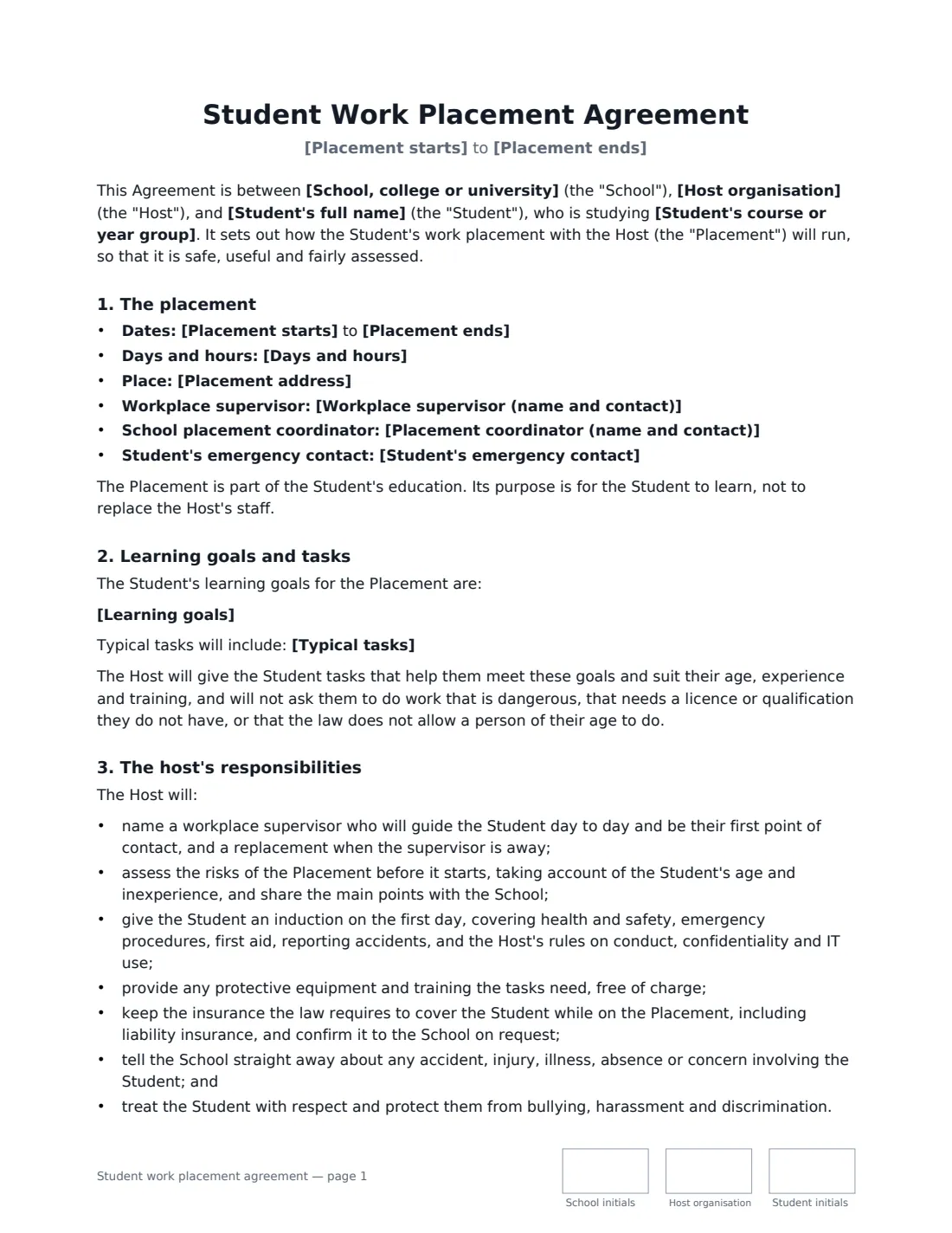
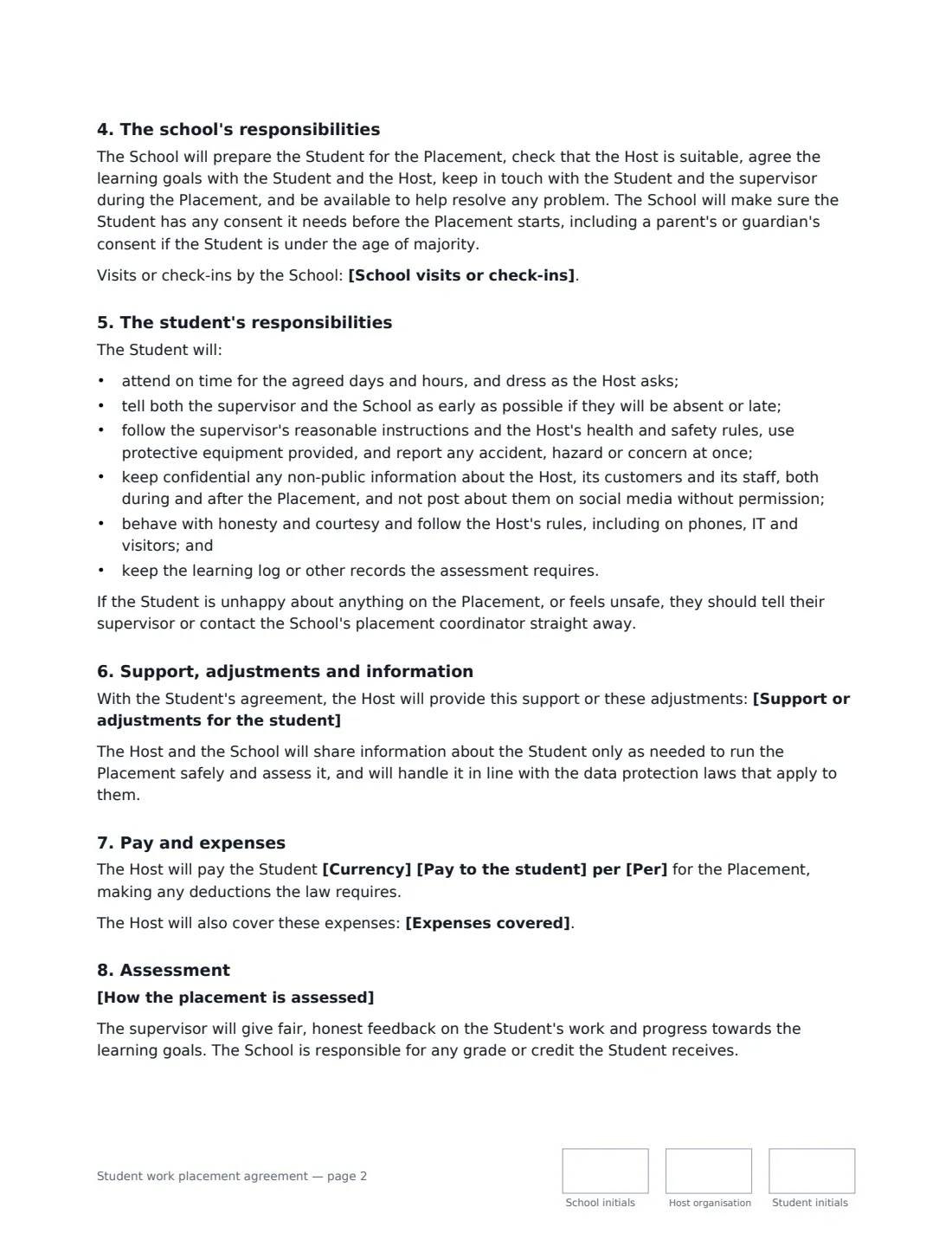
This template records the placement dates, days and hours, place, workplace supervisor, the school's placement coordinator and the student's emergency contact. It sets out the student's learning goals and typical tasks, and says the host will only give tasks suited to the student's age and training. It lists the host's duties (supervisor, risk assessment, induction, protective equipment, insurance, reporting incidents, respect), the school's duties (preparation, suitability, contact, consents including parental consent for minors) and the student's (attendance, safety, confidentiality, conduct, keeping records). It also covers agreed support or adjustments, information sharing, pay or an unpaid placement, expenses, how the placement is assessed and any school visits, and ending the placement early.
- Best for
- Schools, colleges and universities arranging placements with employers
- Signed by
- Three parties — the school, the host organisation and the student
- Pay
- Paid (per hour, day, week or month) or unpaid as part of the course
- Length
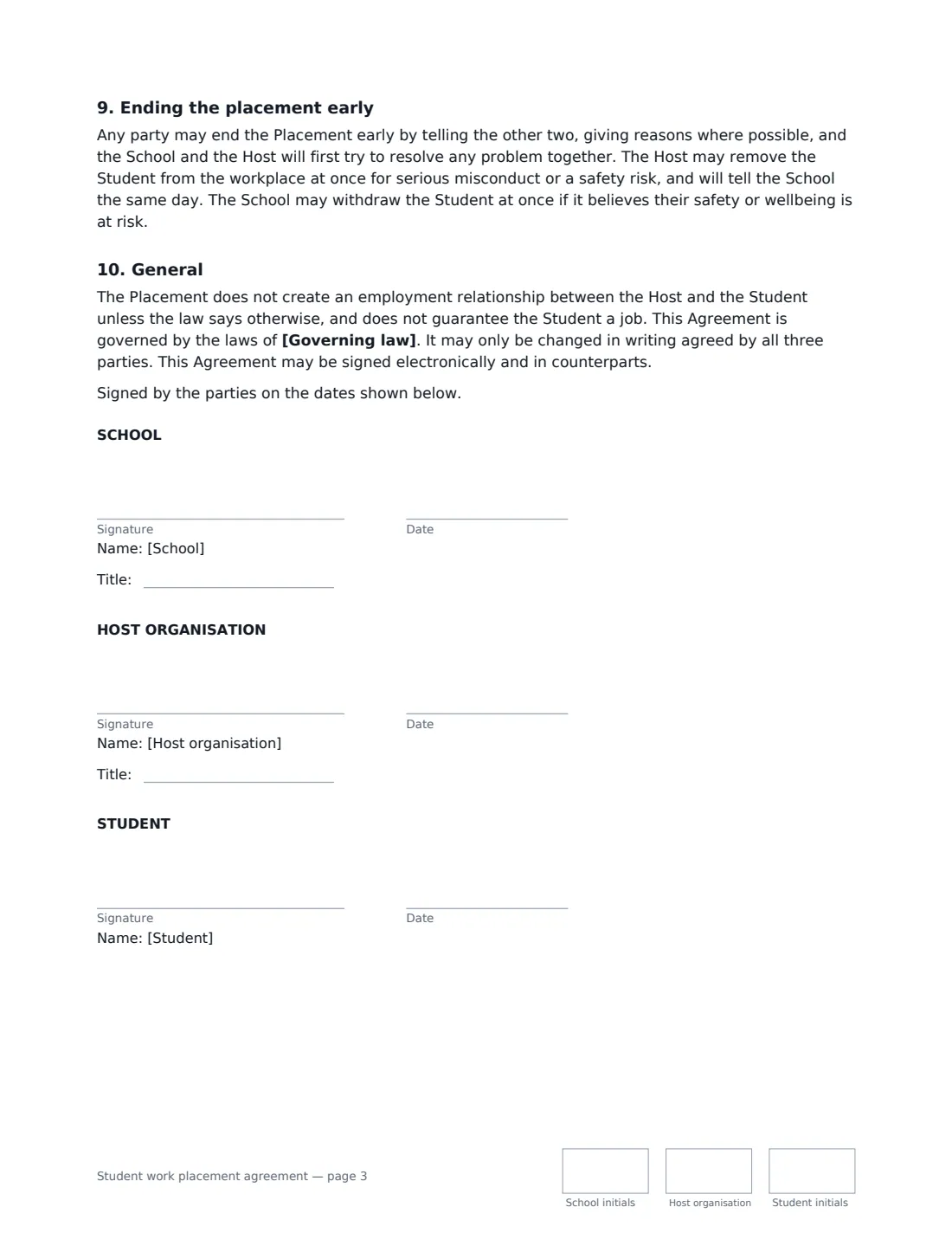
- About 3 pages, initialled by all three parties on every page
When to Use a student work placement agreement
- A secondary school arranging a week of work experience
- A college placing vocational students with local employers
- A university arranging a year-in-industry, co-op or sandwich placement
- A nursing, teaching or social work practicum at a host organisation
- A training provider arranging workplace learning for adult learners
What You Fill In
21 blanks, then the name and email of each person who signs: school, host organisation, student.
1 The parties
- School, college or university*
- Placement coordinator (name and contact)*
- Host organisation*
- Placement address*
- Workplace supervisor (name and contact)*
- Student's full name*
- Student's course or year group*
- Student's emergency contact*
2 The placement
- Placement starts*
- Placement ends*
- Days and hours*
- Learning goals*
- Typical tasks*
- Support or adjustments for the student
3 Pay and expenses
- Currency*
- Pay to the student
- Per* hour · day · week · month
- Expenses covered
4 Assessment
- How the placement is assessed*
- School visits or check-ins
- Governing law*
5 Who signs
- School signature and date, job title, initials on every page · The school, college or university arranging the placement — usually the placement coordinator.
- Host organisation signature and date, job title, initials on every page · The employer hosting the student — usually the placement supervisor or a manager.
- Student signature and date, initials on every page · The student. If they are a minor, also get a parent or guardian's consent.
What the student work placement agreement Covers
- The placement
- Learning goals and tasks
- The host's responsibilities
- The school's responsibilities
- The student's responsibilities
- Support, adjustments and information
- Pay and expenses
- Assessment
- Ending the placement early
- General
Using the student work placement agreement, step by step
1 Name the three parties and the contacts
Enter the school, the host organisation and placement address, the student's name and course, the workplace supervisor and school coordinator with contact details, and the student's emergency contact. These appear together at the top of the agreement for quick reference.
2 Plan the placement
Set the dates and daily hours, then write the learning goals — one per line — and the typical tasks. Add any support or adjustments only if the student has agreed to share them.
3 Pay and expenses
Enter pay and the pay period for a paid placement, or leave pay empty for an unpaid placement; the wording changes to match. Add any expenses the host covers, such as travel or lunch.
4 Agree the assessment and send
Edit the assessment description (a learning log and supervisor reports by default) and any school visits or check-ins, add the governing law, then add the host's signer and the student. All three sign and initial each page.
Tips Before You Send It
- If the student is a minor, get a parent or guardian's consent as well — VergeHR's parental consent template can be sent alongside.
- Ask the host for its risk assessment and proof of insurance before the placement starts.
- Check local rules on the hours and tasks young people may do, and whether an unpaid placement is allowed for this course.
- Agree how the student should report a problem if they can't reach their supervisor, and make sure they have the coordinator's number.
Sign It Online In Minutes
- Fill in the blanks. Names, dates and amounts go straight into the agreement — the preview shows exactly where.
- Name who signs. Tick “This is me” for your own part. VergeHR builds the PDF with every signature, date and initials box on the right line, and you can check or move anything before sending.
- Send it. Each signer gets a secure link and signs from any device — no account needed. The signed PDF, with an audit trail and a Certificate of Completion, is filed in Files and emailed to everyone.
Student work placement agreement: frequently asked questions
Does the student need to be paid?
It depends on local law and on whether the placement is a required part of the student's course. Leave pay empty and the agreement records that the placement is unpaid and that the host and school have each checked it is allowed; fill it in for a paid placement.
What if the student is a minor?
The agreement says the school will obtain any consent needed, including a parent's or guardian's consent if the student is under the age of majority. You can send a separate parental consent for them to sign.
Who is responsible for the student's safety?
The host is responsible for a safe workplace — risk assessment, induction, protective equipment and insurance — while the school checks the placement is suitable and keeps in touch. The student must follow the safety rules and report concerns straight away.
Can three parties sign electronically?
Yes. VergeHR places signature, date and initials boxes for the school, the host and the student, and each signs from their own device. Electronic signatures are generally valid for agreements like this in the US (ESIGN Act and UETA), the UK, the EU (eIDAS) and Canada.