

What is a saaS subscription agreement?
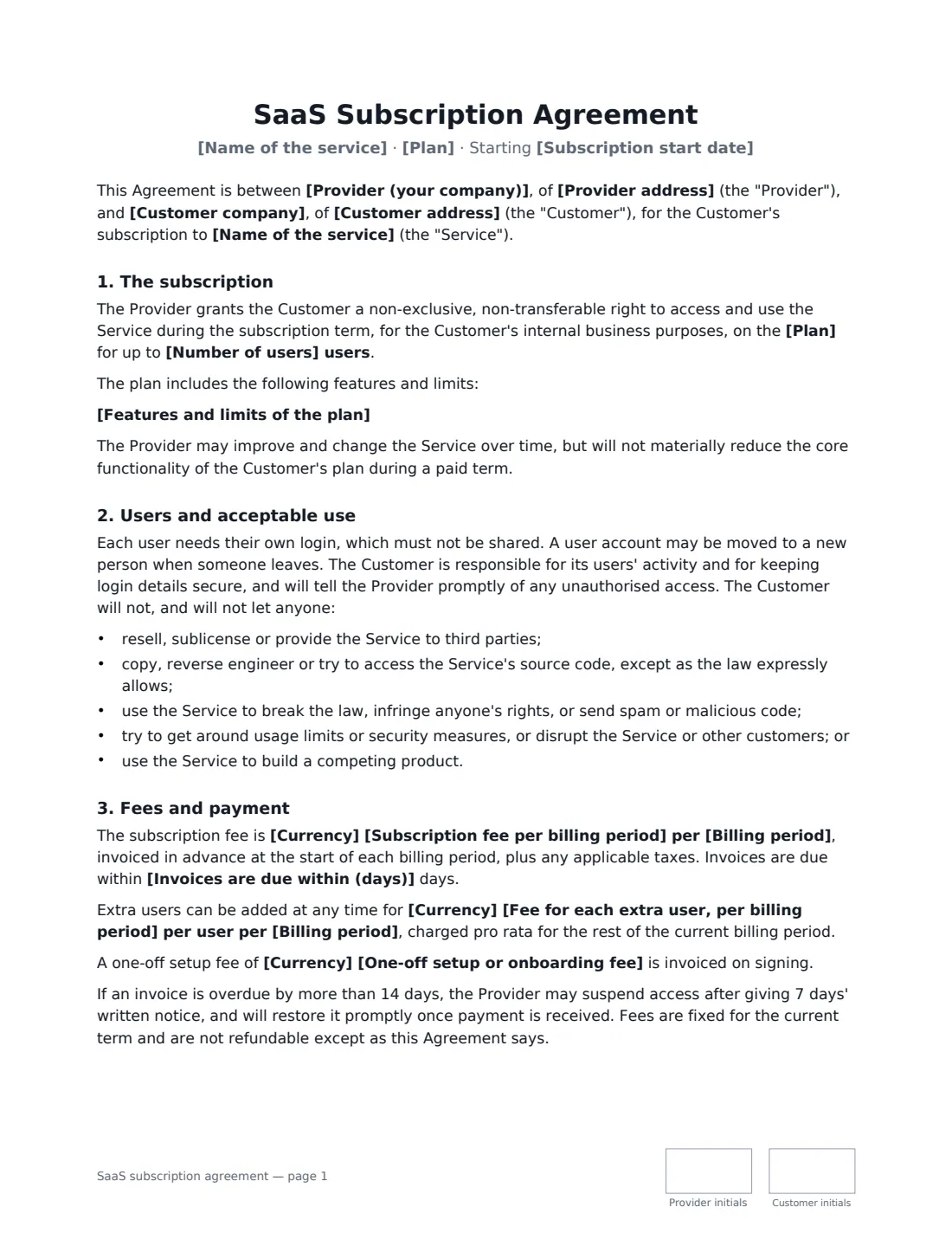
A SaaS subscription agreement is the contract between a software-as-a-service company and a business customer. Self-serve customers usually accept online terms, but larger customers often want a signed agreement that names their plan, number of users, price and term, and answers the questions their finance, IT and legal teams will ask: what happens at renewal, how available is the service, who owns the data, and how do we get it back if we leave?
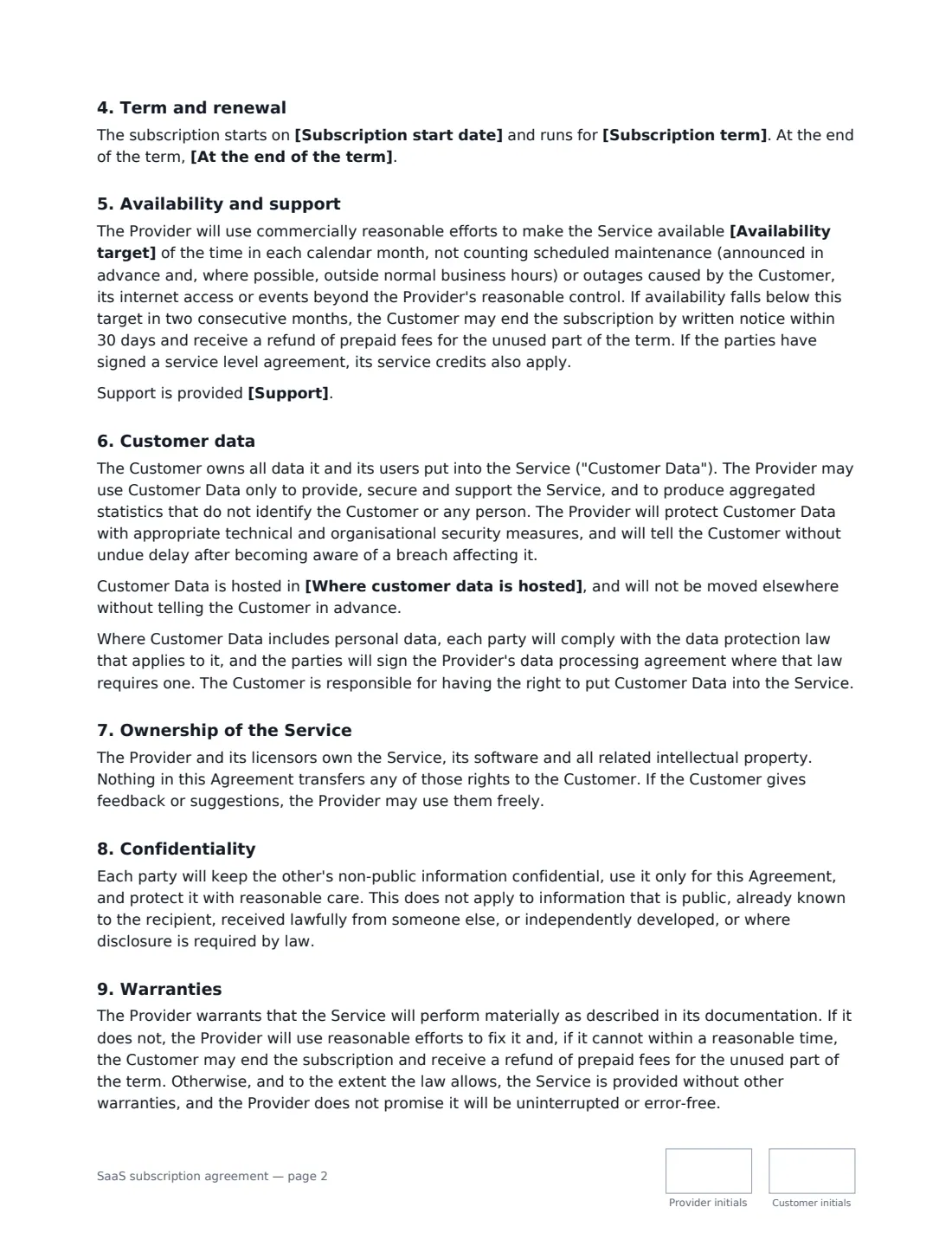
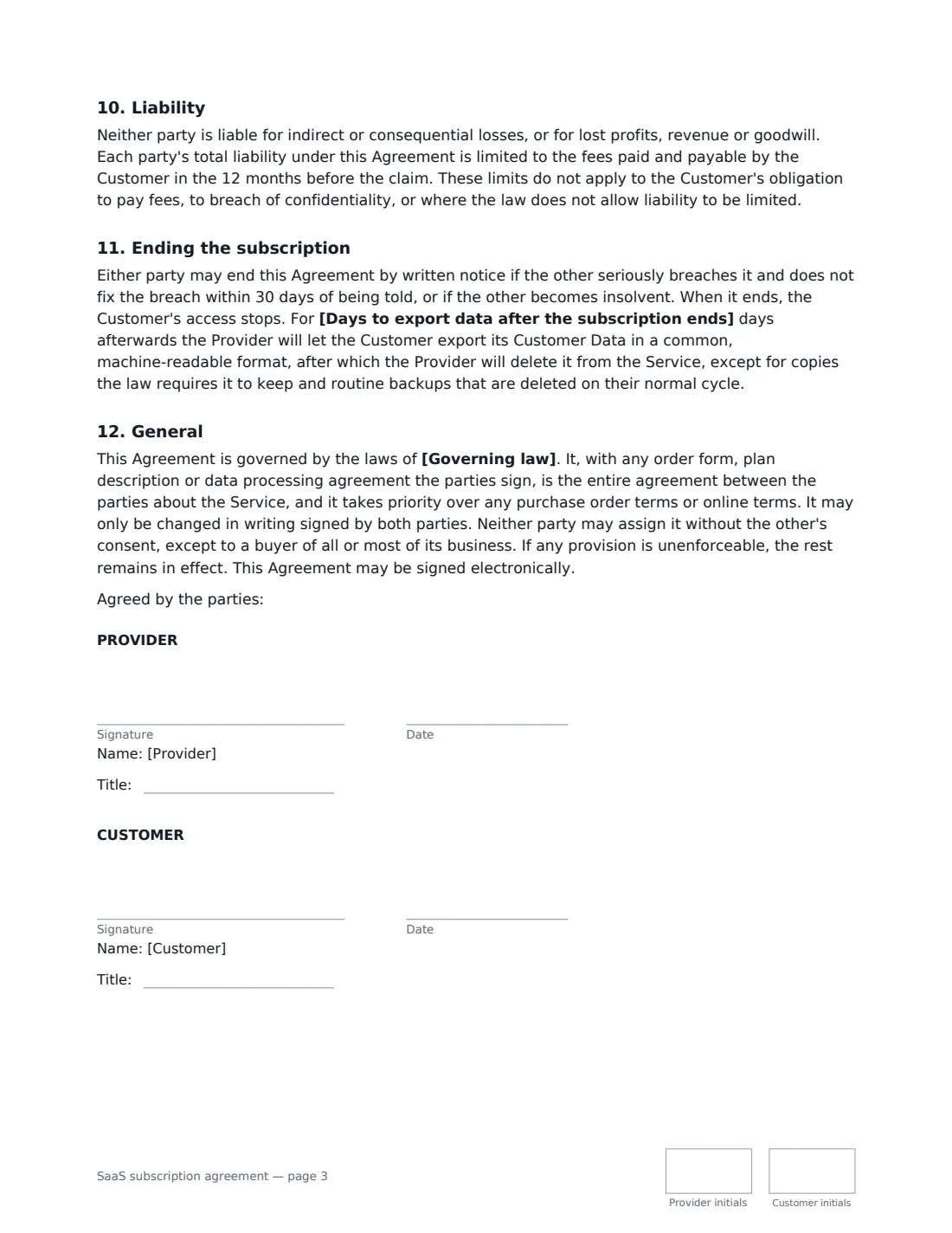
This template grants the customer a right to use the service for its internal business purposes on the plan and number of users you set, with acceptable-use rules and single-user logins. It covers fees billed monthly, quarterly or yearly in advance, extra users, an optional setup fee, suspension for overdue invoices, price changes only at renewal, automatic or manual renewal, an availability target with a right to leave and a refund after repeated shortfalls, support, customer data ownership and security, confidentiality, a warranty that the service performs as documented, a liability cap, and a data export window after the subscription ends.
- Best for
- B2B SaaS companies signing business customers on a named plan
- Signed by
- The provider and the customer, each with a job title
- Term and renewal
- 1 to 36 months; automatic renewal or ends unless renewed
- Length
- About 3 pages, initialled on every page
When to Use a saaS subscription agreement
- Closing an annual contract with a business customer that needs a signed agreement
- Moving a customer from monthly self-serve billing to an annual plan
- Selling a team or enterprise plan with a fixed number of user seats
- Early-stage SaaS founders who need a clear, readable customer contract
- Renewing a customer on updated terms or pricing
What You Fill In
23 blanks, then the name and email of each person who signs: provider, customer.
1 The parties
- Provider (your company)*
- Provider address
- Customer company*
- Customer address
2 The subscription
- Name of the service*
- Subscription start date*
- Plan*
- Number of users*
- Features and limits of the plan
- Subscription term* 1 month · 12 months · 24 months · 36 months
- At the end of the term* it renews automatically for further periods of the same length unless either party gives notice · it ends, unless the parties agree in writing to renew
- Notice to stop renewal (days before the term ends)*
3 Fees
- Currency*
- Subscription fee per billing period*
- Billing period* month · quarter · year
- Fee for each extra user, per billing period
- One-off setup or onboarding fee
- Invoices are due within (days)*
4 Service and data
- Availability target* 99.0% · 99.5% · 99.9% · 99.95%
- Support*
- Where customer data is hosted
- Days to export data after the subscription ends*
- Governing law*
5 Who signs
- Provider signature and date, job title, initials on every page · Someone authorised to sign customer contracts for your software company.
- Customer signature and date, job title, initials on every page · An officer or manager who can commit the customer business to the subscription.
What the saaS subscription agreement Covers
- The subscription
- Users and acceptable use
- Fees and payment
- Term and renewal
- Availability and support
- Customer data
- Ownership of the Service
- Confidentiality
- Warranties
- Liability
- Ending the subscription
- General
Using the saaS subscription agreement, step by step
1 Name the service and plan
Enter the service name, the plan and the number of users. Optionally list the plan's features and limits, or attach your plan page to the envelope.
2 Set the term, renewal and fees
Choose the term and whether it renews automatically. Enter the fee per billing period and choose monthly, quarterly or yearly billing. Add an extra-user price and a setup fee if you charge them.
3 Describe service and data
Choose the availability target, describe your support, and optionally say where customer data is hosted. Set how many days the customer has to export its data after the subscription ends.
4 Send for signature
Add the customer's signer — someone who can commit the business — and send. The signed PDF is emailed to both sides and filed in Files.
Tips Before You Send It
- If the customer's data includes personal data, sign your data processing agreement alongside this one where data protection law requires it.
- Some places have rules about reminding customers before an automatic renewal. Check what applies before relying on auto-renewal.
- If the customer wants service credits for downtime, sign a service level agreement too — this agreement refers to one if it exists.
- The agreement takes priority over the customer's purchase order terms, so a PO issued later doesn't quietly change the deal.
Sign It Online In Minutes
- Fill in the blanks. Names, dates and amounts go straight into the agreement — the preview shows exactly where.
- Name who signs. Tick “This is me” for your own part. VergeHR builds the PDF with every signature, date and initials box on the right line, and you can check or move anything before sending.
- Send it. Each signer gets a secure link and signs from any device — no account needed. The signed PDF, with an audit trail and a Certificate of Completion, is filed in Files and emailed to everyone.
SaaS subscription agreement: frequently asked questions
What is the difference between a SaaS agreement and terms of service?
Terms of service are usually accepted online by every user. A SaaS subscription agreement is signed with a specific business customer and records its plan, users, price, term and any negotiated points. Many SaaS companies use both.
Who owns the data in a SaaS agreement?
Under this template, the customer owns all data it puts into the service. The provider may use it only to provide, secure and support the service and for anonymous aggregated statistics, and must let the customer export it when the subscription ends.
Does this include an SLA?
It sets an availability target and lets the customer leave with a refund after two consecutive months below it. For service credits and response-time commitments, use the separate service level agreement template.
Is a SaaS agreement signed electronically valid?
In most countries, including the US (ESIGN Act and UETA), the UK, the EU (eIDAS) and Canada, an electronic signature is generally valid for an ordinary commercial contract like this one. VergeHR keeps an audit trail and a Certificate of Completion with the signed PDF as evidence of who signed and when.
Is this template free?
Yes. The template is free to use with the eSignature app in VergeHR. Signers don't need a VergeHR login.