

What is a managed IT services agreement?
A managed IT services agreement is the contract between a managed service provider (MSP) or IT support company and a business that outsources its day-to-day IT. It replaces vague "we look after your computers" arrangements with a clear list of what is included for the monthly fee, how quickly the provider responds, what is backed up, and what costs extra.
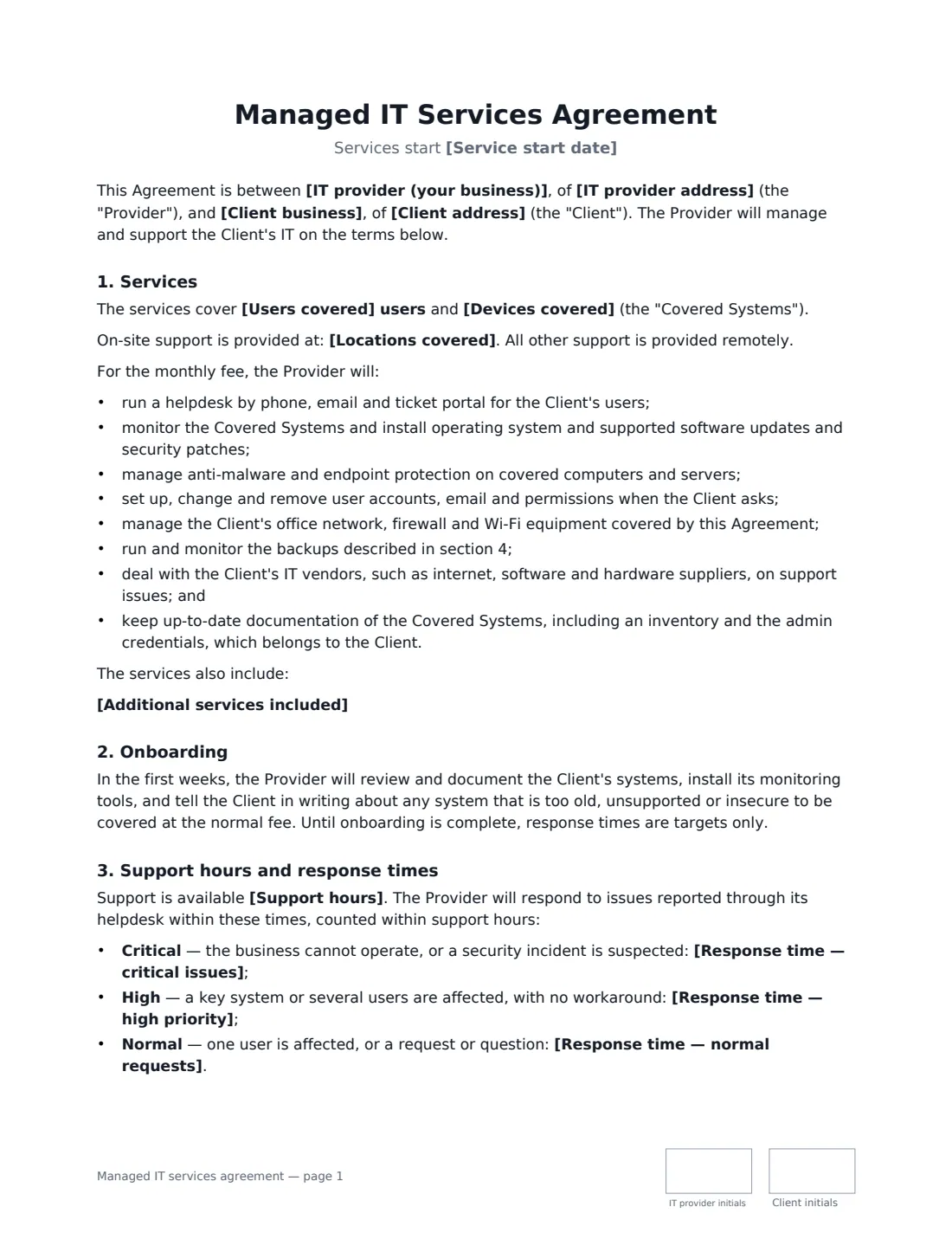
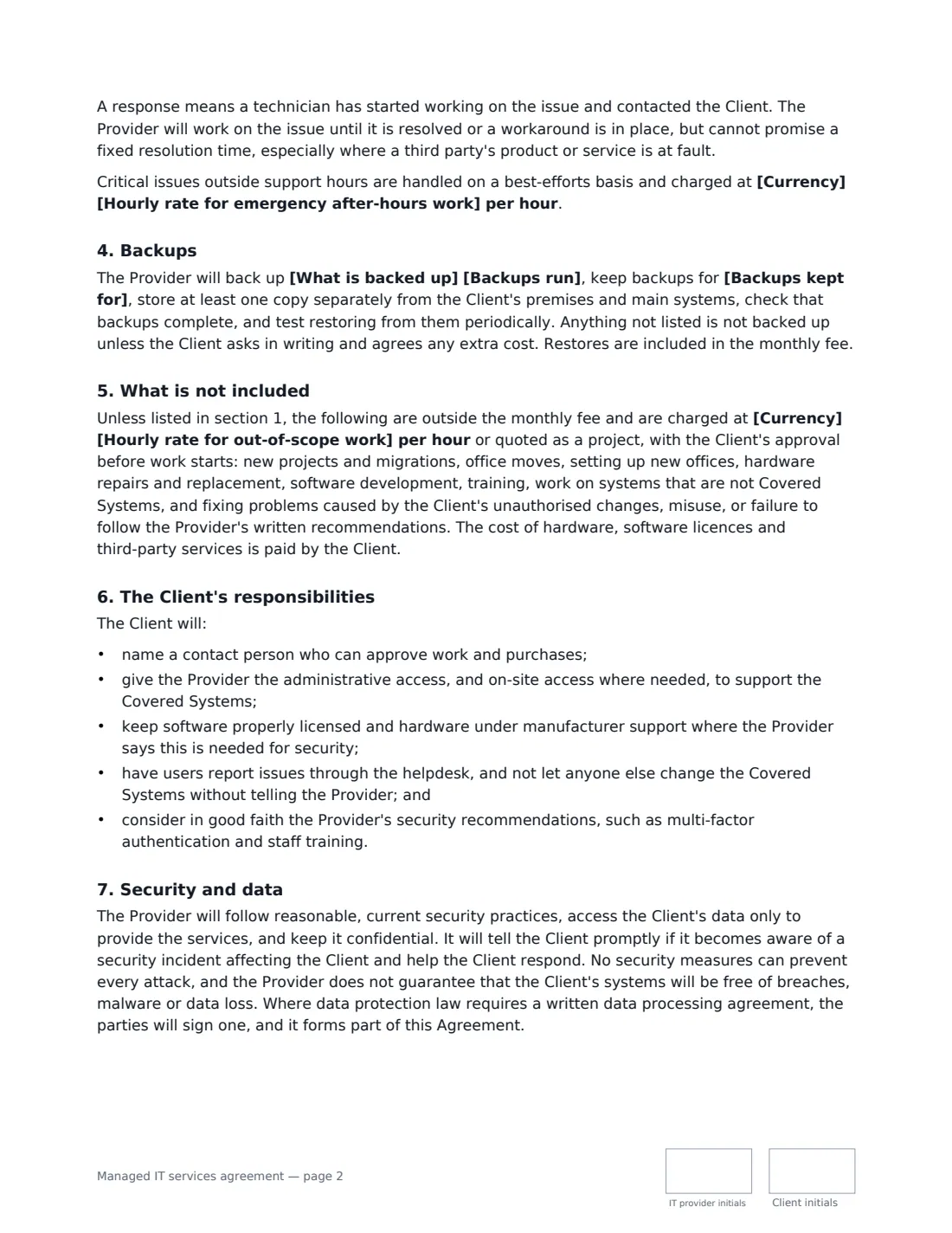
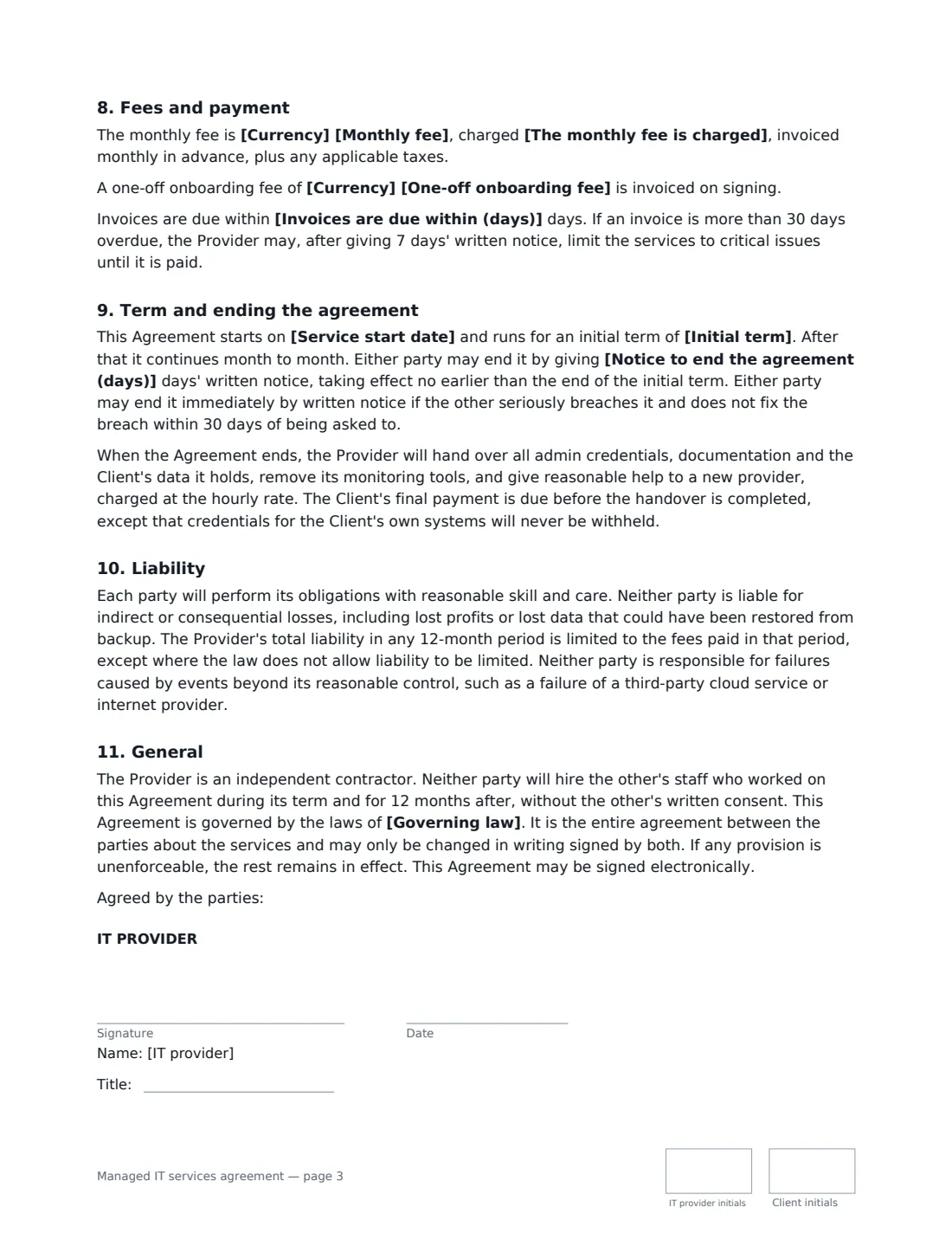
This template covers the services most small-business MSP contracts include — a helpdesk, monitoring and patching, endpoint protection, user administration, network and firewall management, backups and vendor liaison — plus an onboarding period, response times for critical, high and normal issues, an out-of-scope list charged by the hour, the client's responsibilities, security and data handling, an initial term, and an orderly handover of passwords and documentation when the contract ends. You choose the coverage, support hours, response times, backup frequency and retention, and how the fee is charged: flat, per user or per device.
- Best for
- IT support companies and MSPs signing small and mid-sized business clients
- Signed by
- The IT provider and the client business, each with a job title
- Response times
- You choose them for critical, high and normal issues
- Length
- About 3 pages, initialled on every page
When to Use a managed IT services agreement
- Moving a client from ad-hoc, pay-as-you-go support to a monthly managed plan
- Signing a new office or practice that has no in-house IT staff
- Per-user IT support for a growing team that works partly from home
- Adding backup and security management to an existing support relationship
- Renewing an MSP contract with clearer response times and exclusions
What You Fill In
26 blanks, then the name and email of each person who signs: it provider, client.
1 The parties
- IT provider (your business)*
- IT provider address
- Client business*
- Client address
2 Coverage
- Service start date*
- Users covered*
- Devices covered*
- Locations covered
- Additional services included
3 Support and response times
- Support hours*
- Response time — critical issues* 30 minutes · 1 hour · 2 hours · 4 hours
- Response time — high priority* 2 business hours · 4 business hours · 8 business hours
- Response time — normal requests* 8 business hours · 1 business day · 2 business days
- Hourly rate for emergency after-hours work
4 Backups
- What is backed up*
- Backups run* hourly · several times a day · daily · weekly
- Backups kept for* 30 days · 90 days · 1 year · 7 years
5 Fees and term
- Currency*
- Monthly fee*
- The monthly fee is charged* as a flat fee for the coverage above · per user covered · per device covered
- One-off onboarding fee
- Hourly rate for out-of-scope work*
- Invoices are due within (days)*
- Initial term* 1 month · 6 months · 12 months · 24 months · 36 months
- Notice to end the agreement (days)*
- Governing law*
6 Who signs
- IT provider signature and date, job title, initials on every page · You, or a director or manager who signs for your IT business.
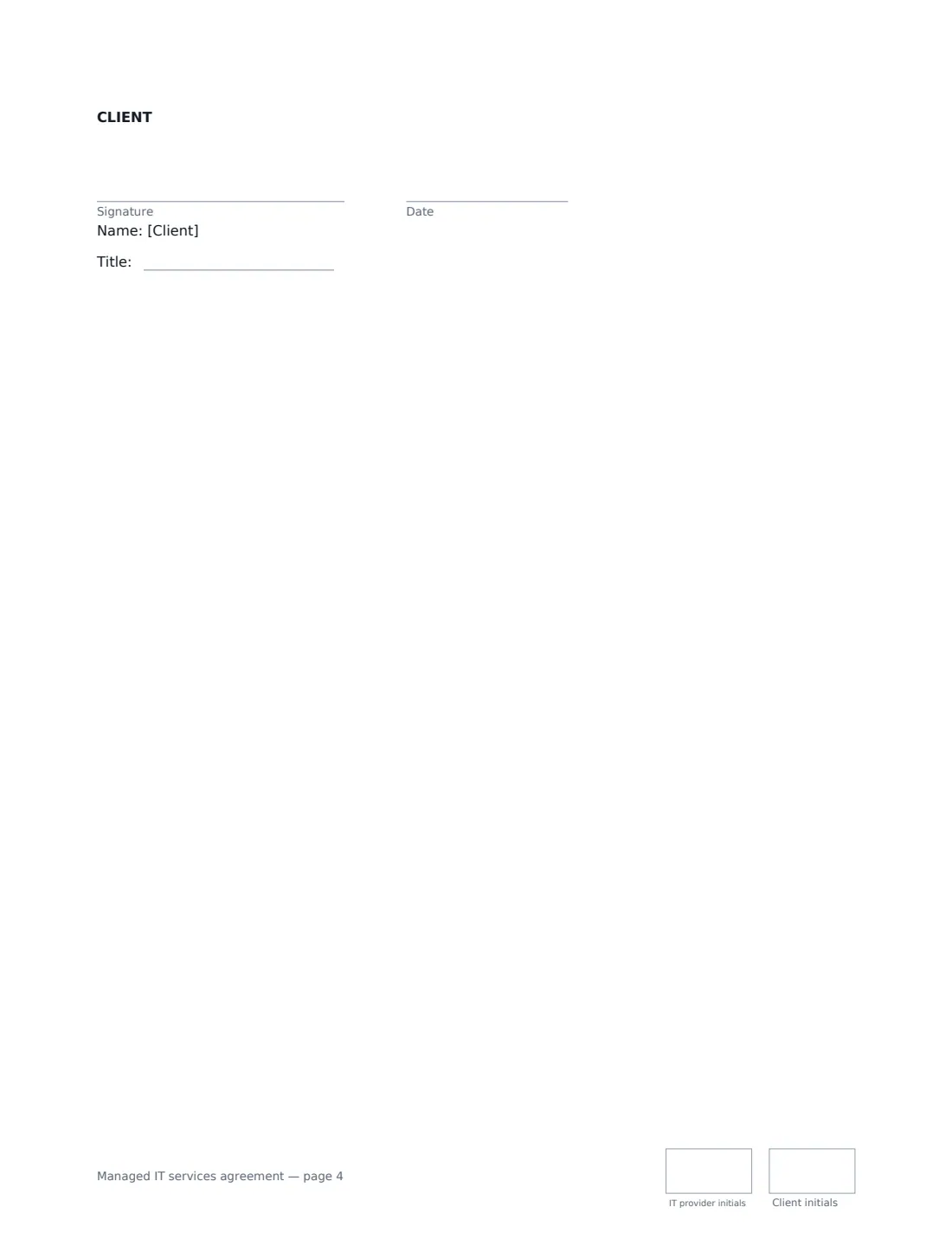
- Client signature and date, job title, initials on every page · An owner, officer or manager who can sign for the client business.
What the managed IT services agreement Covers
- Services
- Onboarding
- Support hours and response times
- Backups
- What is not included
- The Client's responsibilities
- Security and data
- Fees and payment
- Term and ending the agreement
- Liability
- General
Using the managed IT services agreement, step by step
1 Define the coverage
Enter the number of users and describe the devices covered, such as one laptop and phone per user plus the office network. Add on-site locations if you visit, and any extra services like security training or quarterly reviews.
2 Set support hours and response times
Enter your support hours with the time zone, then choose response times for critical, high and normal issues. Optionally add an after-hours rate for emergencies. The agreement explains that a response means a technician has started work — not that the problem is fixed.
3 Describe the backups
Say what is backed up (for example email, cloud files and the file server), how often and how long backups are kept. Anything not listed is not backed up unless agreed in writing.
4 Set the fee and term
Enter the monthly fee and whether it is flat, per user or per device, any onboarding fee, your hourly rate for projects, the initial term and the notice period. Then add the client's signer and send.
Tips Before You Send It
- Onboarding is where problems surface. The agreement lets you flag systems that are too old or insecure to cover at the normal fee before response times become binding.
- Check how long your client's industry or local law needs records kept before choosing backup retention.
- Where data protection law requires a written data processing agreement between you, sign one alongside this agreement — it becomes part of it.
- The agreement says admin credentials for the client's own systems are never withheld at handover, even while a final invoice is outstanding. That protects both sides.
Sign It Online In Minutes
- Fill in the blanks. Names, dates and amounts go straight into the agreement — the preview shows exactly where.
- Name who signs. Tick “This is me” for your own part. VergeHR builds the PDF with every signature, date and initials box on the right line, and you can check or move anything before sending.
- Send it. Each signer gets a secure link and signs from any device — no account needed. The signed PDF, with an audit trail and a Certificate of Completion, is filed in Files and emailed to everyone.
Managed IT services agreement: frequently asked questions
What is the difference between response time and resolution time?
Response time is how quickly a technician starts working on an issue and contacts the client. Resolution time is how long it takes to fix it, which often depends on third parties. This agreement commits to response times and to keep working until the issue is resolved or worked around.
What is usually not included in a managed IT agreement?
New projects and migrations, office moves, hardware repairs and purchases, software licences, training and fixing damage caused by unauthorised changes. Under this template they are charged at your hourly rate or quoted as a project, with the client's approval first.
Do I also need a service level agreement?
This agreement already sets response times. If a client wants measurable uptime commitments with service credits, you can also sign a separate service level agreement.
Is an electronically signed IT services agreement binding?
In most countries, including the US (ESIGN Act and UETA), the UK, the EU (eIDAS) and Canada, an electronic signature is generally valid for an ordinary commercial contract like this one. VergeHR keeps an audit trail and a Certificate of Completion with the signed PDF as evidence of who signed and when.
Is this template free?
Yes. The template is free to use with the eSignature app in VergeHR. Signers don't need a VergeHR login.