

What is a speaker agreement?
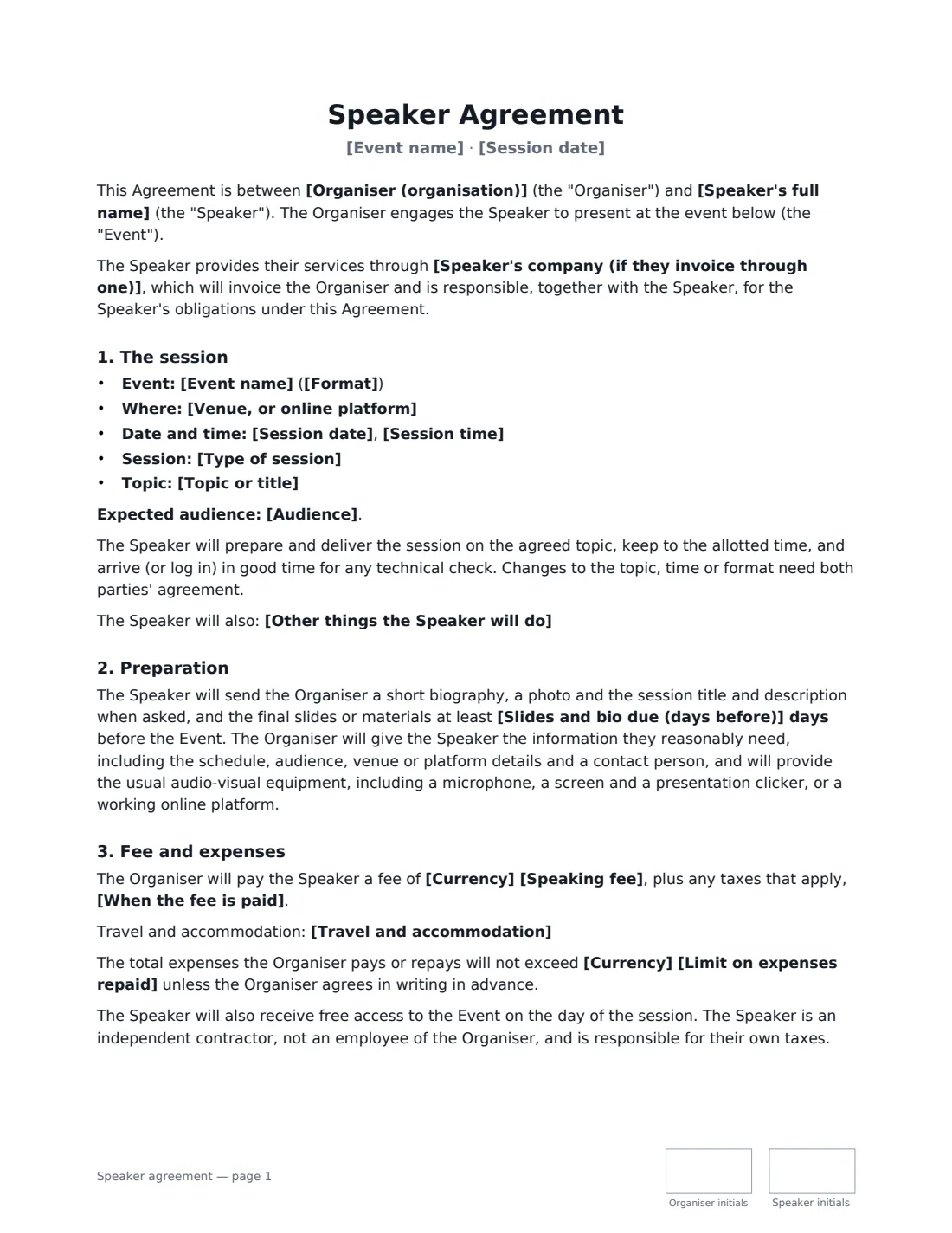
A speaker agreement confirms that a speaker will present at an event and settles the details that cause most disagreements later: the topic and length of the session, when slides are due, what the organiser pays for, whether the session is recorded and published, who owns the material, and what happens if either side cancels.
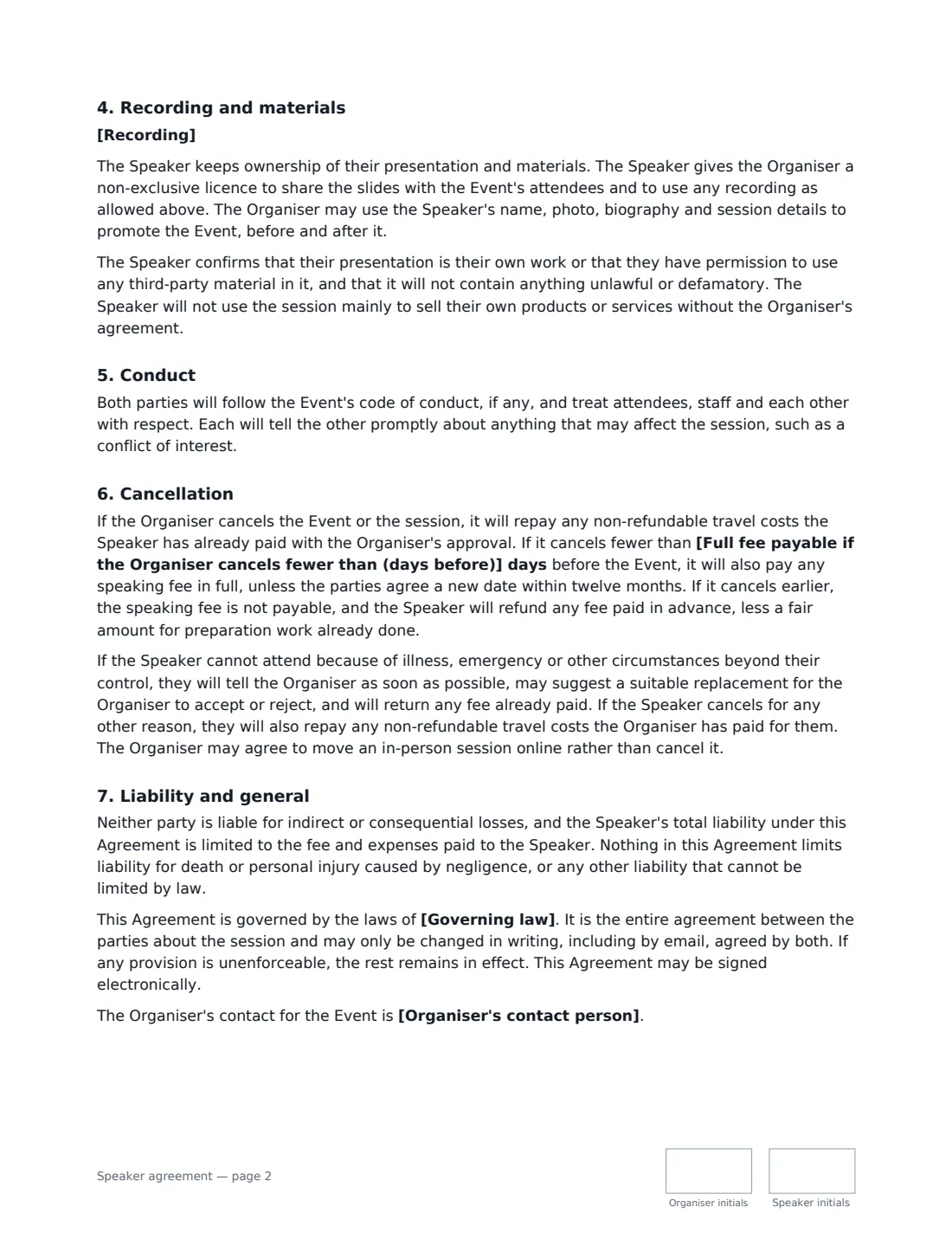
This template covers the event and format (in person, online or hybrid), the session, topic and audience, any extra duties such as a preparation call or dinner, preparation and audio-visual equipment, the speaking fee (or none), travel and accommodation with an optional cap, recording and publication, the speaker keeping ownership of their materials, originality and no hard selling, a code of conduct, cancellation by either side and liability. VergeHR places both signatures, dates and initials.
- Best for
- Conferences, trade shows, company events, workshops and webinars
- Signed by
- The organiser (with a job title) and the speaker
- Fee
- Paid, or unpaid — leave the fee empty and the agreement says so
- Length
- About 3 pages, initialled on every page
When to Use a speaker agreement
- A conference booking a paid keynote speaker
- A trade association inviting an unpaid panellist, with travel covered
- A company booking an external trainer for a half-day workshop
- A webinar host confirming a guest speaker and recording rights
- A meetup or university society inviting a guest lecturer
What You Fill In
22 blanks, then the name and email of each person who signs: organiser, speaker.
1 The parties
- Organiser (organisation)*
- Organiser's contact person
- Speaker's full name*
- Speaker's company (if they invoice through one)
2 The event
- Event name*
- Format* in person · online · hybrid (in person and streamed)
- Venue, or online platform*
3 The session
- Session date*
- Session time*
- Type of session*
- Topic or title*
- Audience
- Other things the Speaker will do
- Slides and bio due (days before)*
4 Fee and expenses
- Currency*
- Speaking fee
- When the fee is paid* within 30 days after the event, on receipt of an invoice · 50% on signing and 50% within 30 days after the event · in full before the event
- Travel and accommodation* The Organiser will book and pay for reasonable economy travel and accommodation. · The Organiser will repay the Speaker's reasonable travel and accommodation costs against receipts. · The Speaker pays their own travel and accommodation. · No travel is needed.
- Limit on expenses repaid
5 Recording and materials
- Recording* The Organiser may record the session and share it with registered attendees only. · The Organiser may record the session and publish it publicly, including online. · The session will not be recorded.
6 Cancellation
- Full fee payable if the Organiser cancels fewer than (days before)*
7 Other terms
- Governing law*
8 Who signs
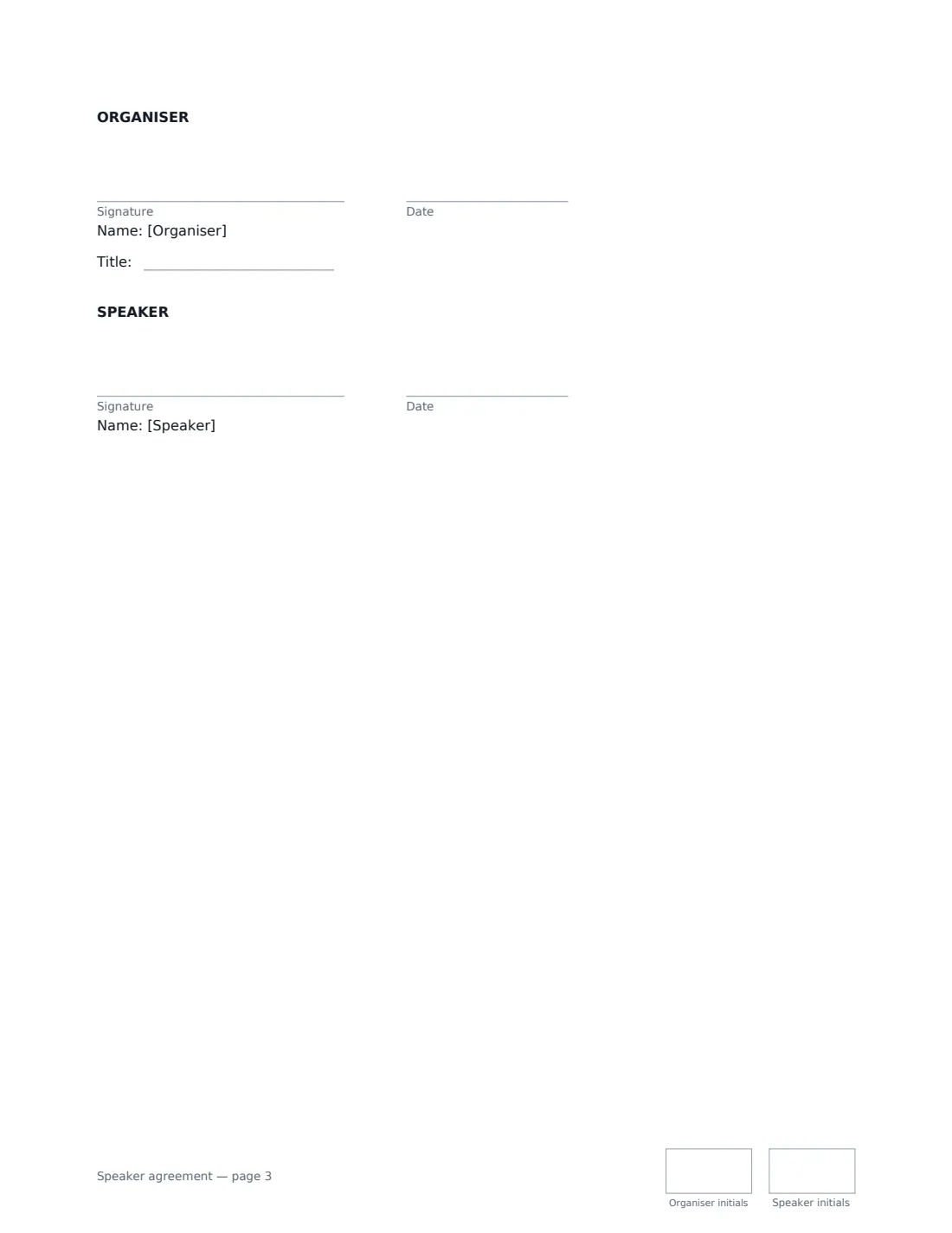
- Organiser signature and date, job title, initials on every page · The organisation running the event and booking the speaker.
- Speaker signature and date, initials on every page · The speaker, trainer or panellist, or their company.
What the speaker agreement Covers
- The session
- Preparation
- Fee and expenses
- Recording and materials
- Conduct
- Cancellation
- Liability and general
Using the speaker agreement, step by step
1 Describe the event and session
Enter the event name, format and venue or platform, the session date and time, the type of session (for example a 45-minute keynote with Q&A) and the topic. Add the expected audience if you know it.
2 Set deadlines and extras
Choose how many days before the event slides and a bio are due, and list anything else the speaker agrees to do, such as a prep call or a promotional video.
3 Agree the money
Enter the speaking fee and when it is paid, or leave it empty for an unpaid session. Pick who books and pays for travel, and add a cap on expenses if you want one.
4 Choose the recording rule and send
Pick whether the session is recorded for attendees only, published publicly, or not recorded. Set the late-cancellation window, add the speaker and send.
Tips Before You Send It
- Be clear about recording before the speaker signs — some speakers charge more, or decline, if a session is published publicly.
- The speaker keeps ownership of their slides; the organiser gets a licence to share them with attendees and to use recordings as agreed.
- If you want the speaker to stay for networking, a dinner or a book signing, list it under "Other things the Speaker will do".
- If the speaker invoices through a company, add it — the company then invoices and is responsible alongside the speaker.
Sign It Online In Minutes
- Fill in the blanks. Names, dates and amounts go straight into the agreement — the preview shows exactly where.
- Name who signs. Tick “This is me” for your own part. VergeHR builds the PDF with every signature, date and initials box on the right line, and you can check or move anything before sending.
- Send it. Each signer gets a secure link and signs from any device — no account needed. The signed PDF, with an audit trail and a Certificate of Completion, is filed in Files and emailed to everyone.
Speaker agreement: frequently asked questions
What should a speaker agreement include?
The event, date and format; the session length and topic; preparation deadlines; the fee and expenses; recording and use of materials; promotion; and cancellation terms for both sides. This template covers all of these.
Who owns the presentation?
Under this template the speaker keeps ownership of their presentation and materials, and gives the organiser a non-exclusive licence to share the slides with attendees and use any recording as allowed by the option you choose.
What happens if the organiser cancels?
The organiser repays approved, non-refundable travel costs. If it cancels within the late-cancellation window you set, it also pays any speaking fee in full unless a new date within twelve months is agreed.
Is a speaker contract signed online legally valid?
In most countries, including the US (ESIGN Act and UETA), the UK, the EU (eIDAS) and Canada, an electronic signature is generally valid for an ordinary services contract like this one. VergeHR keeps an audit trail and a Certificate of Completion with the signed PDF as evidence of who signed and when.
Can I change the wording?
You fill in the blanks and choose the options on the setup page; optional clauses appear only when you fill them in. If you need different clauses, draft your own document and upload it to VergeHR eSignature instead — you can still place the signature boxes in the editor.
Is this template free?
Yes. The template is free to use with the eSignature app in VergeHR. The person you send it to doesn't need a VergeHR login to sign.