

What is a trade credit application?
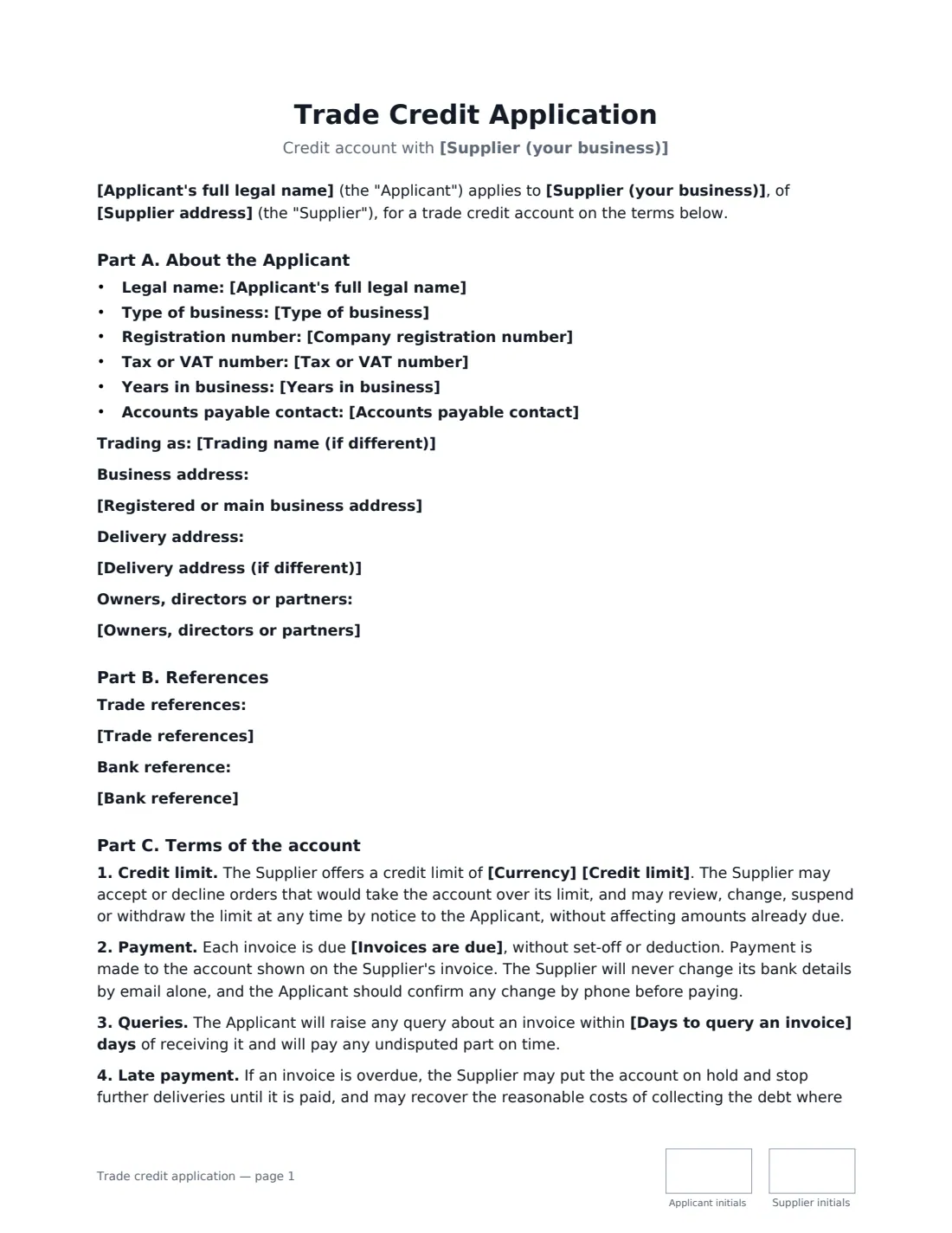
A trade credit application is the form a business customer completes to buy from a supplier on account — ordering now and paying on terms such as 30 days from the invoice — instead of paying up front. For the supplier it gathers what's needed to decide how much credit to extend; for both sides it records the terms the account runs on.
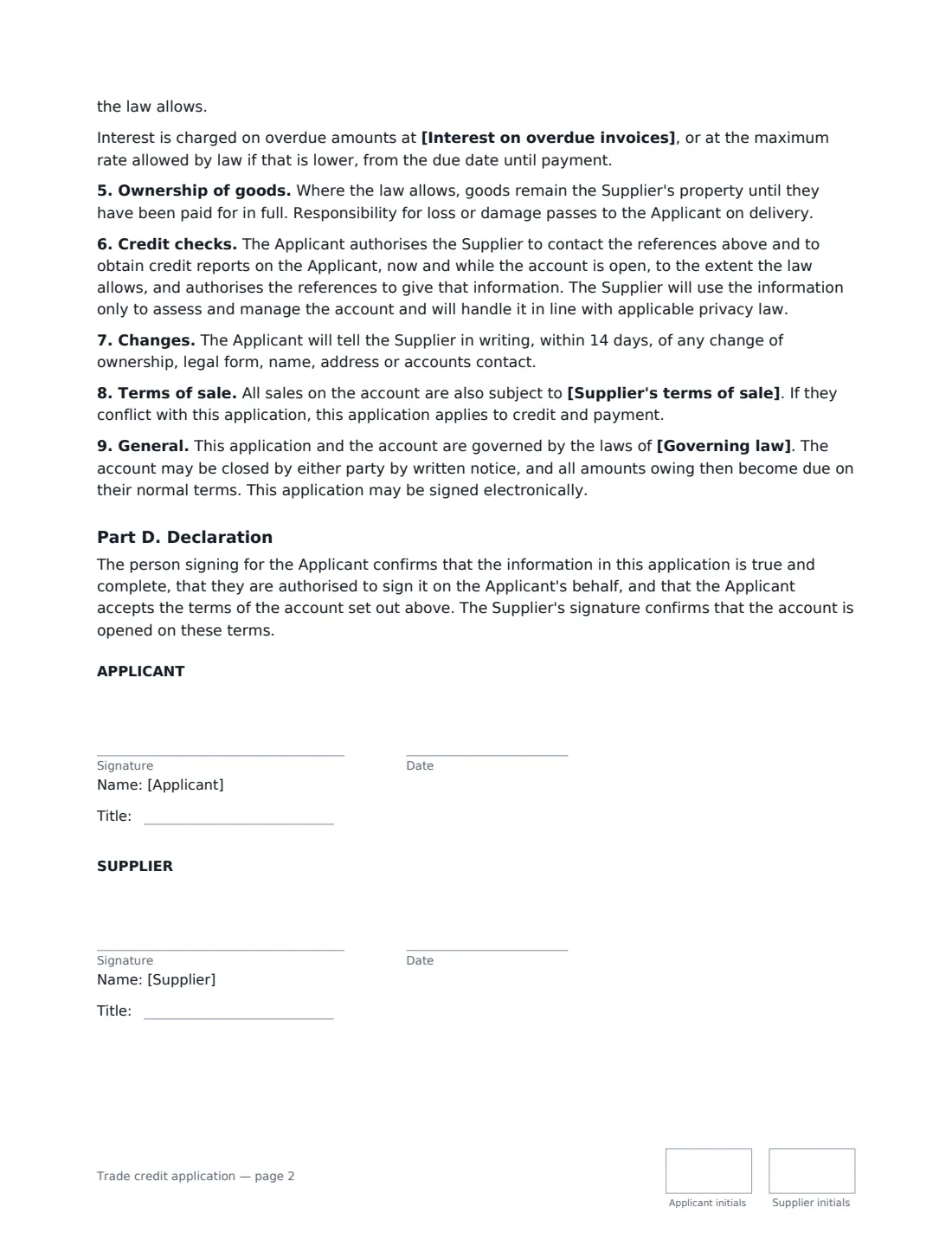
This template has four parts. Part A records the applicant: legal and trading name, type of business, registration and tax numbers, years in business, addresses, owners or directors and the accounts-payable contact. Part B holds trade references and a bank reference. Part C sets the terms: credit limit, when invoices are due, how to raise an invoice query, what happens on late payment (optional interest), ownership of goods until paid where the law allows, consent to credit checks, notice of changes, and how your terms of sale apply. Part D is the applicant's declaration that the information is true and they can sign for the business; the supplier's countersignature opens the account on those terms.
- Best for
- Wholesalers, distributors, manufacturers and trade suppliers opening B2B accounts
- Signed by
- The applicant, then the supplier to approve the account
- Payment terms
- 7, 14, 30 or 60 days from invoice, or 30 days from month end
- Length
- About 2 pages, initialled on every page
When to Use a trade credit application
- A building supplies merchant opening an account for a contractor
- A food wholesaler giving a restaurant 30-day terms
- A manufacturer setting up a new retailer or distributor
- A print or packaging supplier offering credit to a regular business customer
- A business reviewing and re-papering an existing customer's credit limit
What You Fill In
21 blanks, then the name and email of each person who signs: applicant, supplier.
1 Supplier
- Supplier (your business)*
- Supplier address
2 The applicant
- Applicant's full legal name*
- Trading name (if different)
- Type of business* Company or corporation · Limited liability company (LLC) · Partnership · Sole trader or sole proprietor · Other organisation
- Company registration number
- Tax or VAT number
- Years in business
- Registered or main business address*
- Delivery address (if different)
- Owners, directors or partners
- Accounts payable contact*
3 References
- Trade references
- Bank reference
4 Credit terms
- Currency*
- Credit limit*
- Invoices are due* 7 days from the invoice date · 14 days from the invoice date · 30 days from the invoice date · 30 days from the end of the invoice month · 60 days from the invoice date
- Interest on overdue invoices
- Days to query an invoice*
- Supplier's terms of sale
- Governing law*
5 Who signs
- Applicant signature and date, job title, initials on every page · A director, owner or officer who can bind the applying business.
- Supplier signature and date, job title, initials on every page · The supplier granting the account. Its signature approves the account on these terms.
What the trade credit application Covers
- Part A. About the Applicant
- Part B. References
- Part C. Terms of the account
- Part D. Declaration
Using the trade credit application, step by step
1 Collect the applicant's details
Ask the customer for their legal name, registration and tax numbers, addresses, owners and accounts contact, and their references. You enter them before sending; the applicant checks them before signing.
2 Set the limit and terms
Enter the credit limit and choose when invoices are due. Add late-payment interest only if you want it — many places cap or set the rate — and the number of days to query an invoice.
3 Link your terms of sale
If you have standard terms of sale, name them (for example a link and version). Otherwise the form refers to the terms in force at each order, available on request.
4 Send, then countersign
The applicant signs first with their job title. When you've checked references, you countersign to open the account. The signed application is filed in Files.
Tips Before You Send It
- Don't ask for full bank account numbers or passwords — a bank name and contact for a reference is enough.
- The form says you will never change your bank details by email alone and asks the applicant to confirm any change by phone, so make sure your own accounts team works that way too.
- If you want a director or owner to guarantee the account personally, use a separate guarantee signed by that person.
- Review limits periodically. The terms let you change, suspend or withdraw a limit by notice.
Sign It Online In Minutes
- Fill in the blanks. Names, dates and amounts go straight into the agreement — the preview shows exactly where.
- Name who signs. Tick “This is me” for your own part. VergeHR builds the PDF with every signature, date and initials box on the right line, and you can check or move anything before sending.
- Send it. Each signer gets a secure link and signs from any device — no account needed. The signed PDF, with an audit trail and a Certificate of Completion, is filed in Files and emailed to everyone.
Trade credit application: frequently asked questions
What is trade credit?
Trade credit lets a business buy goods or services from a supplier now and pay later, on agreed terms such as 30 days from the invoice date, up to a credit limit.
Can the supplier run a credit check?
The applicant authorises the supplier to contact the references and obtain credit reports, now and while the account is open, to the extent the law allows. The supplier uses the information only to assess and manage the account.
Does this include a personal guarantee?
No. A personal guarantee is a separate promise by an individual and should be a separate document signed by that person.
Is an electronically signed credit application valid?
Electronic signatures are generally valid for ordinary business agreements like this in the US (ESIGN Act and UETA), the UK, the EU (eIDAS) and Canada. VergeHR keeps an audit trail and a Certificate of Completion with the signed PDF.