

What is a notice to proceed?
A notice to proceed (NTP) is a short letter from a project owner to a contractor that authorises work to begin under a contract that has already been signed. It matters because many construction contracts start the contract time — and any liquidated damages or milestones — from the date given in the notice, not the date the contract was signed. It gives the owner control over when the clock starts, for example once financing, permits or the site are ready.
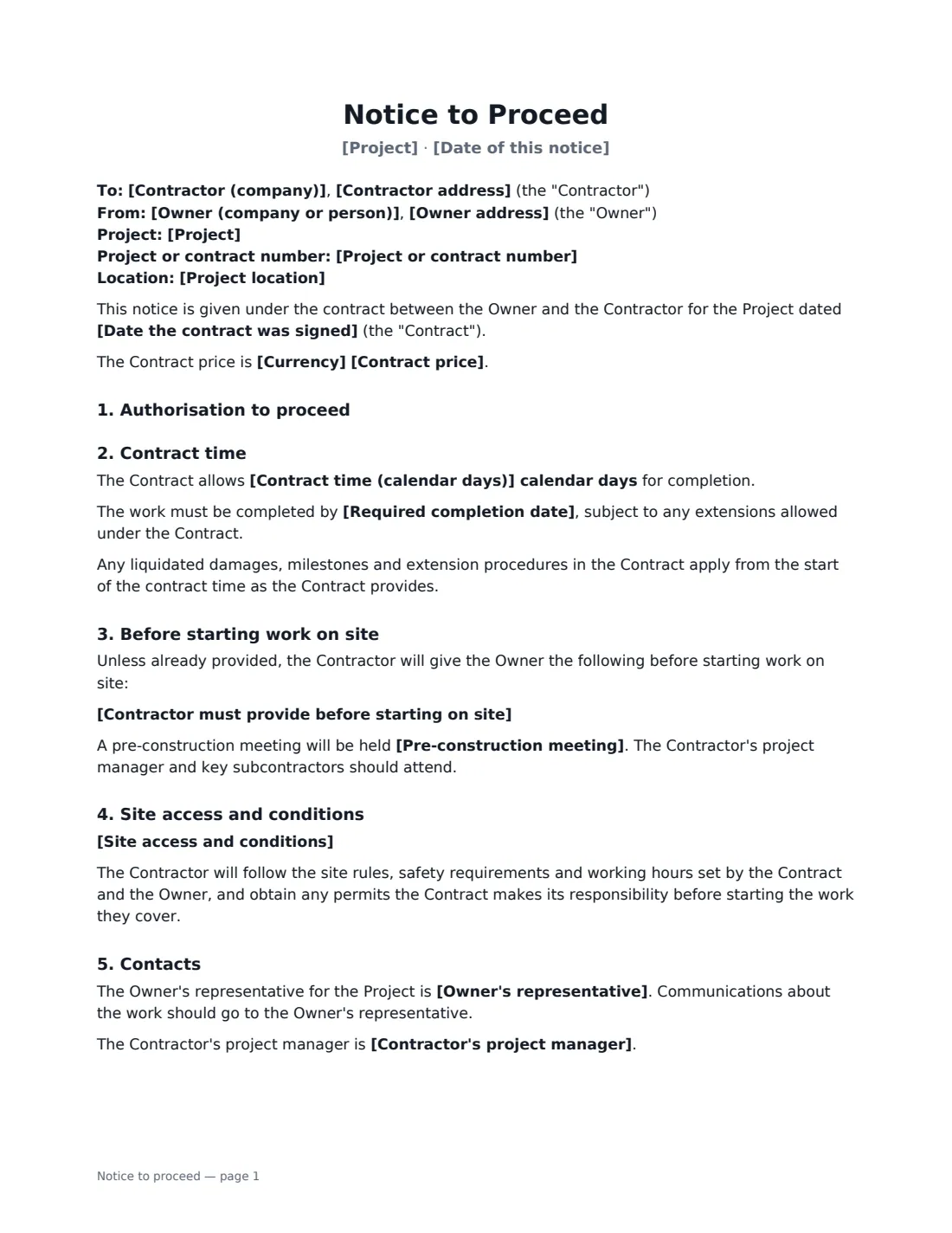
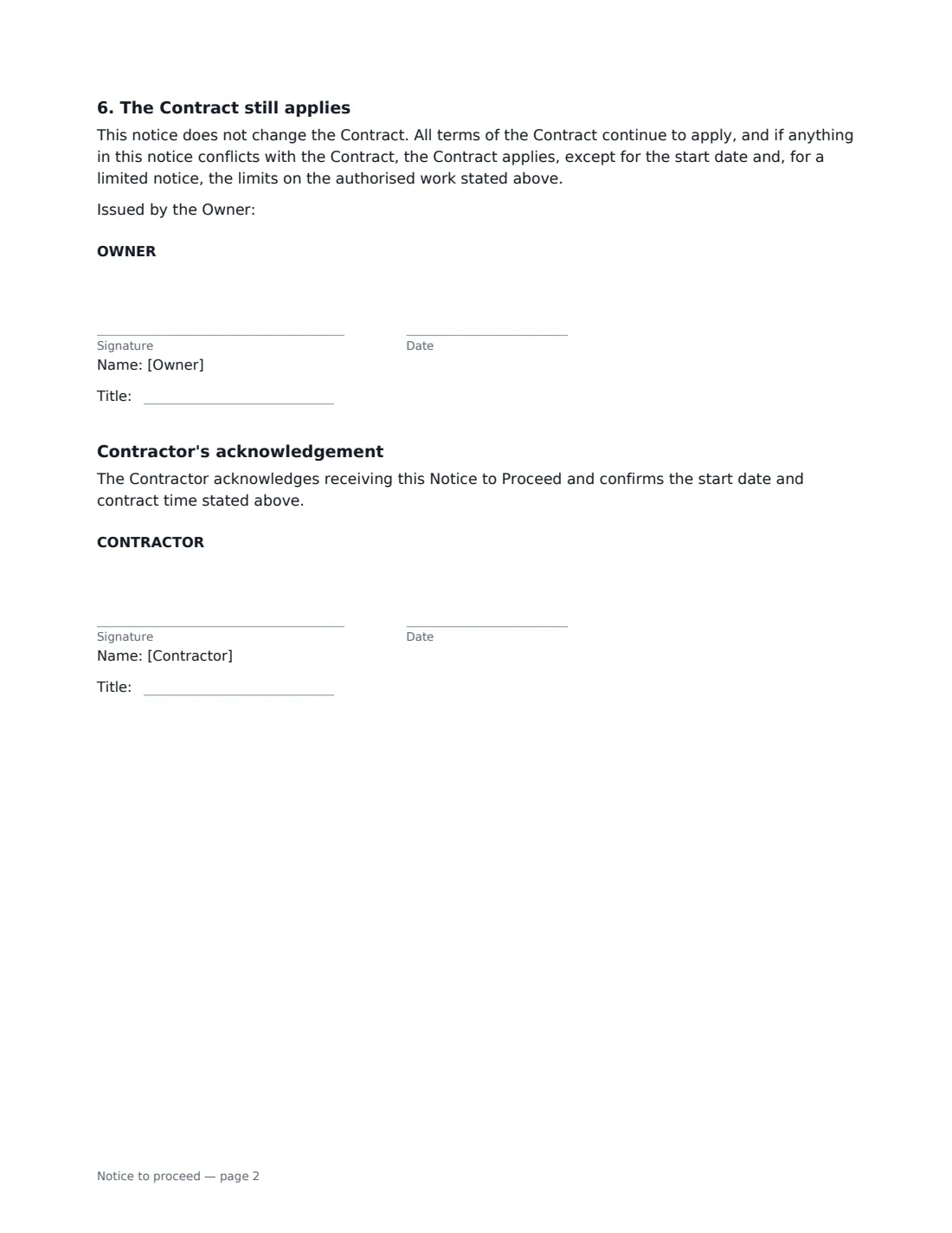
This template can be a full notice to proceed, covering all the work under the contract, or a limited notice to proceed that authorises only listed work — such as submittals, mobilisation or ordering long-lead materials — up to a cost cap. It records the contract date and price, the start date, the contract time in calendar days and/or a completion date, what the contractor must provide before starting on site (insurance certificates, bonds, schedule, subcontractor list), site access and conditions, an optional pre-construction meeting and the key contacts. The owner signs to issue it and the contractor signs to acknowledge it.
- Best for
- Construction and renovation projects, public and private works, fit-outs, infrastructure
- Signed by
- The owner issues it; the contractor signs to acknowledge
- Types
- Full notice to proceed, or limited notice to proceed with a cost cap
- Length
- About 2 pages
When to Use a notice to proceed
- Starting construction once permits and financing are in place
- Letting a contractor order long-lead equipment before full go-ahead
- Setting a clear start date for liquidated damages and milestones
- Mobilising a contractor on a public works or municipal project
- A developer releasing each phase of a multi-phase contract
What You Fill In
22 blanks, then the name and email of each person who signs: owner, contractor.
1 The parties
- Owner (company or person)*
- Owner address
- Contractor (company)*
- Contractor address
2 The contract
- Date of this notice*
- Project*
- Project or contract number
- Project location
- Date the contract was signed*
- Currency*
- Contract price
3 Authorisation
- Type of notice* Full notice to proceed · Limited notice to proceed
- Work authorised (limited notice only)
- Cost cap (limited notice only)
- Contractor may start on*
- Contract time (calendar days)
- Required completion date
4 Before work starts
- Contractor must provide before starting on site
- Site access and conditions
- Pre-construction meeting
5 Contacts
- Owner's representative*
- Contractor's project manager
6 Who signs
- Owner signature and date, job title · The project owner, or the owner's authorised representative, issuing the notice.
- Contractor signature and date, job title · The contractor acknowledging the notice — someone authorised to sign for it.
What the notice to proceed Covers
- Authorisation to proceed
- Contract time
- Before starting work on site
- Before starting work on site
- Site access and conditions
- Contacts
- The Contract still applies
- Contractor's acknowledgement
Using the notice to proceed, step by step
1 Identify the contract
Enter the owner and contractor, the project name and number, its location, the date the contract was signed and, if you like, the contract price.
2 Choose full or limited
Pick a full notice to proceed for all the work, or a limited notice and describe exactly which work is authorised and the cost cap. With a limited notice no other work may start until a full notice is issued.
3 Set the start and contract time
Enter the date the contractor may start, then the contract time in calendar days, the required completion date, or both, as your contract provides.
4 List pre-start items and send
Edit the default list of what the contractor must provide before starting on site, add site access rules, the pre-construction meeting and the contacts. Sign as owner and send — the contractor signs the acknowledgement.
Tips Before You Send It
- Check your contract: it may say how the notice must be given and when the contract time starts. The notice doesn't change the contract.
- Only issue a full NTP once insurance, bonds and permits the contract requires are in place.
- With a limited NTP, set a realistic cost cap and describe the authorised work precisely — the owner pays for authorised work within the cap if the project doesn't go ahead.
- Keep the signed acknowledgement with the contract — it's your evidence of the agreed start date.
Sign It Online In Minutes
- Fill in the blanks. Names, dates and amounts go straight into the agreement — the preview shows exactly where.
- Name who signs. Tick “This is me” for your own part. VergeHR builds the PDF with every signature, date box on the right line, and you can check or move anything before sending.
- Send it. Each signer gets a secure link and signs from any device — no account needed. The signed PDF, with an audit trail and a Certificate of Completion, is filed in Files and emailed to everyone.
Notice to proceed: frequently asked questions
What is the difference between a full and a limited notice to proceed?
A full NTP authorises all of the work under the contract. A limited NTP authorises only specific early work, such as submittals or ordering materials, up to a cost cap, before the owner commits to the whole project. Unless the contract says otherwise, this template treats the contract time as starting with the full notice, not the limited one.
Does a notice to proceed change the contract?
No. All contract terms continue to apply, and the contract prevails if anything conflicts — except the start date and, for a limited notice, the limits on the authorised work.
Why does the contractor sign it?
The contractor's signature acknowledges receipt and confirms the start date and contract time, which avoids later disputes about when the clock started.
Is an electronically signed notice to proceed valid?
Electronic signatures are generally valid for ordinary contract documents in the US (ESIGN Act and UETA), the UK, the EU (eIDAS) and Canada. Some public-sector contracts specify how notices must be delivered, so check yours. VergeHR keeps an audit trail and a Certificate of Completion with the signed PDF.
Is this template free?
Yes. The template is free to use with the eSignature app in VergeHR, and the contractor doesn't need a VergeHR login to sign.